
1. Pendahuluan
Thank you for choosing the HARDELL Mini Cordless Rotary Tool. This versatile and compact tool is designed for various light-duty tasks such as sanding, polishing, drilling, carving, and engraving. Its cordless design and multiple speed settings provide flexibility and precision for your DIY projects and crafts. Please read this manual thoroughly before use to ensure safe and optimal operation.
2. Informasi Keselamatan
- Always wear appropriate personal protective equipment, including safety glasses, during operation.
- Jaga area kerja tetap bersih dan terang. Area yang berantakan atau gelap mengundang kecelakaan.
- Jangan mengoperasikan perkakas listrik di lingkungan yang mudah meledak, seperti di dekat cairan, gas, atau debu yang mudah terbakar.
- Jauhkan anak-anak dan orang di sekitar saat mengoperasikan perkakas listrik. Gangguan dapat menyebabkan Anda kehilangan kendali.
- Hindari penyalaan yang tidak disengaja. Pastikan sakelar dalam posisi mati sebelum menghubungkan ke baterai, mengangkat, atau membawa alat tersebut.
- Jangan memaksakan penggunaan perkakas listrik. Gunakan perkakas listrik yang tepat untuk aplikasi Anda.
- Cabut baterai dari alat listrik sebelum melakukan penyesuaian, mengganti aksesori, atau menyimpan alat listrik.
- Simpan perkakas listrik yang tidak digunakan di luar jangkauan anak-anak dan jangan izinkan orang yang tidak mengenal perkakas listrik atau petunjuk ini mengoperasikan perkakas listrik.
- Rawat perkakas listrik dan aksesorinya. Periksa ketidaksejajaran atau pengikatan komponen yang bergerak, kerusakan komponen, dan kondisi lain yang dapat memengaruhi pengoperasian perkakas listrik.
- Gunakan perkakas listrik, aksesori, dan mata bor sesuai dengan petunjuk ini, dengan mempertimbangkan kondisi kerja dan pekerjaan yang akan dilakukan.
- This rotary tool is not designed for heavy-duty tasks.
3. Isi Paket
The HARDELL Mini Cordless Rotary Tool kit includes the following items:
- HARDELL Mini Cordless Rotary Tool (Orange)
- Kabel Pengisian Daya USB-C
- Assorted Accessories (35 pieces), including:
- Pengamplasan band
- bantalan pemoles
- Grinding heads
- Mata bor
- Engraving tips
- Memotong roda
- Collets (various sizes)
- Wrench for accessory changes

Image: The HARDELL Mini Cordless Rotary Tool shown with its included USB-C charging cable and various accessories, such as sanding bands, cutting discs, drill bits, and grinding heads.
4. Produk Lebihview
Familiarize yourself with the components of your HARDELL Mini Cordless Rotary Tool:

Image: Diagram showing the key parts of the rotary tool, including the Locking Collar, Spindle Lock Button, On/Off Button, Speed Control Button, Unique Cooling Device, and Type-C Charging Port.
- Kerah Pengunci: Firmly fixes accessories in place.
- Tombol Kunci Spindel: Quick collet lock for fast accessory changes. Caution: Do not press this button when the device is running.
- Tombol On/Off: Menghidupkan atau mematikan alat.
- Tombol Kontrol Kecepatan (+/-): Adjusts the rotational speed. The "+" button increases speed, and the "-" button decreases speed.
- Lampu LED: Illuminates the work area for enhanced precision and visibility.
- Port Pengisian Daya Tipe-C: For convenient charging using a USB-C cable.
- Perangkat Pendingin Unik: Designed to dissipate heat during operation.
Pengaturan Kecepatan
The tool features 5-speed settings for various applications:
- Kecepatan 1: 5000 RPM (Recommended for polishing)
- Kecepatan 2: 8000 RPM (Recommended for sanding)
- Kecepatan 3: 11000 RPM (Recommended for carving)
- Kecepatan 4: 14000 RPM (Recommended for grinding)
- Kecepatan 5: 18000 RPM (Recommended for drilling)
5. Penyiapan dan Pemasangan Aksesori
Pemasangan aksesori yang tepat sangat penting untuk pengoperasian yang aman dan efektif.
General Accessory Installation
- Tekan tombol pengunci spindel dan buka mur.
- Choose the suitable collet and insert it into the tool. Then, place the black nut over the collet. Install the accessory you need to use.
- Press the spindle lock button again, then tighten the nut to secure the accessory.

Image: Visual guide demonstrating the four steps to install various accessories into the rotary tool's collet.
Installing a Sanding Band
- Insert the sanding drum into the collet and tighten the nut.
- Loosen the screw of the sanding drum.
- Install the sanding band onto the drum.
- Press down the spindle lock button and tighten the screw of the sanding drum with the provided wrench.

Image: Visual instructions for attaching a sanding band to the rotary tool, showing the drum, band, and tightening process.
Installing an HSS Cutting Disc or Sanding Paper
- Insert the wheel mandrel into the collet and tighten the nut.
- Dismantle the screw of the wheel mandrel.
- Install the wheel mandrel and assemble the HSS cutting disc or sanding paper.
- Press down the spindle lock button and tighten the screw of the wheel mandrel with the provided wrench.
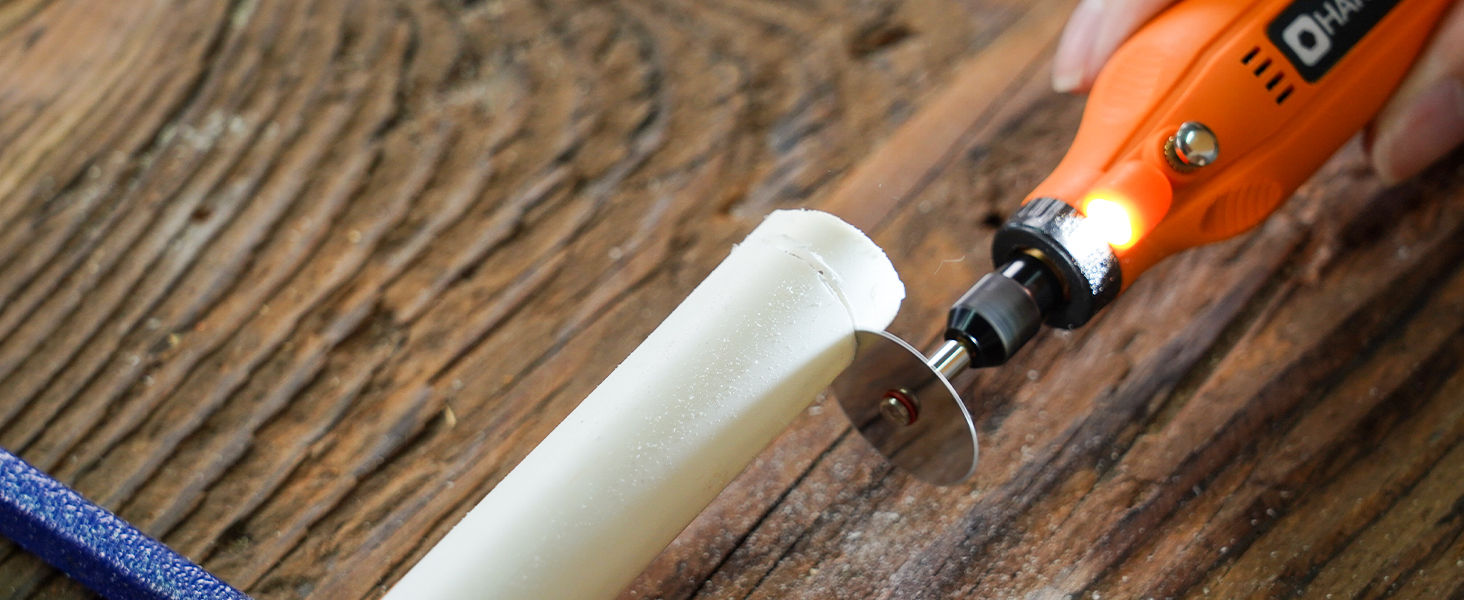
Image: Visual instructions for attaching an HSS cutting disc or sanding paper to the rotary tool, detailing the mandrel and securing steps.
6. Petunjuk Pengoperasian
- Daya Hidup/Mati: Press the On/Off button to turn the tool on or off.
- Sesuaikan Kecepatan: Use the '+' and '-' buttons to cycle through the 5 available speed settings (5000 RPM to 18000 RPM). The LED indicators will show the current speed level.
- Lampu LED: The integrated LED light automatically illuminates when the tool is powered on, providing visibility for detailed work.
- Operasi: Hold the tool firmly and apply gentle pressure to the workpiece. Allow the tool to do the work; excessive force can lead to poor results or damage to the tool/workpiece.

Image: A person using the HARDELL Mini Cordless Rotary Tool for carving a wooden piece, demonstrating its ergonomic design and precision.

Gambar: Close-up view of the rotary tool in action, with its LED light brightly illuminating the precise point of contact on a workpiece, highlighting its utility in detailed tasks.
7. Aplikasi
The HARDELL Mini Cordless Rotary Tool is ideal for a variety of light-duty projects, including but not limited to:
- Engraving on various materials
- Sanding small surfaces or edges
- Carving intricate designs
- Drilling small holes
- Grinding for shaping or smoothing
- Polishing for a smooth finish
- Trimming excess material

Gambar: Pameran kolaseasing the multi-purpose capabilities of the rotary tool, including sanding wood, carving glass, polishing beads, grinding metal, drilling shells, and cutting plastic.
8. Pemeliharaan
Mengisi Alat
- Connect the provided USB-C charging cable to the charging port at the base of the tool.
- Plug the other end of the USB-C cable into a compatible power source (e.g., computer, car charger, power bank).
- The LED indicators will show the charging status. A full charge provides up to 100 minutes of continuous use under no-load conditions.
Pembersihan dan Penyimpanan
- After each use, disconnect any accessories and gently wipe the tool body with a clean, dry cloth.
- Remove any dust or debris from the collet and spindle area.
- Store the tool and its accessories in a dry, clean place, preferably in its original carrying case, away from direct sunlight and extreme temperatures.
9. Penyelesaian masalah
- Alat tidak menyala: Ensure the tool is fully charged. If the battery is low, connect it to a power source using the USB-C cable.
- Performa menurun: Check if the accessory is securely installed. Ensure the battery is adequately charged. The tool is designed for light-duty tasks; avoid using it for heavy-duty applications that may exceed its capacity.
- Getaran atau kebisingan yang berlebihan: Ensure the accessory is correctly inserted and tightened. A loose or damaged accessory can cause vibration. Replace any worn or damaged accessories.
- Terlalu panas: If the tool feels excessively hot, discontinue use and allow it to cool down. Ensure the cooling vents are not obstructed.
10. Spesifikasi
| Fitur | Spesifikasi |
|---|---|
| Merek | KERAS |
| Nomor Model | DM12405ORANGEH-2 |
| Sumber Daya | Bertenaga Baterai (3.7V Lithium Ion) |
| Pengaturan Kecepatan | 5-Speed (5000-18000 RPM) |
| Jenis Pengisian Daya | USB Tipe C |
| Berat Barang | 0.3 lbs (7.4 ounces / 0.21 Kilograms) |
| Fitur Khusus | Compact, LED Light |
| Komponen yang Termasuk | 35 Accessories, USB-C Cable |
11. Garansi dan Dukungan
For warranty information, technical support, or any questions regarding your HARDELL Mini Cordless Rotary Tool, please refer to the documentation included in your product packaging or contact HARDELL customer service directly. Contact details can typically be found on the manufacturer's websitus atau pada kemasan produk.


