
1. Pendahuluan
This manual provides essential instructions for the safe and effective use of your DOAO A3 Pro Electric Razor. Please read this manual thoroughly before first use and retain it for future reference.
The DOAO A3 Pro is designed for men's shaving, offering both wet and dry shaving capabilities. It features 3D floating heads, powerful dual-track blades, a pop-up trimmer, and a waterproof design for easy cleaning.
2. Isi Paket
Verifikasi bahwa semua item yang tercantum di bawah ini ada dalam paket Anda:
- DOAO A3 Pro Electric Shaver
- Tutup pelindung
- Sikat Pembersih
- Tas Perjalanan
- Kabel Daya USB-C
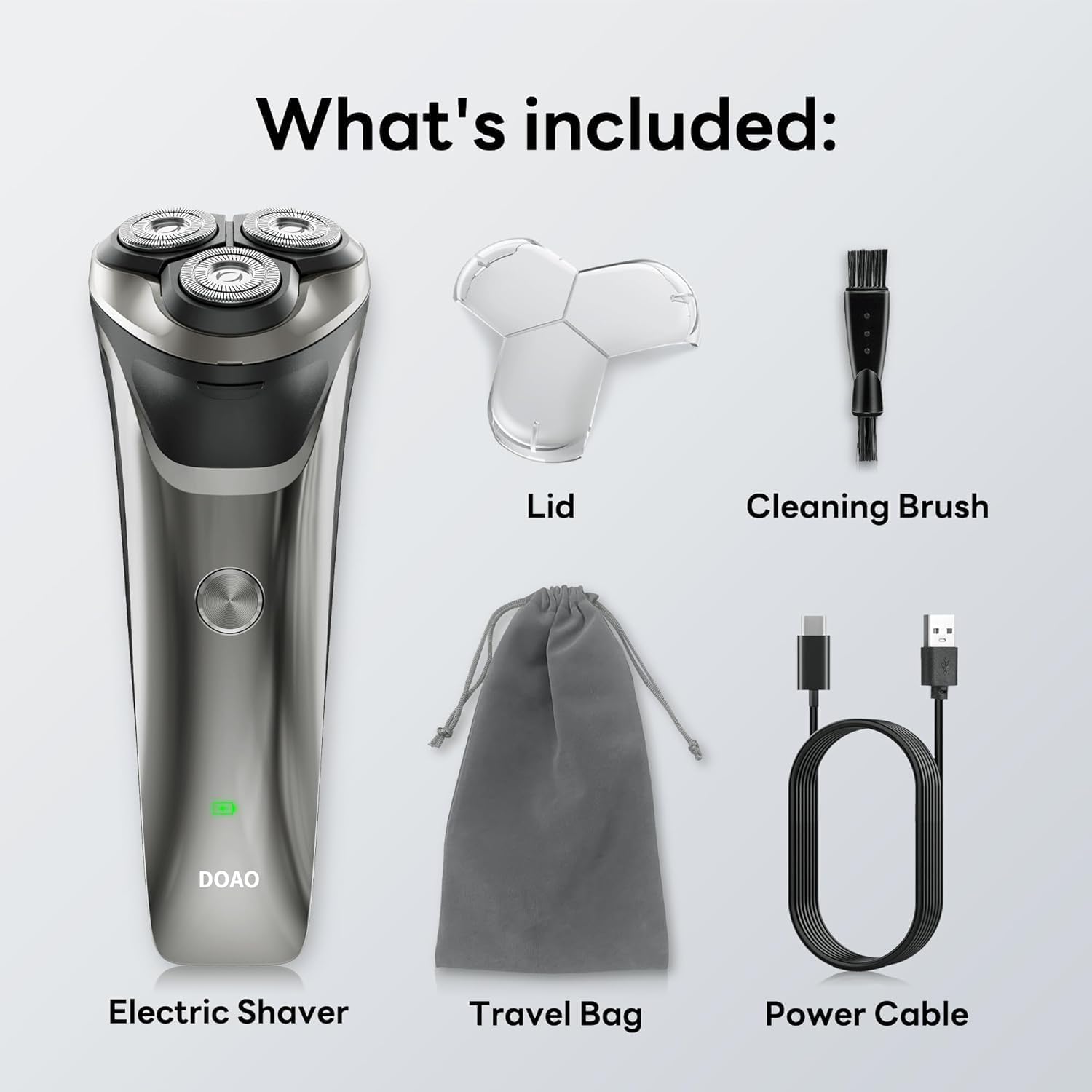
Image: All components included in the DOAO A3 Pro Electric Razor package.
3. Fitur Produk
- Kepala Mengambang 3D: Ergonomically designed to adapt to facial contours for a close shave.
- Powerful Dual-Track Blades: High-speed motor with blades cutting up to 56,000 times per minute for efficient shaving.
- Desain 100% Tahan Air: Suitable for wet or dry shaving and easy cleaning under running water.
- Pemangkas Pop-Up: Integrated trimmer for precise grooming of sideburns, mustaches, and beard edges.
- Baterai Tahan Lama: Provides up to 120 minutes of continuous use on a 1.5-hour charge.
- Pengisian USB-C: Pengisian daya yang nyaman dan cepat.

Image: Illustration of the shaver's 3D floating heads and powerful dual-track blades.
4. Pengaturan
4.1 Biaya Awal
- Sebelum digunakan pertama kali, isi daya alat cukur hingga penuh.
- Connect the USB-C power cable to the charging port on the shaver.
- Colokkan ujung kabel USB-C lainnya ke adaptor daya USB yang kompatibel (tidak termasuk) atau port USB komputer.
- Indikator LED akan menunjukkan status pengisian daya. Pengisian daya penuh biasanya memakan waktu 1.5 jam.
- Setelah terisi penuh, lepaskan alat cukur dari sumber listrik.

Image: The shaver connected to its USB-C charging cable, illustrating battery life and charging time.
5. Petunjuk Pengoperasian
5.1 Mencukur
The DOAO A3 Pro supports both wet and dry shaving.
Mencukur Kering:
- Pastikan wajah Anda bersih dan kering.
- Tekan tombol daya untuk menghidupkan alat cukur.
- Move the shaver in small, circular motions over your skin, applying gentle pressure.
- Stretch your skin with your free hand to ensure hairs stand upright for a closer shave.
Mencukur Basah:
- Oleskan busa atau gel cukur ke wajah Anda.
- Tekan tombol daya untuk menghidupkan alat cukur.
- Move the shaver in small, circular motions over your skin.
- Rinse the shaver head under running water during shaving to prevent clogging.

Image: A user demonstrating wet shaving with the DOAO A3 Pro electric razor.
5.2 Menggunakan Pemangkas Pop-Up
- Cari sakelar pemangkas pop-up di bagian belakang alat cukur.
- Geser sakelar ke atas untuk mengaktifkan pemangkas.
- Use the trimmer to shape sideburns, mustaches, or to define beard lines.
- After use, slide the switch downwards to retract the trimmer.

Image: The integrated pop-up trimmer in use for precise grooming.
6. Pemeliharaan
6.1 Membersihkan Alat Cukur
Pembersihan teratur memastikan kinerja dan kebersihan yang optimal.
Pembersihan Harian (Setelah Setiap Penggunaan):
- Matikan alat cukur.
- Open the shaver head by pressing the release button (if applicable) or gently pulling it open.
- Bilas kepala alat cukur dan ruang penampung rambut secara menyeluruh di bawah air mengalir hangat.
- Shake off excess water and allow the shaver head to air dry before closing or attaching the protective lid.
Thorough Cleaning (Weekly or as Needed):
- Turn off the shaver and detach the shaver head.
- Use the provided cleaning brush to remove any trapped hairs from the blades and inner chamber.
- Bilas semua bagian di bawah air mengalir hangat.
- Pastikan semua bagian benar-benar kering sebelum dipasang kembali.

Image: The shaver head being rinsed under running water, highlighting its waterproof feature.
Penggantian Pisau 6.2
For optimal shaving performance, it is recommended to replace the shaver heads every 12 months, or sooner if you notice reduced performance or discomfort.
- Matikan alat cukur.
- Gently twist and pull the old shaver head upwards to remove it.
- Align the new shaver head with the shaver body and press down until it clicks into place.
7. Penyelesaian masalah
| Masalah | Kemungkinan Penyebab | Larutan |
|---|---|---|
| Alat cukur tidak menyala. | Baterai habis. | Isi daya alat cukur hingga penuh. |
| Poor shaving performance / pulling hairs. | Pisau tumpul atau tersumbat oleh rambut. | Bersihkan kepala alat cukur secara menyeluruh. Pertimbangkan untuk mengganti kepala alat cukur jika kinerja tidak membaik. |
| Alat cukur berhenti saat digunakan. | Baterai lemah. | Isi ulang alat cukur. |
| Indikator pengisian daya tidak berfungsi. | Kabel atau adaptor daya rusak. | Cobalah kabel USB-C atau adaptor daya yang berbeda. Pastikan sambungan terpasang dengan aman. |
Jika masalah berlanjut setelah mencoba solusi ini, silakan hubungi dukungan pelanggan.
8. Spesifikasi
- Model: A3 Pro
- Sumber Daya: Ditenagai Baterai (1 baterai A disertakan)
- Jenis Baterai: ion litium
- Waktu Pengisian: Sekitar 1.5 jam
- Waktu Operasional: Up to 120 minutes (approx. 60 days of daily use)
- Peringkat Tahan Air: 100% Tahan Air
- Fitur Khusus: Cordless, Pop-up Trimmer
- Penggunaan yang Direkomendasikan: Menghadapi
- Pabrikan: DOAO
- Dimensi Paket: 8.03x6.1x2.52 inci
- Berat Barang: 9.88 ons
9. Garansi dan Dukungan
Your DOAO A3 Pro Electric Razor comes with comprehensive support and warranty:
- Garansi Seumur Hidup: Enjoy peace of mind with a lifetime warranty on your product.
- Garansi 365 Hari: Specific warranty details may apply, refer to product registration for full terms.
- Bantuan Teknis Seumur Hidup: Access to technical assistance for the lifespan of your product.
- Free Return & 100% Refund: Hassle-free returns and full refunds if you are not satisfied.
- Dukungan Cepat 24/7: Responsive customer support available within 12 hours.
For any inquiries, technical assistance, or warranty claims, please contact DOAO customer support through the platform where you purchased the product.

Image: DOAO customer support information.