
1. Pendahuluan
Welcome to the realme Buds T200 True Wireless Earbuds user manual. This guide provides detailed instructions on how to set up, operate, maintain, and troubleshoot your earbuds. Please read this manual carefully before using the product to ensure optimal performance and longevity.

Image: realme Buds T200 True Wireless Earbuds and Charging Case in Mystic Grey.
2. Apa yang ada di dalam kotak
Upon opening your realme Buds T200 package, you should find the following items:
- realme Buds T200 Earbuds (Left and Right)
- Kotak Pengisian Daya
- Ujung telinga (berbagai ukuran)
- Panduan Pengguna
- Kabel Pengisian Daya USB (Tipe-C)
3. Produk Lebihview
The realme Buds T200 are designed for comfort and high-quality audio. Familiarize yourself with the components:
- Earbud: Each earbud features a 12.4mm dynamic bass driver, multiple microphones for call noise cancellation, and touch control areas.
- Kotak Pengisian Daya: Houses and charges the earbuds. It includes a charging port, an LED indicator for battery status, and a pairing button.
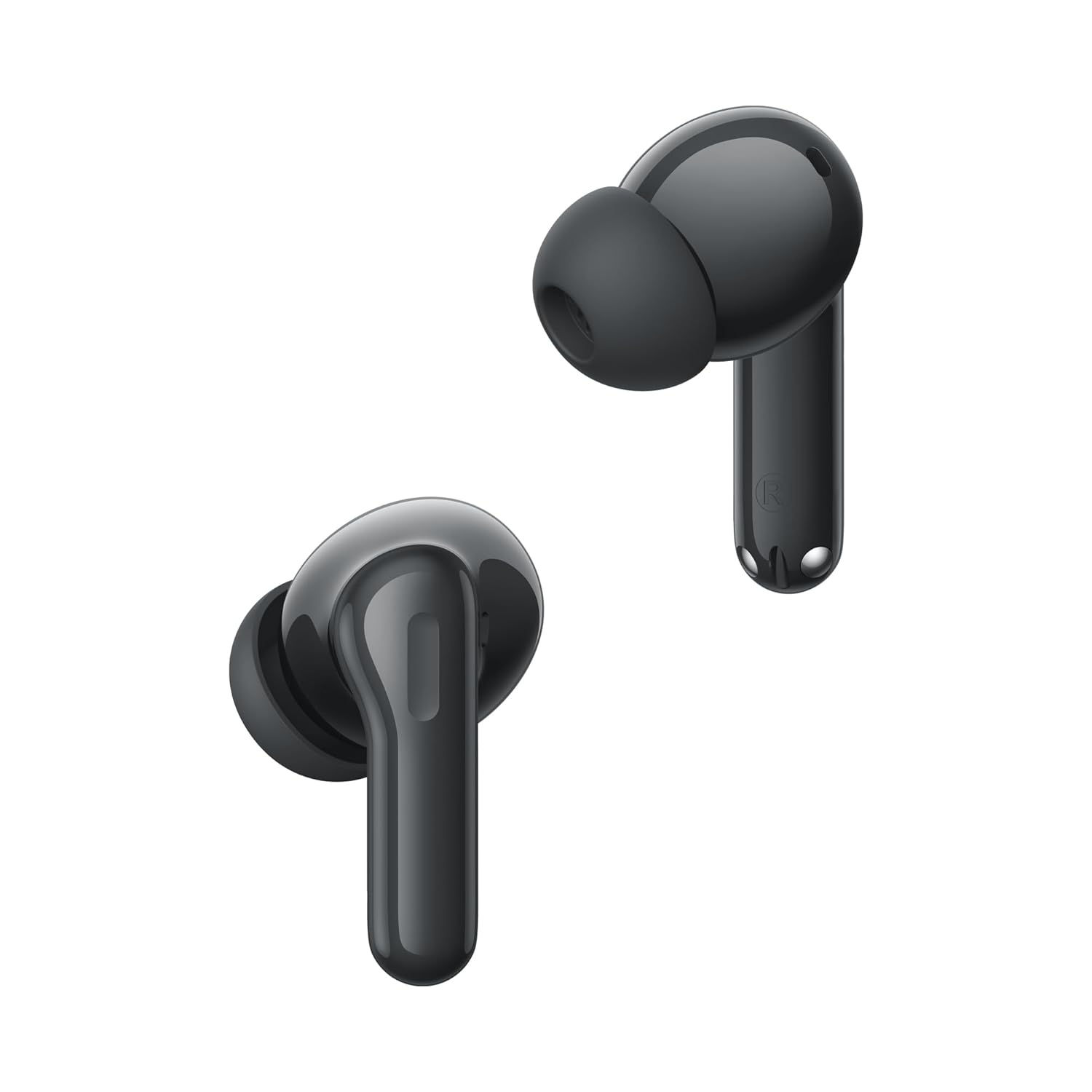
Gambar: Close-up view of the realme Buds T200 earbuds, highlighting their design.
Video Produk Selesaiview
Video: Penjelasan singkatview pertunjukanasing the realme Buds T200 True Wireless Earbuds, their design, and key features.
4. Pengaturan
4.1 Mengisi Daya Earbud dan Casing
Sebelum penggunaan pertama, isi daya earbud dan casing pengisi daya hingga penuh.
- Masukkan earbud ke dalam casing pengisi daya. Pastikan terpasang dengan benar.
- Connect the USB Type-C charging cable to the charging port on the case and to a power adapter.
- The LED indicator on the case will show charging status. A full charge typically takes about 2 hours.
4.2 Memasangkan dengan Perangkat
Pasangan pertama kali:
- Open the charging case. The earbuds will automatically enter pairing mode, and the indicator light will flash.
- Pada perangkat Anda (ponsel pintar, tablet, laptop), aktifkan Bluetooth.
- Pencarian untuk Perangkat yang tersedia dan pilih "realme Buds T200" dari daftar.
- Once connected, the indicator light on the case will turn solid.
Re-pairing or Connecting to a New Device:
- Tempatkan kedua earbud di wadah pengisi daya dan biarkan penutupnya terbuka.
- Press and hold the function button on the charging case for 3 seconds until the indicator light flashes rapidly. This indicates pairing mode.
- Follow steps 2-4 from the "First-time Pairing" instructions on your desired device.
5. Petunjuk Pengoperasian
The realme Buds T200 offer various features for an enhanced audio experience.
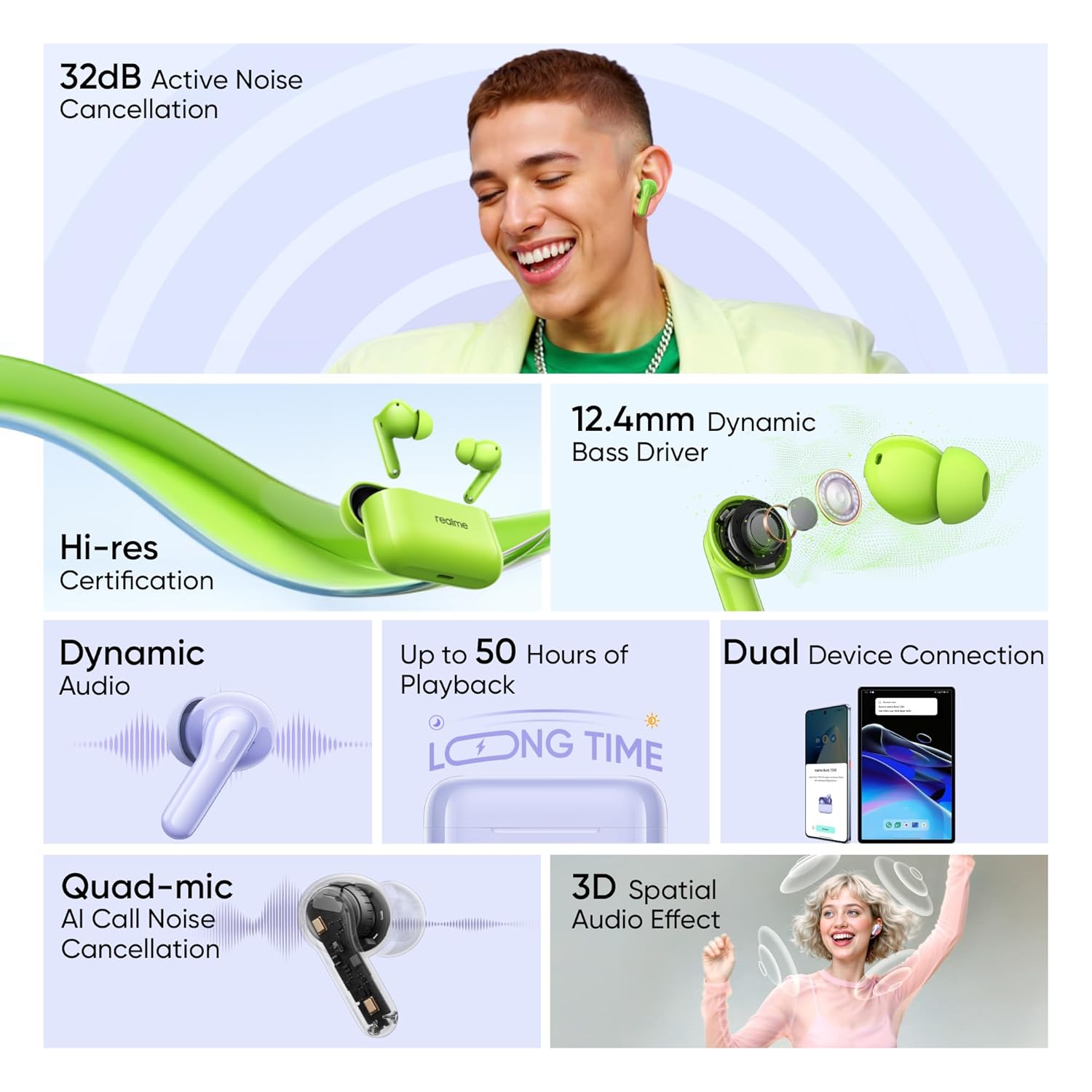
Image: Visual representation of key features: 32dB ANC, 12.4mm Dynamic Bass Driver, Hi-Res Certification, Dynamic Audio, up to 50 Hours of Playback, Dual Device Connection, Quad-mic AI Call Noise Cancellation, and 3D Spatial Audio Effect.
5.1 Kontrol Sentuh
The earbuds feature intuitive touch controls. The default controls are:
- Ketuk dua kali: Putar/Jeda musik, Jawab/Akhiri panggilan.
- Ketuk Tiga Kali: Lagu berikutnya.
- Press and Hold (one earbud): Switch between Noise Cancellation modes (ANC On/Transparency/ANC Off).
- Press and Hold (both earbuds simultaneously): Enter/Exit Gaming Mode (Low Latency).
Note: These controls can often be customized via the realme Link app.
5.2 Peredam Kebisingan Aktif (ANC)
The realme Buds T200 feature 32dB Active Noise Cancellation to reduce ambient noise.

Image: A person smiling while wearing the earbuds, illustrating the benefit of 32dB Active Noise Cancellation for a quiet listening experience.
To cycle through ANC On, Transparency Mode, and ANC Off, press and hold the touch area on either earbud. Transparency Mode allows you to hear your surroundings while still enjoying your audio.
5.3 Fungsi Panggilan
The Quad-mic AI Call Noise Cancellation ensures clear voice transmission during calls.

Image: An internal diagram of an earbud highlighting the FF Mic and Talk Mic, demonstrating the Quad-Mic AI Call Noise Cancellation technology for clear calls.
- Menjawab/Mengakhiri Panggilan: Ketuk dua kali pada salah satu earbud.
- Tolak Panggilan: Tekan dan tahan salah satu earbud selama 2 detik.
5.4 Battery Life and Fast Charging
The earbuds and charging case provide up to 50 hours of total playback.
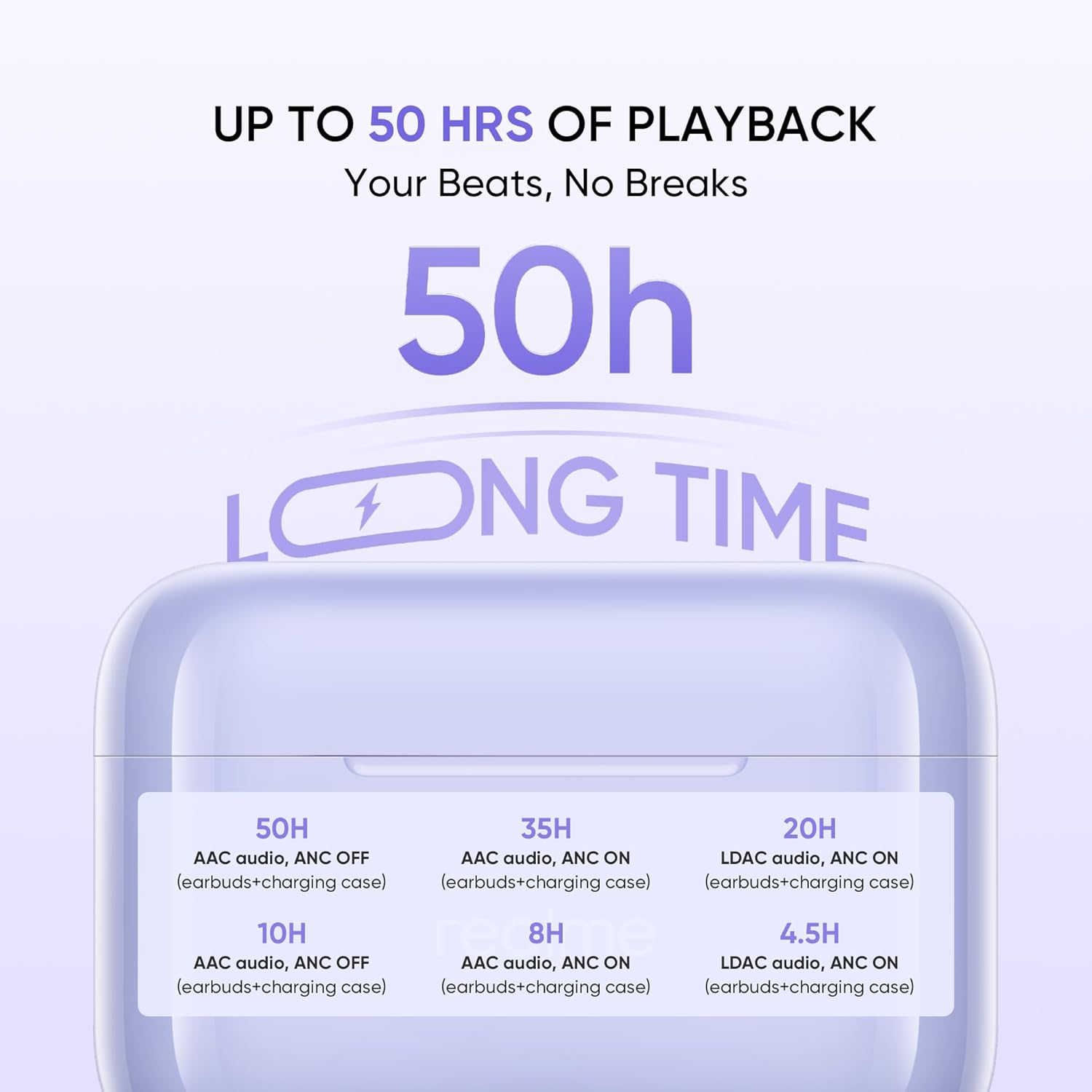
Image: A graphic detailing the battery life: 50H (AAC audio, ANC OFF with case), 35H (AAC audio, ANC ON with case), 20H (LDAC audio, ANC ON with case). Individual earbud playback times are also shown.
The fast charge feature allows for quick power-ups when you're short on time.
Audio Resolusi Tinggi 5.5
Experience superior sound quality with Hi-Res Audio certification.

Image: The realme Buds T200 earbuds and case with a 'Hi-Res Audio Wireless' and 'LDAC' logo, indicating professional audio certification for clear and detailed sound.
6. Pemeliharaan
Proper maintenance ensures the longevity and performance of your realme Buds T200.
6.1 Pembersihan
- Gunakan kain lembut, kering, dan bebas serat untuk membersihkan earbud dan wadah pengisi daya.
- Untuk kotoran membandel, sedikit dampBilas kain dengan air atau pembersih ringan non-abrasif. Hindari kelembapan berlebih.
- Gently clean the eartips and speaker mesh to prevent wax buildup, which can affect sound quality.
- Ensure all components are completely dry before placing earbuds back into the case or charging.
6.2 Penyimpanan
- Selalu simpan earbud dalam wadah pengisi dayanya saat tidak digunakan untuk melindunginya dan menjaganya tetap terisi daya.
- Simpan perangkat di tempat yang sejuk dan kering, jauhkan dari sinar matahari langsung, suhu ekstrem, dan kelembapan.
7. Penyelesaian masalah
If you encounter issues with your realme Buds T200, try the following solutions:
7.1 Earbud Tidak Dapat Dipasangkan atau Terhubung
- Pastikan kedua earbud terisi daya dan diletakkan dengan benar di dalam wadah pengisian daya.
- Open the case lid and press the function button for 3 seconds to enter pairing mode.
- Matikan dan nyalakan Bluetooth pada perangkat Anda.
- Forget/delete "realme Buds T200" from your device's Bluetooth list and try pairing again.
- Ensure your device is within the Bluetooth range (10 meters).
7.2 Tidak Ada Suara atau Volume Rendah
- Periksa tingkat volume pada perangkat dan earbud Anda.
- Pastikan earbud terpasang dengan benar di telinga Anda.
- Bersihkan kotoran atau lilin telinga dari jaring speaker.
- Coba pasangkan kembali earbud dengan perangkat Anda.
7.3 Masalah Pengisian Daya
- Pastikan kabel pengisi daya terhubung dengan aman ke casing dan sumber daya.
- Cobalah menggunakan kabel USB Type-C dan adaptor daya yang berbeda.
- Pastikan kontak pengisian daya pada earbud dan bagian dalam casing bersih dan bebas halangan.
7.4 Active Noise Cancellation Not Working
- Ensure ANC is activated via the touch controls (press and hold either earbud).
- Check if the earbuds are properly sealed in your ear. Try different sized eartips for a better fit.
- Pastikan earbud bersih dan bebas dari kotoran.
8. Spesifikasi
| Fitur | Spesifikasi |
|---|---|
| Merek | realme |
| Nama Model | Tunas T200 |
| Nomor Model | RMA2410 |
| Warna | Mystic Grey |
| Penempatan Telinga | Di Telinga |
| Faktor Bentuk | Nirkabel Sejati |
| Impedansi | 32 Ohm |
| Kontrol Kebisingan | Peredam Kebisingan Aktif (32 dB) |
| Jenis Penggerak Audio | Driver Dinamis |
| Ukuran Driver Audio | 12.4 Milimeter |
| Latensi Audio | 45 Milidetik |
| Rentang Frekuensi | 20 - 20000 hertz |
| Versi Bluetooth | 5.4 |
| Jangkauan Bluetooth | 10 Meter |
| Jenis Kontrol | Kontrol Sentuh |
| Metode Kontrol | App (realme Link) |
| Rata-rata Umur Baterai | 50 Jam (dengan casing pengisi daya) |
| Waktu Pengisian Baterai | 2 Jam |
| Tingkat Tahan Air | Tahan Air (Peringkat IP55) |
| Berat Barang | 47 gram |
| Pabrikan | Guang xi Tonly Electronics Technology Co., Ltd |
9. Garansi dan Dukungan
9.1 Informasi Garansi
The realme Buds T200 come with a Garansi Pabrik 1 Tahun Terhitung sejak tanggal pembelian. Garansi ini mencakup cacat produksi dalam penggunaan normal. Harap simpan struk pembelian Anda sebagai bukti pembelian untuk klaim garansi.
Garansi tidak mencakup kerusakan yang disebabkan oleh:
- Kerusakan yang tidak disengaja, penyalahgunaan, atau penyalahgunaan.
- Perbaikan atau modifikasi yang tidak sah.
- Keausan normal.
- Kegagalan untuk mengikuti instruksi dalam manual ini.
9.2 Dukungan Pelanggan
For further assistance, technical support, or warranty claims, please contact realme customer service through their official websitus atau informasi kontak yang tersedia dalam kemasan produk Anda.
Importer Contact Information: REALME MOBILE TELECOMMUNICATIONS (INDIA) PRIVATE LIMITED