
Perkenalan
Thank you for choosing the Desobry Home CD Player with Speakers. This device offers versatile audio playback options, including CD, Bluetooth, FM radio, USB, and AUX input. It is designed for both wall-mounted and desktop use, providing a convenient and enjoyable listening experience. Please read this manual carefully to ensure proper use and maintenance of your new CD player.
Isi Paket
Verifikasi bahwa semua item yang tercantum di bawah ini disertakan dalam paket Anda:
- Desobry Compact CD Player
- Kontrol Jarak Jauh
- Kabel listrik
- Adaptor USB
- Kabel AUX
- Wall-Mounted Plate
- Dudukan Meja
- Paket Sekrup
- Panduan Pengguna
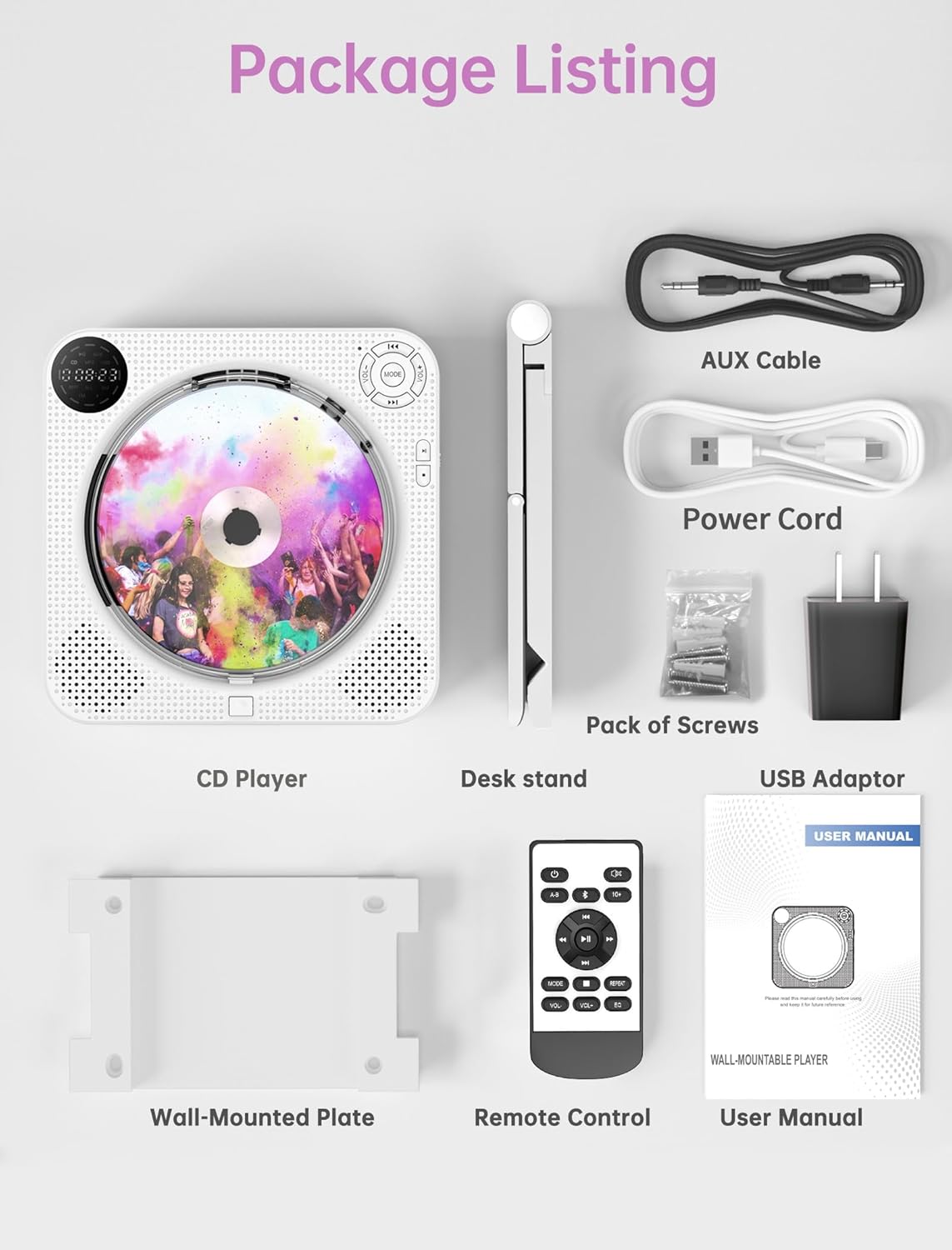
Image: All components included in the Desobry CD Player package, laid out neatly. This includes the CD player, remote control, various cables, mounting hardware, and the user manual.
Produk Selesaiview dan Kontrol
Familiarize yourself with the buttons and ports on your CD player:

Image: A detailed diagram of the Desobry CD Player, highlighting and numbering each button and port on the front and side panels for easy identification.
Kontrol Panel Depan:
- CD Lid: Protective cover for the CD disc.
- Jilid -: Kurangi tingkat volume.
- Saklar MODE: Cycle through playback modes (CD, Bluetooth, FM, USB, AUX).
- Sebelumnya: Skip to the previous track/station or navigate menu.
- Jilid +: Tingkatkan volume.
- Berikutnya: Skip to the next track/station or navigate menu.
- Bermain: Mulai pemutaran.
- Berhenti sebentar: Jeda pemutaran.
- Pengeras suara: Integrated audio output speakers.
- Tampilan Status: LED screen showing current mode, track, volume, etc.
- Light Charging LED: Lampu indikator status pengisian daya.
- Tombol Buka Sampul CD: Press to open the CD lid for disc insertion/removal.
Port Panel Samping:
- DC-5VIN: Port input daya (5V DC).
- Daya HIDUP/MATI: Saklar daya utama.
- Pelabuhan AUX: Input audio 3.5 mm untuk perangkat eksternal.
- Port USB: Untuk pemutaran melalui USB drive.
- Pelabuhan Headphone: Output audio 3.5 mm untuk headphone.
Pengaturan
Sambungan Daya:
Connect the provided power cable to the DC-5VIN port on the side of the CD player and plug the USB adaptor into a standard wall outlet. Alternatively, the player can be powered via a portable power bank using the USB cable.

Image: Illustration showing two power supply options for the CD player: one connected to a wall outlet via a USB adaptor, and another connected to a portable power bank.
Opsi Pemasangan:
The CD player can be used on a desktop or mounted on a wall.
- Penggunaan Desktop: Attach the desk stand to the bottom of the CD player. Place the player on a stable, flat surface.
- Pemasangan di dinding: Use the provided wall-mounted plate and screws to securely attach the plate to a wall. Then, slide the CD player onto the plate. Ensure the wall can support the weight of the player.

Image: The Desobry CD Player shown in both wall-mounted and desktop configurations, illustrating the use of the wall plate and desk stand.
Petunjuk Pengoperasian
After connecting power, turn on the player using the Power ON/OFF switch on the side. Use the MODE button to select your desired function.
Pemutaran CD:
- Press the CD Cover Open Button to open the CD lid.
- Carefully place a CD (CD, CD-R, HDCD, MP3, WMA format) onto the spindle, label side up.
- Close the CD lid.
- Press the MODE button until "CD" appears on the status display.
- Tekan tombol Putar untuk memulai pemutaran.
- Use the Previous/Next buttons to skip tracks and Volume +/- to adjust the sound.

Image: The Desobry CD Player displaying its compatibility with various CD formats including CD, CD-R, HDCD, WMA, and MP3, with a person enjoying music in the background.
Bluetooth Mode (Transmitter & Receiver):
The player supports both transmitting and receiving Bluetooth audio.
Bluetooth Transmitter (BT TX):
- Ensure the CD player is in CD, USB, or AUX mode.
- Press the "BT TX" button on the remote control. The Bluetooth icon on the player's display will flash, indicating it is searching for a device.
- Place your Bluetooth headphones or speaker in pairing mode.
- Once connected, the Bluetooth icon will become solid. The player's internal speakers will be muted.
- Catatan: If multiple Bluetooth devices are nearby, the player will automatically connect to the device with the strongest signal. Turn off other devices if you need to connect to a specific one.

Image: The Desobry CD Player on a shelf, with a hand holding the remote control pointing to the 'BT TX' button, illustrating the Bluetooth transmitter function for connecting to wireless headphones or speakers.
Bluetooth Receiver (BT RX):
- Press the MODE button until "BT" appears on the status display. The Bluetooth icon will flash.
- On your smartphone, tablet, or other Bluetooth device, search for "Desobry CD Player" (or similar name) in the Bluetooth settings.
- Select the player to pair. Once connected, the Bluetooth icon will become solid.
- Play audio from your device, and it will stream through the CD player's speakers.

Image: The Desobry CD Player on a table, with a smartphone displaying Bluetooth settings, illustrating how to connect external devices to the CD player as a Bluetooth receiver.
Radio FM:
- Press the MODE button until "FM" appears on the status display.
- The player will automatically scan and store available FM stations (76MHz-108MHz).
- Gunakan tombol Sebelumnya/Berikutnya untuk menavigasi stasiun yang tersimpan.
- Adjust volume with Volume +/-.

Image: The Desobry CD Player in a kitchen setting, displaying the FM radio function with various frequencies and icons for weather, traffic, music, and sports, while a couple prepares food.
Pemutaran USB:
- Masukkan flash drive USB yang berisi audio files into the USB port on the side of the player.
- Press the MODE button until "USB" appears on the status display.
- The player will automatically begin playing audio filedari drive USB.
- Use the Play/Pause, Previous/Next, and Volume +/- buttons for control.

Image: The Desobry CD Player on a desk, with a USB flash drive inserted into its side port, demonstrating its support for USB audio input.
Masukan AUX:
- Connect an external audio device (e.g., smartphone, MP3 player) to the AUX port on the side of the CD player using the provided 3.5mm AUX cable.
- Press the MODE button until "AUX" appears on the status display.
- Play audio from your external device. The sound will be output through the CD player's speakers.
- Control playback and volume primarily from your external device.
AB Ulangi Fungsi:
This function allows you to repeat a specific segment of audio. Ideal for language learning or musical practice.
- During CD or USB playback, press the A-B Repeat button (usually on the remote) at the desired starting point (A).
- Press the A-B Repeat button again at the desired ending point (B).
- The segment between A and B will repeat continuously.
- Press the A-B Repeat button a third time to cancel the function.
Mode EQ:
The player may offer various equalizer (EQ) presets to optimize sound for different music genres. Use the EQ button on the remote control to cycle through available modes such as Pop, Jazz, Rock, Classic, and Flat.
Pemeliharaan
Proper care ensures the longevity of your CD player.
- Pembersihan: Gunakan kain lembut dan kering untuk membersihkan bagian luar pemutar. Jangan gunakan cairan pembersih atau bahan abrasif.
- Perawatan Cakram: Pegang CD pada bagian tepinya. Jaga agar cakram tetap bersih dan bebas dari goresan. Simpan di dalam kotaknya saat tidak digunakan.
- Penutup Debu: The integrated dust cover protects the CD mechanism from dust and debris. Keep it closed when not changing discs. The CD opening button design facilitates disc changes without removing the entire cover.
- Penyimpanan: When not in use for extended periods, disconnect the power cable and store the player in a cool, dry place.

Image: A close-up of the Desobry CD Player highlighting the dust cover and the dedicated CD cover open button, emphasizing ease of disc replacement and protection.
Penyelesaian Masalah
Jika Anda mengalami masalah, lihat tabel di bawah untuk masalah umum dan solusinya.
| Masalah | Kemungkinan Penyebab | Larutan |
|---|---|---|
| Pemutar musik tidak menyala. | Power cable not connected properly; Power outlet issue; Power switch off. | Ensure power cable is securely connected. Try a different power outlet. Confirm the Power ON/OFF switch is in the 'ON' position. |
| Tidak ada suara dari speaker. | Volume too low; Mute activated; Incorrect mode selected; Bluetooth TX active. | Increase volume. Check if mute is active. Select the correct playback mode (CD, USB, FM, AUX). If Bluetooth TX is active, sound will output to paired Bluetooth device. |
| CD tersendat atau tidak berputar. | Disk kotor atau tergores; Disk dimasukkan dengan tidak benar; Format disk tidak didukung. | Clean the CD with a soft cloth. Reinsert the disc correctly. Ensure the disc format is supported (CD, CD-R, HDCD, MP3, WMA). |
| Perangkat Bluetooth tidak dapat terhubung. | Player not in Bluetooth pairing mode; Device too far; Interference; Other devices connected. | Ensure player is in BT RX mode (for receiving) or BT TX mode (for transmitting). Place devices closer. Turn off other Bluetooth devices nearby. |
| Penerimaan sinyal radio FM buruk. | Sinyal lemah; Interferensi. | Reposition the player to improve signal reception. Avoid placing near other electronic devices that may cause interference. |
| Kontrol jarak jauh tidak berfungsi. | Batteries low or dead; Obstruction between remote and player. | Replace remote control batteries. Ensure a clear line of sight between the remote and the player. |
Spesifikasi
| Fitur | Keterangan |
|---|---|
| Merek | Desobry |
| Nomor Model | CD player with speaker |
| Teknologi Konektivitas | USB, Bluetooth, AUX |
| Fitur Khusus | FM Radio, Programmable Memory, Wireless (Bluetooth TX/RX) |
| Komponen yang Termasuk | Charging cable, Remote control, Wall-mounted plate, Desk stand, USB adaptor, AUX cable |
| Jumlah Cakram | 1 |
| Format Audio yang Didukung | CD, CD-R, HDCD, MP3, WMA |
| Jenis Konektor | 3.5mm Jack (Headphone, AUX) |
| Jangkauan Radio FM | 76MHz-108MHz |
| Masukan Daya | Tegangan DC5V |
Garansi dan Dukungan
This Desobry CD Player comes with a Garansi 12 bulan sejak tanggal pembelian.
If you encounter any problems with your product or have questions, please contact Desobry customer support. We are committed to providing a positive solution within 24 hours.
For support, please refer to the contact information provided in your original purchase documentation or visit the official Desobry weblokasi.