1. Informasi Keselamatan Penting
Harap baca semua petunjuk dengan saksama sebelum menggunakan perangkat. Simpan manual ini untuk referensi di masa mendatang.
- Do not use if you have a pacemaker, artificial joints, or electronic medical devices.
- Consult a physician before use if you have any pre-existing medical conditions, skin sensitivities, or are pregnant.
- Jangan gunakan pada luka terbuka, area yang bengkak, atau area kulit yang mengalami iritasi.
- Jauhkan dari jangkauan anak-anak.
- Jangan merendam perangkat dalam air atau menggunakannya di lingkungan yang terlalu lembap.
- Gunakan hanya kabel pengisi daya dan adaptor daya yang telah disediakan.
- Hentikan penggunaan segera jika Anda mengalami ketidaknyamanan atau rasa sakit.
2. Produk Lebihview
The HX-601/603 Wireless Knee Massager is designed to provide therapeutic massage and integrated heating for your knees. Its ergonomic and portable design allows for comfortable use at home, in the office, or during travel.
2.1 Komponen
- Main Massager Unit with Control Panel
- Tali yang dapat disesuaikan
- Magnetic Battery Compartment
- Kabel Pengisian Daya USB
2.2 Fitur
- Operasi Nirkabel: Enjoy massage without tangled cords.
- Integrated Heating: Therapeutic heat to improve circulation and relax muscles.
- 3 Tingkat Intensitas: Customize your massage experience.
- Pengatur Waktu 15 Menit: Automatic shut-off for safety and optimal session duration.
- Panel Kontrol Digital: Easy adjustment of settings with LED display.
- Desain Ergonomis: Conforms to the knee for maximum comfort and effectiveness.
- Comfortable Fabrics: Made with breathable materials for extended use.

The image displays the wireless knee massager worn on a knee, illustrating the integrated heating function with red arrows indicating heat flow.
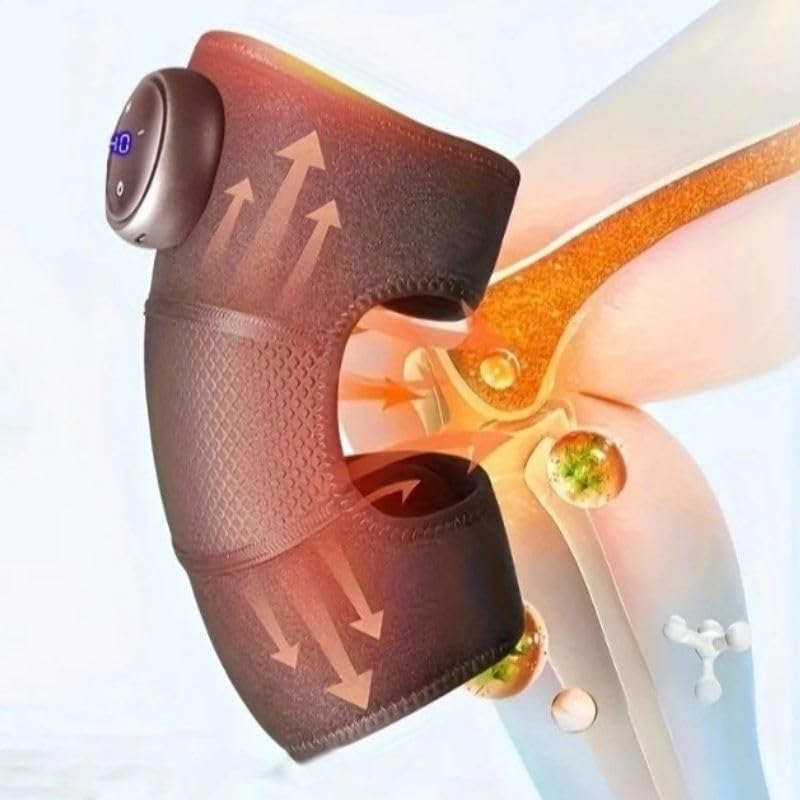
This image highlights the device's control panel with a digital display and buttons, along with the magnetic battery compartment for wireless operation.

Sebuah detail view of the massager's fabric, emphasizing its comfortable, breathable, and non-stuffy texture.
3. Pengaturan
3.1 Mengisi Daya Perangkat
- Locate the charging port on the massager unit.
- Connect the USB charging cable to the device and to a compatible USB power adapter (not included) or computer USB port.
- The LED indicator on the control panel will show charging status. A full charge typically takes several hours.
- Pastikan perangkat terisi penuh sebelum digunakan pertama kali untuk masa pakai baterai yang optimal.
3.2 Attaching to the Knee
- Unfold the knee massager.
- Position the main unit over your knee, ensuring the massage elements are centered.
- Secure the massager using the adjustable straps, ensuring a snug but comfortable fit. Do not overtighten.
4. Petunjuk Pengoperasian
4.1 Daya Hidup/Mati
- To turn on: Press and hold the Power button (usually marked with a circle or power symbol) on the control panel for 2-3 seconds. The LED display will illuminate.
- To turn off: Press and hold the Power button again for 2-3 seconds. The display will turn off.
4.2 Adjusting Massage Intensity
- Once powered on, press the Intensity button (usually marked with '+' or '-') to cycle through the 3 available intensity levels.
- The current intensity level will be indicated on the LED display.
4.3 Activating Heating Function
- Press the Heat button (usually marked with a wave or heat symbol) to activate or deactivate the integrated heating function.
- The heating indicator on the display will light up when active.
4.4 Pengatur Waktu Otomatis
The device is equipped with an automatic 15-minute timer. After 15 minutes of continuous operation, the massager will automatically shut off. You can restart the device for another session if desired, but it is recommended to take breaks between sessions.
5. Pemeliharaan
5.1 Pembersihan
- Pastikan perangkat dimatikan dan dicabut sebelum dibersihkan.
- Bersihkan permukaan alat pijat dengan kain lembut dan kering.amp kain.
- Jangan gunakan pembersih abrasif, pelarut, atau bahan kimia keras.
- Jangan merendam perangkat dalam air.
5.2 Penyimpanan
- Simpan perangkat di tempat yang sejuk dan kering, jauhkan dari sinar matahari langsung dan suhu ekstrem.
- Keep it away from sharp objects that could damage the fabric or internal components.
6. Penyelesaian masalah
| Masalah | Kemungkinan Penyebab | Larutan |
|---|---|---|
| Perangkat tidak menyala. | Baterai lemah atau perangkat belum terisi daya. | Charge the device fully. Ensure the power button is pressed and held for 2-3 seconds. |
| Tidak ada panas atau panas yang lemah. | Heating function not activated or low battery. | Ensure the heat button is pressed. Charge the device. |
| Intensitas pijatan terlalu lemah/kuat. | Pengaturan intensitas salah. | Adjust the intensity using the '+' or '-' buttons. |
| Perangkat berhenti tiba-tiba. | Timer otomatis 15 menit aktif atau baterai lemah. | This is normal operation due to the timer. Recharge the device if the battery is low. |
7. Spesifikasi
| Nomor Model | HX-601/603 |
| Merek | Umum |
| Sumber Daya | Bertenaga Baterai |
| Jil.tage | 5V |
| Kekuatan | 7W |
| Dimensi Produk | Ukuran 25x14x8 cm |
| Berat Produk | 100 gram |
| Bahan | Electronic Components, Plastic, Fabric |
| Pengatur waktu | 15 minutes (automatic shut-off) |
| Tingkat Intensitas | 3 |
| Negara Asal | Brazil |
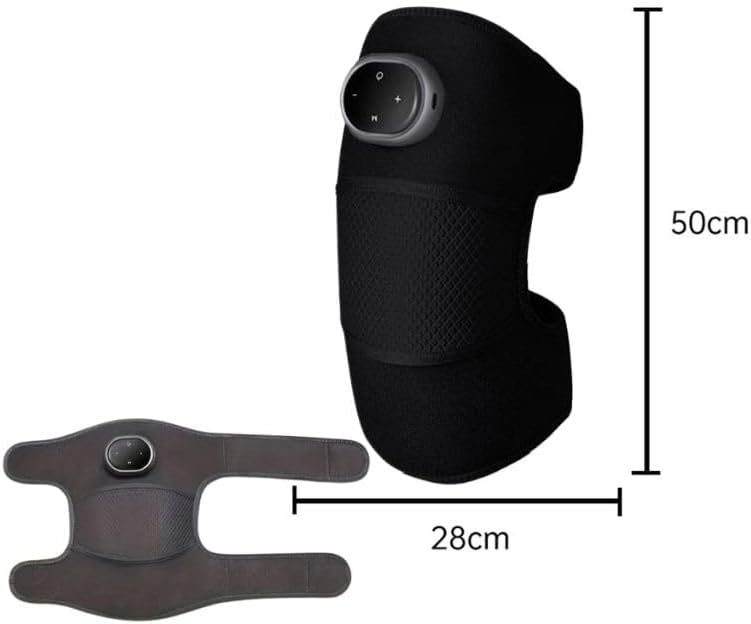
This image provides the physical dimensions of the knee massager, indicating a length of 50cm and a width of 28cm when laid flat.
8. Garansi dan Dukungan
This product is manufactured by Knee. For warranty information or technical support, please contact your retailer or the manufacturer directly. Please retain your proof of purchase.
Catatan: Ketentuan garansi spesifik dapat berbeda-beda tergantung wilayah dan pengecer.


