
1. Pendahuluan
This instruction manual provides essential information for the safe and efficient operation of your VEVOR 2.2 kW Variable Frequency Drive (VFD). This VFD is designed to convert single-phase AC 220-240V input into three-phase AC 220-240V output, enabling precise speed control for various industrial motors. Please read this manual thoroughly before installation and operation to ensure proper use and to prevent damage or injury.

Gambar: Seorang jenderal view of the VEVOR 2.2 kW Variable Frequency Drive (VFD), showcasing desain dan panel kontrolnya yang ringkas.
2. Petunjuk Keselamatan
PERINGATAN: Improper installation or operation can lead to serious injury or property damage. Always follow these safety guidelines.
- Ensure power is disconnected before any wiring or maintenance.
- The VFD must be properly grounded to prevent electrical shock.
- Do not connect U/V/W output directly to AC power supply; this will damage the inverter.
- Install the inverter in a non-flammable, dry environment, free from explosive gases.
- Only qualified professionals should perform wiring and installation.
- Do not open the VFD casing; internal components are under high pressure and can cause injury.
- The VFD features a 10-layer protection system, including overcurrent, overload, overvoltage, phase loss, and short circuit protection. However, these are supplementary and do not replace safe operating practices.

Image: Diagram illustrating the VEVOR VFD's comprehensive safety protections, including overcurrent, overload, overvoltage, short circuit, and phase loss protection.
3. Produk Lebihview
The VEVOR 2.2 kW VFD is a robust and efficient solution for controlling the speed of three-phase motors. It offers stable performance, energy efficiency, and a user-friendly interface.
Fitur Utama:
- Daya Keluaran: 2.2 kW (3 HP), 10 A.
- Masukan: Single-phase AC 220-240 V, 50/60 Hz.
- Keluaran: Three-phase AC 220-240 V, 0-400 Hz.
- Kontrol: Soft start and stop for smooth motor operation.
- Perlindungan: 10-layer system including overcurrent, overload, overvoltage, phase loss, and short circuit protection.
- Pendinginan: Powerful fan and multi-hole design for efficient heat dissipation and quiet operation.
- Antarmuka Pengguna: Intuitive control panel with a 5-digit LED display, speed adjustment knob, and removable panel for remote operation (20 cm cable).
- Daya tahan: High-quality circuit control board and high-temperature resistant plastic casing.
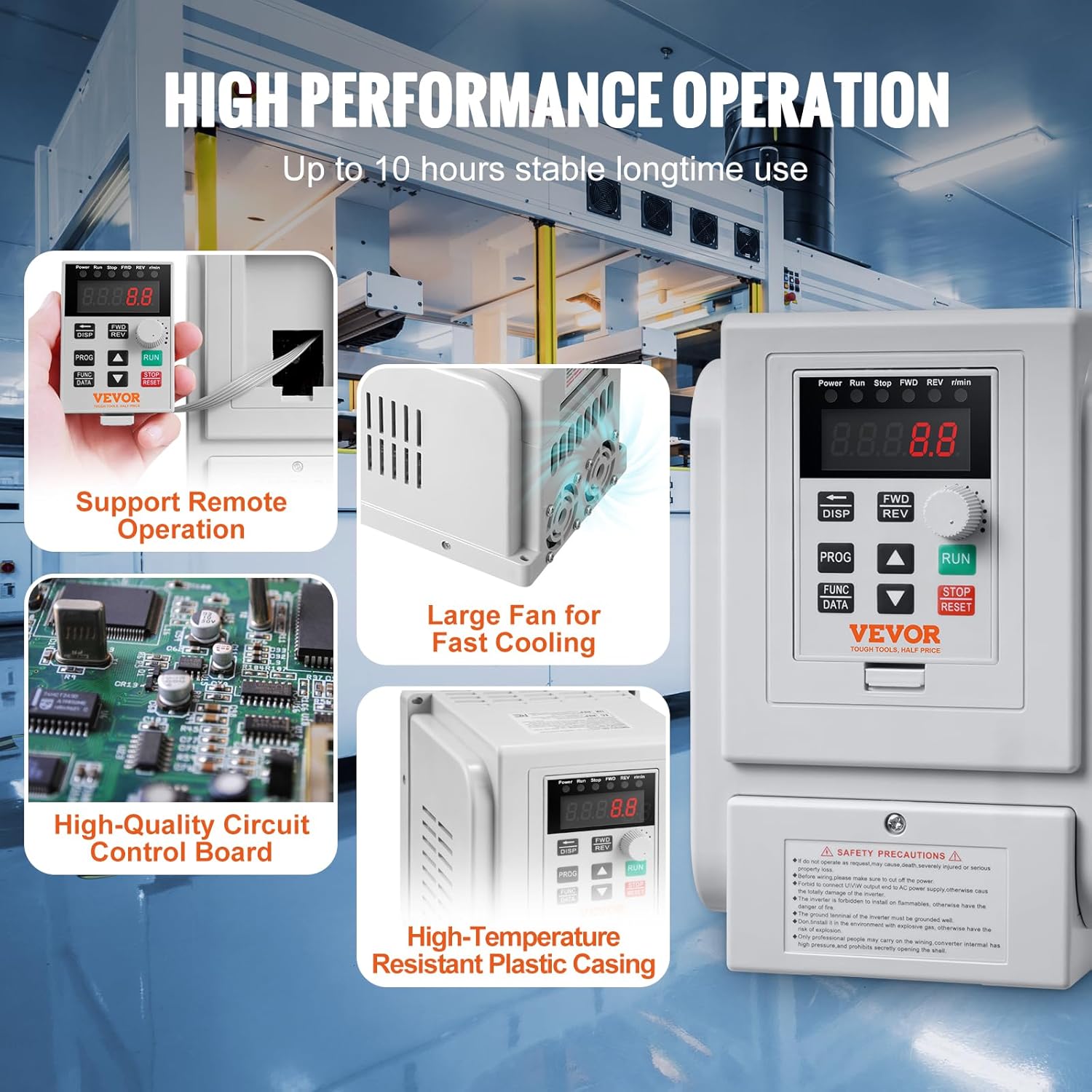
Gambar: Detail view of the VEVOR VFD highlighting its high-performance features, including support for remote operation, a large cooling fan for rapid heat dissipation, a high-quality circuit control board, and a high-temperature resistant plastic casing.
4. Pengaturan dan Instalasi
4.1 Diagram Pengkabelan
Refer to the following diagram for correct wiring. Ensure all connections are secure and comply with local electrical codes.

Image: Wiring diagram showing single-phase AC 220-240V input connected to terminals L and N, and three-phase AC 220-240V output connected to motor terminals U, V, W. Grounding terminal (GND) is also indicated.
4.2 Koneksi Terminal
| Label Terminal | Deskripsi Fungsi |
|---|---|
| L, N | Terminal masukan AC 220V fase tunggal |
| kamu, v, w | Output terminal connect to three phase motor |
| GND | Terminal pembumian |
Penting: Ensure the motor's wiring configuration is set for 220V three-phase operation if it is a dual-voltage motor (e.g., 220V/380V).
5. Petunjuk Pengoperasian
5.1 Panel Kontrol Selesaiview
VFD ini memiliki panel kontrol intuitif untuk pengoperasian dan penyesuaian parameter yang mudah.

Gambar: Detail view of the VEVOR VFD control panel, showing the 5-digit LED display, status indicators, speed adjustment knob, and function keys (DISP, FWD/REV, PROG, FUNC/DATA, RUN, STOP/RESET).
- Indikator Status: Displays current operating status (Power, Run, Stop, FWD, REV, r/min).
- Layar Tampilan LED 5 Digit: Shows frequency, speed, and parameter values.
- Tombol Pengatur Kecepatan: Used to adjust the output frequency/motor speed.
- Tombol JALANKAN: Starts the inverter output.
- Tombol STOP/RESET: Stops the inverter output or resets fault conditions.
- FWD/REV Key: Toggles between forward and reverse rotation.
- Tombol DISP: Shifts between programming modes or jog mode in normal operation.
- Tombol PROG: Used for selecting programming mode or programming.
- FUNC/DATA Button: Used for setting function data.
- Panah Atas/Bawah: For navigating menus and adjusting values.
5.2 Operasi Dasar
- Nyalakan: Connect the VFD to the power supply. The LED display will light up.
- Tetapkan Frekuensi: Putar Tombol Penyesuaian Kecepatan to set the desired output frequency (0-400 Hz).
- Mulai Motor: Tekan tombol BERLARI Tekan tombol untuk menghidupkan motor. Motor akan berakselerasi hingga frekuensi yang telah diatur.
- Ubah Arah: Tekan tombol FWD / PENDAHULUAN key to switch between forward and reverse rotation.
- Hentikan Motor: Tekan tombol BERHENTI MENGULANG tombol untuk menghentikan motor.
- Reset Fault: If a fault occurs, the VFD will display an error code. Press BERHENTI MENGULANG to clear the fault after addressing the issue.
5.3 Pengaturan Parameter
Detailed parameter settings are crucial for optimizing VFD performance for specific applications. Refer to the comprehensive user guide (if provided separately) for advanced parameter configurations. Basic parameters typically include:
- Frekuensi Keluaran Maksimum
- Waktu Akselerasi/Deselerasi
- Frekuensi Nilai Motor
- Nilai Motor Voltage
- Motor Nilai Saat Ini
Gunakan PROG Dan FUNC/DATA buttons along with the Up/Down arrows to navigate and modify parameters.
6. Pemeliharaan
Perawatan rutin memastikan umur pakai dan pengoperasian VFD Anda yang andal.
- Pembersihan: Keep the VFD clean and free from dust and debris. Use a soft, dry cloth. Do not use liquid cleaners.
- Ventilasi: Ensure the cooling fan and ventilation holes are unobstructed for proper heat dissipation.
- Koneksi: Periksa secara berkala semua sambungan kabel untuk memastikan kekencangannya dan tanda-tanda korosi.
- Lingkungan: Maintain the operating environment within specified temperature and humidity ranges.
- Inspeksi: Inspect the VFD for any physical damage or unusual noises during operation.
7. Penyelesaian masalah
If you encounter issues with your VFD, refer to the following common problems and solutions. For persistent issues, contact VEVOR customer support.
| Masalah | Kemungkinan Penyebab | Larutan |
|---|---|---|
| VFD tidak menyala | No power supply; loose connections; internal fault | Check power input; verify wiring; contact support |
| Motor tidak menyala | Incorrect wiring; VFD in stop mode; fault condition; incorrect parameters | Verify motor and VFD wiring; press RUN; check for error codes and reset; review pengaturan parameter |
| Motor runs erratically or at wrong speed | Incorrect frequency setting; motor parameters mismatch; unstable power supply | Adjust speed knob; verify motor parameters (rated frequency, voltage); ensure stable input power |
| VFD displays error code | Arus lebih, tegangan lebihtage, overload, phase loss, etc. | Refer to the VFD's specific error code list (if available in full manual); address the underlying cause (e.g., reduce load, check wiring); press STOP/RESET to clear |
| Terlalu panas | Blocked ventilation; excessive ambient temperature; continuous heavy load | Clear obstructions from fan/vents; ensure adequate airflow; reduce load or operating time; consider a VFD with higher capacity if consistently overloaded |
8. Spesifikasi
Detailed technical specifications for the VEVOR 2.2 kW Variable Frequency Drive.

Image: VEVOR VFD showing physical dimensions and key technical specifications such as model number, horsepower, power, current, input/output voltage, input/output frequency, operating temperature, and net weight.
| Parameter | Nilai |
|---|---|
| Nomor Model | AT1-2200X |
| Daya kuda | 3HP |
| Kekuatan | 2.2 kW |
| Saat ini | 10 Sebuah |
| Masukan Voltage | AC 220-240 V Single Phase |
| Volume Keluarantage | AC 220-240 V Three Phase |
| Frekuensi Masukan | 50/60Hz |
| Frekuensi Keluaran | Frekuensi 0-400Hz |
| Suhu Operasional | 10°C - 40°C (50°F - 104°F) |
| Berat Bersih | 1.2 kg (2.6 lbs) ± 3% |
| Dimensi (P x L x T) | 126 x 125 x 186 mm (4.9 x 5 x 7.3 inci) |
| Bahan | Aluminium (internal components), High-temperature resistant plastic (casing) |
| Jenis Tampilan | DIPIMPIN |
9. Garansi dan Dukungan
For warranty information, technical support, or service inquiries, please contact VEVOR customer service. Keep your purchase receipt and product model number handy when contacting support.
You can typically find support contact details on the official VEVOR websitus atau melalui platform pembelian Anda.