1. Pendahuluan
Welcome to your new Baseus BC1 Open Ear Earbuds. This manual provides detailed instructions for setup, operation, and maintenance to ensure you get the best experience from your device. The Baseus BC1 earbuds feature a comfortable open-ear design, secure tri-curve clip, rich sound with powerful bass, clear calls with 4-mic AI noise reduction, IP55 water resistance, and precise button control.
2. Isi Paket
Harap periksa isi paket untuk memastikan semua item ada:
- Baseus BC1 Open Ear Earbuds (Left & Right)
- Kotak Pengisian Daya
- Panduan Pengguna
- Kabel Pengisian Tipe-C

3. Produk Lebihview
The Baseus BC1 Open Ear Earbuds are designed for comfort and high-quality audio, allowing you to stay aware of your surroundings. The compact charging case provides extended battery life and convenient storage.

4. Pengaturan
4.1. Pengisian daya
Sebelum penggunaan pertama, isi daya earbud dan casing pengisi daya hingga penuh.
- Hubungkan kabel pengisi daya Type-C yang tersedia ke port pengisian daya pada casing dan ke sumber daya.
- Pengisian daya hingga penuh memerlukan waktu sekitar 1.5 jam.
- The earbuds offer up to 7.5 hours of listening on a single charge, and up to 38 hours total with the fully charged case.

4.2. Daya Hidup/Mati
- Nyalakan: Buka wadah pengisi daya, dan earbud akan menyala secara otomatis.
- Matikan: Masukkan kembali earbud ke dalam wadah pengisian daya dan tutup penutupnya; earbud akan mati secara otomatis.
4.3. Pemasangan Bluetooth
- Open the charging case. The earbuds will automatically enter pairing mode, indicated by a flashing LED light.
- Pada perangkat Anda (smartphone, tablet, dll.), buka pengaturan Bluetooth dan aktifkan Bluetooth.
- Pencarian untuk "Baseus BC1" in the list of available devices and select it to connect.
- Once connected, you will hear a confirmation tone, and the LED indicator on the earbuds will turn off.
4.4. Mengenakan Earbud
For optimal comfort and sound quality, follow these steps to wear your earbuds:
- Gently clip each earbud onto your ear, ensuring the main body rests comfortably behind your earlobe.
- Adjust the earbud to find the most comfortable and secure position. The tri-curve ergonomic clip is designed to adapt to various ear shapes.
- Ensure the sound outlet is aligned with your ear canal to experience the best sound quality.


5. Petunjuk Pengoperasian
5.1. Kontrol Tombol
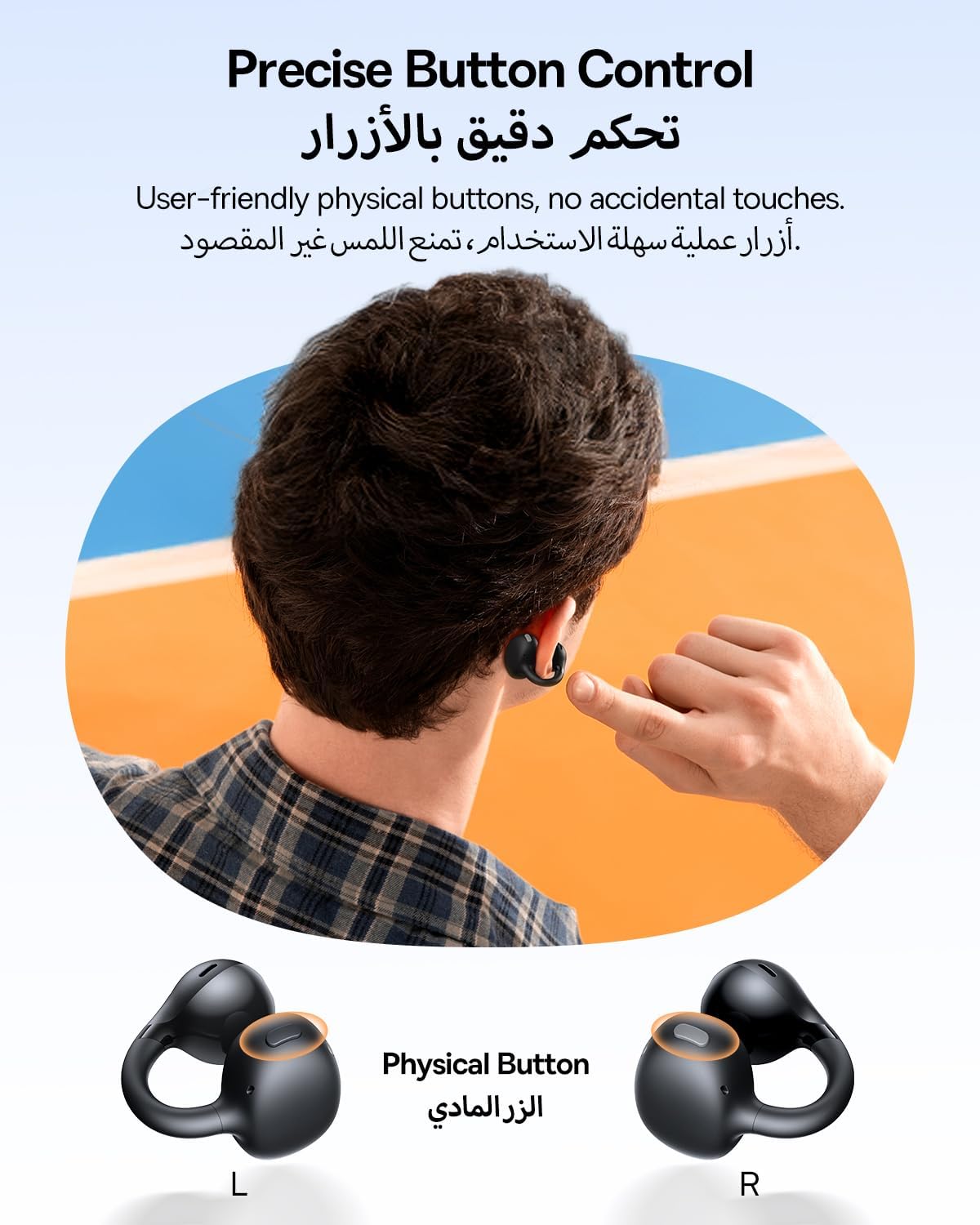
The Baseus BC1 earbuds feature physical buttons for precise control, minimizing accidental touches. The functions are as follows:
- Putar/Jeda: Single press the button on either earbud.
- Volume Naik: Single press the button on the right earbud.
- Volume Turun: Single press the button on the left earbud.
- Lagu Berikutnya: Long press the button on the right earbud for 1.5 seconds.
- Lagu Sebelumnya: Long press the button on the left earbud for 1.5 seconds.
- Menjawab/Mengakhiri Panggilan: Double press the button on either earbud.
- Tolak Panggilan: Long press the button on either earbud for 1.5 seconds during an incoming call.
- Asisten Suara: Triple press the button on the right earbud.
- Cycle Modes (Game/Movie/Normal): Triple press the button on the left earbud.
5.2. App Customization
Download the official Baseus app from your device's app store to unlock advanced features and personalize your listening experience:
- EQ yang dapat disesuaikan: Adjust the equalizer settings to fine-tune the audio to your preference.
- Suara Profiles: Pilih dari berbagai preset sound profiles for different music genres or listening scenarios.
- Touch Control Personalization: Reassign touch control functions to suit your needs.

5.3. Koneksi Multi Titik
The Baseus BC1 earbuds support simultaneous connection to two devices, allowing seamless switching between them:
- Pair the earbuds with your first device (e.g., smartphone).
- Putuskan sambungan earbud dari pengaturan Bluetooth perangkat pertama. Earbud akan kembali memasuki mode pemasangan.
- Pair the earbuds with your second device (e.g., tablet or laptop).
- Manually reconnect the earbuds to the first device from its Bluetooth settings.
- The earbuds will now be connected to both devices simultaneously, allowing you to switch audio sources without re-pairing.

6. Pemeliharaan
6.1. Pembersihan
To ensure optimal performance and longevity of your earbuds:
- Regularly clean the earbuds and the charging contacts inside the case using a clean, dry cotton swab.
- Jika perlu, d dengan ringanampen the cotton swab with alcohol for disinfection.
- Avoid issues such as the earbuds being unable to charge or power on due to prolonged lack of cleaning.
6.2. Penyimpanan
- Saat tidak digunakan, selalu simpan earbud di dalam wadah pengisian dayanya untuk melindunginya dari debu dan kerusakan.
- If the earbuds will not be used for an extended period, charge the case at least once every three months to maintain battery health.
7. Penyelesaian masalah
If you encounter any issues with your Baseus BC1 earbuds, please refer to the following common problems and solutions:
- Earbud tidak dapat dipasangkan: Ensure Bluetooth is enabled on your device and the earbuds are in pairing mode. Try forgetting previous pairings on your device and re-pairing.
- Hanya satu earbud yang berfungsi: Place both earbuds back in the charging case, close the lid for 10 seconds, then open it again. If the issue persists, perform a factory reset.
- Kualitas suara buruk: Ensure the earbuds are worn correctly and the sound outlet is aligned with your ear canal. Check the EQ settings in the Baseus app.
- Earbud tidak mengisi daya: Clean the charging contacts on both the earbuds and the case. Ensure the charging cable is properly connected to a working power source.
7.1. Reset Pabrik
If the earbuds are not functioning correctly, a factory reset may resolve the issue:
- Remove the pairing information of the earbuds from your device's Bluetooth settings (e.g., "Forget This Device").
- Place both earbuds into the charging case, ensuring they are securely in place.
- Close the charging case for 3 seconds, then reopen it.
- With the charging case open, long press the button on the charging case for 10 seconds until the indicator light flashes white twice. This indicates that the reset is complete.
- After the factory reset, use the initial Bluetooth pairing method (Section 4.3) to reconnect and resume normal use.
8. Spesifikasi
| Fitur | Detil |
|---|---|
| Nama Model | SM1 |
| Nomor Model Barang | PM153 |
| Merek | Dasar |
| Warna | Hitam |
| Penempatan Telinga | Telinga Terbuka |
| Faktor Bentuk Headphone | Telinga Terbuka |
| Teknologi Konektivitas | Nirkabel |
| Teknologi Komunikasi Nirkabel | Bahasa Indonesia: Bluetooth |
| Impedansi | Tegangan 16 ohm |
| Kontrol Kebisingan | Tidak ada |
| Soket Headphone | Tidak ada Jack |
| Metode Kontrol | Tombol Tekan |
| Tingkat Tahan Air | Tahan Air (IP55) |
| Waktu Pengisian Daya | 1.5 jam |
| Berat Barang | 111 gram |
| Dimensi Paket | Ukuran 13.4x8.5x4.2 cm |
| Komponen yang Termasuk | Panduan Pengguna |
| Bahan | Plastik |
| Perangkat yang Kompatibel | Phones, tablets, desktop computers, laptops, mobile phones, smart speakers, TVs, digital video game players |
9. Informasi Keselamatan
- Avoid prolonged listening at high volume levels to prevent potential hearing damage.
- Jangan gunakan earbud dalam situasi yang membahayakan, seperti ketidakmampuan mendengar suara sekitar (misalnya saat mengemudi, bersepeda, berjalan di tengah kemacetan).
- Jauhkan earbud dan wadah pengisi daya dari suhu ekstrem, sinar matahari langsung, dan kelembapan.
- Do not attempt to disassemble, repair, or modify the product. This may void the warranty and cause damage.
- Keep out of reach of children and pets to prevent accidental ingestion or misuse.
- Buang produk dan baterainya secara bertanggung jawab sesuai dengan peraturan setempat.
10. Garansi & Dukungan
Untuk informasi garansi, dukungan teknis, atau pertanyaan terkait produk lainnya, silakan merujuk ke situs resmi Baseus. websitus atau hubungi distributor lokal Anda.
You can also visit the official Baseus Store for more information: Toko Baseus


