
DANFI AUDIO DF TE-2017
DANFI AUDIO DF TE-2017 VintagBuku Panduan Pengguna Pemutar Rekaman Bluetooth Nirkabel
Model: TE-2017 | Merek: DANFI AUDIO DF
1. Produk Lebihview dan Fitur
The DANFI AUDIO DF TE-2017 is a versatile record player designed for an enhanced audio experience. It combines vintage aesthetics with modern functionality, offering multiple playback and recording options.
- 3-Speed Belt Drive Turntable: Supports 33 1/3, 45, and 78 RPM vinyl records.
- Konektivitas Bluetooth Nirkabel: Stream music wirelessly from compatible devices.
- USB Recording & Playback: Convert vinyl to digital formats (MP3/WAV) and play music from USB drives (up to 64GB).
- Speaker Stereo bawaan: Dual speakers with EQ technology for clear sound.
- Masukan AUX: Hubungkan sumber audio eksternal melalui kabel 3.5 mm.
- Output RCA: Hubungkan ke eksternal amplifiers or powered speakers for expanded audio.
- Fungsi Berhenti Otomatis: Automatically stops the turntable at the end of a record.
- Removable Dust Cover: Melindungi pemutar piringan hitam dan rekaman dari debu.

Gambar 1.1: Selesaiview of the DANFI AUDIO DF TE-2017 Record Player with key features highlighted.
2. Apa yang ada di dalam kotak
Buka kemasan semua komponen dengan hati-hati dan pastikan barang-barang berikut disertakan:
- Pemutar Rekaman DANFI AUDIO DF TE-2017
- Power Cord & Adapter (100-240V~)
- Adaptor 45 RPM
- Jarum Pengganti
- Slipmat Meja Putar
- User Manual (dokumen ini)
3. Petunjuk Penyiapan
- Membuka kemasan pemutar piringan hitam: Remove all packaging materials and place the turntable on a stable, flat surface.
- Pasang Slipmat: Place the felt slipmat onto the turntable platter.
- Lepaskan Pelindung Stylus: Carefully remove the white plastic stylus protector from the needle.
- Hubungkan Daya: Plug the power adapter into the DC 5V/1A port on the back of the turntable and then into a wall outlet.
- Position Dust Cover: Ensure the clear dust cover is properly seated on its hinges. It can be left open or closed during playback.

Image 3.1: The DANFI AUDIO DF TE-2017 Record Player ready for use.
4. Petunjuk Pengoperasian
4.1 Memutar Piringan Hitam
- Nyalakan: Rotate the 'VOLUME' knob clockwise to turn on the turntable.
- Pilih Mode Phono: Press the 'MODE' button until 'PHO' is displayed on the LED screen.
- Rekor Tempat: Place a vinyl record on the turntable platter. For 45 RPM records, use the included adapter.
- Atur Kecepatan: Adjust the speed switch (33, 45, or 78 RPM) to match your record's speed.
- Enable/Disable Auto-Stop: The auto-stop switch is located near the tonearm. Set it to 'ON' for the turntable to stop automatically at the end of the record, or 'OFF' for continuous play.
- Posisi Tonearm: Gently lift the tonearm using the cueing lever. Move the tonearm over the desired track on the record.
- Lengan Nada Bawah: Slowly lower the tonearm onto the record using the cueing lever. The music will begin to play.
- Sesuaikan Volume: Gunakan kenop 'VOLUME' untuk mengatur level suara.
- Hentikan Pemutaran: At the end of the record (if auto-stop is off), or to stop manually, gently lift the tonearm using the cueing lever and return it to its rest.

Image 4.1: Proper placement of the tonearm on a vinyl record.
4.2 Mode Bluetooth
- Nyalakan: Rotate the 'VOLUME' knob clockwise to turn on the turntable.
- Pilih Mode Bluetooth: Press the 'MODE' button until 'BT' is displayed on the LED screen. The turntable will emit an audible tone indicating it's in pairing mode.
- Pasangkan Perangkat: On your Bluetooth-enabled device (smartphone, tablet, etc.), search for 'TE-2017' in the Bluetooth settings and select it to pair.
- Putar Musik: Once paired, you can stream music from your device through the turntable's speakers. Use the play/pause and track skip buttons on the turntable or your device.
Video 4.2.1: Demonstration of the DANFI AUDIO DF record player in pink, showcasing its Bluetooth functionality and ease of use.
4.3 Perekaman dan Pemutaran USB
- Masukkan USB Drive: Insert a USB flash drive (up to 64GB) into the USB port on the front panel.
- Record Vinyl: While playing a vinyl record in Phono mode, press the 'M' (Mode) button until 'REC' appears on the display. The recording will begin. Press 'M' again to stop recording and save the file.
- Play USB Audio: Press the 'MODE' button until 'USB' is displayed. The turntable will automatically play audio files from the USB drive. Use the control buttons (play/pause, skip) to navigate tracks.

Image 4.3.1: Visual guide for USB recording from vinyl.
4.4 Masukan AUX
Connect external audio devices (e.g., MP3 players, smartphones without Bluetooth) to the 'AUX' input jack on the front panel using a 3.5mm audio cable. Press the 'MODE' button until 'AUX' is displayed to play audio from the connected device.
4.5 RCA Line-Out
For enhanced sound, connect the 'RCA OUT' ports on the back of the turntable to an external amplifier or powered speakers using RCA cables. Ensure proper left and right channel connections.
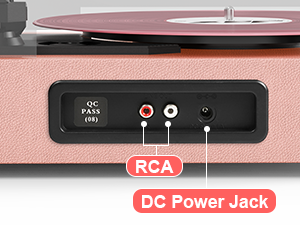
Image 4.5.1: Rear panel connections for RCA output and power.
5. Pemeliharaan
- Membersihkan Stylus: Gently clean the stylus regularly with a soft brush, brushing from back to front.
- Cleaning Records: Use a carbon fiber brush or a record cleaning solution to keep your vinyl records free of dust and debris.
- Dust Cover Care: Wipe the dust cover with a soft, dry cloth. Avoid abrasive cleaners.
- Turntable Surface: Clean the turntable's surface with a soft, slightly damp kain.
- Penggantian Jarum: The stylus (needle) should be replaced after approximately 300-500 hours of playback to maintain sound quality and prevent damage to your records.
6. Penyelesaian masalah
- Tidak Ada Daya: Ensure the power adapter is securely connected to both the turntable and a working wall outlet. Check the 'VOLUME' knob is turned on.
- Tidak ada suara: Verify the volume is turned up. If using external speakers, ensure they are powered on and correctly connected via RCA. If in Bluetooth mode, confirm successful pairing.
- Melewati Rekaman: Ensure the record is clean and free of dust. Check that the turntable is on a stable, level surface. The stylus might need cleaning or replacement.
- Masalah Pemasangan Bluetooth: Make sure the turntable is in 'BT' mode. Ensure your device's Bluetooth is enabled and within range. Try unpairing and re-pairing the device.
- USB Recording Failure: Check that the USB drive is formatted correctly (FAT32) and has sufficient space. Ensure the capacity is less than 64GB.
7. Spesifikasi
| Fitur | Spesifikasi |
|---|---|
| Dimensi Produk | 14.1x11.2x4.9 inci |
| Berat Barang | 4.85 pon |
| Nomor Model | TE-2017 |
| Merek | DANFI AUDIO DF |
| Kecepatan Rotasi Maksimum | 78 RPM (mendukung 33 1/3, 45, 78 RPM) |
| Fitur Khusus | AUX Input, Built-In Bluetooth Receiver, Digital Recorder, Dust Cover, RCA Output |
| Bahan | Kayu Rekayasa |
| Warna | Merah Muda Muda |
| Perangkat yang Kompatibel | Headphone, MP3 Player, Personal Computer, Smartphone, Tablet |
8. Garansi dan Dukungan
For warranty information and customer support, please refer to the documentation included with your product or contact DANFI AUDIO DF directly through their official webatau melalui saluran layanan pelanggan. Simpan struk pembelian Anda untuk klaim garansi.
Dukungan online: Kunjungi Toko DANFI AUDIO DF di Amazon untuk informasi produk tambahan dan sumber daya dukungan.
Ask a question about this manual
Ask about setup, troubleshooting, compatibility, parts, safety, or missing instructions. Manuals+ will review the question and use this page’s manual context to help answer it.