
1. Pendahuluan
This manual provides essential information for the safe and efficient use of your VIVO T4 Pro 5G smartphone. Please read this guide thoroughly before using your device to ensure optimal performance and longevity. The VIVO T4 Pro 5G is a high-performance smartphone designed for advanced mobile communication and multimedia experiences.
2. Isi Paket
Verifikasi bahwa paket Anda berisi item berikut:
- VIVO T4 Pro 5G Smartphone
- Adaptor Daya
- Kabel USB Tipe-C
- Alat Pengeluar SIM
- Panduan Memulai Cepat
- Informasi Keselamatan
Catatan: Isi dapat berbeda-beda tergantung wilayah.
3. Perangkat Berakhirview
Familiarize yourself with the physical components of your VIVO T4 Pro 5G.
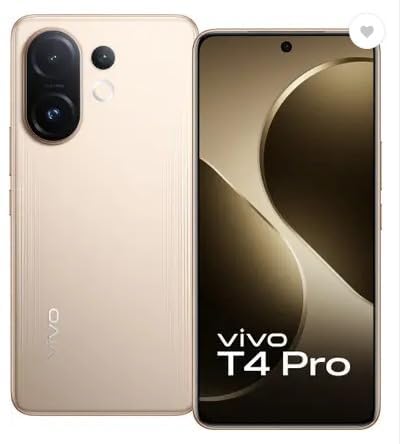
Gambar 3.1: Depan dan Belakang View of the VIVO T4 Pro 5G. This image displays the overall design of the smartphone, highlighting its sleek profile and the placement of the rear camera module.
3.1. Tombol dan Port Fisik
- Tombol Daya: Located on the right side, used to power on/off the device, or wake/sleep the screen.
- Tombol Volume: Located above the power button, used to adjust media volume, call volume, and notification volume.
- Port USB Tipe-C: Terletak di bagian bawah, digunakan untuk pengisian daya dan transfer data.
- Baki Kartu SIM: Typically on the side, for inserting Nano-SIM cards and microSD cards.
- Pembicara: Terletak di bagian bawah untuk output audio.
- Mikrofon: Terintegrasi untuk panggilan dan perekaman suara.
3.2. Sistem Kamera
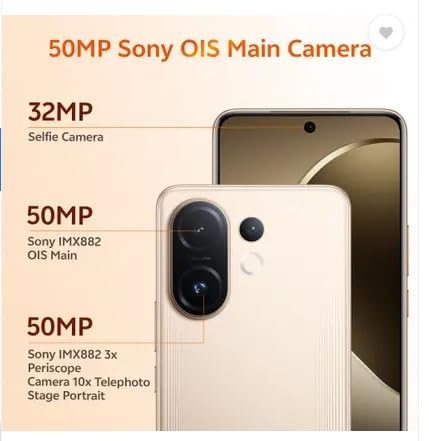
Gambar 3.2: Terperinci view of the VIVO T4 Pro 5G camera system. This image illustrates the arrangement of the 50MP Sony OIS Main Camera, 50MP Sony IMX882 3x Periscope Camera, and the 32MP Selfie Camera.
The VIVO T4 Pro 5G features an advanced camera system for high-quality photography and videography:
- Kamera Belakang: Includes a 50MP Sony OIS Main Camera and a 50MP Sony IMX882 3x Periscope Camera for versatile shooting, including telephoto and portrait modes.
- Kamera Depan: A 32MP Selfie Camera for clear self-portraits and video calls.
3.3. Komponen Internal
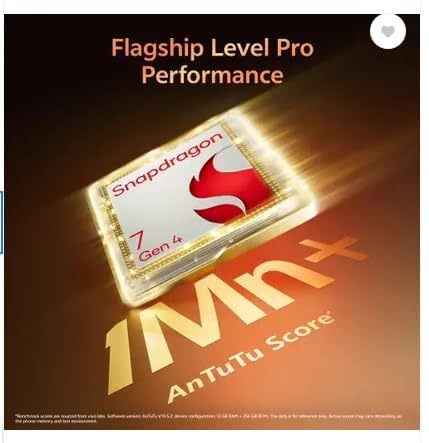
Gambar 3.3: Representation of the Snapdragon 7 Gen 4 processor. This image highlights the powerful chipset responsible for the device's performance.
The device is powered by a Snapdragon 7 Gen 4 processor, ensuring smooth performance for demanding applications and multitasking.
3.4. Fitur Ketahanan

Gambar 3.4: Illustration of the VIVO T4 Pro 5G's IP68 and IP69 water and dust protection. This image demonstrates the device's resistance to environmental elements.
The VIVO T4 Pro 5G features IP68 and IP69 ratings for industry-leading water and dust protection, enhancing its durability in various environments.
4. Pengaturan
4.1. Memasukkan Kartu SIM dan Kartu microSD
- Temukan tempat kartu SIM di sisi perangkat Anda.
- Masukkan alat pelepas SIM ke dalam lubang kecil di samping baki dan tekan dengan kuat hingga baki keluar.
- Masukkan kartu Nano-SIM dan/atau kartu microSD Anda ke dalam slot yang telah ditentukan pada baki. Pastikan kontak emas menghadap ke bawah.
- Masukkan kembali baki secara hati-hati ke dalam perangkat hingga terkunci pada tempatnya.
4.2. Pengaktifan Awal dan Pengaturan Dasar
- Tekan dan tahan tombol daya hingga logo VIVO muncul.
- Ikuti petunjuk di layar untuk memilih bahasa, wilayah, dan terhubung ke jaringan Wi-Fi.
- Masuk dengan akun Google Anda atau buat akun baru untuk mengakses layanan Google dan Play Store.
- Siapkan metode kunci layar pilihan Anda (PIN, pola, kata sandi, sidik jari, atau buka kunci wajah).
- Complete the remaining setup steps as guided by the device.
5. Petunjuk Pengoperasian
5.1. Navigasi Dasar
- Layar Beranda: Geser ke kiri atau kanan untuk menavigasi antar layar beranda.
- Laci Aplikasi: Geser ke atas dari bagian bawah layar untuk mengakses semua aplikasi yang terinstal.
- Panel Notifikasi: Geser ke bawah dari atas layar untuk view pemberitahuan dan pengaturan cepat.
- Aplikasi Terbaru: Swipe up and hold from the bottom (gesture navigation) or tap the square button (3-button navigation) to view aplikasi yang baru saja digunakan.
5.2. Melakukan Panggilan dan Mengirim Pesan
- Panggilan: Open the Phone app, enter the number, and tap the call icon. To answer an incoming call, swipe up. To reject, swipe down.
- Pesan: Open the Messages app, tap the "Start chat" or "+" icon, enter the recipient's number or select from contacts, type your message, and tap send.
5.3. Menghubungkan ke Jaringan
- Wifinya: Pergi ke Pengaturan > Jaringan & internet > Wi-FiAktifkan Wi-Fi, pilih jaringan yang Anda inginkan, dan masukkan kata sandi jika diperlukan.
- Bluetooth dapat digunakan untuk berbagai keperluan, seperti: Pergi ke Pengaturan > Perangkat yang terhubung > BluetoothAktifkan Bluetooth, pindai perangkat, dan pasangkan dengan aksesori yang Anda inginkan.
- Data Seluler: Pergi ke Pengaturan > Jaringan & internet > Jaringan selulerPastikan data seluler diaktifkan.
5.4. Menggunakan Kamera
The VIVO T4 Pro 5G camera offers various modes and features:
- Buka aplikasi Kamera.
- Select your desired mode (e.g., Photo, Portrait, Video, Night, Pro).
- Ketuk tombol rana untuk mengambil foto atau memulai/menghentikan perekaman video.
- Use pinch-to-zoom or the on-screen zoom controls to adjust magnification, including the 3x optical zoom.
- Access settings within the camera app to adjust resolution, filters, and other parameters.
6. Pemeliharaan
6.1. Membersihkan Perangkat Anda
- Gunakan kain lembut dan tidak berbulu untuk membersihkan layar dan bodi.
- Avoid using harsh chemicals, abrasive materials, or compressed air.
- Untuk noda membandel, sedikit dampbilas kain dengan air atau pembersih layar yang dirancang untuk perangkat elektronik.
6.2. Perawatan Baterai
- Hindari suhu ekstrem karena dapat menurunkan masa pakai baterai.
- Gunakan hanya aksesori pengisi daya asli atau yang bersertifikasi.
- Do not fully discharge the battery frequently. Optimal battery health is maintained between 20% and 80% charge.
6.3. Pembaruan Perangkat Lunak
Periksa dan instal pembaruan perangkat lunak secara berkala untuk memastikan perangkat Anda memiliki fitur, patch keamanan, dan peningkatan kinerja terbaru. Kunjungi Pengaturan > Sistem > Pembaruan sistem.
7. Penyelesaian masalah
| Masalah | Larutan |
|---|---|
| Perangkat tidak menyala | Ensure the battery is charged. Connect to the power adapter and wait a few minutes before attempting to power on again. If unresponsive, perform a force restart by holding the Power button for 10-15 seconds. |
| Aplikasi mogok atau macet | Tutup dan buka kembali aplikasi. Bersihkan cache aplikasi (Pengaturan > Aplikasi > [Nama Aplikasi] > Penyimpanan & cache > Hapus cache). Update the app from the Play Store. If the issue persists, uninstall and reinstall the app. |
| Konektivitas jaringan yang buruk | Check if Wi-Fi or mobile data is enabled. Restart your device. Reset network settings (Pengaturan > Sistem > Opsi pengaturan ulang > Atur ulang Wi-Fi, seluler & Bluetooth). Ensure your SIM card is properly inserted. |
| Baterai cepat habis | Reduce screen brightness, disable unnecessary background apps, turn off Wi-Fi/Bluetooth/GPS when not in use. Check battery usage in Pengaturan > Baterai untuk mengidentifikasi aplikasi yang menghabiskan banyak daya. |
| Sensor sidik jari tidak berfungsi | Pastikan jari Anda bersih dan kering. Daftarkan ulang sidik jari Anda di Pengaturan > Keamanan & privasi > Buka kunci perangkat > Sidik jari. |
7.1. Reset Pabrik
Jika Anda mengalami masalah terus-menerus yang tidak dapat diselesaikan melalui pemecahan masalah dasar, pengaturan ulang pabrik mungkin diperlukan. Peringatan: A factory reset will erase all data on your device. Back up important data before proceeding. Go to Pengaturan > Sistem > Opsi reset > Hapus semua data (reset pabrik).
8. Spesifikasi
| Nama Model | VIVO T4 Pro 5G |
| Sistem Operasi | Android 14 |
| Prosesor | Snapdragon 7 Gen 4 (2.8 GHz) |
| RAM | 8 GB |
| Penyimpanan Internal | 128 GB |
| Resolusi Tampilan | 1080 x 2392 piksel |
| Konektivitas | 5G, Wi-Fi, Bluetooth, GPS |
| Port Audio | USB Tipe C |
| Kapasitas Baterai | 6500 Miliamp Jam |
| Dimensi (P x L x T) | 16.4x7.7x0.8 sentimeter |
| Berat Barang | 250 gram |
| Warna | Blaze Gold |
| Pabrikan | Vivo Mobile India Pvt. Ltd. |
9. Garansi dan Dukungan
9.1. Garansi Produk
Your VIVO T4 Pro 5G smartphone comes with a standard manufacturer's warranty. Please refer to the warranty card included in your package for specific terms, conditions, and duration. Keep your purchase receipt as proof of purchase for warranty claims.
9.2. Dukungan Pelanggan
For technical assistance, service, or further inquiries, please contact VIVO customer support. You can find contact information on the official VIVO websitus atau di bagian dukungan pada pengaturan perangkat Anda.
- Dukungan online: Kunjungi situs resminya VIVO India Support Weblokasi for FAQs, troubleshooting guides, and service center locations.
- Pusat Layanan: Locate authorized VIVO service centers for in-person assistance.