
1. Pendahuluan
Welcome to the Genérico GT8 Drone User Manual. This guide provides essential information for the safe and effective operation, maintenance, and troubleshooting of your GT8 drone. Please read this manual thoroughly before operating the drone to ensure a safe and enjoyable flight experience.
2. Pedoman Keselamatan
Adherence to these safety guidelines is crucial for preventing accidents and ensuring the longevity of your drone.
- Pemeriksaan Pra-Penerbangan: Always inspect the drone, remote control, and battery for any damage before each flight.
- Lingkungan Penerbangan: Fly in open areas, away from people, buildings, trees, and power lines. Avoid flying in strong winds, rain, or fog.
- Keamanan Baterai: Use only approved chargers and batteries. Do not overcharge or puncture batteries. Discontinue use if batteries are damaged or swollen.
- Keamanan Baling-Baling: Keep hands and face clear of rotating propellers. Ensure propellers are securely attached before flight.
- Hargai Privasi: Be mindful of privacy laws and regulations when using the camera.
- Altitude and Distance: Adhere to local regulations regarding maximum flight altitude and distance.
- Prosedur darurat: Familiarize yourself with the Return-to-Home (RTH) function and emergency stop procedures.
3. Isi Paket
Verifikasi bahwa semua item ada dalam paket Anda:
- Pesawat Nirawak GT8
- Remote Control with Integrated Screen
- 1x Flight Battery (additional batteries available with Fly More kit)
- baling baling cadangan
- Kabel Pengisian Daya
- User Manual (dokumen ini)
- Optional Memory Card (may be included depending on package)
4. Produk Lebihview
4.1 Komponen Drone

This image displays the Genérico GT8 drone in its unfolded state alongside its remote control. The drone features four propellers, a central body housing the camera and gimbal system, and landing gear. The remote control has a built-in screen for real-time FPV viewing.
- Propeller: Provide lift and thrust.
- Motor: Brushless motors for stable flight.
- Camera with 3-Axis Gimbal: Captures 4K HD video and photos, stabilized for smooth footage.
- Obstacle Avoidance Sensors: Mendeteksi rintangan untuk mencegah tabrakan.
- Flight Battery Compartment: Houses the removable flight battery.
- Indikator LED: Display drone status and battery level.
4.2 Komponen Kontrol Jarak Jauh

This image shows the Genérico GT8 drone in its folded, compact state next to the remote control. The remote control features dual joysticks, various control buttons, and a central integrated screen for FPV (First Person View) without needing a separate smartphone.
- Tongkat Kontrol: Untuk arah dan ketinggian penerbangan.
- Layar Terintegrasi: Menampilkan umpan FPV waktu nyata dan data penerbangan.
- Tombol Daya: Menyalakan/mematikan kendali jarak jauh.
- Tombol Kembali ke Layar Utama (RTH): Initiates automatic return to takeoff point.
- Tombol Foto/Video: Mengambil gambar atau memulai/menghentikan perekaman video.
- Gimbal Control Dial: Adjusts camera tilt.
5. Pengaturan
5.1 Pemasangan dan Pengisian Baterai
- Insert the flight battery into the drone's battery compartment until it clicks securely into place.
- Connect the charging cable to the battery and a suitable USB power adapter (not included).
- Charge the battery fully before first use. The LED indicators on the battery will show charging status.
- Isi daya remote control menggunakan port dan kabel pengisian daya khusus yang tersedia.
5.2 Pemasangan Baling-Baling
Ensure propellers are installed correctly according to their markings (e.g., A and B) and the corresponding motor arms. Incorrect installation can lead to unstable flight.
- Unfold the drone arms.
- Match the propeller type (A or B) with the motor base.
- Press down and rotate the propeller in the direction indicated until it locks securely.
5.3 Persiapan Kontrol Jarak Jauh
- Pastikan remote control terisi penuh.
- Press and hold the power button to turn on the remote control.
5.4 Pasangan Awal
- Tempatkan drone di permukaan yang rata dan rata.
- Hidupkan drone.
- Nyalakan kendali jarak jauh.
- Follow the on-screen instructions on the remote control to pair with the drone. This usually involves moving the control sticks in a specific pattern.
6. Mengoperasikan Drone
6.1 Daftar Periksa Pra-Penerbangan
- Drone battery fully charged and securely installed.
- Remote control fully charged.
- Propellers correctly installed and undamaged.
- Flight area clear of obstacles and people.
- GPS signal acquired (if applicable, for RTH and stable flight).
6.2 Lepas Landas dan Pendaratan
- Lepas Landas Otomatis: Press the dedicated auto-takeoff button on the remote control. The drone will ascend to a safe height and hover.
- Lepas landas manual: Push both control sticks outwards and downwards to arm the motors. Then, slowly push the left stick (throttle) upwards to ascend.
- Pendaratan Otomatis: Press the dedicated auto-landing button. The drone will descend and land automatically.
- Pendaratan Manual: Slowly pull the left stick (throttle) downwards to descend. Once landed, pull both sticks outwards and downwards to disarm the motors.
6.3 Kontrol Penerbangan
Use the control sticks on the remote control to maneuver the drone:
- Tuas Kiri (Gas/Yaw): Atas/Bawah untuk ketinggian, Kiri/Kanan untuk rotasi (yaw).
- Tuas Kanan (Pitch/Roll): Up/Down for forward/backward movement (pitch), Left/Right for sideways movement (roll).
6.4 Camera Operation (4K HD with 3-Axis Gimbal)
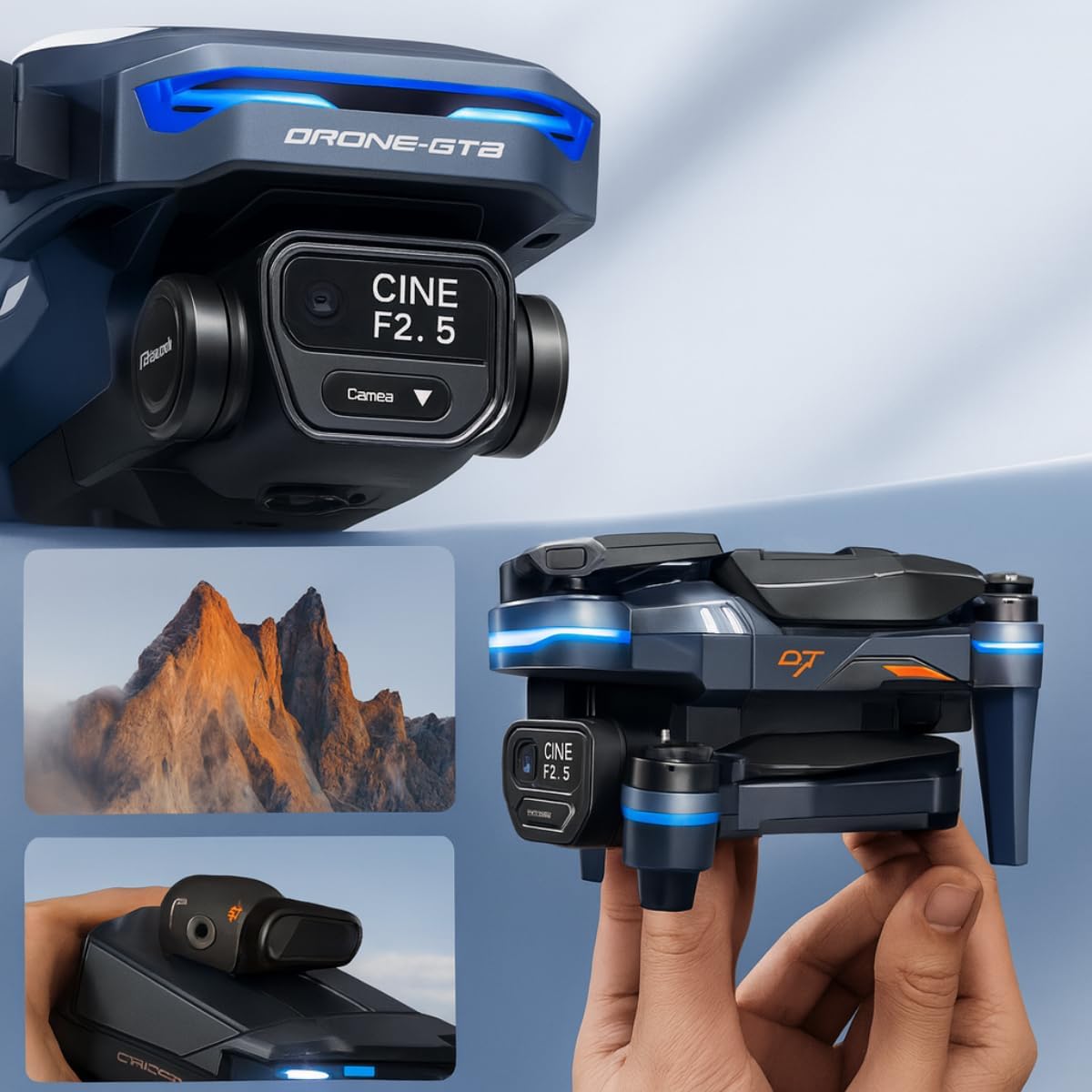
Gambar ini memberikan gambaran jarak dekat view of the Genérico GT8 drone's camera and 3-axis gimbal system, highlighting its cinematic capabilities. The camera is labeled 'CINE F2.5', indicating its aperture. Below, smaller images show the drone held in hand and a scenic mountain view, illustrating its portability and imaging potential.
- Tombol Foto/Video: Tekan sekali untuk mengambil foto, tekan dan tahan untuk memulai/menghentikan perekaman video.
- Gimbal Control Dial: Use the dial on the remote control to adjust the camera's vertical angle (tilt) during flight for optimal framing.
- Resolusi 4K HD: The camera captures high-definition 4K footage, providing clear and detailed visuals.
- Gimbal 3-Axis: The gimbal stabilizes the camera, ensuring smooth and shake-free video even during drone movements.
6.5 Mode Penerbangan Cerdas
The GT8 drone offers several intelligent flight modes for automated and creative filming:
- Ikuti Saya: The drone automatically tracks and follows a designated subject (e.g., the remote control).
- Orbit: The drone flies in a circular path around a chosen point of interest, keeping it centered in the frame.
- Titik arah: Plan a flight path by setting multiple waypoints on the map, and the drone will fly the route autonomously.
- timelapse: Capture a series of photos over time to create a timelapse video.
- Tembakan Cepat: Pre-programmed flight patterns that capture short, cinematic video clips.
6.6 Penghindaran Rintangan
The drone is equipped with obstacle avoidance sensors that help detect and bypass obstacles in its flight path, enhancing flight safety. Always remain vigilant and do not solely rely on these sensors.
6.7 Return-to-Home (RTH)
The RTH function allows the drone to automatically return to its takeoff point. This feature is activated by pressing the RTH button on the remote control or automatically when the battery is low or connection is lost. The RTH function relies on GPS/GLONASS signals for accurate positioning.
7. Pemeliharaan
7.1 Pembersihan
- Wipe the drone and remote control with a soft, dry cloth after each use.
- Gently clean the camera lens with a microfiber cloth.
- Remove any debris from the motors and propeller shafts.
7.2 Penyimpanan
- Store the drone and remote control in a cool, dry place, away from direct sunlight.
- Lepaskan baterai dari drone dan remote control jika disimpan dalam jangka waktu lama.
7.3 Perawatan Baterai
- Charge batteries fully before storage if they will not be used for a long time.
- Do not store fully charged or completely depleted batteries for extended periods. Aim for approximately 50-60% charge for long-term storage.
7.4 Penggantian Baling-baling
If propellers are damaged, replace them immediately using the spare propellers provided or genuine replacements. Ensure correct propeller type (A or B) is installed on the corresponding motor.
8. Penyelesaian masalah
Lihat tabel di bawah untuk masalah umum dan solusinya:
| Masalah | Kemungkinan Penyebab | Larutan |
|---|---|---|
| Drone tidak menyala | Baterai lemah atau tidak terisi daya; Baterai tidak terpasang dengan benar. | Charge the flight battery; Ensure battery is securely inserted. |
| Remote control tidak menyala. | Low or uncharged remote control battery. | Isi daya kendali jarak jauh. |
| Drone fails to pair with remote control | Prosedur pemasangan yang salah; Interferensi. | Repeat pairing steps carefully; Move to an area with less interference. |
| Penerbangan tidak stabil atau melayang | Propellers damaged or incorrectly installed; Calibration needed; Strong winds. | Replace damaged propellers, ensure correct installation; Perform IMU/compass calibration; Fly in calm conditions. |
| Kualitas video/foto buruk | Dirty camera lens; Insufficient lighting; SD card issues; Gimbal not calibrated. | Clean lens; Fly in well-lit conditions; Check/format SD card; Calibrate gimbal. |
| Return-to-Home (RTH) not working accurately | Weak or no GPS/GLONASS signal at takeoff point; Compass interference. | Ensure strong GPS/GLONASS signal before takeoff; Calibrate compass in an open area. |
| Obstacle avoidance not functioning | Sensors obstructed or dirty; Flying too fast for sensors to react. | Clean sensors; Reduce flight speed in complex environments. |
9. Spesifikasi
Key technical specifications for the Genérico GT8 Drone:
- Merek: Genérico
- Model: GT8
- Warna: Abu-abu
- Teknologi Konektivitas: Bluetooth (for certain functions, e.g., app connection)
- Berat Drone: 500 gram
- Dimensi (P x L x T): 30 x 20 x 12 centimeters (unfolded)
- Kamera: Resolusi 4K HD
- Gimbal: Stabilisasi 3 Sumbu
- Waktu Penerbangan: Up to 30 minutes (varies based on flight conditions and battery charge)
- Navigasi: GLONASS (for positioning and RTH)
- Fitur Keselamatan: Obstacle Avoidance, Return-to-Home (RTH)
- Mode Cerdas: Follow, Orbit, Waypoints, Timelapse, QuickShots
10. Garansi dan Dukungan
For warranty information, please refer to the documentation provided at the time of purchase or contact your retailer. For technical support, assistance with operation, or spare parts, please contact Genérico customer service through the contact details provided on the product packaging or the official Genérico weblokasi.