
1. Pendahuluan
This manual provides essential instructions for the safe and efficient operation of your WISCENT Bluetooth Stereo System WTB-799. Please read this manual thoroughly before using the product and retain it for future reference.
The WISCENT WTB-799 is a compact home audio system featuring a CD player, Bluetooth 5.0 wireless streaming, FM radio, USB playback, and a 3.5mm AUX-in port. It delivers 40W peak power (2 x 20W RMS) through its two-way speaker system, designed for balanced sound reproduction.
2. Informasi Keselamatan
- Sumber Daya: Pastikan voltase catu dayatage matches the rating indicated on the unit.
- Ventilasi: Jangan menghalangi lubang ventilasi. Berikan ruang yang cukup di sekitar unit agar aliran udara berjalan dengan baik.
- Air dan Kelembaban: Jangan biarkan unit terkena hujan, kelembapan, atau cairan yang menetes/terciprat. Jangan meletakkan benda berisi cairan, seperti vas bunga, di atas unit.
- Panas: Jauhkan unit dari sumber panas seperti radiator, pemanas, kompor, atau peralatan lainnya (termasuk amppengangkat) yang menghasilkan panas.
- Pembersihan: Cabut unit dari stopkontak sebelum membersihkan. Gunakan kain lembut dan kering. Jangan gunakan cairan pembersih atau pembersih aerosol.
- Pelayanan: Jangan mencoba untuk memperbaiki produk ini sendiri. Rujuk semua servis ke personel servis yang berkualifikasi.
- CD player: This product contains a laser. Do not open the CD compartment while a disc is playing. Avoid direct exposure to the laser beam.
3. Isi Paket
Buka kemasan semua barang dengan hati-hati dan pastikan Anda telah menerima hal-hal berikut:
- Main Unit (Stereo System)
- 2 x Bookshelf Speakers
- Remote Control (baterai AAA tidak termasuk)
- Kabel Daya AC
- Kabel AUX 3.5mm
- User Manual (dokumen ini)

4. Produk Lebihview
4.1 Kontrol Panel Depan

- Tombol power: Menyalakan atau mematikan unit.
- Tombol MAINKAN/JEDA: Starts or pauses playback for CD, USB, or Bluetooth.
- Tombol LEWATI/TUNE (◀◀ / ▶▶): Skips tracks on CD/USB, navigates radio frequencies, or fast forwards/rewinds.
- Tombol PINDAI: Memulai pemindaian otomatis untuk stasiun radio FM.
- RPT (REPEAT) Button: Cycles through repeat modes (one, all, random) for CD/USB.
- Tombol VOLUME: Menyesuaikan tingkat volume utama.
- EQ/FUN Button: Selects sound equalizer presets or switches input functions (CD, Bluetooth, FM, USB, AUX).
- Port USB: Untuk menghubungkan perangkat penyimpanan USB untuk pemutaran MP3.
- Soket AUX-IN: Untuk menghubungkan perangkat audio eksternal melalui kabel 3.5 mm.
- Jack Headphone: Untuk mendengarkan secara pribadi dengan headphone.
4.2 Sambungan Panel Belakang
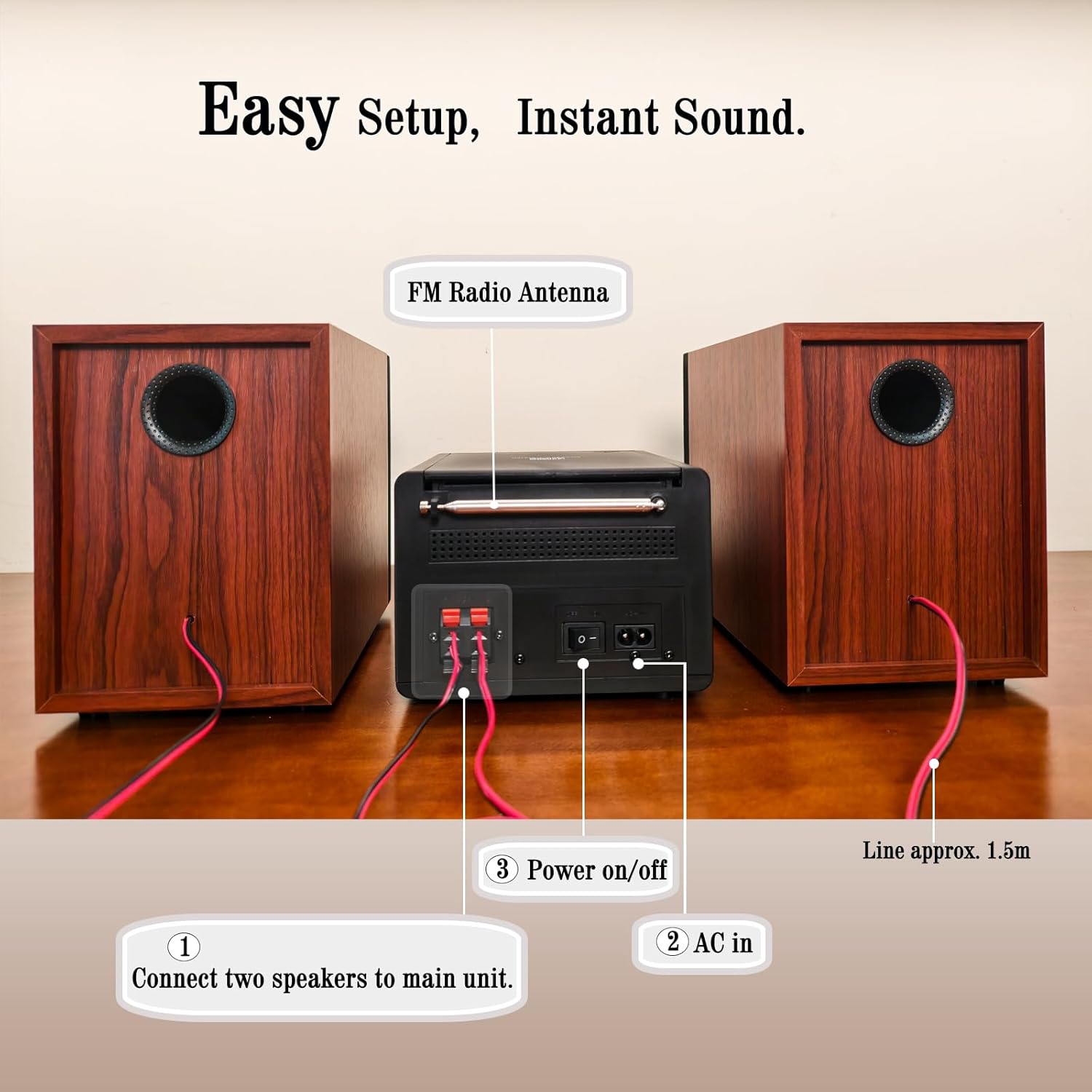
- Terminal Pembicara: Connect the included bookshelf speakers.
- Antena Radio FM: Extend for optimal FM signal reception.
- AC DI: Hubungkan kabel daya AC.
- Sakelar Hidup/Mati: Sakelar daya utama untuk unit.
5. Pengaturan
5.1 Menghubungkan Speaker
- Identify the speaker wires. Each speaker has two wires, typically red (+) and black (-).
- Connect the red wire from each speaker to the red (+) terminal on the main unit.
- Connect the black wire from each speaker to the black (-) terminal on the main unit.
- Ensure a secure connection for both speakers.
5.2 Menghubungkan Antena FM
Extend the FM wire antenna located at the rear of the main unit for improved radio reception. Position it for the best possible signal.
5.3 Menghubungkan Daya
- Plug the AC power cable into the AC IN port on the rear of the main unit.
- Colokkan ujung kabel daya AC lainnya ke stopkontak dinding standar.
- Ensure the main Power On/Off switch on the rear panel is in the 'ON' position.
6. Petunjuk Pengoperasian
6.1 Daya Hidup/Mati
Tekan tombol KEKUATAN button on the front panel or the remote control to turn the unit on or off (standby mode).
6.2 Pemilihan Sumber
Tekan tombol EQ/MENYENANGKAN button repeatedly on the front panel or the FUNGSI button on the remote control to cycle through available input sources: CD, Bluetooth, FM Radio, USB, AUX-in.
6.3 Pemutaran CD

- Open the CD compartment cover on top of the main unit.
- Place a CD (CD, CD-R, CD-RW, or MP3 CD) onto the spindle with the label side facing up.
- Tutup penutup kompartemen CD.
- Select 'CD' mode using the EQ/MENYENANGKAN tombol.
- Pemutaran akan dimulai secara otomatis. Jika tidak, tekan tombol PUTAR/JEDA tombol.
- Gunakan LEWATI/TUNE tombol untuk menavigasi trek.
- Tekan tombol RPT button to select repeat modes (Repeat One, Repeat All, Random Play).
6.4 Pemasangan Bluetooth
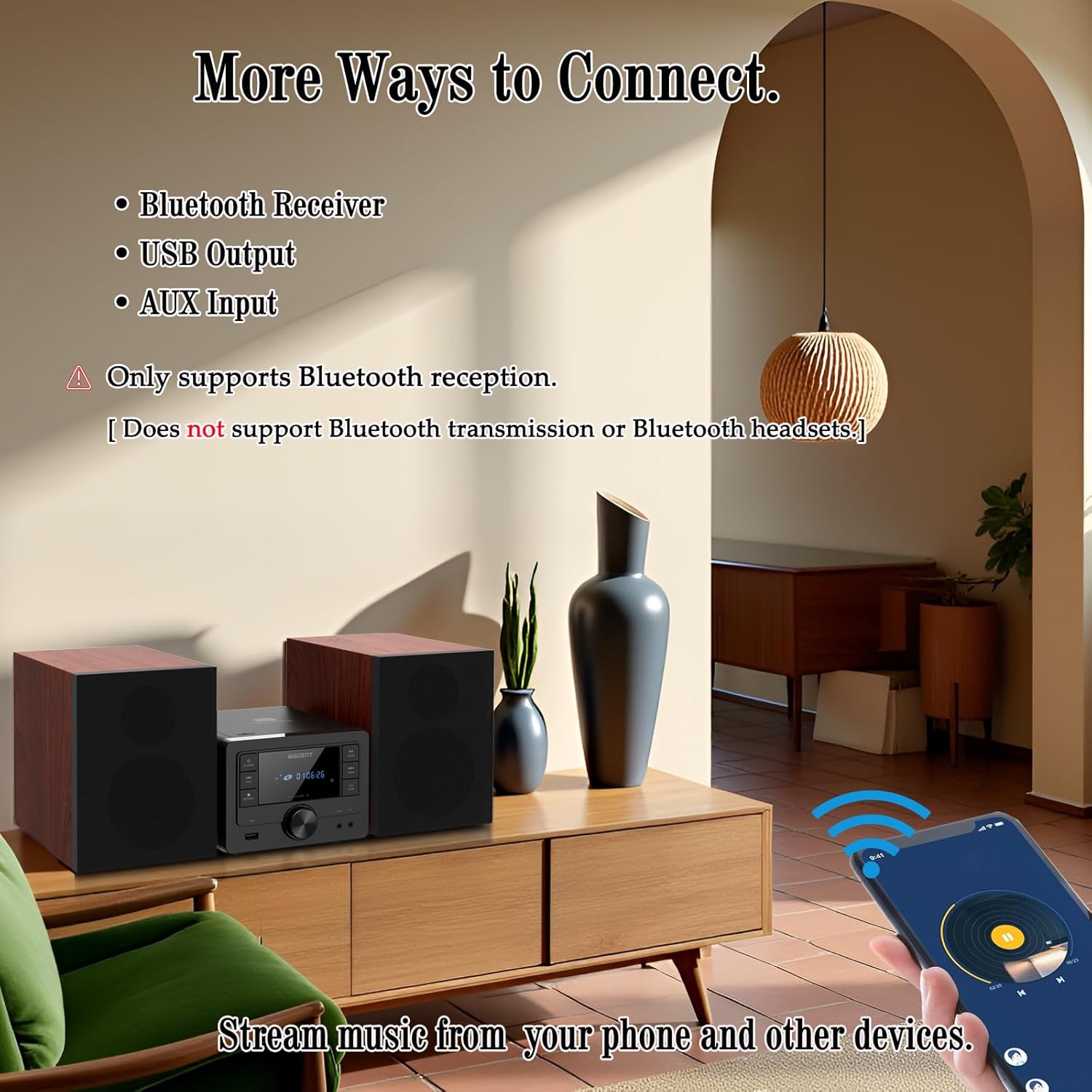
- Select 'Bluetooth' mode using the EQ/MENYENANGKAN tombol. Layar akan menampilkan 'BT' dan berkedip, menandakan perangkat berada dalam mode pemasangan.
- On your Bluetooth-enabled device (smartphone, tablet), go to its Bluetooth settings and enable Bluetooth.
- Pencarian untuk available devices and select 'WTB-799' from the list.
- Once paired, the display will stop flashing and show 'BT' steadily.
- You can now stream audio from your device to the stereo system.
- Catatan: This system supports Bluetooth reception only. It cannot transmit audio to Bluetooth headphones or other Bluetooth speakers.
Operasi Radio FM 6.5
- Select 'FM' mode using the EQ/MENYENANGKAN tombol.
- Tekan tombol PEMINDAIAN tombol untuk memindai dan menyimpan stasiun FM yang tersedia secara otomatis.
- Gunakan LEWATI/TUNE buttons to manually tune to a specific frequency or navigate through saved stations.
6.6 Pemutaran USB
- Insert a USB flash drive (formatted with MP3 files) into the USB port on the front panel.
- Select 'USB' mode using the EQ/MENYENANGKAN tombol.
- Pemutaran akan dimulai secara otomatis. Jika tidak, tekan tombol PUTAR/JEDA tombol.
- Gunakan LEWATI/TUNE tombol untuk menavigasi trek.
- Tekan tombol RPT button to select repeat modes (Repeat One, Repeat All, Random Play).
6.7 Koneksi AUX-in
- Connect one end of the 3.5mm AUX cable to the AUX-IN jack on the front panel of the stereo system.
- Connect the other end of the AUX cable to the headphone jack or audio output of your external audio device (e.g., smartphone, MP3 player).
- Select 'AUX' mode using the EQ/MENYENANGKAN tombol.
- Kontrol pemutaran dan volume dari perangkat eksternal Anda.
6.8 Sound Settings (EQ Modes)
Tekan tombol EQ/MENYENANGKAN button (or EQ button on the remote) repeatedly to cycle through the available equalizer presets:
- Datar: Neutral sound profile.
- Batu: Enhanced bass and treble.
- Popnya: Slightly boosted bass and vocals.
- Klasik: Emphasizes mid-range frequencies.
- Jazz: Slightly boosted bass and treble with a warm tone.
6.9 Penggunaan Kontrol Jarak Jauh
The included remote control allows for convenient operation from a distance. Insert two AAA batteries (not included) into the remote control before use. Point the remote control towards the main unit's front panel sensor.
7. Pemeliharaan
- Pembersihan: Use a soft, dry cloth to clean the unit's exterior. Do not use abrasive cleaners, waxes, or solvents.
- CD Player Lens: Jika terjadi masalah pemutaran CD, gunakan cakram pembersih lensa CD yang tersedia di pasaran.
- Penyimpanan: Bila tidak digunakan dalam jangka waktu lama, cabut unit dan simpan di tempat sejuk dan kering.
8. Penyelesaian masalah
| Masalah | Kemungkinan Penyebab | Larutan |
|---|---|---|
| Tidak ada daya | Power cable not connected; Rear power switch off; Wall outlet not active. | Check power cable connection; Ensure rear power switch is ON; Test wall outlet with another device. |
| Tidak ada suara | Volume too low; Incorrect input source; Speakers not connected properly; Mute function active. | Increase volume; Select correct input source; Check speaker wire connections; Deactivate mute. |
| CD tidak dapat diputar | CD inserted incorrectly; CD dirty/scratched; Incorrect source selected. | Reinsert CD label side up; Clean or replace CD; Select 'CD' source. |
| Bluetooth tidak berpasangan | Unit not in pairing mode; Bluetooth on device off; Device too far. | Select 'Bluetooth' source (display flashes); Enable Bluetooth on your device; Move device closer to the unit. |
| Penerimaan FM buruk | Antena tidak memanjang/diposisikan dengan benar. | Fully extend and reposition the FM antenna. |
| USB tidak dikenali | Drive USB tidak diformat dengan benar; Tidak kompatibel file jenis; drive USB rusak. | Ensure USB is FAT32 formatted with MP3 files; Coba drive USB yang lain. |
| Kontrol jarak jauh tidak berfungsi | Baterai habis/dipasang dengan tidak benar; Ada penghalang antara remote dan unit. | Replace batteries (AAA); Ensure correct battery polarity; Remove obstructions. |
9. Spesifikasi
- Merek: WISCENT
- Model: WTB-799
- Teknologi Konektivitas: Auxiliary, Bluetooth 5.0, USB
- Tipe Pembicara: Stereo, 2-way (Woofer & Tweeter)
- Daya Keluaran: 40W Peak (2 x 20W RMS)
- Kompatibilitas CD: CD, CD-R, CD-RW, MP3 CD
- Frekuensi Radio FM: 87.5~108MHz
- Port USB: USB 2.0 (for MP3 playback)
- Dimensi Produk (Unit Utama): 6.3" x 7.5" x 4.7" (160x190x120 mm)
- Dimensi Produk (Setiap Speaker): 5.3" x 8.1" x 7.5" (135x205x190 mm)
- Berat Barang: Sekitar 3.3 pon
- Warna: Hitam
10. Garansi dan Dukungan
For warranty information and technical support, please refer to the warranty card included with your product or contact the retailer where you purchased the WISCENT Bluetooth Stereo System WTB-799. You may also visit the official WISCENT websitus untuk bantuan lebih lanjut.
Pabrikan: WISCENT