
1. Pendahuluan
Thank you for choosing the DEVAISE ASJZ031 Electric Standing Desk. This manual provides essential information for the safe assembly, operation, and maintenance of your new desk. Please read these instructions thoroughly before use and retain them for future reference.
This electric standing desk is designed to provide a versatile workspace, allowing seamless transitions between sitting and standing positions to promote better posture and productivity. It features a robust steel frame, a powerful lift system, and a seamless one-piece desktop for enhanced stability.
2. Petunjuk Keselamatan
- Pastikan semua komponen ada dan tidak rusak sebelum perakitan.
- Jauhkan anak-anak dan hewan peliharaan dari meja selama pengoperasian untuk mencegah cedera.
- Jangan membebani meja terlalu berat. Kapasitas berat maksimum adalah 80 kg.
- Pastikan tidak ada penghalang di atas atau di bawah meja saat menyesuaikan ketinggiannya.
- Keep hands and fingers clear of moving parts during height adjustments.
- Gunakan hanya adaptor daya dan kabel yang telah disediakan.
- Do not disassemble or modify the desk's electrical components. Contact customer support for service.
- Letakkan meja di permukaan yang rata untuk memastikan kestabilan.
3. Isi Paket
Verify that all parts are included in your package. Refer to the diagram below for identification.

Image: All components of the DEVAISE Electric Standing Desk laid out for assembly.
- Meja (1 buah)
- Kaki (2 buah)
- Kaki (2 buah)
- Crossbar/Motor Assembly
- Panel Kontrol
- Adaptor Daya dan Kabel
- Kait Headphone
- Perlengkapan Perakitan (sekrup, kunci Allen)
4. Petunjuk Perakitan
Follow these steps for assembling your DEVAISE Electric Standing Desk. It is recommended to have two people for certain steps.
- Pasang Kaki ke Tungkai: Secure the two feet to the bottom of each leg using the provided screws.
- Install Crossbar/Motor Assembly: Connect the crossbar, which contains the motor, between the two legs. Ensure it is securely fastened.
- Pasangkan Kaki ke Meja Kerja: Carefully place the desktop upside down on a soft, clean surface. Align the assembled leg frame with the pre-drilled holes on the desktop and secure it with the appropriate screws.
- Connect Control Panel and Power: Mount the control panel to the underside of the desktop in the designated area. Connect all motor and power cables as per the diagram in your included paper manual.
- Pasang Pengait Headphone: Attach the headphone hook to the desired side of the desk.
- Manajemen Kabel: Use the included cable ties or clips to organize and secure all cables to prevent tangling and damage.
- Penyalaan Awal: Plug the desk into a power outlet. The control panel should light up.
Untuk visualisasi lebih lanjutview of the desk's features and operation, please refer to the video below:
Video: Selesaiview of the DEVAISE Adjustable Electric Standing Desk, demonstrating its features and height adjustment.
5. Petunjuk Pengoperasian
Your DEVAISE Electric Standing Desk is equipped with an intuitive digital control panel for easy height adjustment and memory presets.
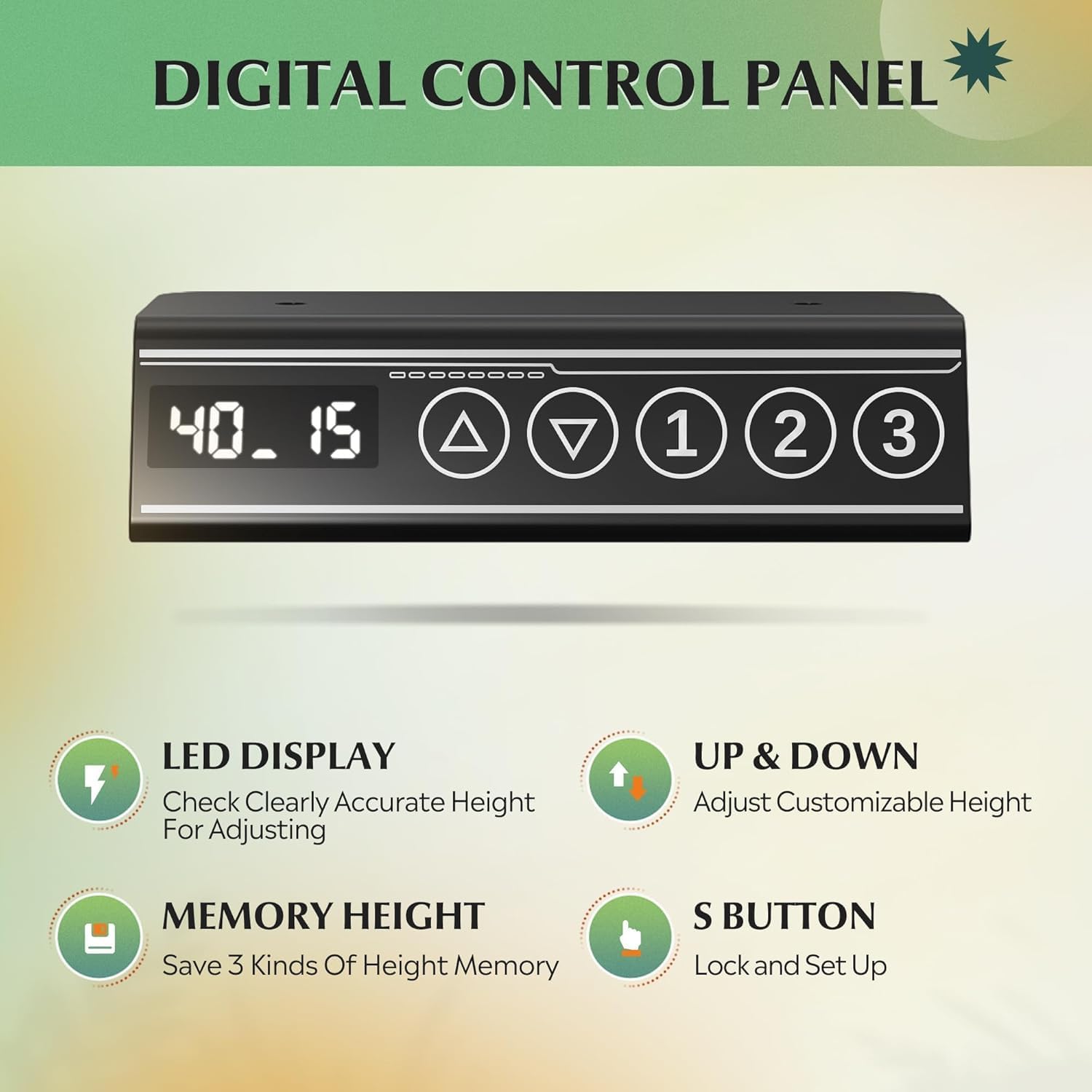
Image: Close-up of the digital control panel with LED display, up/down arrows, and three memory preset buttons.
Penyesuaian Ketinggian
- Menaikkan Meja: Tekan dan tahan tombol Panah Atas (▲) button to raise the desk to your desired standing height.
- Meja Bawah: Tekan dan tahan tombol Panah Bawah (▼) button to lower the desk to your desired sitting height.
- The LED display will show the current height in inches. The adjustable height range is approximately 28.35 inches to 46.46 inches.

Image: Illustration showing the DEVAISE Standing Desk adjusting from its lowest height (28.35 inches) to its highest height (46.45 inches).
Preset Memori
The desk features three programmable memory presets to save your favorite sitting and standing heights.
- Sesuaikan ketinggian meja sesuai keinginan Anda menggunakan panah atas/bawah.
- Tekan tombol 'S' button (Set button). The display will flash.
- Immediately press one of the numbered memory buttons (1, 2, atau 3) untuk menyimpan ketinggian saat ini ke pengaturan awal tersebut.
- To recall a saved height, simply press the corresponding numbered memory button (1, 2, atau 3Meja akan secara otomatis berpindah ke posisi yang telah disimpan.
Anti-Collision System
The desk is equipped with an anti-collision system that automatically stops and slightly reverses movement if it encounters an obstruction during height adjustment. This feature enhances safety and prevents damage to the desk or surrounding objects.
Video: Demonstration of the DEVAISE Electric Standing Desk in various home office settings, highlighting its smooth operation and cable management features.
6. Pemeliharaan
- Pembersihan: Usap permukaan meja dan bingkai dengan kain lembut.amp kain. Hindari bahan kimia keras atau pembersih abrasif.
- Manajemen Kabel: Periodically check that all cables are securely fastened and not pinched or tangled.
- Pengencang: Occasionally check and tighten any loose screws to maintain stability.
- Motor: Motor ini tidak memerlukan perawatan. Jangan mencoba melumasi atau membuka penutup motor.
7. Penyelesaian masalah
| Masalah | Kemungkinan Penyebab | Larutan |
|---|---|---|
| Meja tidak bergerak. | Power cable disconnected; motor cable loose. | Check all power and motor connections. Ensure the desk is plugged into a working outlet. |
| Meja bergerak tidak rata atau menimbulkan suara yang tidak biasa. | Uneven load; loose fasteners; obstruction. | Distribute weight evenly. Check and tighten all screws. Ensure no obstructions are interfering with movement. |
| Sistem anti-tabrakan sering aktif. | Sensitivity too high; frequent obstructions. | Ensure clear path for desk movement. Refer to the full manual for adjusting anti-collision sensitivity if available. |
| Preset memori tidak berfungsi. | Preset tidak disimpan dengan benar. | Re-program the memory presets following the operating instructions. |
If you encounter issues not listed here or if solutions do not resolve the problem, please contact DEVAISE customer support.
8. Spesifikasi
| Merek | MENYINGKIRKAN |
| Nomor Model | ASJZ031-new |
| Dimensi Produk | 27.5"Panjang x 55"Lebar x 28"T |
| Rentang Tinggi yang Dapat Disesuaikan | 28.35" hingga 46.46" |
| Warna | Hitam |
| Jenis Bahan Atas | Kayu Rekayasa |
| Bahan Dasar | Besi |
| Rekomendasi Berat Maksimum | 180 pon (81.6 kg) |
| Berat Barang | 37 pon (16.8 kg) |
| Fitur Khusus | 3 Preset Memories, Adjustable Height, Electric, Quiet, Whole Piece Desktop |
9. Garansi dan Dukungan
The DEVAISE ASJZ031 Electric Standing Desk comes with a Garansi rangka 1 tahun. For any questions regarding assembly, product selection, or warranty claims, please contact our U.S.-based product support team. We offer 24/7 customer service to assist you.
For further assistance, please visit the official DEVAISE website or contact the customer service number provided with your purchase documentation.