
1. Pendahuluan
This manual provides essential information for the VIMIN 10-Port 10G/2.5G Unmanaged Ethernet Switch. This device is designed to expand your network capacity with high-speed connectivity, featuring 8x 2.5 Gigabit Ethernet ports and 2x 10 Gigabit Ethernet ports. It offers a non-blocking 80Gbps switching capacity, ensuring efficient data transfer for demanding applications like 4K streaming, gaming, and NAS connections. The switch operates on a plug-and-play principle, requiring no complex configuration for immediate use.
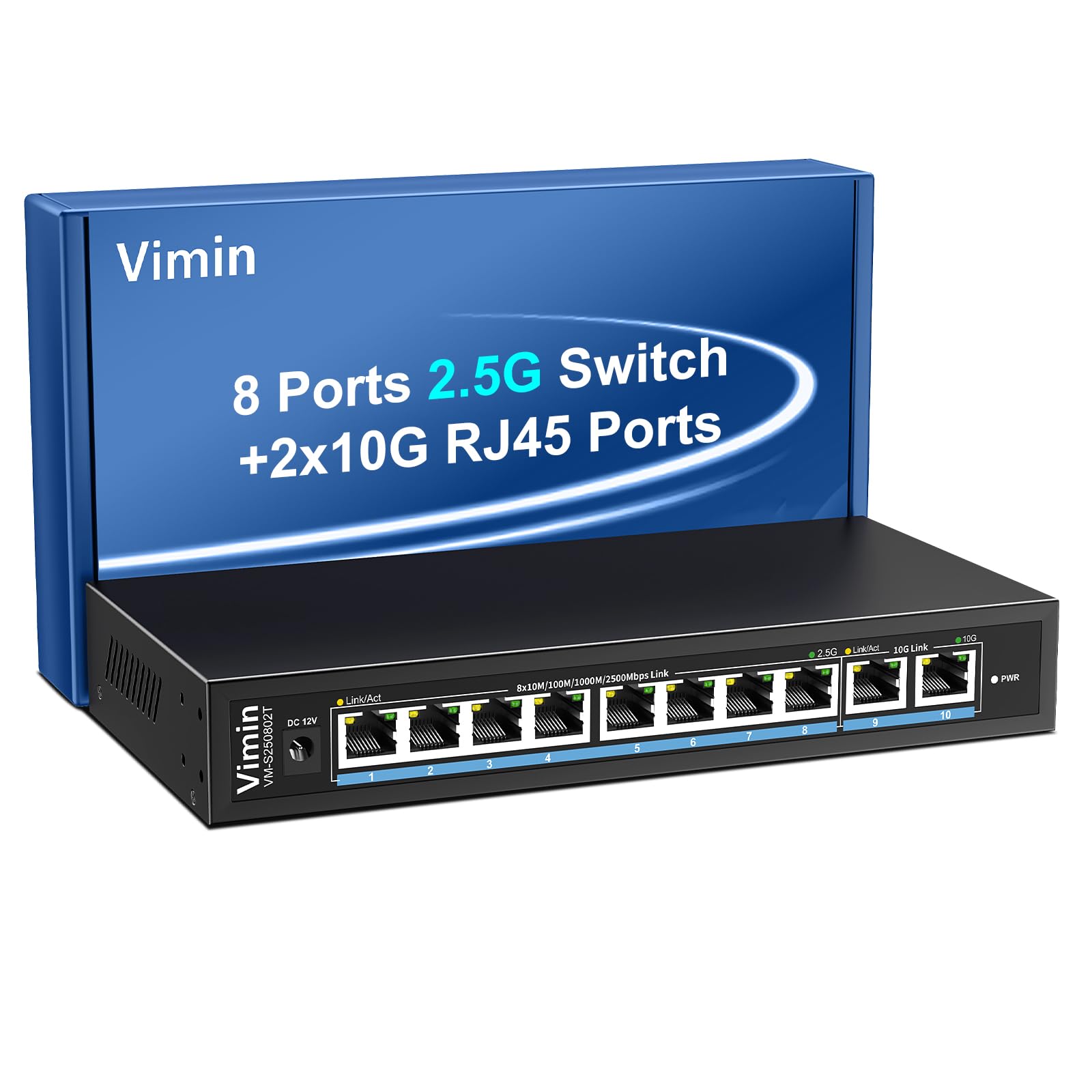
Figure 1: VIMIN 10-Port 2.5Gb Unmanaged Ethernet Switch in a typical setup.
2. Isi Paket
Harap periksa bahwa semua barang ada dan dalam kondisi baik saat membuka paket. Jika ada barang yang hilang atau rusak, silakan hubungi layanan pelanggan.
- 1x VIMIN 10-Port 2.5G Unmanaged Ethernet Switch
- 1x Panduan Pengguna
- 1x Kabel Daya

Figure 2: Package contents of the VIMIN 10-Port 2.5G Ethernet Switch.
3. Produk Lebihview
3.1 Panel Depan
The front panel of the switch features ten RJ45 Ethernet ports and LED indicators for status monitoring.
- Port 1-8: 2.5 Gigabit Ethernet ports (10/100/1000/2500Mbps auto-negotiation).
- Port 9-10: 10 Gigabit Ethernet ports (10/100/1000/2500/5000/10000Mbps auto-negotiation).
- Link/Act LED (Yellow/Green): Indicates link status and data activity.
- 2.5G Link LED (Green, for ports 1-8): Indicates a 2.5Gbps connection.
- 10G Link LED (Green, for ports 9-10): Indicates a 10Gbps connection.
- LED PWR: Menunjukkan status daya.

Figure 3: Front and rear panel of the VIMIN 10-Port 2.5G Ethernet Switch.

Gambar 4: Rinci view of the RJ45 ports and LED indicators.
3.2 Panel Belakang
The rear panel includes the DC 12V 1A power input port.
4. Pengaturan
The VIMIN 10-Port Ethernet Switch is designed for simple plug-and-play operation, requiring no software configuration.
4.1 Sambungan Daya
- Connect the provided power adapter to the DC 12V 1A power input port on the rear panel of the switch.
- Plug the power adapter into a standard electrical outlet. The PWR LED on the front panel will illuminate, indicating the switch is powered on.
4.2 Koneksi Perangkat
- Connect your network devices (e.g., NAS, PC, Wireless AP, WiFi 7 Routers, 10G Adapter/NIC, Gaming PC, 4K/8K Video devices) to any of the RJ45 ports (1-10) using appropriate Ethernet cables.
- The switch automatically detects the speed and duplex mode of the connected device. The Link/Act LED for the respective port will light up when a valid connection is established and flash during data transmission.

Figure 5: Plug and Play connectivity with various network devices.

Gambar 6: Contohample applications for the 10-Port 2.5G Ethernet Switch.
4.3 Cable Type Recommendations
For optimal performance, especially for 2.5G and 10G connections, use appropriate Ethernet cable types:
| Jenis Kabel | 10 juta | 100 juta | 1G | 2.5G | 5G | 10G |
|---|---|---|---|---|---|---|
| KUCING 3/4 | ✓ | ✗ | ✗ | ✗ | ✗ | ✗ |
| kucing 5 | ✓ | ✓ | ✗ | ✗ | ✗ | ✗ |
| KUCING 5e | ✓ | ✓ | ✓ | ✗ | ✗ | ✗ |
| kucing 6 | ✓ | ✓ | ✓ | ✓ | ✓ | (<55m) |
| CAT 6A/7 | ✓ | ✓ | ✓ | ✓ | ✓ | ✓ |
Figure 7: Ethernet cable type compatibility and performance.
4.4 Opsi Pemasangan
The compact design of the switch allows for both desktop placement and wall mounting to save space.

Figure 8: Desktop and wall-mount installation options.
5. Petunjuk Pengoperasian
The VIMIN 10-Port Unmanaged Ethernet Switch operates automatically once connected, requiring no user intervention for basic network functions.
5.1 Negosiasi Otomatis
Each port on the switch supports auto-negotiation, automatically adjusting the transmission method and speed (10/100/1000/2500Mbps for ports 1-8, and up to 10Gbps for ports 9-10) to match the connected device. This ensures optimal performance without manual configuration.

Figure 9: Self-Negotiation Functionality.
5.2 Kontrol Aliran
The switch supports IEEE 802.3x flow control for full-duplex mode and backpressure for half-duplex mode. These mechanisms prevent data packet loss during periods of high network traffic by temporarily pausing data transmission from congested devices, ensuring stable and reliable connections.
6. Pemeliharaan
To ensure the longevity and optimal performance of your VIMIN Ethernet Switch, follow these maintenance guidelines:
- Pembersihan: Gunakan kain lembut dan kering untuk membersihkan bagian luar sakelar. Jangan gunakan pembersih cair atau aerosol.
- Ventilasi: Ensure proper airflow around the switch. Do not block ventilation openings. The fanless design relies on natural convection for cooling.
- Lingkungan: Place the switch in a cool, dry location away from direct sunlight, heat sources, and excessive moisture.
- Kekuatan: Use only the provided power adapter. Disconnect power during electrical storms or when unused for long periods.
7. Penyelesaian masalah
If you encounter issues with your VIMIN Ethernet Switch, refer to the following common troubleshooting steps:
- Tidak Ada Daya:
- Pastikan adaptor daya tersambung dengan aman ke sakelar dan stopkontak listrik yang berfungsi.
- Verifikasi apakah stopkontak berfungsi dengan mencolokkan perangkat lain.
- Check if the PWR LED on the switch is illuminated.
- Tidak Ada Tautan/Aktivitas di Port:
- Pastikan kabel Ethernet terhubung dengan aman ke port switch dan perangkat yang terhubung.
- Pastikan perangkat yang terhubung dihidupkan dan berfungsi dengan benar.
- Cobalah kabel Ethernet yang berbeda untuk mengesampingkan kemungkinan kerusakan kabel.
- Uji dengan port yang berbeda pada sakelar.
- Kecepatan Jaringan Lambat:
- Ensure you are using appropriate cable types (e.g., CAT6 or CAT6A/7 for 2.5G/10G connections) as indicated in Section 4.3.
- Check the network adapter settings on your connected device to ensure it supports the desired speed.
- Verify that the Link/Act LED indicates the expected speed (e.g., green for 2.5G/10G).
- Kurangi kemacetan jaringan dengan membatasi aktivitas yang menggunakan bandwidth tinggi secara bersamaan.
- Koneksi Intermiten:
- Periksa sambungan kabel yang longgar.
- Ensure the switch is placed in a stable environment, free from excessive vibrations or temperature fluctuations.
- Consider potential electromagnetic interference from other electronic devices.
8. Spesifikasi
| Fitur | Keterangan |
|---|---|
| Merek | VINIL |
| Nomor Model | 8x2.5G Ethernet (Unmanaged) |
| Jumlah Pelabuhan | 10 (8x 2.5G RJ45, 2x 10G RJ45) |
| Jenis Antarmuka | RJ45 |
| Kecepatan Transfer Data | 10 Gigabits Per Second (Max) |
| Kapasitas Pengalihan | Kecepatan 80Gbps |
| Kontrol Aliran | IEEE 802.3x (Full-Duplex), Backpressure (Half-Duplex) |
| Standar | IEEE 802.3bz, IEEE 802.3u, IEEE 802.3ab, IEEE 802.3z |
| Masukan Daya | DC 12V 1A (AC 100-240V adapter) |
| Berat Barang | 1.83 pon (sekitar 0.83 kg) |
| Dimensi Paket | 9.53 x 6.5 x 2.99 inci (sekitar 24.2 x 16.5 x 7.6 cm) |
| Warna | Hitam |
| Perangkat yang Kompatibel | Desktop, Gaming Console, Laptop, NAS, Wireless AP |
9. Garansi dan Dukungan
VIMIN products are designed for reliability and performance. For warranty information, technical support, or any product-related inquiries, please refer to the warranty card included with your product or visit the official VIMIN website. You may also contact VIMIN customer service through the retailer where the product was purchased.
Untuk bantuan lebih lanjut, silakan kunjungi VIMIN Store on Amazon.