
Perkenalan
Welcome to the user manual for your Samsung QN65QN990FFXZA 65 Inch QN990F Neo QLED 8K TV. This document provides essential information for setting up, operating, maintaining, and troubleshooting your television. Please read these instructions carefully to ensure proper use and to maximize your viewpengalaman ing.

Gambar 1: Depan view of the Samsung QN65QN990FFXZA 65 Inch QN990F Neo QLED 8K TV.
Pengaturan
1. Pembongkaran dan Penempatan
- Keluarkan TV dan semua aksesori dari kemasan dengan hati-hati.
- Place the TV on a stable, flat surface or mount it on a wall using a VESA 400mm x 300mm compatible mount. Ensure adequate ventilation around the TV.
2. Connecting the Wireless One Connect Box
The Samsung QN990F utilizes a Wireless One Connect Box to manage all external connections, reducing cable clutter around the TV. Connect all your devices to this box.

Figure 2: Wireless One Connect Box for streamlined connections.
3. External Device Connections
Connect your external devices (e.g., Blu-ray player, game console, soundbar) to the Wireless One Connect Box using the appropriate ports.

Figure 3: Detailed diagram of the Wireless One Connect Box ports.
- Cable/ANT: Connect for over-the-air antenna or cable TV signals.
- USB-A: Standard rectangular port for power or media playback.
- EX-Link: Samsung service port for external control and diagnostics.
- HDMI 1, 2, 4: Transmits high-definition video and audio from external devices. Supports 8K@120Hz / 4K@240Hz for Gaming.
- HDMI 3 (eARC): Enhanced audio return for high-quality sound and advanced formats. Supports 8K@120Hz / 4K@240Hz for Gaming.
- Eternet: Wired internet connection for streaming, updates, and smart features.
- Keluaran Audio (Optik): Delivers high-quality digital audio to soundbars or receivers.
- Kekuatan: Connects the power cable to the Wireless One Connect Box.
4. Koneksi Daya
- Connect the power cable to the Wireless One Connect Box, then plug it into a wall outlet.
- Ensure the TV is properly connected to the One Connect Box.
Petunjuk Pengoperasian
1. Initial Setup and Smart Features
Upon first power-on, the TV will guide you through the initial setup process, including network connection, channel scanning, and smart feature configuration. The TV runs on the One UI Tizen operating system.
- Prosesor AI NQ8 Gen3: This processor optimizes content for enhanced viewing.
- Peningkatan Skala AI 8K Pro: Lower resolution content is automatically upscaled to near 8K clarity.

Figure 4: 8K AI Upscaling Pro enhances content to near 8K resolution.
2. Peningkatan Kualitas Gambar
- Bebas Silau: This technology minimizes reflections on the screen, improving visibility in bright environments.
- Neo Quantum HDR 8K+: Experience enhanced contrast and color depth.
- Quantum Matrix Technology Pro: Precise light control for detailed images.
- Sangat Viewsudut: Maintains picture quality from various viewposisi ing.
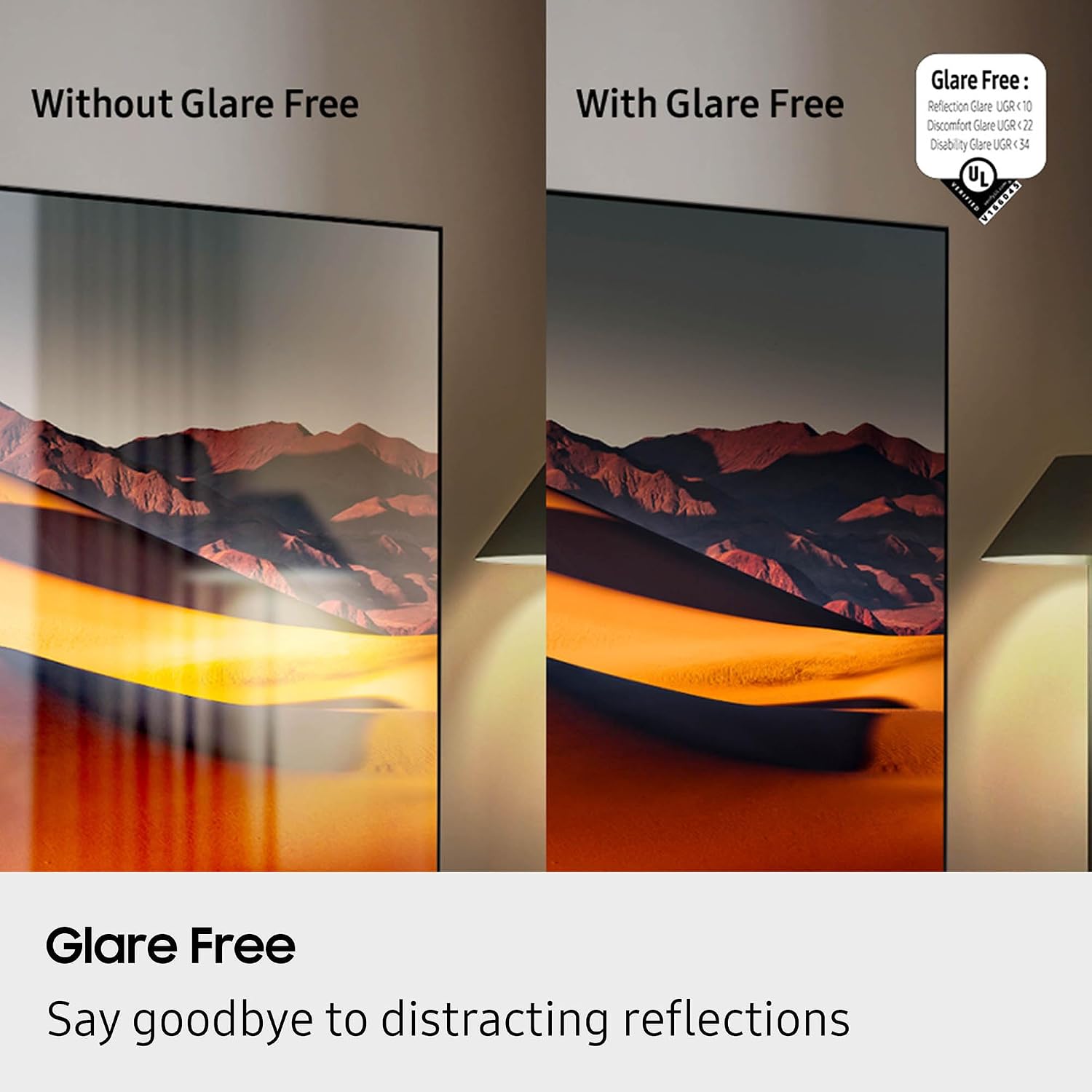
Figure 5: Glare Free technology reduces screen reflections.
3. Fitur Audio
- Dolby Atmos: Memberikan suara yang mendalam dan multidimensi.
- Simfoni Q: Synchronizes TV speakers with compatible Samsung soundbars for a richer audio experience.
- AVA Pro (Active Voice Amplifier Pro): Enhances dialogue clarity in noisy environments.
- Adaptive Sound Pro: Mengoptimalkan suara berdasarkan konten dan akustik ruangan.
- 6.2.4 Saluran Suara Sekitar: Integrated speaker system for a comprehensive audio field.
4. Fitur Permainan
- Pusat Permainan: Access cloud gaming services and console games directly from your TV.
- 120Hz Refresh Rate & VRR FreeSync Premium Pro: Ensures smooth, tear-free gaming.

Figure 6: Samsung Gaming Hub for integrated gaming experience.
5. Video Produk Resmi
Video 1: Sebuah pengarahan informatifview of the Samsung QN990F Series TV features and capabilities.
Pemeliharaan
1. Pembersihan Layar
To clean your TV screen, use a soft, lint-free cloth. For stubborn marks, a non-ammonia and alcohol-free screen cleaning solution is recommended.

Figure 7: Recommended screen cleaning solution for display screens.
- Apply cleaning solution to the cloth, not directly to the screen.
- Gently wipe the screen to remove dust, dirt, and fingerprints.
- Hindari bahan kimia keras atau bahan abrasif.
2. Pembaruan Perangkat Lunak
Periodically check for and install software updates to ensure optimal performance and access to the latest features. This can usually be done through the TV's settings menu under "Support" or "Software Update."
Penyelesaian Masalah
Jika Anda mengalami masalah dengan TV Anda, ikuti langkah-langkah pemecahan masalah umum berikut.
Tidak Ada Daya / Tidak Ada Gambar
- Ensure the power cable is securely connected to both the One Connect Box and the wall outlet.
- Verify the One Connect Box is properly connected to the TV.
- Periksa apakah stopkontak berfungsi dengan mencolokkan perangkat lain.
- Tekan tombol daya pada remote control atau pada TV itu sendiri.
Tidak Ada Suara
- Periksa level volume pada TV dan perangkat audio yang terhubung (soundbar, receiver).
- Pastikan TV tidak dimatikan suaranya.
- Verify audio cables are correctly connected to the One Connect Box.
- If using external audio, check the audio output settings on the TV.
Kualitas Gambar Buruk
- Check the source resolution. While 8K AI Upscaling Pro enhances content, native 8K content will provide the best quality.
- Sesuaikan pengaturan gambar (kecerahan, kontras, ketajaman, warna) di menu TV.
- Ensure all video cables are securely connected and not damaged.
- If using an antenna, check antenna positioning and signal strength.
Kontrol Jarak Jauh Tidak Berfungsi
- Ganti baterai pada remote control.
- Pastikan tidak ada penghalang antara remote dan TV.
- Try re-pairing the remote control with the TV if it's a Bluetooth remote (refer to the TV's on-screen guide for pairing instructions).
Spesifikasi
| Fitur | Spesifikasi |
|---|---|
| Nama Model | QN65QN990FFXZA |
| Ukuran Layar | 65 inci |
| Teknologi Tampilan | QLED baru |
| Resolusi | 8K |
| Tingkat Penyegaran | 120Hz |
| Prosesor | Prosesor NQ8 AI Gen3 |
| Peningkatan Teknologi | 8K AI Upscaling Pro |
| Sistem Operasi | Satu UI Tizen |
| Konektivitas | HDMI x 5, USB-A x 3, USB-C x 1, Ethernet, RF, Wireless One Connect, Bluetooth, Wi-Fi |
| Mode Keluaran Audio | Surround (6.2.4 channel) |
| Integrated Surround Sound | Dolby Atmos |
| Format HDR Didukung | HDR10+, HDR10 |
| Dimensi Produk (P x L x T) | 10.5"Panjang x 56.4"Lebar x 35.1"T |
| Berat Barang | 66.6 pon |
| Standar Pemasangan VESA | Ukuran 400 x 300 mm |
| Warna | Grafit Hitam |
Garansi dan Dukungan
Garansi Pabrik
Your Samsung QN65QN990FFXZA 65 Inch QN990F Neo QLED 8K TV comes with a full 1-year manufacturer's warranty. This warranty covers defects in materials and workmanship under normal use. Please retain your proof of purchase for warranty claims.
Dukungan Pelanggan
For technical assistance, troubleshooting beyond this manual, or warranty service, please contact Samsung Customer Support. Refer to the official Samsung website or your product registration documents for the most current contact information.
- Dukungan online: Kunjungi dukungan resmi Samsung. weblokasi.
- Dukungan Telepon: Contact the Samsung customer service hotline.