
Perkenalan
The AURAFIT AI Smart Watch F39C is an advanced wearable device designed to enhance your daily life with intelligent features. It integrates AI technology for voice interaction, offers comprehensive health monitoring, supports Bluetooth calling, and provides a personalized visual experience. This manual provides detailed instructions for setting up, operating, and maintaining your smart watch.
Isi Paket
Sebelum memulai, pastikan semua item ada dalam paket Anda:
- AURAFIT AI Smart Watch F39C
- Kabel Pengisi Daya Magnetik
- User Manual (dokumen ini)
- Additional Watch Strap (if included in your specific package)

Image: The AURAFIT AI Smart Watch F39C, magnetic charging cable, and two watch straps are displayed on a white background, illustrating the package contents.
Pengaturan
1. Mengisi Daya Perangkat
Before first use, fully charge your AURAFIT AI Smart Watch. Connect the magnetic charging cable to the charging points on the back of the watch and plug the USB end into a power adapter (not included) or a computer's USB port. A full charge typically takes approximately 2 hours.
2. Installing the Aurafit App
To unlock the full functionality of your smart watch, download and install the official "Aurafit" app on your smartphone. The app is compatible with both iOS (version 9.0 and above) and Android (version 5.0 and above) devices. Pencarian untuk "Aurafit" in your device's app store.
3. Memasangkan dengan Ponsel Pintar Anda
- Pastikan Bluetooth diaktifkan di ponsel cerdas Anda.
- Open the Aurafit app and follow the on-screen instructions to create an account or log in.
- In the app, navigate to the device pairing section and select your AURAFIT F39C smart watch from the list of available devices.
- Konfirmasikan permintaan pemasangan pada jam tangan dan telepon pintar Anda.
For optimal performance of AI features, ensure the Aurafit app remains open and running in the background on your phone.
Petunjuk Pengoperasian
Navigasi Dasar
The AURAFIT F39C features a 2.01-inch HD full-touch display. Swipe across the screen to navigate through menus, access different functions, and view notifications. Use the side button for power on/off, returning to the home screen, or accessing specific features as configured.
AI Assistant (ChatGPT Integration)
Your smart watch includes an integrated AI assistant. Connect via Bluetooth to your phone and launch the companion app to utilize intelligent voice interaction for queries, information, and daily assistance. Long press the interface button to start speaking to the AI assistant.
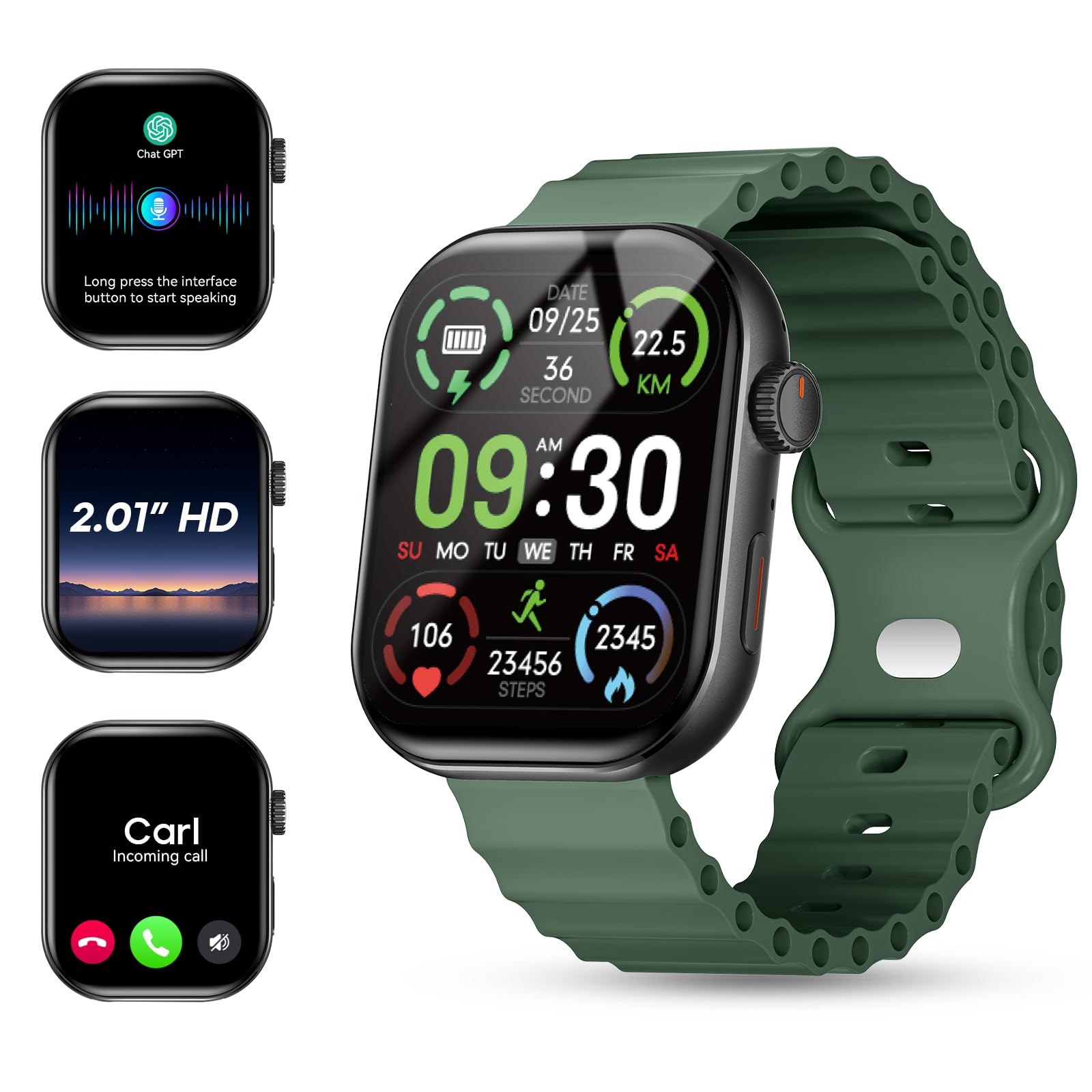
Image: The AURAFIT AI Smart Watch F39C screen shows an AI assistant conversation, a list of smart notifications from various apps, and options for answering or making calls, including call history and a dialpad.
Menyesuaikan Tampilan Jam
Personalize your watch with a variety of watch faces. The Aurafit app allows you to input keywords to automatically generate uniquely styled faces or choose from over 100 pre-designed options.

Image: The AURAFIT AI Smart Watch F39C displays various customized watch faces, including one generated from a photo and another with a cat design. The image also highlights the 2.01-inch HD screen.
Panggilan dan Notifikasi Bluetooth
With built-in HD speakers and noise-canceling microphones, the watch supports Bluetooth calls and contact synchronization. You can answer or make calls directly from your wrist. The 2.01-inch HD color display also shows real-time notifications from various apps like SMS, WhatsApp, Facebook, Instagram, dan Twitter.
Video: This video demonstrates the Bluetooth calling feature of the AURAFIT AI Smart Watch F39C, showing how to answer calls directly from the watch and manage notifications.
Pelacakan Kesehatan
The AURAFIT F39C is equipped with a multidimensional health monitoring system to track key health metrics:
- Denyut Jantung: Pemantauan detak jantung Anda secara berkelanjutan.
- Blood Oxygen Levels (SpO2): Measures oxygen saturation in your blood.
- Stress Indices: Memberikan wawasan tentang tingkat stres Anda.
- Sleep Cycles: Tracks light sleep, deep sleep, and REM stages for comprehensive sleep analysis.
The innovative AI health assessment system within the app generates personalized wellness improvement plans based on your data, helping you adjust your lifestyle for better health outcomes.

Image: The AURAFIT AI Smart Watch F39C shows various health tracking screens, including heart rate graphs, sleep patterns, stress detection, and SpO2 levels. An accompanying phone screen displays an AI health analysis report.
Mode Olahraga
For fitness enthusiasts, the watch offers over 100 professional sports modes, including running, cycling, and various ball sports. It tracks key metrics such as workout duration, calories burned, and heart rate zones to help optimize your training effectiveness.

Image: The AURAFIT AI Smart Watch F39C shows a grid of icons representing over 100 sports modes. The watch screen displays real-time activity data like steps, speed, heart rate, calories, and distance, with a phone showing GPS tracking.
Fitur Cerdas Lainnya
The AURAFIT F39C includes a range of additional smart functionalities:
- Jam Alarm: Atur alarm langsung dari jam tangan Anda.
- Kontrol Kamera: Kendalikan kamera ponsel cerdas Anda dari jarak jauh.
- Kontrol Musik: Kelola pemutaran musik di perangkat Anda yang terhubung.
- Prakiraan Cuaca: Dapatkan pembaruan cuaca secara langsung.
- Pengatur waktu: Utilize a built-in timer function.
- Temukan Ponsel Anda: Temukan ponsel pintar Anda yang telah dipasangkan.
- Latihan Pernapasan: Sesi latihan pernapasan terpandu untuk relaksasi.
- Kalkulator: Basic calculator functionality.
- Pasar saham: View stock information.

Image: The AURAFIT AI Smart Watch F39C shows multiple screens demonstrating its diverse functions, including an alarm clock, remote camera control, music playback, weather forecast, and a timer.
Pemeliharaan
Pembersihan
Wipe the watch and straps regularly with a soft, dry cloth. If necessary, use a slightly damp kain dan sabun lembut, lalu keringkan sepenuhnya. Hindari bahan kimia keras atau bahan abrasif.
Tahan Air
The AURAFIT F39C has an IP68 rating, meaning it is resistant to dust and can withstand immersion in water up to 1 meter for 30 minutes. Note: It is not recommended for swimming, showering, or exposure to hot water or steam, as this can compromise the water resistance.
Perawatan Baterai
To prolong battery life, avoid extreme temperatures. Charge the watch using the provided magnetic cable. The watch features magnetic fast charging and offers up to 7 days of battery life with typical use.
Penyelesaian Masalah
- Jam tidak menyala: Pastikan jam tangan terisi penuh. Sambungkan ke pengisi daya magnetik dan tunggu beberapa menit sebelum mencoba menyalakannya.
- Tidak dapat dipasangkan dengan telepon:
- Pastikan Bluetooth diaktifkan pada ponsel dan jam tangan Anda.
- Make sure the Aurafit app is installed and running.
- Mulai ulang ponsel dan jam tangan Anda.
- Periksa apakah jam tangan sudah terhubung dengan perangkat lain. Putuskan sambungan jika perlu.
- Data kesehatan yang tidak akurat: Ensure the watch is worn snugly on your wrist, not too tight or too loose. Clean the sensors on the back of the watch. Environmental factors and individual physiology can affect readings.
- Masa pakai baterai pendek:
- Kurangi kecerahan layar.
- Limit frequent use of power-intensive features like continuous heart rate monitoring or extensive Bluetooth calls.
- Ensure the Aurafit app is updated to the latest version.
- Notifikasi tidak muncul:
- Pastikan jam tangan terhubung dengan benar ke ponsel Anda melalui Bluetooth.
- Check notification settings within the Aurafit app and your phone's system settings to ensure permissions are granted.
- Ensure the Aurafit app is running in the background.
Spesifikasi
| Fitur | Detil |
|---|---|
| Nomor Model | F39C |
| Merek | AURAFIT |
| Ukuran Layar | 2.01 inci |
| Jenis Tampilan | DIPIMPIN |
| Resolusi | 240*296 |
| Menyentuh | Sentuhan layar penuh |
| Teknologi Konektivitas | Bluetooth 5.3 |
| Kapasitas Baterai | 260 mAh |
| Waktu Pengisian Baterai | 2 Jam |
| Daya Tahan Baterai (Penggunaan Umum) | Hingga 7 hari |
| Peringkat Tahan Air | Tingkat IP68 |
| Kompatibilitas Sistem Operasi | Android 5.0+, iOS 9.0+ |
| Aplikasi yang Didukung | Aurafit Apps |
| Metrik yang Diukur | Heart Rate, Blood Oxygen, Sleep, Stress, Steps, Calories, Distance |
| Berat Barang | 6 ons (sekitar 170g) |
| Bahan Kasus | Baja tahan karat |
| Bahan Pita | Sintetis |
| Bahasa Indonesia: GPS | Tidak ada GPS |
Garansi dan Dukungan
Informasi Garansi
The AURAFIT AI Smart Watch F39C comes with a 1-year manufacturer's warranty from the date of purchase. This warranty covers manufacturing defects under normal use. It does not cover damage caused by misuse, accidents, unauthorized modifications, or failure to follow the instructions in this manual.
Dukungan Pelanggan
For technical assistance, warranty claims, or further inquiries, please contact AURAFIT customer support through the official Aurafit app or visit the AURAFIT brand store online. Please have your model number (F39C) and proof of purchase ready when contacting support.

