
1. Informasi Keselamatan Penting
Harap baca semua petunjuk dengan saksama sebelum perakitan dan penggunaan. Simpan manual ini untuk referensi di kemudian hari.
- Selalu ikuti petunjuk perakitan dengan hati-hati.
- Jangan melebihi batas berat maksimum 200 pon (90.7 kg).
- Pastikan meja diletakkan pada permukaan yang rata.
- Keep the power cord away from heat sources and liquids.
- Always turn off and unplug the desk when not in use or when performing maintenance.
- Keep the control panel out of reach of children and pets to prevent accidental operation.
- Avoid placing objects that could be damaged by movement under the desk.
2. Produk Lebihview
The SEDETA Corner Electric Standing Desk is designed for ergonomic flexibility, allowing users to switch between sitting and standing positions. It features a height-adjustable mechanism, a built-in storage drawer, and an integrated power strip.

Gambar 2.1: Selesaiview of the SEDETA Corner Electric Standing Desk.
Fitur Utama:
- Pengaturan ketinggian elektrik dari 28.3 inci hingga 46.9 inci.
- LED display with 3 customizable memory presets.
- Integrated storage drawer.
- Built-in power strip with 2 USB ports and 3 AC outlets.
- Quiet motor operation (under 40 dB).
- Sturdy alloy steel frame with engineered wood tabletop.
3. Pengaturan dan Perakitan
Assembly is required for this product. Please refer to the separate assembly guide included in your product packaging for detailed step-by-step instructions. Ensure all components are present before beginning assembly.
Daftar Periksa Pra-Perakitan:
- Verify all parts are included as per the assembly guide.
- Ensure you have the necessary tools (not all tools may be included).
- Bersihkan area yang luas untuk perakitan.
Pengaturan awal:
- Once assembled, place the desk in its desired corner location.
- Sambungkan kabel daya ke stopkontak listrik yang diarde.
- Ensure all cables are securely connected to the control box and motors.
4. Petunjuk Pengoperasian
Fungsi Panel Kontrol:
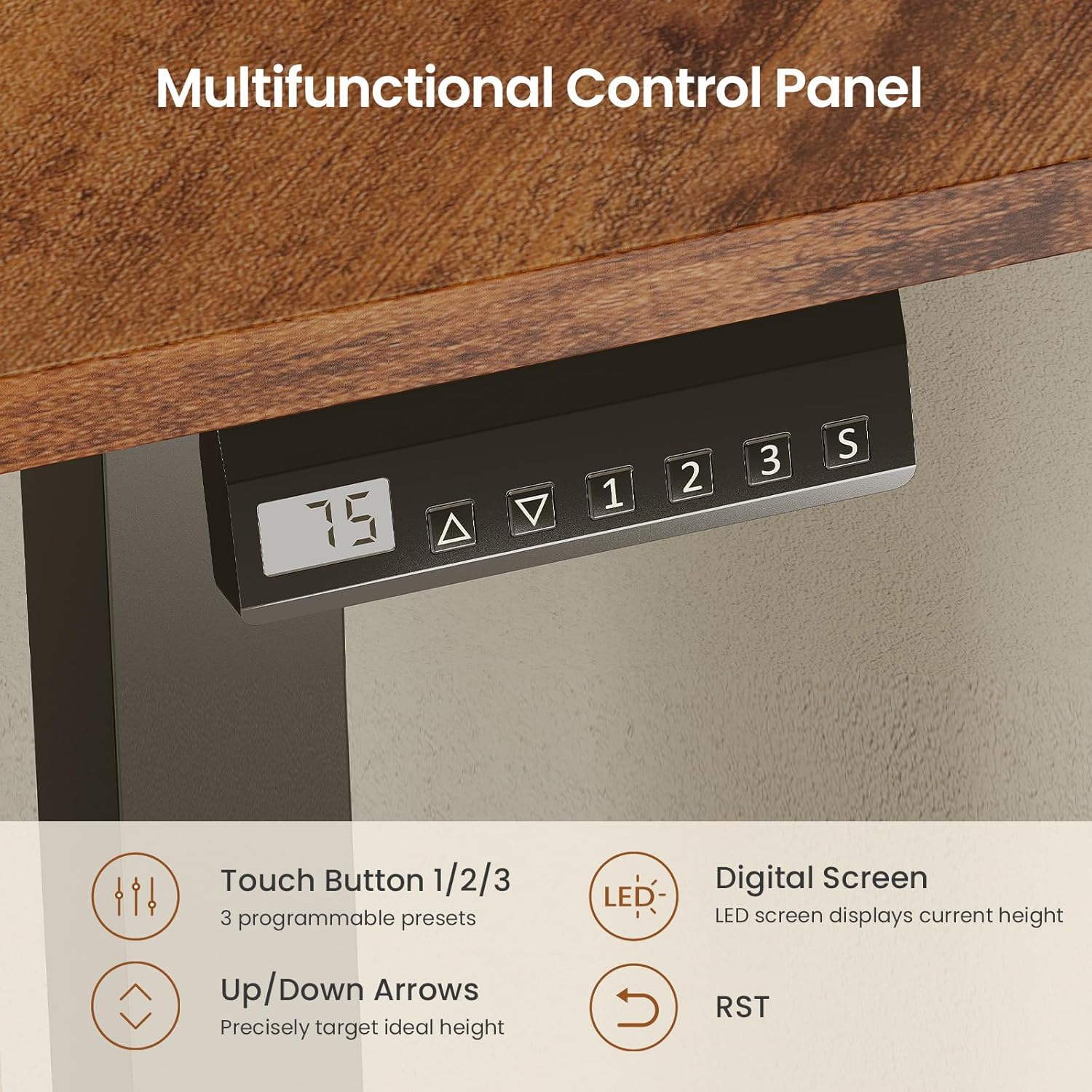
Image 4.1: Multifunctional Control Panel with LED display and memory presets.
- Panah Atas/Bawah (▲ / ▼): Press and hold to adjust the desk height continuously. Release to stop at the desired height. The LED screen displays the current height.
- Pengaturan Memori Awal (1, 2, 3): To save a height, adjust the desk to the desired position, then press the 'S' button followed by the desired number (1, 2, or 3). To recall a saved height, simply press the corresponding number button.
- 'S' Button: Used to save memory presets.
- 'RST' Button: Used for resetting the desk (refer to Troubleshooting for details).
Kisaran Penyesuaian Tinggi:

Image 4.2: The desk offers flexible height adjustment from 28.3 inches to 46.9 inches.
The desk can be adjusted from a minimum height of 28.3 inches to a maximum height of 46.9 inches. This allows for comfortable sitting and standing positions for various users.
Strip Daya Terpadu:
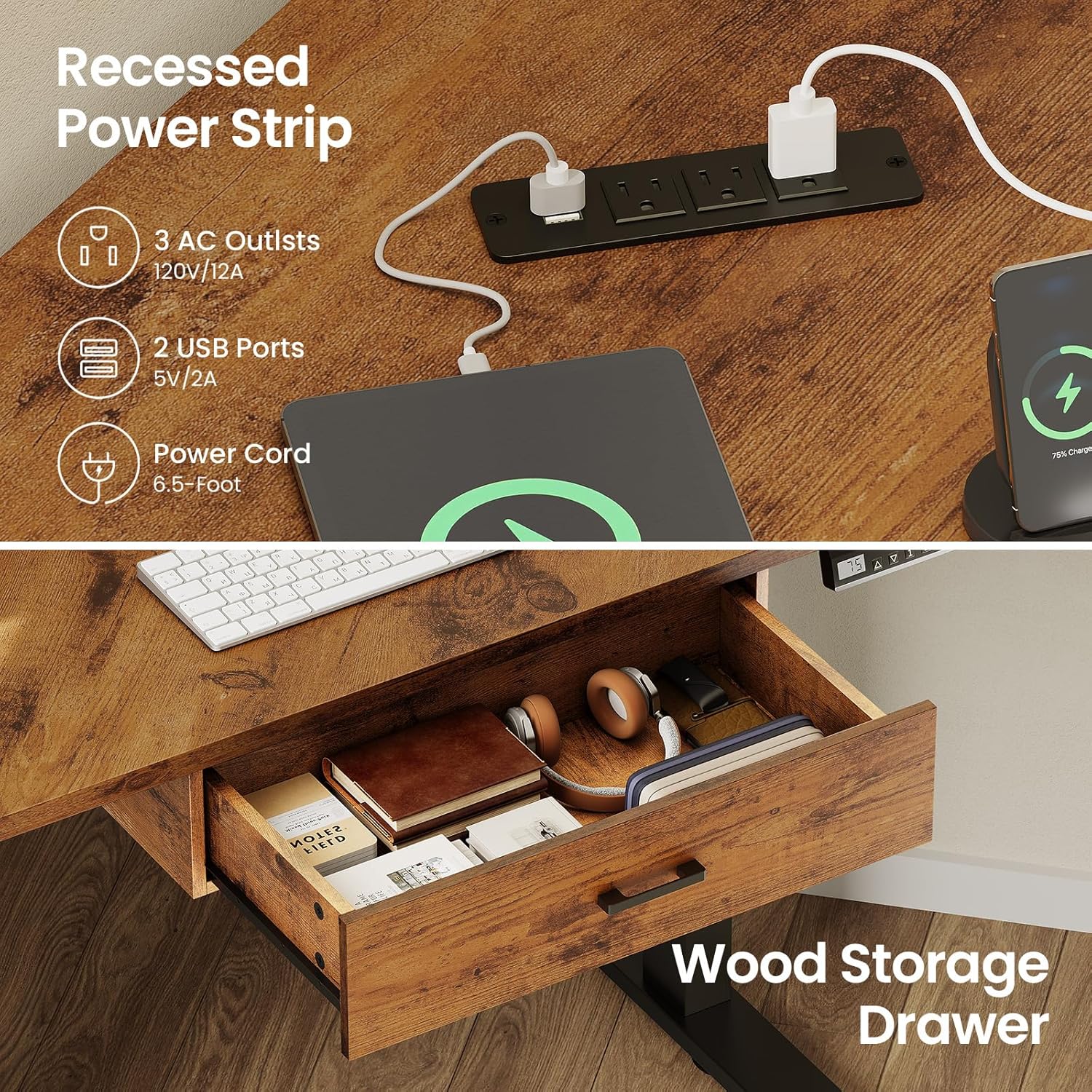
Image 4.3: Recessed power strip and integrated storage drawer.
The desk includes a recessed power strip with 3 AC outlets (120V/12A) and 2 USB ports (5V/2A) for convenient charging and powering of your devices. The power cord is 6.5 feet long.
Laci Penyimpanan:
A built-in storage drawer provides space for small office supplies, keeping your desktop organized and clutter-free.
5. Pemeliharaan
Regular maintenance ensures the longevity and proper functioning of your standing desk.
- Pembersihan: Bersihkan permukaan dan rangka meja dengan kain lembut dan kering.amp kain. Hindari pembersih abrasif atau bahan kimia keras.
- Manajemen Kabel: Periodically check that all cables are securely connected and not pinched or damaged.
- Pemeriksaan Motor: Listen for any unusual noises during operation. If you hear grinding or excessive noise, discontinue use and refer to the troubleshooting section.
- Distribusi berat: Ensure weight is evenly distributed on the desk surface, especially when adjusting height.
6. Penyelesaian masalah
If you encounter issues with your desk, please refer to the following common solutions:
| Masalah | Kemungkinan Penyebab | Larutan |
|---|---|---|
| Desk does not move or stops mid-movement. | Power disconnected, overload, or motor error. | Check power connections. Reduce weight on the desk. Perform a reset. |
| Uneven height adjustment. | Obstruction or motor synchronization issue. | Clear any obstructions. Perform a reset to re-synchronize motors. |
| LED display shows an error code. | Kesalahan sistem tertentu. | Refer to the full assembly manual for specific error code meanings or perform a reset. |
Prosedur Reset:
If the desk is not functioning correctly, a reset may resolve the issue. Consult your assembly manual for the exact reset procedure, which typically involves pressing and holding the 'RST' button until the desk moves to its lowest position and then slightly up, indicating a successful reset.
7. Spesifikasi
| Fitur | Detil |
|---|---|
| Nomor Model | B0FSKJFWGY |
| Merek | SEDIKIT |
| Desain Meja | Corner Electric Standing Desk |
| Dimensi Produk (P x L x T) | 32"D x 32"W x 28.3"H (pada ketinggian terendah) |
| Tinggi Minimum | 28.3 inci |
| Tinggi Maksimum | 46.9 inci |
| Rekomendasi Berat Maksimum | 200 pon (90.7 kg) |
| Bahan Dasar | Baja Paduan |
| Jenis Bahan Atas | Kayu Rekayasa |
| Tingkat Kebisingan | Under 40 dB during operation |
| Strip daya | 3 stopkontak AC (120V/12A), 2 port USB (5V/2A) |
| Panjang Kabel Daya | 6.5 kaki |
| Jumlah Laci | 1 |
| Perakitan Diperlukan | Ya |
8. Informasi Garansi
Specific warranty details for the SEDETA Corner Electric Standing Desk are not provided in this manual. Please refer to the warranty card included with your product packaging or visit the official SEDETA websitus untuk syarat dan ketentuan garansi yang komprehensif.
9. Dukungan Pelanggan
If you require further assistance, have questions about assembly, operation, or troubleshooting that are not covered in this manual, please contact SEDETA customer support. Contact information can typically be found on the product packaging, the official SEDETA websitus, atau melalui pengecer Anda.