
Perkenalan
This manual provides essential information for setting up, operating, and maintaining your TCL 32S5K 32-inch HD QLED Google Smart TV. Please read this manual thoroughly before using your television to ensure safe and optimal performance. Keep this manual for future reference.
Informasi Keselamatan
Selalu ikuti tindakan pencegahan keselamatan dasar saat menggunakan televisi ini untuk mengurangi risiko kebakaran, sengatan listrik, dan cedera. Jangan biarkan TV terkena hujan atau kelembapan. Jangan membuka penutup TV.asing; refer all servicing to qualified personnel. Ensure proper ventilation and avoid placing the TV near heat sources. Use only the power cord and accessories specified by the manufacturer.
Isi Paket
Verifikasi bahwa semua item ada dalam paket:
- TCL 32S5K 32-inch HD QLED Google Smart TV
- Kontrol Jarak Jauh
- Kabel Listrik
- Dudukan TV (2 buah) dan Sekrup
- Panduan Memulai Cepat
- Kartu Garansi
Pengaturan
Instalasi Fisik
Instalasi berdiri: Place the TV screen-down on a soft, flat surface. Attach the two stand pieces to the designated slots on the bottom of the TV using the provided screws. Ensure the stand is securely fastened.
Pemasangan di dinding: If wall-mounting, ensure you use a VESA-compatible wall mount (not included) and follow the wall mount manufacturer's instructions. Disconnect the power cord before mounting.
Menghubungkan Perangkat
Connect your external devices to the appropriate ports on the TV. Refer to the image below for port locations and types.

Figure 1: Rear and Side Connectivity Ports. This image illustrates the various input and output ports available on the TCL 32S5K Smart TV, including USB 2.0, LAN, Antenna/Cable In, Digital Audio Out (Optical), HDMI 1, HDMI 2, and AV In adapter.
- HDMI Ports (1, 2): Hubungkan pemutar Blu-ray, konsol game, dekoder kabel/satelit, atau perangkat lain yang mendukung HDMI.
- Port USB 2.0: Hubungkan perangkat penyimpanan USB untuk pemutaran media.
- Pelabuhan LAN: Hubungkan kabel Ethernet untuk koneksi internet kabel.
- Antena/Kabel Masuk: Hubungkan antena atau sinyal TV kabel.
- Keluaran Audio Digital (Optik): Connect to an external audio receiver or soundbar for digital audio.
- Adaptor AV In: Use the provided adapter to connect older devices with composite video and stereo audio outputs.
Pengaktifan Awal dan Pengaturan Google TV
After connecting all necessary cables, plug the power cord into an electrical outlet. Press the power button on the remote control or on the TV. Follow the on-screen instructions to complete the initial setup, which includes selecting your language, connecting to a Wi-Fi network, and signing in to your Google account to access Google TV features.
Pengoperasian
Fungsi Kontrol Jarak Jauh
The remote control allows you to navigate the Google TV interface, adjust volume, change channels, access apps, and control playback. Familiarize yourself with the button layout for easy operation.
Antarmuka Google TV
Google TV organizes your favorite movies, shows, and live TV from across your apps and subscriptions. Use the remote to browse recommendations, search for content, and manage your watch list. Access the Google Play Store to download additional applications.
Fitur Konektivitas
- Wifinya: Connects your TV to your home wireless network for internet access and streaming.
- Bluetooth dapat digunakan untuk berbagai keperluan, seperti: Pair Bluetooth-enabled devices such as headphones or game controllers for a personalized experience.
- Googlecast (Chromecast built-in): Cast content from your compatible mobile devices or computer directly to your TV screen.
Pengaturan Gambar dan Suara
Your TCL 32S5K TV features QLED technology, Full HD resolution, HDR10 support, and Dolby Audio for an enhanced viewing and listening experience. Adjust picture modes (e.g., Standard, Vivid, Movie) and sound modes (e.g., Standard, Music, Movie) through the TV settings menu to suit your preferences.

Figure 2: Image Quality Features. This image highlights the key display technologies of the TCL 32S5K Smart TV, including QLED for vibrant colors, FHD (Full High Definition) for clear resolution, and HDR10 for enhanced contrast and brightness.
Pemeliharaan
Membersihkan TV Anda
Selalu cabut steker TV sebelum membersihkan. Gunakan kain lembut dan kering untuk menyeka layar dan kabinet. Untuk noda membandel, gosok perlahan.ampen the cloth with water or a mild, non-abrasive screen cleaner. Never spray cleaner directly onto the screen or allow liquids to enter the TV's openings.
Pembaruan Perangkat Lunak
Your Google TV may receive automatic software updates. Ensure your TV is connected to the internet to receive these updates, which can improve performance and add new features. You can also manually check for updates in the TV's settings menu.
Penyelesaian Masalah
Jika Anda mengalami masalah dengan TV Anda, lihat solusi umum berikut:
- Tidak Ada Daya: Periksa apakah kabel daya terpasang dengan aman ke TV dan stopkontak. Coba stopkontak lain.
- Tidak Ada Gambar/Gambar Buruk: Ensure all cables are correctly connected. Check the input source. Adjust picture settings. If using an antenna, check signal strength.
- Tidak Ada Suara/Suara Buruk: Check volume levels and mute settings. Ensure external audio devices are properly connected and selected as the audio output.
- Kontrol Jarak Jauh Tidak Berfungsi: Ganti baterainya. Pastikan tidak ada penghalang antara remote dan sensor IR TV.
- Masalah Koneksi Jaringan: Restart your router and modem. Reconnect to the Wi-Fi network in the TV settings. For wired connections, ensure the Ethernet cable is properly connected.
- Google TV Slow/Unresponsive: Restart the TV by unplugging it for a few minutes and plugging it back in. Clear cache for problematic apps in settings.
For persistent issues, consult the TCL support websitus atau hubungi layanan pelanggan.
Spesifikasi
Below are the technical specifications for the TCL 32S5K Smart TV:
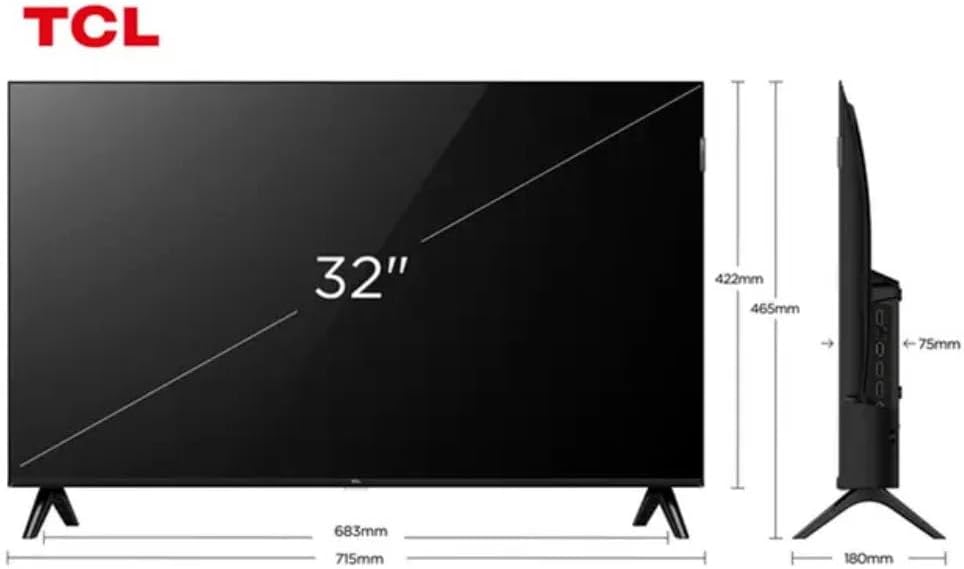
Figure 3: TV Dimensions. This image provides a detailed diagram of the TCL 32S5K Smart TV's physical dimensions, including screen size (32 inches), width (715mm), height (422mm without stand, 465mm with stand), and depth (75mm).
| Fitur | Keterangan |
|---|---|
| Nama Model | 32S5K |
| Ukuran Layar | 32 inci |
| Teknologi Tampilan | Lampu LED QLED |
| Resolusi | 1080p (HD Penuh) |
| Tingkat Penyegaran | 60Hz |
| Konektivitas | Bluetooth, Ethernet, HDMI, USB, Wi-Fi |
| Jumlah Port HDMI | 2 |
| Fitur Khusus | Integrated Speaker, Google TV, Googlecast Integrated, HDR10, Dolby Audio |
| Dimensi Produk (P x L x T) | 7.6P x 71.6L x 42.3A centimeters (approx. 3 x 28.2 x 16.7 inches) |
| Pabrikan | TCL |
| Negara Asal | Brazil |
Garansi dan Dukungan
Informasi Garansi
The TCL 32S5K Smart TV comes with a Garansi pabrik 1 tahun. This warranty covers defects in materials and workmanship under normal use. Please retain your proof of purchase for warranty claims. For specific terms and conditions, refer to the warranty card included in your package or visit the official TCL weblokasi.
Dukungan Pelanggan
If you require technical assistance, have questions about your product, or need to initiate a warranty claim, please contact TCL customer support. You can typically find contact information on the TCL official websitus atau dalam dokumentasi produk Anda.
Before contacting support, please have your TV model number (32S5K) and serial number ready, along with a detailed description of the issue.