
1. Pendahuluan
The Audizio Desio is a versatile digital radio that combines classic aesthetics with modern audio technology. It features DAB, DAB+, and FM tuning for clear radio reception, along with Bluetooth 5.0 for wireless streaming, a USB port for media playback, and a 3.5mm AUX input for wired connections. The radio is equipped with a 2.4-inch color LCD display and integrated stereo speakers, making it suitable for various environments such as living rooms, kitchens, or bedrooms.
This manual provides detailed instructions for setting up, operating, and maintaining your Audizio Desio radio. Please read it thoroughly before use to ensure proper functionality and to maximize your listening experience.
2. Informasi Keselamatan
- Pastikan tegangan adaptor dayatage matches your local power supply before connecting.
- Jangan biarkan unit terkena hujan, kelembapan, atau suhu ekstrem.
- Hindari meletakkan unit di dekat sumber panas atau terkena sinar matahari langsung.
- Jangan membuka casing; serahkan semua servis kepada personel yang berkualifikasi.
- Jauhkan unit dari medan magnet yang kuat.
- Bersihkan unit hanya dengan kain lembut dan kering.
3. Isi Paket
Mohon periksa apakah semua barang lengkap saat membongkar kemasan:
- Audizio Desio DAB/DAB+/FM Radio
- Adaptor Daya (DC 5V)
- Kontrol Jarak Jauh
- Panduan Pengguna
4. Kontrol dan Koneksi
Kontrol Panel Depan
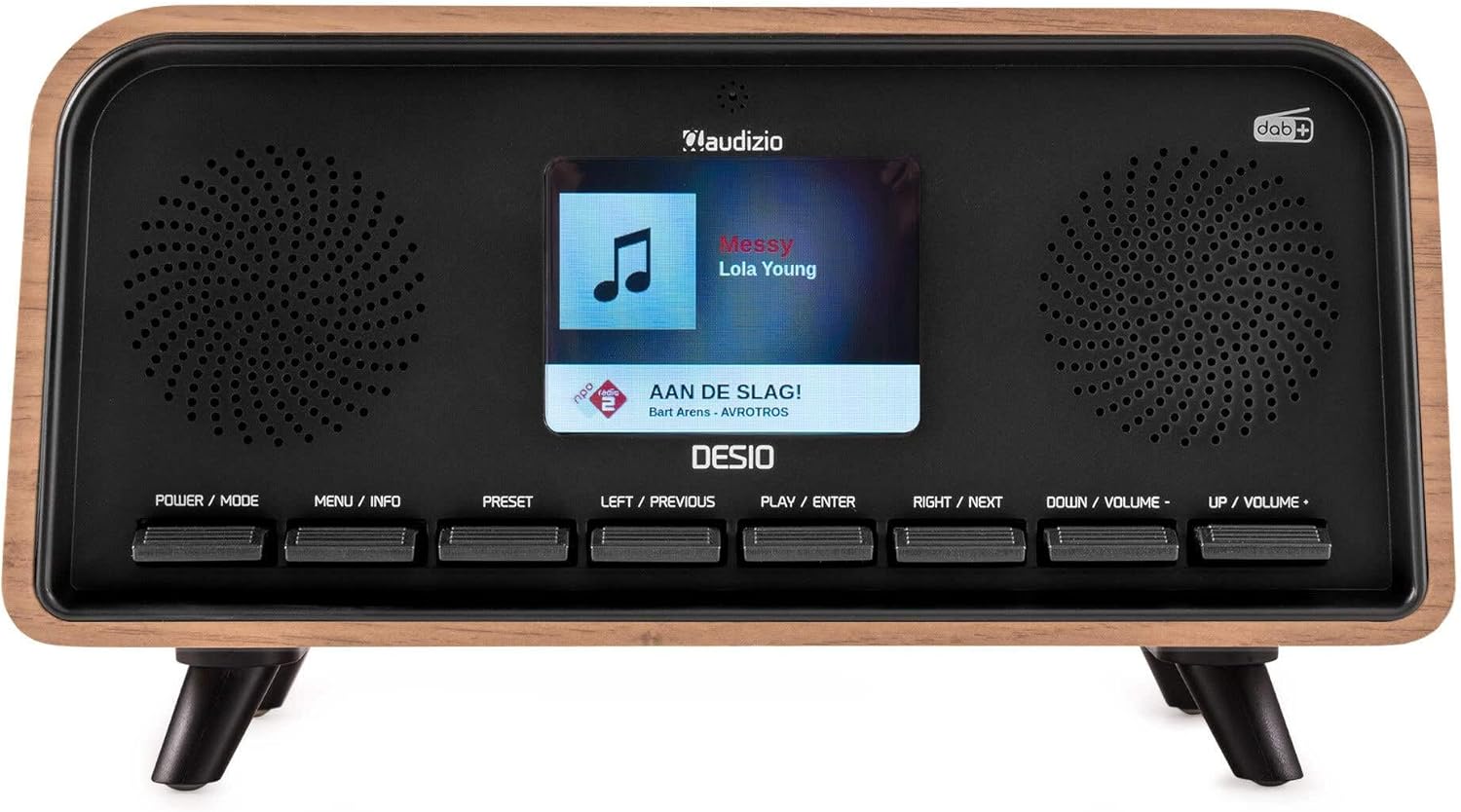
Depan view of the Audizio Desio radio, showing the display playing music with artist and track information. The control buttons are visible below the screen.
- POWER / MODE: Press to turn on/off. Press and hold to switch between DAB, FM, Bluetooth, USB, and AUX modes.
- MENU / INFO: Press to access menu options. In playback mode, press to cycle through information display.
- PRESET: Press to recall saved stations. Press and hold to save current station.
- LEFT / PREVIOUS: Navigate left in menus, or skip to previous track/station.
- PLAY / ENTER: Confirm selection in menus, or play/pause media.
- RIGHT / NEXT: Navigate right in menus, or skip to next track/station.
- DOWN / VOLUME -: Decrease volume, or navigate down in menus.
- UP / VOLUME +: Increase volume, or navigate up in menus.
Koneksi Panel Belakang
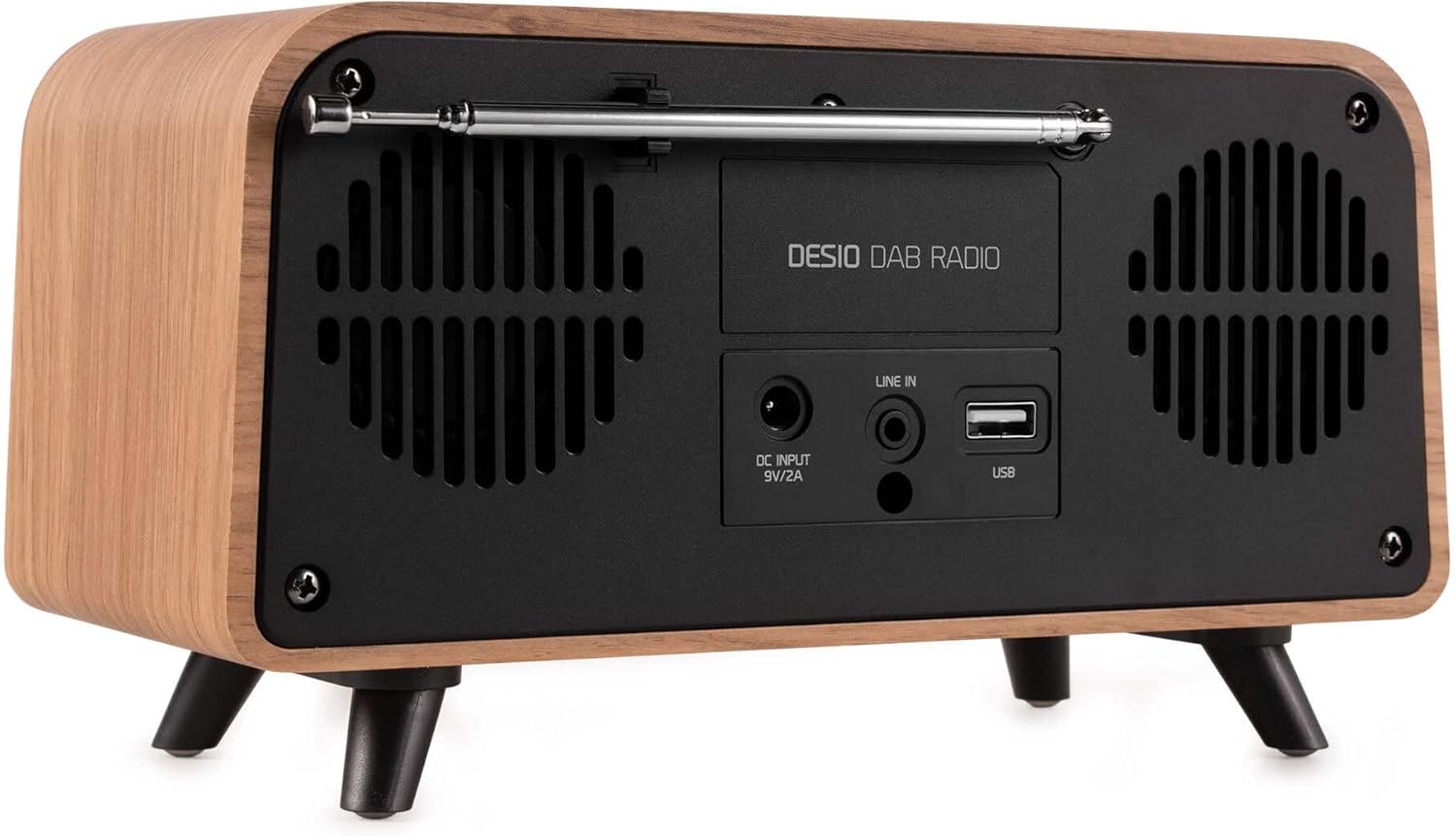
Belakang view of the Audizio Desio radio, highlighting the DC INPUT 9V/2A, LINE IN (3.5mm AUX), and USB ports. The telescopic antenna is extended.
- DC INPUT 9V/2A: Hubungkan adaptor daya yang disediakan di sini.
- LINE IN (3.5mm AUX): Hubungkan perangkat audio eksternal menggunakan kabel audio 3.5 mm.
- Kabel USB: Insert a USB flash drive for MP3 playback.
- Antena teleskopik: Extend fully for optimal DAB/DAB+ and FM reception.
5. Pengaturan Awal
- Hubungkan Daya: Plug the provided DC 5V power adapter into the DC INPUT port on the rear of the radio, then plug the adapter into a wall outlet.
- Perpanjang Antena: Fully extend the telescopic antenna located on the rear of the unit for best reception.
- Nyalakan: Tekan tombol DAYA / MODE tombol untuk menyalakan radio.
- First-time DAB Scan: Upon first power-on, the radio will automatically perform a full scan for DAB/DAB+ stations. This may take a few minutes. The display will show the scanning progress.
- Tetapkan Waktu/Tanggal: The time and date will usually be set automatically via DAB signal. If not, you can manually set them via the menu.
6. Petunjuk Pengoperasian
Pengoperasian Radio DAB/DAB+ 6.1

Depan view of the Audizio Desio radio, displaying a DAB radio station ('NPO Klassiek') and current time.
- Select DAB Mode: Tekan tombol DAYA / MODE button repeatedly until 'DAB' is displayed.
- Pindai untuk Stasiun: If no stations are found or you wish to rescan, press MENU / INFORMASI, lalu gunakan LEFT / PREVIOUS or TEPAT DI SEBELAH to select 'Full Scan' and press PLAY / ENTER.
- Pilih Stasiun: Gunakan LEFT / PREVIOUS or TEPAT DI SEBELAH buttons to browse available stations. Press PLAY / ENTER untuk memilih stasiun.
- Simpan Preset: Untuk menyimpan stasiun, tekan dan tahan tombol SETELAN TERLEBIH DAHULU tombol. Menggunakan LEFT / PREVIOUS or TEPAT DI SEBELAH to choose a preset number (1-50), then press PLAY / ENTER untuk mengonfirmasi.
- Ingat Preset: Untuk memanggil kembali stasiun yang tersimpan, tekan tombol SETELAN TERLEBIH DAHULU button (do not hold). Use LEFT / PREVIOUS or TEPAT DI SEBELAH untuk memilih preset yang diinginkan, lalu tekan PLAY / ENTER.

Depan view of the Audizio Desio radio, showing the 'Preset Recall' menu on the display, indicating empty preset slots.
Operasi Radio FM 6.2
- Pilih Mode FM: Tekan tombol DAYA / MODE button repeatedly until 'FM' is displayed.
- Pemindaian Otomatis: Tekan dan tahan PLAY / ENTER to automatically scan for and save available FM stations.
- Penyetelan Manual: Menggunakan LEFT / PREVIOUS or TEPAT DI SEBELAH untuk menyempurnakan frekuensi.
- Save/Recall Presets: Follow the same procedure as for DAB radio (Section 6.1).
6.3 Pengoperasian Bluetooth (BT)

Depan view of the Audizio Desio radio, with the display showing 'BT' (Bluetooth) mode and 'Connected' status.
- Pilih Mode BT: Tekan tombol DAYA / MODE button repeatedly until 'BT' is displayed. The radio will enter pairing mode, indicated by a flashing Bluetooth icon.
- Pasangkan Perangkat: On your smartphone, tablet, or laptop, enable Bluetooth and search for available devices. Select 'Audizio Desio' from the list.
- Menghubungkan: Once paired, the display will show 'Connected'. You can now stream audio from your device to the radio.
- Kontrol Pemutaran: Use your connected device or the radio's PLAY / ENTER, LEFT / PREVIOUS, Dan TEPAT DI SEBELAH tombol untuk mengontrol pemutaran.
6.4 Pemutaran USB

Depan view of the Audizio Desio radio, with the display showing 'USB' mode, current time, and details of an MP3 file sedang dimainkan.
- Masukkan USB Drive: Insert a USB flash drive (formatted to FAT32) containing MP3 filecolokkan ke port USB di bagian belakang radio.
- Pilih Mode USB: Tekan tombol DAYA / MODE button repeatedly until 'USB' is displayed. The radio will automatically start playing the first compatible audio file.
- Navigasi Files: Menggunakan LEFT / PREVIOUS or TEPAT DI SEBELAH to skip tracks. Press PLAY / ENTER untuk menjeda/melanjutkan pemutaran.
6.5 Masukan AUX
- Hubungkan Perangkat: Connect an external audio device (e.g., MP3 player, smartphone) to the 'LINE IN' (3.5mm AUX) port on the rear of the radio using a 3.5mm audio cable (not included).
- Pilih Mode AUX: Tekan tombol DAYA / MODE button repeatedly until 'AUX' is displayed.
- Kontrol Pemutaran Ulang: Playback is controlled directly from your connected external device. Adjust volume using the radio's volume controls.
6.6 Fungsi Alarm dan Timer
- Mengatur Alarm: Akses pengaturan alarm melalui MENU / INFORMASI button. You can set multiple alarms with customizable sources (DAB, FM, Buzzer), volume, and recurrence (daily, weekdays, weekends).
- Pengatur Waktu Tidur: The sleep timer allows the radio to turn off automatically after a set period. Access this function via the MENU / INFORMASI button and select the desired duration.
- Fungsi Tunda: When an alarm sounds, press any button (except Power) to activate the snooze function for a short period.
7. Pemeliharaan
- Pembersihan: Use a soft, dry, lint-free cloth to clean the radio's surface. Do not use abrasive cleaners, waxes, or solvents.
- Perawatan Antena: Tangani antena teleskopik dengan hati-hati untuk menghindari bengkok atau patah.
- Penyimpanan: Jika menyimpan radio untuk jangka waktu yang lama, cabut dari sumber daya listrik dan simpan di tempat yang sejuk dan kering.
8. Penyelesaian masalah
| Masalah | Kemungkinan Penyebab | Larutan |
|---|---|---|
| Tidak ada daya | Adaptor daya tidak tersambung atau stopkontak rusak. | Check power adapter connection and try a different outlet. |
| Penerimaan DAB/FM yang buruk | Antenna not fully extended or poor signal area. | Fully extend the antenna. Try repositioning the radio. Perform a full scan. |
| Bluetooth tidak terhubung | Radio not in BT mode, device not in pairing mode, or too far away. | Ensure radio is in BT mode. Put your device in pairing mode. Move device closer to the radio (within 10m). |
| Pemutaran USB tidak berfungsi | USB drive tidak terpasang dengan benar, tidak didukung. file format, or drive not FAT32. | Masukkan kembali drive USB. Pastikan files are MP3. Check USB drive format (FAT32). |
| Tidak ada suara dari AUX | Radio not in AUX mode, cable faulty, or external device volume low. | Select AUX mode. Check 3.5mm cable. Increase volume on both radio and external device. |
9. Spesifikasi Teknis
- Merek: Audizio
- Model: Desio
- Teknologi Penyetel: FM, DAB+
- Bluetooth dapat digunakan untuk berbagai keperluan, seperti: Version 5.0 (Range: 10m)
- Opsi Pemutaran: Bluetooth, USB, 3.5mm AUX input
- Stasiun Preset: 50
- Menampilkan: LCD Warna 2.4 inci
- Fungsi: Alarm, Sleep Timer, Snooze, Dimming, Week/Weekend Alarm
- Max Speaker Power: 30Watt
- Catu Daya: DC 5V (Power Adapter)
- Dimensi Produk (P x P x T): Ukuran 32x16x18 cm
- Berat: 1.66 kg
10. Garansi dan Dukungan
This product comes with a standard manufacturer's warranty. For detailed warranty terms and conditions, please refer to the documentation provided at the time of purchase or contact your retailer.
For technical support, troubleshooting assistance, or service inquiries, please contact the Audizio customer support team or your local dealer. Please have your product model number (Desio) and purchase information ready when contacting support.