
Perkenalan
This manual provides essential information for setting up, operating, maintaining, and troubleshooting your HP 15.6-inch FHD IPS Touchscreen Laptop. Please read this guide thoroughly to ensure optimal performance and longevity of your device. This laptop features an AMD Ryzen 7 7730U processor, 64GB DDR4 RAM, 2.28TB storage (2TB SSD + 288GB Docking Station Set), AMD Radeon Graphics, and runs on Windows 11 Pro.
Pengaturan
Membuka Kemasan dan Menyalakan Daya Awal
Carefully remove all components from the packaging. Connect the power adapter to the laptop and a power outlet. Press the power button to turn on the laptop. Follow the on-screen instructions to complete the initial Windows 11 Pro setup.
Aksesoris yang disertakan
Your laptop package includes the following accessories:
- 1x 7-in-1 Docking Station with 256GB Storage
- 1x 32GB MicroSD Card with Adapter
- 1x Kabel Data Tipe-C
- 1x 3-in-1 Charging Cable
- 1x Suede Cleaning Cloth
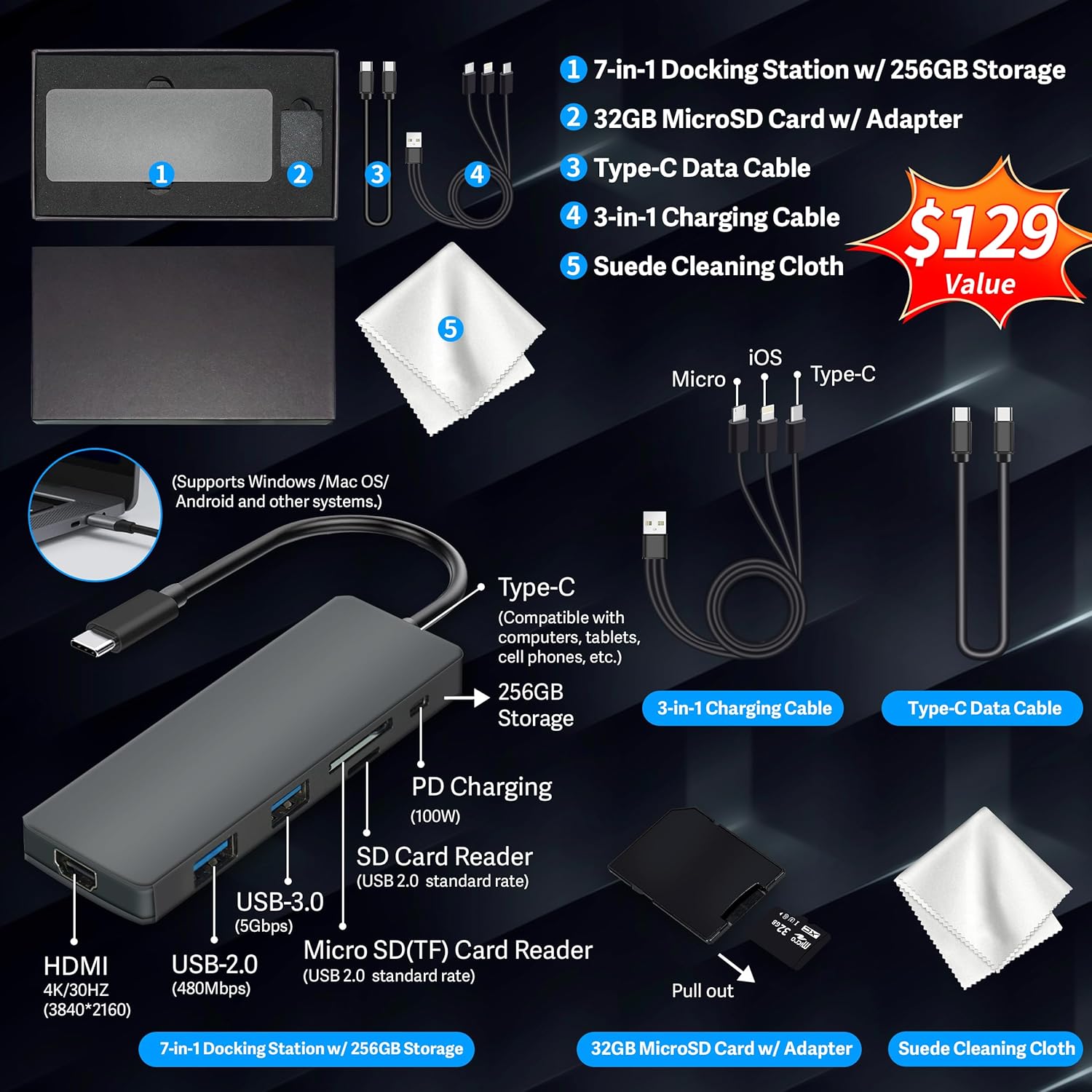
Figure 1: Included accessories, including the 7-in-1 docking station, various cables, and a cleaning cloth.
Mengoperasikan Laptop Anda
Fitur Tampilan
The HP 15.6-inch laptop features an FHD IPS touchscreen display with a resolution of 1920 x 1080 pixels and an anti-glare coating. This display provides clear and vibrant visuals from various viewsudut ing.

Figure 2: The 15.6-inch FHD IPS display offers crisp and vivid details.
Connectivity and Peripherals
Your laptop is equipped with various connectivity options and integrated features to enhance your user experience.
- Kamera HD 720p: For video calls and online meetings.
- Wi-Fi 6: Untuk konektivitas internet nirkabel berkecepatan tinggi.
- Bluetooth dapat digunakan untuk berbagai keperluan, seperti: For connecting wireless peripherals such as mice, keyboards, and headphones.
- Tombol angka: A full numeric keypad is integrated for efficient data entry and calculations.

Figure 3: Key features for staying connected and productive, including the numeric keypad.
The laptop includes multiple ports for connecting external devices:
- 2 port USB Tipe-A
- 1x port USB Tipe-C
- 1 buah port HDMI
- 1x Headphone/Microphone Combo jack

Figure 4: Multi-port configuration on the laptop for various connections.
Kinerja dan Multitasking
Equipped with an AMD Ryzen 7 7730U processor, 64GB DDR4 RAM, and AMD Radeon Graphics, this laptop is designed for efficient multitasking and demanding applications. The 2.28TB storage (2TB SSD + 288GB Docking Station Set) provides ample space and fast access to your files.

Figure 5: Core specifications for performance and storage.

Figure 6: Laptop demonstrating effortless multitasking with several applications running simultaneously.
The laptop is designed for extended use, offering reliable battery life to support your daily tasks.

Figure 7: The laptop supports continuous work throughout the day with its battery performance.
Pemeliharaan
Untuk memastikan umur panjang dan kinerja optimal laptop HP Anda, ikuti panduan perawatan berikut:
- Pembersihan: Use the provided suede cleaning cloth or a soft, lint-free cloth to clean the screen and exterior. Avoid harsh chemicals.
- Pembaruan Perangkat Lunak: Regularly update your Windows 11 Pro operating system and drivers to ensure security and performance.
- Perawatan Baterai: Hindari mengosongkan daya baterai sepenuhnya secara sering. Untuk penyimpanan jangka panjang, isi daya baterai hingga sekitar 50-70%.
- Ventilasi: Pastikan ventilasi laptop tidak terhalang untuk mencegah panas berlebih. Gunakan laptop di permukaan yang keras dan rata.
- Penyimpanan: Simpan laptop di tempat yang sejuk dan kering, jauhkan dari sinar matahari langsung dan suhu ekstrem.
Penyelesaian Masalah
Bagian ini membahas masalah umum yang mungkin Anda temui dengan laptop Anda.
Laptop Tidak Menyala
- Pastikan adaptor daya tersambung dengan aman ke laptop dan stopkontak yang berfungsi.
- Verifikasi apakah stopkontak berfungsi dengan mencolokkan perangkat lain.
- Jika baterai benar-benar habis, biarkan baterai terisi daya setidaknya selama 15-30 menit sebelum mencoba menghidupkan perangkat.
Screen Remains Blank
- Periksa apakah laptop menyala (lampu indikator daya).
- Try connecting an external monitor to see if display output is available.
- Sesuaikan kecerahan layar menggunakan tombol fungsi.
Masalah Konektivitas Wi-Fi
- Pastikan Wi-Fi diaktifkan di pengaturan Windows.
- Mulai ulang router dan modem Anda.
- Perbarui driver Wi-Fi Anda melalui Pengelola Perangkat.
- Periksa apakah ada halangan atau gangguan fisik.
Kinerja Lambat
- Tutup aplikasi yang tidak diperlukan yang berjalan di latar belakang.
- Periksa Task Manager untuk melihat proses yang mengonsumsi CPU atau RAM tinggi.
- Pastikan sistem operasi dan driver Anda sudah diperbarui.
- Jalankan pembersihan disk dan defragmentasi (untuk HDD, tidak diperlukan untuk SSD).
- Pindai malware atau virus.
Spesifikasi
Below are the detailed technical specifications for your HP 15.6-inch FHD IPS Touchscreen Laptop.

Figure 8: Laptop dimensions and weight for portability.
| Fitur | Detil |
|---|---|
| Merek | HP |
| Nama Model | HP 15.6" FHD IPS Touchscreen Laptop |
| Ukuran Layar | 15.6 inci |
| Resolusi Tampilan | 1920 x 1080 Piksel (FHD) |
| Jenis Tampilan | LED IPS Touchscreen |
| Prosesor | AMD Ryzen 7 7730U (8 Cores, 2 GHz base) |
| Koprosesor Grafis | Grafis AMD Radeon (Terintegrasi) |
| Memori RAM | 64 GB DDR4 (3200 MHz) |
| Penyimpanan | 2 TB SSD + 288 GB Docking Station Set (Total 2.28 TB) |
| Sistem Operasi | Windows 11 Pro |
| Konektivitas | Wi-Fi 6 (802.11ax), Bluetooth, HDMI, USB |
| Pelabuhan | 2x USB Type-A, 1x USB Type-C, 1x HDMI, 1x Headphone/Microphone Combo |
| Webkamera | Kamera HD 720p |
| Papan ketik | Ukuran penuh dengan Keypad Numerik |
| Dimensi (P x L x T) | 14.17" x 9.29" x 0.73" |
| Berat Barang | 3.52 pon (sekitar 1.6 kg) |
| Warna | Perak |
| UPC | 196188514924 |
| ASIN | B0FX2NR2WN |
Informasi Garansi
Your HP laptop comes with a manufacturer's warranty. For upgraded components (RAM/SSD), a 1-year warranty is provided by SnowBell. The original 1-year manufacturer warranty applies to all other components of the laptop. Please retain your proof of purchase for warranty claims. For detailed terms and conditions, refer to the warranty documentation included with your product or visit the official HP support weblokasi.
Mendukung
For further assistance, technical support, or service inquiries, please refer to the following resources:
- Dukungan Resmi HP Weblokasi: Mengunjungi support.hp.com untuk driver, manual, dan panduan pemecahan masalah.
- Bantuan Daring: Utilize the built-in Windows 11 Pro help features for software-related questions.
- Contact Retailer: For issues related to upgraded components or purchase, contact SnowBell or your point of purchase.