
1. Informasi Keselamatan Penting
Harap baca semua petunjuk keselamatan dengan saksama sebelum menggunakan produk ini. Simpan panduan ini untuk referensi di kemudian hari.
- Jangan biarkan perangkat terkena hujan atau lembab.
- Hindari suhu ekstrem.
- Gunakan hanya adaptor daya yang telah disediakan.
- Jangan mencoba membongkar atau memperbaiki perangkat sendiri. Hubungi petugas servis yang berkualifikasi.
- Buang baterai dan komponen elektronik secara bertanggung jawab sesuai dengan peraturan setempat.
2. Apa yang ada di dalam kotak
Pastikan semua barang ada saat membuka kemasan:
- 1 x Desobry 14.2" Portable TV
- 1 x Panduan Pengguna
- 1 x Antena
- 1 x Pengisi Daya Mobil
- 1 x 12V AC Adapter
- Kabel 1 x RCA
- 1 x Car Headrest Mount Holder
- 2 x Baterai AAA (untuk kendali jarak jauh)
- 1x Kontrol Jarak Jauh

Gambar: Semua komponen yang termasuk dalam kemasan produk.
3. Produk Lebihview
Depan dan samping Views
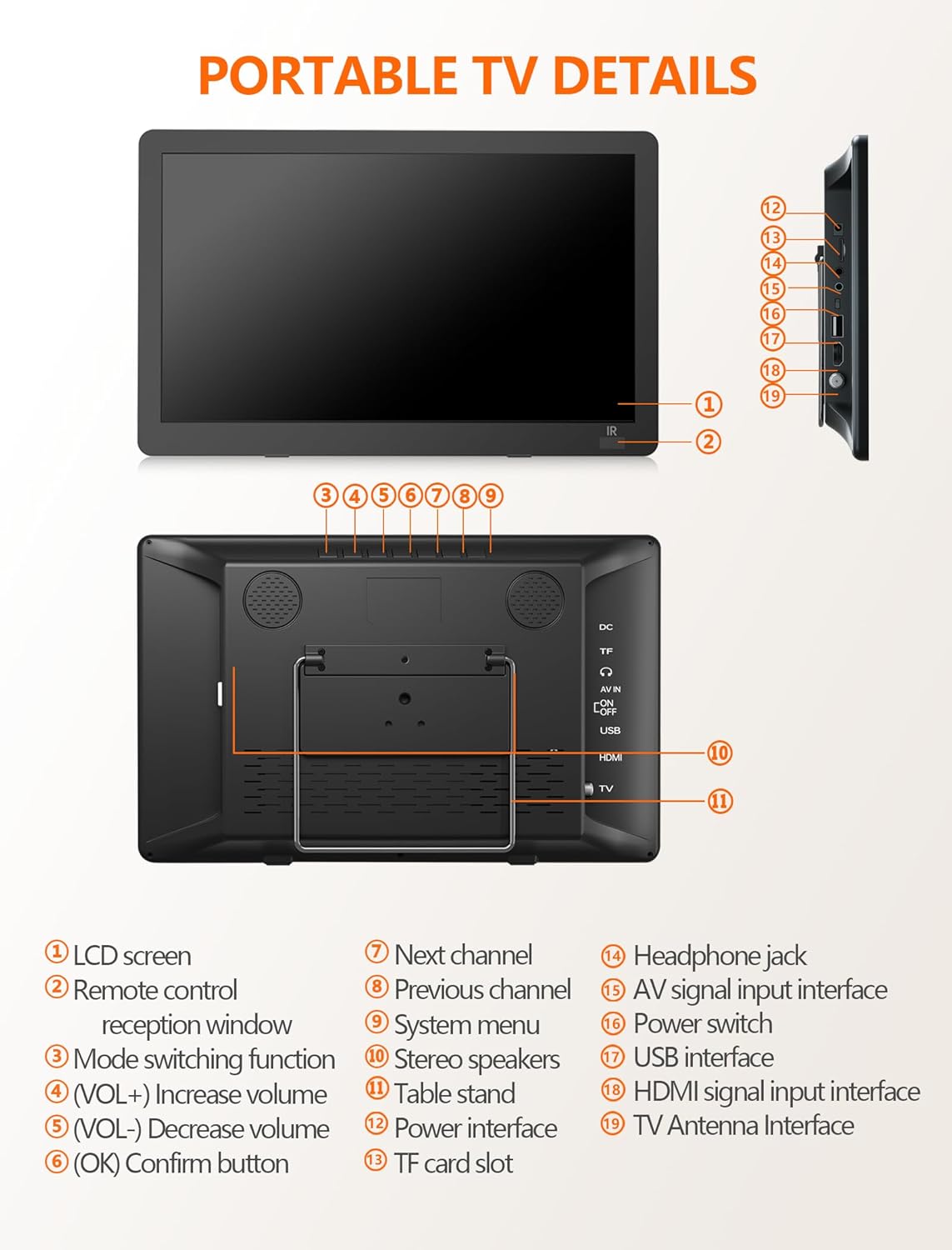
Gambar: Tampak depan dan samping view of the portable TV with labeled components.
- Layar LCD
- Jendela penerimaan kendali jarak jauh
- Fungsi peralihan mode
- Volume Up (VOL+)
- Volume Down (VOL-)
- OK / Confirm button
- saluran berikutnya
- Saluran sebelumnya
- Menu sistem
- Speaker stereo
- Dudukan meja
- Antarmuka daya
- Slot kartu TF
- Soket headphone
- AV signal input interface
- saklar daya
- Antarmuka USB
- Antarmuka input sinyal HDMI
- TV Antenna Interface
4. Pengaturan
4.1 Powering the TV
The TV can be powered in three ways:
- Adaptor AC: Connect the 12V AC adapter to the power interface (12) and a wall outlet.
- Pengisi Daya Mobil: Use the provided car charger to power the TV in a vehicle.
- Baterai bawaan: The TV features a 4000mAh built-in rechargeable battery for portable use.

Image: Three charging systems for the portable TV.
4.2 Antenna Connection and Channel Scan
To receive free-to-air digital TV signals:
- Connect the detachable antenna to the TV Antenna Interface (19). For optimal signal, place the antenna near a window or outdoors.
- Pastikan TV dihidupkan.
- Navigate to the system menu (9) and select ATSC mode.
- Perform an auto-scan for channels. The TV will search and store available digital channels.

Image: Portable TV with antenna connected, displaying a baseball game.
Video: Demonstration of connecting the antenna and performing a channel scan on a portable TV.
Video: Step-by-step guide to connecting the antenna and initiating the channel setup wizard.
5. Operasi
5.1 Memilih Sumber Input
The TV supports multiple input sources:
- ATSC: For digital TV channels via antenna.
- HDMI: Connect external devices like laptops, gaming consoles, or streaming sticks (HDMI cable not included).
- AV Dalam: Connect devices using the AV cable (AV cable included).
- Kabel USB: Putar media files dari drive USB.

Image: HDMI input screen mirroring from a smartphone to the portable TV.

Image: Portable TV connected via AV cable, showing a child watching content.
5.2 Pemutaran Media melalui USB
The USB port (17) supports various media formats:
- Rekaman video: MAVI, MPG, MOV, MKV, MP4, TS, VOB, DAT
- Suara: MP3, WMA, M4A, AAC
- Gambar: JPG, JPEG, BMP, PNG
- Teks: Teks Tertulis

Image: Portable TV showing supported multiple formats for media playback.
5.3 Adjusting Volume and Channels
Use the VOL+ (4) and VOL- (5) buttons on the TV or the remote control to adjust the volume. Use the CH+ (7) and CH- (8) buttons on the TV or the remote control to change channels.
6. Fitur
6.1 High-Definition Display
The 14.2-inch widescreen LCD display offers 1080P high-definition picture quality for clear viewing.

Image: Comparison of 720P and 1080P picture quality on the portable TV.
6.2 Penyangga yang Dapat Disesuaikan
The TV includes a desktop stand and a headrest stand for versatile placement. The built-in table stand (11) is adjustable up to 180 degrees.
6.3 Dual Speakers and Headphone Jack
Enjoy audio through the built-in dual stereo speakers (10) or connect headphones via the headphone jack (14) for private listening.

Image: Portable TV with built-in dual speakers highlighted.
Video: Selesaiview of the portable TV's features, including 1080P display, flexible connectivity, adjustable kickstand, dual speakers, and sleep timer function.
7. Pemeliharaan
To ensure the longevity of your Desobry Portable TV:
- Clean the screen and exterior with a soft, dry cloth. Avoid abrasive cleaners.
- Jauhkan perangkat dari air dan kelembapan tinggi.
- Simpan di tempat sejuk dan kering saat tidak digunakan.
- Hindari menghalangi bukaan ventilasi untuk mencegah panas berlebih.
8. Penyelesaian masalah
8.1 Signal Reception Issues
- Ensure the antenna is securely connected to the TV Antenna Interface (19).
- Place the antenna near a window or outdoors for better signal reception.
- Confirm the TV is set to ATSC mode for digital channels.
- If the local signal is weak, try connecting an outdoor antenna and performing a channel scan again.
8.2 Remote Control Tidak Merespons
- Ensure the AAA batteries in the remote control are correctly inserted and not depleted.
- Point the remote control directly at the remote control reception window (2) on the TV.
- Maintain a distance of no more than 3 meters (10 feet) and within a 30-degree angle from the TV's IR sensor.
9. Spesifikasi
| Ukuran Layar | 14.2 inci |
| Teknologi Tampilan | Layar LCD |
| Resolusi | 1080p |
| Tingkat Penyegaran | 60Hz |
| Teknologi Konektivitas | HDMI, USB, AV |
| Fitur Khusus | Speaker Bawaan, Portabel |
| Kapasitas Baterai | 4000mAh (Terintegrasi) |
| Berat Barang | 3.61 pon |
| Dimensi Produk | 2"Panjang x 2"Lebar x 2"T |
10. Garansi dan Dukungan
For warranty information or technical support, please refer to the contact details provided with your purchase documentation or visit the official Desobry website. If you encounter any problems with your portable TV, please do not hesitate to contact customer support for assistance.