1. Pendahuluan
The Havit MS966SE is a high-performance tri-mode gaming mouse designed for versatility, precision, and comfort. It features a PixArt PMW3325 optical sensor, offering exceptional tracking accuracy and adjustable DPI settings up to 10,000. With its tri-mode connectivity, you can seamlessly switch between 2.4GHz wireless, Bluetooth 5.3, and USB-C wired modes to suit your gaming or work environment. The lightweight and ergonomic design ensures comfortable use during extended sessions, complemented by dynamic RGB lighting for a personalized aesthetic.

Figure 1: Havit MS966SE Gaming Mouse with USB-C cable.
2. Pengaturan
2.1 Membongkar
Carefully remove the mouse and all accessories from the packaging. Ensure all components are present:
- Havit MS966SE Gaming Mouse
- Kabel USB-C ke USB-A
- Penerima USB 2.4GHz
- User Manual (dokumen ini)
2.2 Menghubungkan Mouse
The MS966SE offers three connectivity options:
2.2.1 Mode Nirkabel 2.4GHz
- Insert the 2.4GHz USB receiver into an available USB-A port on your computer.
- Locate the mode switch on the bottom of the mouse and slide it to the 2.4G posisi.
- The mouse will automatically connect to your computer.
2.2.2 Mode Bluetooth 5.3
- Locate the mode switch on the bottom of the mouse and slide it to the BT posisi.
- Di komputer atau perangkat seluler Anda, buka pengaturan Bluetooth dan cari perangkat baru.
- Select "Havit MS966SE" from the list of available devices to pair.
2.2.3 Mode Kabel USB-C
- Connect one end of the provided USB-C cable to the mouse and the other end to an available USB-A port on your computer.
- Mouse akan secara otomatis beralih ke mode kabel dan mulai mengisi daya.
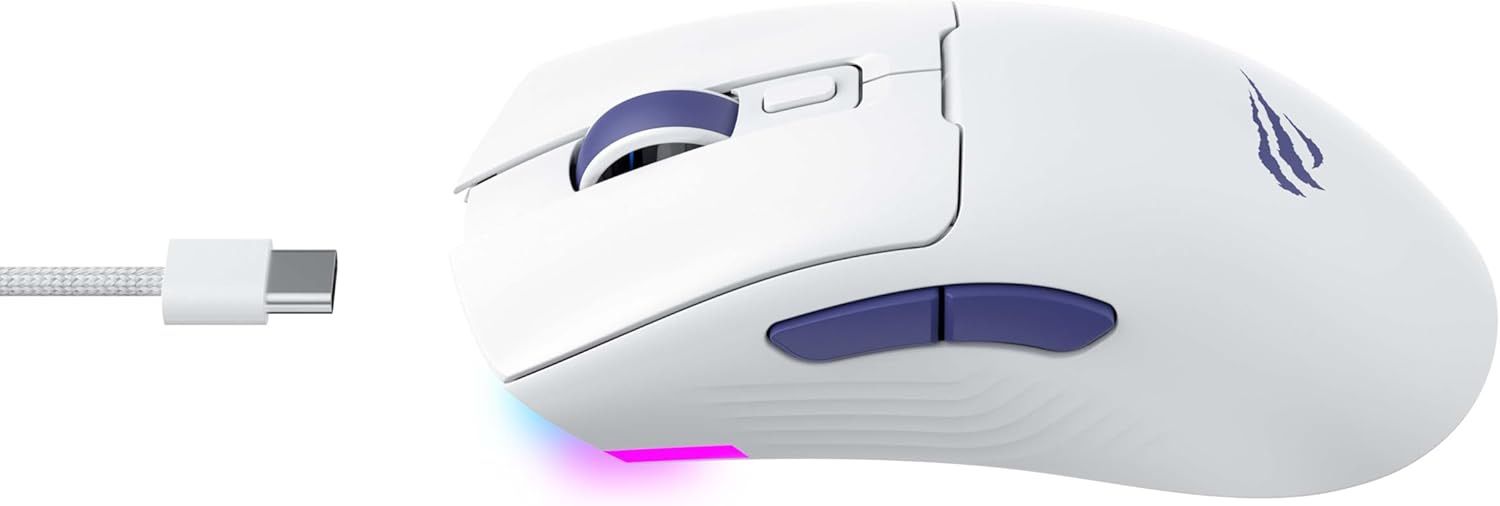
Gambar 2: Sisi view of the mouse, highlighting the USB-C port.
2.3 Mengisi Daya Mouse
To charge the mouse, connect it to your computer using the USB-C cable. The mouse can be used in wired mode while charging. An indicator light on the mouse will show the charging status (refer to the manufacturer's website or product packaging for specific light behaviors).
3. Petunjuk Pengoperasian
3.1 Fungsi Tombol
The Havit MS966SE features several programmable buttons for enhanced control:
- Klik Kiri Tombol: Fungsi klik utama standar.
- Klik Kanan Tombol: Fungsi klik sekunder standar.
- Roda Gulir: Scrolls up/down, and acts as a middle click button.
- Tombol Siklus DPI: Terletak di belakang roda gulir, tombol ini berfungsi untuk beralih di antara tingkat sensitivitas DPI yang telah ditentukan sebelumnya.
- Tombol Samping (Maju/Mundur): Typically used for navigation in web browsers or can be programmed for in-game actions.

Figure 3: Side buttons and ergonomic design.
3.2 Penyesuaian DPI
The PixArt PMW3325 sensor allows for adjustable DPI settings up to 10,000. Press the DPI cycle button (located behind the scroll wheel) to switch between different sensitivity levels. Each press will cycle to the next preset DPI, allowing you to quickly adapt to various tasks or game scenarios.
3.3 Connectivity Mode Switching
To switch between 2.4GHz wireless, Bluetooth, and wired modes, use the physical switch located on the bottom of the mouse. Ensure the correct mode is selected based on your connection preference.
3.4 Pencahayaan RGB
The mouse features dynamic RGB lighting. Specific controls for RGB lighting effects, colors, and brightness may be available through dedicated software provided by Havit. Please visit the official Havit website for software downloads and further customization options.
4. Pemeliharaan
4.1 Pembersihan
- Lepaskan mouse dari komputer sebelum membersihkan.
- Gunakan kain yang lembut, kering, dan tidak berbulu untuk menyeka permukaan tetikus.
- Untuk kotoran membandel, sedikit dampBilas kain dengan air atau larutan pembersih ringan. Hindari bahan kimia keras.
- Gunakan kapas atau udara bertekanan untuk membersihkan area di sekitar tombol dan roda gulir.
- Jangan merendam mouse dalam air atau cairan apa pun.
4.2 Penyimpanan
When not in use for extended periods, store the mouse in a cool, dry place away from direct sunlight and extreme temperatures. If storing for a long time, ensure the mouse is fully charged to maintain battery health.
5. Penyelesaian masalah
5.1 Mouse Tidak Merespons
- Periksa Daya: Pastikan mouse dihidupkan dan memiliki daya baterai yang cukup.
- Periksa Konektivitas:
- Mode Berkabel: Pastikan kabel USB-C terhubung dengan aman ke mouse dan komputer. Coba port USB yang berbeda.
- Nirkabel 2.4GHz: Ensure the USB receiver is properly inserted and the mouse is set to 2.4G mode. Try a different USB port for the receiver.
- Mode Bluetooth: Ensure Bluetooth is enabled on your device and the mouse is paired. Try unpairing and re-pairing the mouse.
- Mulai ulang: Mulai ulang komputer dan mouse Anda.
5.2 DPI Tidak Berubah
- Ensure you are pressing the correct DPI cycle button.
- Jika menggunakan perangkat lunak kustom, periksa pengaturan DPI di dalam perangkat lunak tersebut.
5.3 Kelambatan atau Pemutusan Koneksi dalam Mode Nirkabel
- Gangguan: Move the mouse closer to the receiver/device. Avoid obstacles between the mouse and receiver.
- Tingkat Baterai: Baterai lemah dapat memengaruhi kinerja nirkabel. Isi daya mouse Anda.
- Port USB: Try connecting the 2.4GHz receiver to a different USB port, preferably a USB 2.0 port if available, as some USB 3.0 ports can cause interference.
6. Spesifikasi
| Merek | Havit |
| Model | Bahasa Inggris MS966SE |
| Teknologi Konektivitas | Tri-Mode: 2.4GHz Wireless, Bluetooth 5.3, USB-C Wired |
| Teknologi Sensor | Optik (PixArt PMW3325) |
| Tingkat DPI | DPI yang dapat disesuaikan hingga 10,000 |
| Fitur Khusus | Ergonomic Design, Dynamic RGB Lighting |
| Sistem Operasi yang Kompatibel | Jendela, macOS, Linux |
| Perangkat yang Kompatibel | Notebook, Personal Computer, Tablet, Smartphone |
| Berat Tikus | Sekitar 68 gram |
| Jenis Baterai | ion litium |
7. Garansi dan Dukungan
7.1 Informasi Garansi
This Havit MS966SE Gaming Mouse comes with a Garansi Pabrik 1 TahunHarap simpan bukti pembelian Anda untuk klaim garansi. Garansi mencakup cacat material dan pengerjaan dalam penggunaan normal.
7.2 Dukungan Pelanggan
For technical assistance, troubleshooting beyond this manual, or warranty inquiries, please contact Havit customer service directly. You can find the most up-to-date contact information and support resources on the official Havit weblokasi (www.havit.com).