
1. Pendahuluan
This manual provides detailed instructions for the operation and maintenance of your JORLAI 9-in-1 Record Player, Model T409. This versatile audio system combines a 3-speed turntable with Bluetooth connectivity, AM/FM radio, USB, SD/MMC card playback, CD player, and cassette player, offering a comprehensive solution for your audio entertainment needs.

Gambar 1: Lebihview of the JORLAI 9-in-1 Record Player's multiple functions.
2. Petunjuk Keselamatan
Harap baca dan pahami semua petunjuk keselamatan sebelum mengoperasikan perangkat ini. Simpan manual ini untuk referensi di masa mendatang.
- Sumber Daya: Hubungkan unit hanya ke stopkontak listrik AC dengan tegangan yang ditentukan.tage.
- Ventilasi: Pastikan ventilasi memadai. Jangan halangi lubang ventilasi.
- Air dan Kelembaban: Jangan biarkan unit terkena hujan, kelembapan, atau cairan yang menetes/terciprat.
- Panas: Jauhkan unit dari sumber panas seperti radiator, ventilasi pemanas, kompor, atau peralatan penghasil panas lainnya.
- Pembersihan: Cabut unit dari stopkontak sebelum membersihkan. Gunakan kain lembut dan kering.
- Pelayanan: Jangan mencoba untuk memperbaiki produk ini sendiri. Rujuk semua servis ke personel servis yang berkualifikasi.
- Penempatan: Letakkan unit di permukaan yang stabil dan rata untuk mencegahnya jatuh.
3. Isi Paket
Verifikasi bahwa semua item yang tercantum di bawah ini disertakan dalam paket Anda:
- JORLAI 9-in-1 Record Player (Model T409)
- Kontrol Jarak Jauh
- Panduan Pengguna
- Power Adapter (pre-attached)
4. Fitur dan Komponen Produk
Familiarize yourself with the main components and features of your record player.
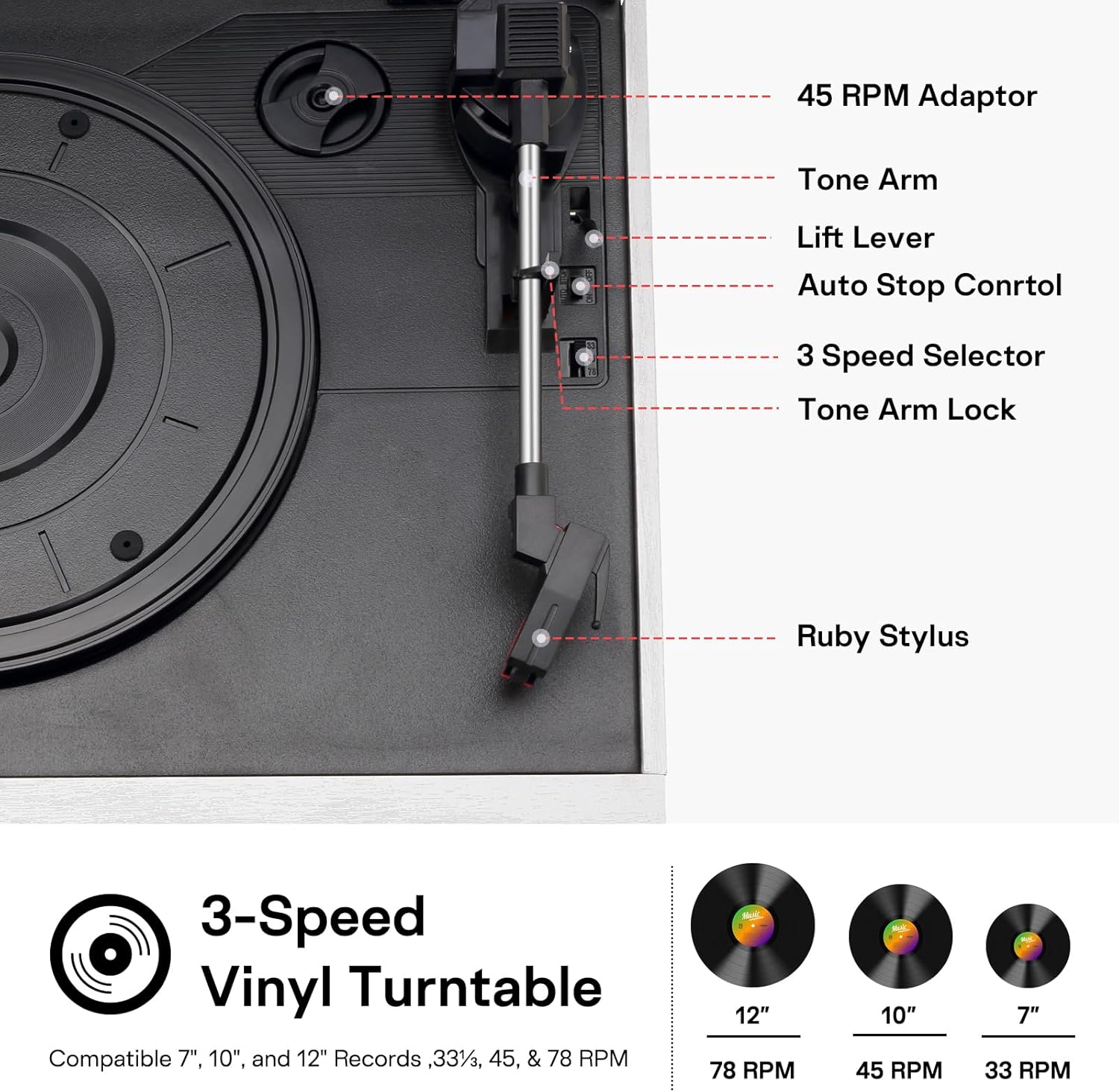
Figure 2: Turntable Components.
Komponen Utama:
- Pemutar Piringan Hitam 3 Kecepatan: Supports 33-1/3, 45, and 78 RPM records.
- Tone Arm with Ruby Stylus: For playing vinyl records.
- Adaptor 45 RPM: For playing 7-inch records with a large center hole.
- CD player: Front-loading tray for audio CDs.
- Pemutar Kaset: Side-loading slot for audio cassettes.
- Radio AM/FM: Tuner terintegrasi untuk siaran radio.
- Port USB: Untuk pemutaran melalui USB drive.
- Slot Kartu SD/MMC: For SD or MMC card playback.
- Konektivitas Bluetooth: Untuk streaming audio nirkabel dari perangkat yang kompatibel.
- Built-in Dual Speakers: Speaker stereo terintegrasi untuk output audio langsung.
- Jalur Keluar RCA: Untuk terhubung ke eksternal amplifier atau speaker bertenaga.
- Jack Headphone: Untuk didengarkan secara pribadi.
- Kontrol Jarak Jauh: For convenient operation of various functions.

Figure 3: Rear panel with RCA Line Out and power connection.
5. Pengaturan
Ikuti langkah-langkah ini untuk mengatur pemutar piringan hitam Anda:
- Membongkar: Keluarkan unit dan semua aksesori dari kemasan dengan hati-hati.
- Penempatan: Place the record player on a flat, stable surface away from direct sunlight, heat sources, and excessive dust or vibration.
- Sambungan Daya: Plug the power adapter into the AC IN jack on the rear of the unit, then plug the other end into a standard wall outlet.
- Penutup Debu: Remove any protective film or packaging from the dust cover and turntable platter.
- Nyalakan Daya Pertama: Tekan tombol POWER untuk menghidupkan unit.
6. Petunjuk Pengoperasian
This section details how to use each playback function of your JORLAI 9-in-1 Record Player.
Video 1: Demonstrates various playback functions of the JORLAI 9-in-1 Record Player, including vinyl, CD, USB, SD card, cassette, AM/FM radio, and Bluetooth connection.
6.1. Pemutaran Vinyl
To play vinyl records:
- Buka penutup debu.
- Place a record on the turntable platter. If playing a 7-inch record, use the 45 RPM adaptor.
- Pilih kecepatan yang sesuai (33, 45, atau 78 RPM) menggunakan sakelar pemilih kecepatan.
- Lepaskan kunci lengan nada.
- Use the lift lever to gently raise the tone arm.
- Manually position the tone arm over the desired track on the record.
- Lower the tone arm using the lift lever. The record will begin to play.
- Sesuaikan volume menggunakan kenop VOLUME.
- At the end of the record, the turntable may stop automatically (if auto-stop is enabled). Use the lift lever to raise the tone arm and return it to its rest.
Lihat Video 1, timestamp 0:05 for a demonstration of vinyl playback.
6.2. Pemutaran CD
Untuk memutar CD audio:
- Press the FUNCTION button repeatedly until 'CD' mode is selected.
- Tekan tombol OPEN/CLOSE untuk membuka baki CD.
- Letakkan CD dengan sisi label menghadap ke atas ke dalam baki.
- Tekan tombol BUKA/TUTUP lagi untuk menutup baki. Unit akan membaca CD.
- Playback will start automatically. Use the PLAY/PAUSE, NEXT, and PREVIOUS buttons to control playback.
- Sesuaikan volume menggunakan kenop VOLUME.
Lihat Video 1, timestamp 0:15 for a demonstration of CD playback.
6.3. Pemutaran Kaset
To play audio cassettes:
- Press the FUNCTION button repeatedly until 'TAPE' mode is selected.
- Insert an audio cassette into the cassette slot on the side of the unit.
- Press the PLAY button on the cassette deck to start playback.
- Use the FAST FORWARD, REWIND, and STOP buttons to control playback.
- Sesuaikan volume menggunakan kenop VOLUME.
Lihat Video 1, timestamp 0:31 for a demonstration of cassette playback.
6.4. Pemutaran USB
Untuk memutar musik dari drive USB:
- Press the FUNCTION button repeatedly until 'USB' mode is selected.
- Masukkan flash drive USB ke port USB.
- Perangkat akan secara otomatis mendeteksi dan mulai memutar audio yang kompatibel. files.
- Use the PLAY/PAUSE, NEXT, and PREVIOUS buttons to control playback.
- Sesuaikan volume menggunakan kenop VOLUME.
Lihat Video 1, timestamp 0:22 for a demonstration of USB playback.
6.5. SD/MMC Card Playback
To play music from an SD or MMC card:
- Press the FUNCTION button repeatedly until 'CARD' mode is selected.
- Insert an SD or MMC card into the card slot.
- Perangkat akan secara otomatis mendeteksi dan mulai memutar audio yang kompatibel. files.
- Use the PLAY/PAUSE, NEXT, and PREVIOUS buttons to control playback.
- Sesuaikan volume menggunakan kenop VOLUME.
Lihat Video 1, timestamp 0:26 for a demonstration of SD card playback.
6.6. Radio AM/FM
Untuk mendengarkan radio:
- Press the FUNCTION button repeatedly until 'FM' or 'AM' mode is selected.
- Rotate the TUNING knob to scan for radio stations.
- Sesuaikan volume menggunakan kenop VOLUME.
Lihat Video 1, timestamp 0:37 for a demonstration of AM/FM radio tuning.
6.7. Koneksi Bluetooth
Untuk memutar audio secara nirkabel melalui Bluetooth:
- Press the FUNCTION button repeatedly until 'BT' (Bluetooth) mode is selected. The display will show 'BT' and flash, indicating it's in pairing mode.
- Aktifkan Bluetooth pada perangkat eksternal Anda (smartphone, tablet, dll.).
- Pencarian untuk available devices and select 'JOPOSTAR' from the list.
- Once paired, the 'BT' indicator will stop flashing, and you can play music from your device through the record player.
- Adjust the volume using the VOLUME knob on the unit or your external device.
Lihat Video 1, timestamp 0:49 for a demonstration of Bluetooth connection.
6.8. Output Line RCA
To connect to external speakers or an amppengangkat:
- Connect an RCA cable (not included) to the 'LINE OUT' ports on the rear of the record player.
- Connect the other end of the RCA cable to the audio input of your external amplifier atau speaker bertenaga.
- Pastikan sistem audio eksternal dalam keadaan menyala dan diatur ke input yang benar.
- Audio will now be routed through your external system.
7. Pemeliharaan
Proper maintenance ensures the longevity of your record player.
- Membersihkan Unit: Use a soft, dry cloth to wipe the exterior surfaces. Do not use abrasive cleaners or solvents.
- Membersihkan Stylus: Gently clean the stylus periodically with a soft brush, brushing from back to front.
- Penutup Debu: Jaga agar penutup debu tetap tertutup saat tidak digunakan untuk melindungi meja putar dari debu dan kotoran.
- Perawatan Rekam Medis: Handle records by their edges. Store them vertically in their sleeves to prevent warping.
8. Penyelesaian masalah
Jika Anda mengalami masalah, lihat masalah umum dan solusi berikut:
| Masalah | Kemungkinan Penyebab | Larutan |
|---|---|---|
| Tidak ada daya | Kabel daya tidak terhubung; stopkontak tidak aktif | Pastikan kabel daya terpasang dengan aman; uji stopkontak dengan perangkat lain. |
| Tidak ada suara | Volume too low; incorrect function selected; external speakers not connected/powered | Increase volume; select correct function (e.g., PHONO, CD); check external speaker connections and power. |
| Pemutar piringan tidak berputar | Belt dislodged; speed selector incorrect | Contact customer support for belt issues; ensure correct speed is selected. |
| Bluetooth tidak berpasangan | Device too far; Bluetooth not enabled on external device; incorrect pairing mode | Move device closer; enable Bluetooth on your device; ensure record player is in BT pairing mode. |
| CD/USB/SD tidak dapat diputar | Disc/media inserted incorrectly; incompatible file format; media damaged | Reinsert media correctly; ensure files are compatible (e.g., MP3); try different media. |
9. Spesifikasi
Technical specifications for the JORLAI T409 Record Player:
- Nama Model: T409
- Merek: JORLAI
- Dimensi Produk: 12.6x10.23x7.67 inci
- Berat Barang: 8.28 pon
- Kecepatan Meja Putar: 33-1/3, 45, 78 putaran per menit
- Tipe Motor: Digerakkan oleh Sabuk
- Sumber Daya: Listrik Kabel
- Komponen yang Termasuk: Kontrol Jarak Jauh
- Fitur Khusus: Bluetooth Connectivity, AM FM Radio, USB SD MMC Inputs, CD Cassette Playback, Built-in Dual Speakers, Remote Control

Gambar 4: Dimensi Produk.
10. Garansi dan Dukungan
For warranty information or technical support, please refer to the warranty card included with your product or contact JORLAI customer service. Keep your purchase receipt as proof of purchase.