
Perkenalan
This manual provides detailed instructions for the Saitake Wireless Arcade Fight Stick Joystick. It covers product features, setup, operation, connection methods, and troubleshooting to ensure optimal performance across various platforms including PC, Android, iOS, Nintendo Switch, PS3, and PS4.
Produk Selesaiview
Video: Sebuah overview of the Saitake Arcade Fight Stick, showcasing its design, joystick, buttons, and key features.
Fitur Utama
- Kompatibilitas Multi-Platform: Compatible with Windows PC, Android, iOS, Nintendo Switch 1/2, PS3, and PS4.
- Tiga Metode Koneksi: Supports Bluetooth, 2.4GHz wireless (with included receiver), and wired (Type-C) connections.
- Layar Tampilan Terintegrasi: A 1.9-inch functional display screen shows function options, volume, lighting effects, brightness, and language settings.
- Jack Headphone 3.5mm: For audio output and communication.
- Fungsi TURBO: Equipped with standard turbo and upgraded auto turbo modes for rapid input execution.
- Fungsi Makro: Customize button mappings and create macro commands with up to 18 keystrokes, including trigger timestamps.
- Joystick Presisi Tinggi: Features an adjustable RGB light ring with 4 modes and 7 colors.
- Rendah-Profile Saklar Merah: Buttons utilize low-profile red switches for light pressure and quick response.
- Desain Ergonomis: Designed for comfortable and extended gaming sessions.
Product Layout and Button Functions
Familiarize yourself with the layout and functions of the arcade fight stick's buttons and controls.

Image: Detailed diagram of the Saitake Arcade Fight Stick showing the location and labels of all buttons and features.
- A: Opsi Menu
- B: Joystick Function Option
- C: Tongkat kendali
- D: Tampilan Layar
- E: Tombol Turbo
- F: Tombol PILIH
- G: Tombol MULAI
- H: Tombol BERANDA
- I: Opsi Koneksi
- J: Touch Panel (for PS4 platform)
- K: Earphone & Microphone Option
- L: Tombol LSB
- M: Tombol RSB
- N: Tombol LB
- O: Tombol LT
- P: Soket Earphone
- Q: MACRO Button
- R: Sebuah tombol
- S: Tombol X
- T: Tombol B.
- U: Tombol Y
- V: Tombol RT
- W: Tombol RB
Pengaturan dan Koneksi
Mengisi Daya Perangkat
The arcade stick has a built-in 1000mAh rechargeable lithium battery. Connect the included USB Type-C cable to the device and a power source (e.g., computer USB port, USB wall adapter) to charge. The display screen will indicate charging status.
Metode Koneksi
The Saitake Arcade Fight Stick supports three primary connection methods:

Image: Visual representation of the Bluetooth switch, 2.4G receiver, and Type-C wired connection port.
- Koneksi Bluetooth:
- Ensure the arcade stick is powered on and in Bluetooth pairing mode (refer to the display screen for status).
- On your device (Android, iOS, Switch, PS3, PS4, PC with Bluetooth), search for available Bluetooth devices.
- Select "Saitake Arcade Stick" to pair.
- Koneksi Nirkabel 2.4GHz:
- Locate the 2.4GHz receiver in the hidden compartment on the back of the arcade stick.
- Plug the 2.4GHz receiver into a USB port on your PC, Switch dock, or PS3/PS4 console.
- Stick arcade seharusnya terhubung secara otomatis ke receiver.
- Koneksi Kabel:
- Connect the USB Type-C cable from the arcade stick to a USB port on your PC, Switch dock, or PS3/PS4 console.
- The device will automatically detect the wired connection.
Kompatibilitas Multi-Platform
The Saitake Arcade Fight Stick is designed for broad compatibility. The image below illustrates the supported systems.

Image: Icons representing Android, iOS, PC, Nintendo Switch, PS3, and PS4, indicating multi-system support.
Petunjuk Pengoperasian
Penggunaan Umum
Once connected, the arcade stick functions as a standard controller for compatible games. Use the joystick for directional input and the action buttons for in-game commands. The 1.9-inch display screen provides real-time information and allows for various adjustments.
Fungsi TURBO
The TURBO function allows for rapid, repeated input of a button press. This can be useful in games requiring fast button mashing.
- Standard Turbo: Tekan tombol TURBO button and the desired action button simultaneously to activate. The button will now rapidly repeat its input when held down.
- Turbo Otomatis: Some modes may offer an auto-turbo feature where the button repeats without needing to be held. Refer to the on-screen display for specific settings.
- Menyesuaikan Kecepatan: The display screen and encoder allow for adjusting the turbo speed settings.
- Menonaktifkan Turbo: Tekan tombol TURBO button and the action button again to deactivate.
Fungsi Makro
The MACRO function allows you to record a sequence of up to 18 keystrokes and assign them to a single button for complex command execution.
- Recording a Macro:
- Tekan tombol MAKRO button to enter recording mode. The display screen will indicate recording status.
- Perform the desired sequence of button presses and joystick movements.
- Tekan tombol MAKRO tombol lagi untuk berhenti merekam.
- Assign the recorded macro to a specific button by pressing that button.
- Executing a Macro: Press the assigned button to execute the recorded sequence.
- Menghapus Makro: Refer to the display screen options or the full manual for instructions on clearing recorded macros.

Image: Visual explanation of the Turbo and Macro functions, highlighting their benefits for efficient gaming.
Display Screen and Audio Jack
- 1.9-inch Functional Display Screen: Use the encoder and buttons near the screen to navigate menus and adjust settings such as volume, lighting effects, brightness, and language. The screen also provides status updates.
- Jack Headphone 3.5mm: Located on the side of the unit, this jack allows you to connect headphones or a headset for in-game audio and voice chat (if supported by the connected platform).
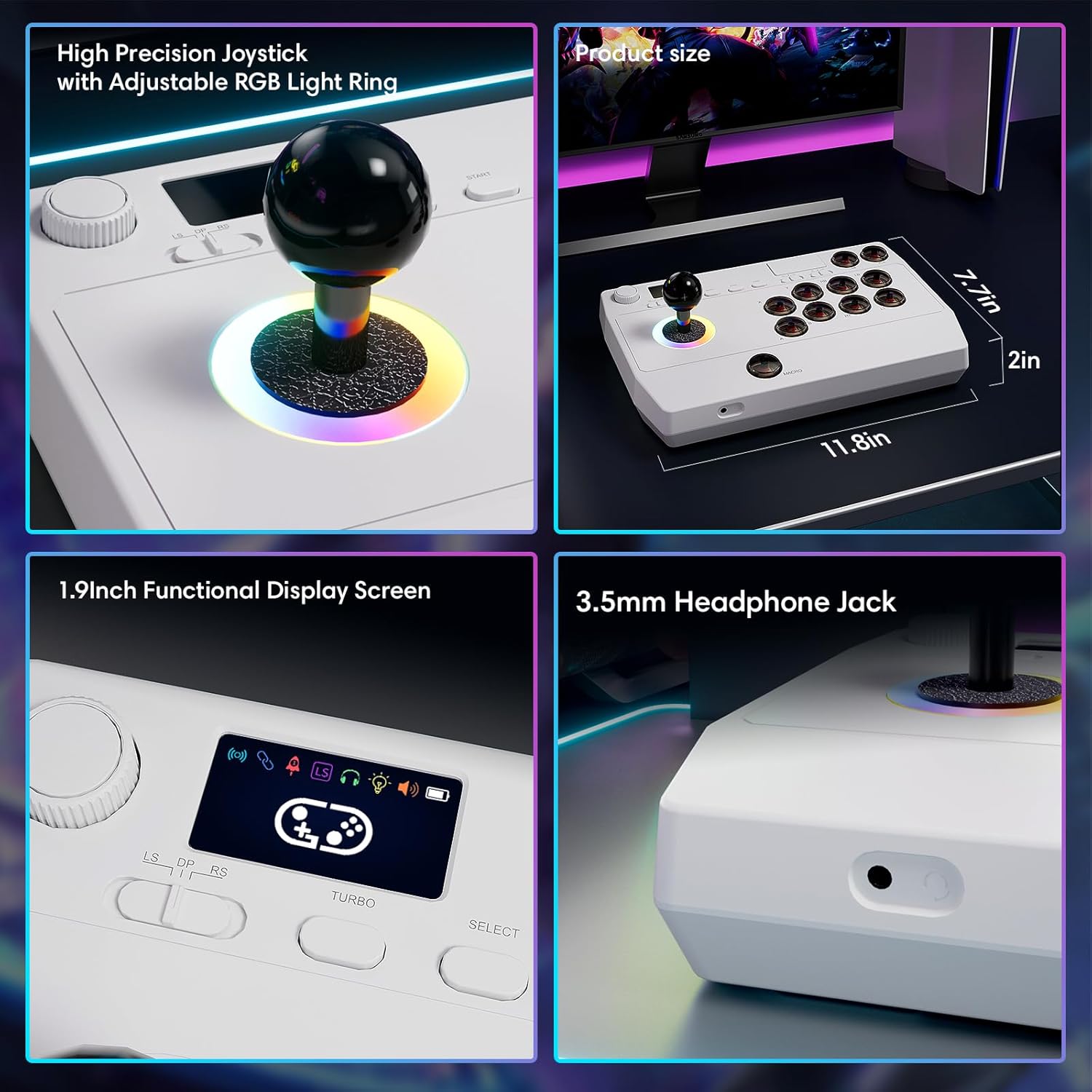
Gambar: Close-up views of the high-precision joystick with RGB lighting, the 1.9-inch functional display screen, and the 3.5mm headphone jack.
Pemeliharaan
- Jaga kebersihan perangkat dengan mengelapnya menggunakan kain lembut dan kering.
- Hindari memaparkan perangkat pada suhu ekstrem, kelembapan, atau sinar matahari langsung.
- Jangan mencoba membongkar perangkat, karena hal ini dapat membatalkan garansi.
- Store the 2.4GHz receiver in its designated compartment when not in use to prevent loss.
Penyelesaian Masalah
- Perangkat tidak menyala:
- Pastikan perangkat terisi penuh. Hubungkan ke sumber daya menggunakan kabel USB Tipe-C.
- Cannot connect wirelessly:
- For Bluetooth, ensure the device is in pairing mode and your host device's Bluetooth is enabled.
- For 2.4GHz, ensure the receiver is securely plugged into a USB port and the arcade stick is in 2.4GHz mode.
- Try restarting both the arcade stick and the host device.
- Buttons or joystick are unresponsive:
- Ensure the device is properly connected (wired or wireless).
- Test the device on a different game or platform to rule out software issues.
- Periksa apakah ada halangan fisik atau kerusakan pada tombol atau joystick.
- Audio issues with 3.5mm jack:
- Ensure headphones are fully plugged in.
- Check the volume settings on both the arcade stick's display and the host device.
- Test with a different pair of headphones.
Spesifikasi
| Nama Model | Tongkat Arcade |
| Merek | Saitake |
| Perangkat yang Kompatibel | Android, iOS, Nintendo Switch 1/2, PC, PlayStation 3/4 |
| Tipe Pengendali | Tongkat kendali |
| Teknologi Konektivitas | Bluetooth, USB (2.4GHz wireless, Wired Type-C) |
| Fitur Tambahan | Ergonomic, Headphone Jack, Portable, Wireless, 1.9-inch Display Screen, TURBO Function, Macro Function, RGB Lighting |
| Platform Perangkat Keras | Desktop, Gaming Console, Laptop, Smartphone, Tablet, Television |
| Sumber Daya | Battery Powered (Built-in 1000mAh Lithium Battery) |
| Dimensi Barang | 11.61x0.71x7.68 inci |
| Warna | Putih |
Garansi dan Dukungan
The Saitake Wireless Arcade Fight Stick Joystick comes with a Garansi 1 tahun sejak tanggal pembelian.
For technical support, troubleshooting assistance, or warranty claims, please contact Saitake customer service through their official webSitus web atau pengecer tempat produk tersebut dibeli. Harap siapkan bukti pembelian dan informasi model produk Anda.