
IKT IKTLYCZ629BBK
IKT Self-Cleaning Bottom Loading Water Cooler Dispenser with Ice Maker
Model: IKTLYCZ629BBK
Perkenalan
Thank you for choosing the IKT Self-Cleaning Bottom Loading Water Cooler Dispenser with Built-in Ice Maker. This manual provides important information for the safe operation, installation, maintenance, and troubleshooting of your appliance. Please read it thoroughly before use and retain it for future reference.
Informasi Keselamatan Penting
- Selalu letakkan dispenser di permukaan yang datar dan stabil.
- Pastikan ventilasi yang baik di sekitar unit.
- Jangan mengoperasikan dispenser dengan kabel atau steker listrik yang rusak.
- Keep children away from the hot water dispenser area due to the risk of burns. Utilize the child safety lock.
- Cabut unit sebelum membersihkan atau melakukan perawatan apa pun.
- Alat ini dirancang hanya untuk penggunaan di dalam ruangan.
Produk Selesaiview
The IKT water cooler dispenser provides hot, cold, and room temperature water, along with a built-in ice maker. It features a bottom-loading design for easy bottle replacement and a self-cleaning function for hygiene.

Gambar 1: Depan view of the IKT Water Cooler Dispenser.

Figure 2: Close-up of the control panel with indicator lights for ice making, child lock, lack of water, ON/OFF, ECO mode, hot water, fresh water, and cold water.
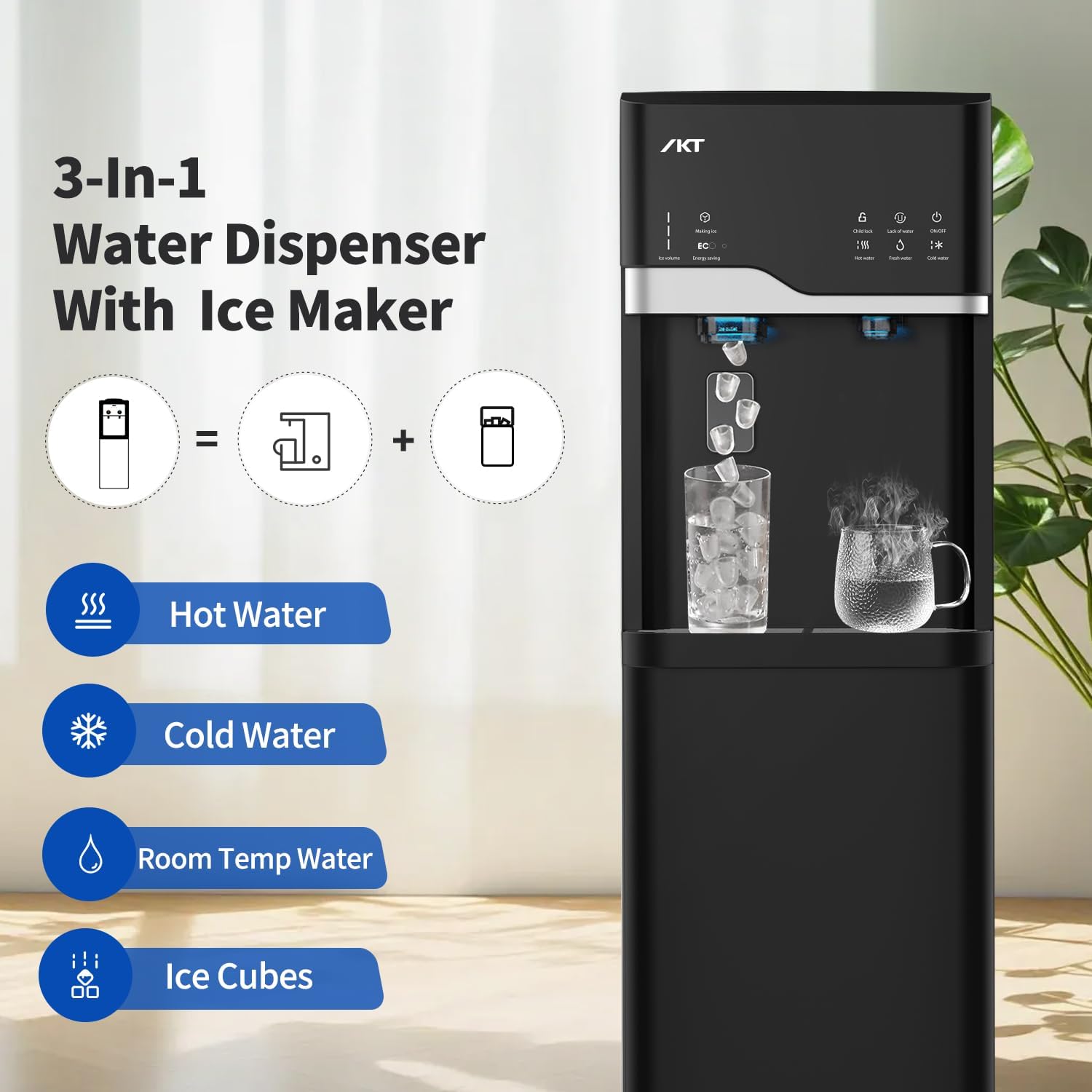
Figure 3: Illustration of the 3-in-1 functionality: Hot Water, Cold Water, Room Temperature Water, and Ice Cubes.
Pengaturan dan Instalasi
1. Membongkar
- Keluarkan dispenser dari kemasannya dengan hati-hati.
- Inspect the unit for any shipping damage. Contact your retailer if damage is found.
- Singkirkan semua bahan kemasan, termasuk selotip atau lapisan pelindung.
2. Penempatan
- Place the dispenser on a level, sturdy surface capable of supporting its weight when full.
- Ensure there is at least 4 inches (10 cm) of clearance from walls to allow for proper ventilation.
- Hindari sinar matahari langsung atau sumber panas.
- Do not place in an area where the temperature will drop below 50°F (10°C).

Figure 4: Product dimensions for placement reference: 16.54 inches (D) x 12.2 inches (W) x 40.75 inches (H).
3. Water Bottle Installation (Bottom Load)
- Buka pintu kabinet bawah.
- Lepaskan tutup dari botol air standar berukuran 3 atau 5 galon.
- Insert the probe from the dispenser into the water bottle opening. Ensure the probe is fully inserted.
- Geser botol air ke dalam lemari dan tutup pintunya.
- Hubungkan dispenser ke stopkontak listrik yang diarde.
- Allow approximately 15-20 minutes for the water tanks to fill and the water to reach desired temperatures before dispensing.

Figure 5: Illustration of a 5-gallon water bottle being placed into the bottom loading compartment.

Figure 6: Diagram showing the bottom loading mechanism and water being drawn upwards.
Petunjuk Pengoperasian
1. Membagi Air
- Air Dingin: Place your cup under the cold water spigot and press the cold water button/lever.
- Air Suhu Ruangan: Place your cup under the room temperature water spigot and press the room temperature water button/lever.
- Hot Water (with Child Safety Lock): To dispense hot water, first press and hold the child safety lock button, then press the hot water button/lever. Release the child safety lock button once hot water begins to flow.

Figure 7: The child safety lock feature, requiring a two-step process to dispense hot water.
2. Ice Making Function
- The dispenser has a built-in ice maker that produces bullet-shaped ice.
- Ice production starts automatically when the ice-making function is enabled.
- The unit can produce up to 22 lbs of ice daily and stores approximately 0.88 lbs.
- Catatan: This unit does not keep ice frozen. Ice will melt if not used, and the water will return to the reservoir for new ice production.

Figure 8: Details on ice production: 7 minutes per cycle, 9 pieces per cycle, 22 lbs daily capacity. Note that ice is not kept frozen.

Gambar 9: Internal view showing the ice making mechanism and the UV lamp in the cold water reservoir.
3. Energy Saving Mode (ECO Function)
- Press the "ECO" button on the control panel to activate the energy-saving mode.
- In ECO mode, the machine will stop heating water at night to conserve energy.

Figure 10: The dispenser operating in low light, demonstrating the illuminated dispensing area, which can be managed with the ECO mode.
Perawatan dan Pembersihan
1. Fungsi Pembersihan Diri
- To activate the self-cleaning function, press and hold the ice-making button for 3 seconds.
- The indicator light will blink, and the power light will remain on during the cleaning cycle.
- The machine will automatically shut off after approximately 10 minutes.
- Sebuah UV lamp is located in the cold water reservoir for enhanced sanitation.
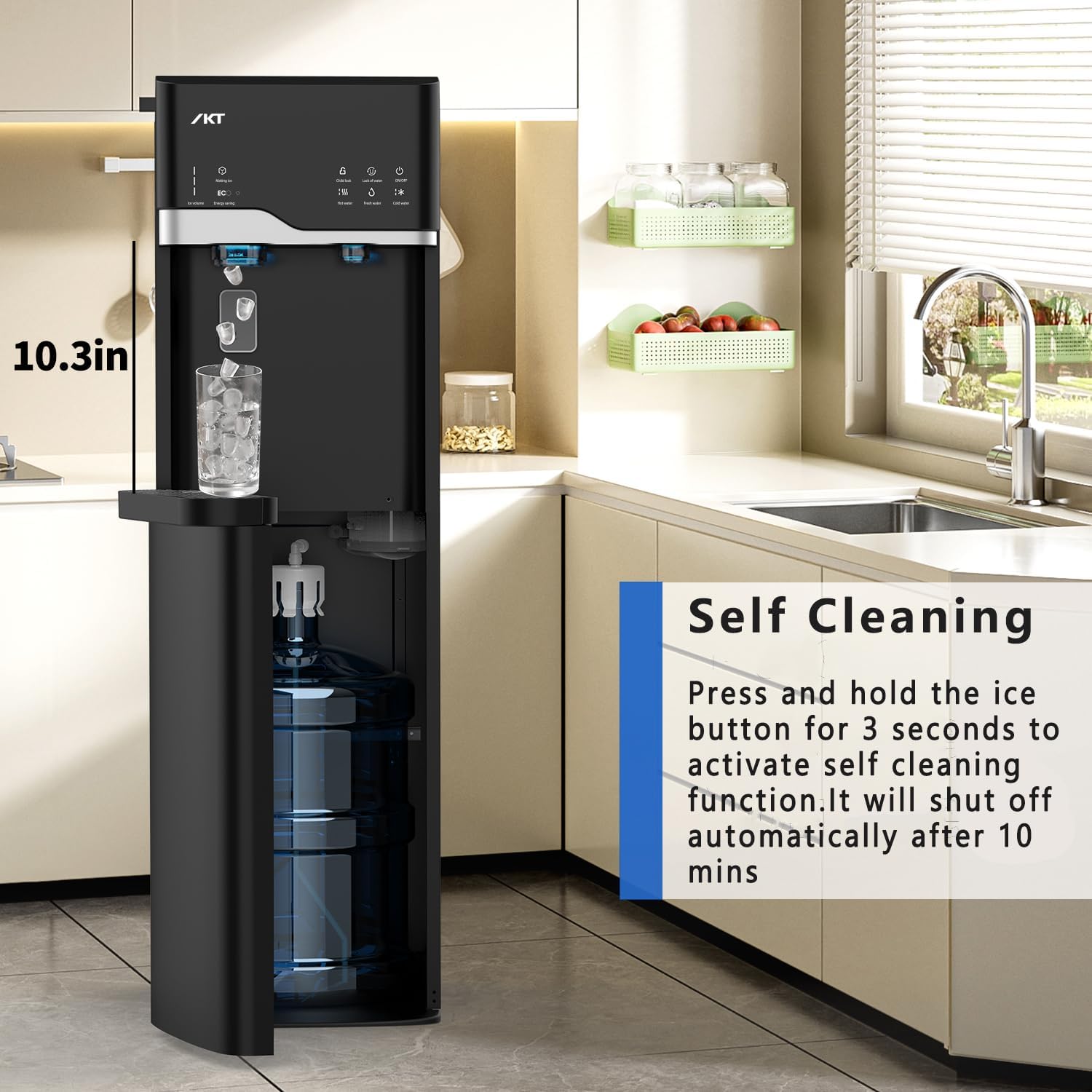
Figure 11: Instructions for activating the self-cleaning function by pressing the ice button for 3 seconds. The cycle lasts 10 minutes.

Figure 12: Diagram illustrating the UV-infused cleaning technology, which helps reduce contaminants and improve water taste.
2. Drip Tray Cleaning
- The removable drip tray should be emptied and cleaned regularly to prevent overflow and maintain hygiene.
- Simply slide out the tray, empty any accumulated water, wash with mild soap and water, rinse thoroughly, and replace.
Penyelesaian Masalah
| Masalah | Kemungkinan Penyebab | Larutan |
|---|---|---|
| No water dispensing (any temperature) | Botol air kosong atau tidak terpasang dengan benar. | Check the water bottle and ensure it is full and the probe is correctly inserted. Replace if empty. |
| Tidak ada air panas | Hot water switch off; child safety lock not engaged correctly. | Ensure the hot water heating function is on. Press and hold the child safety lock button before pressing the hot water button. |
| Tidak ada air dingin | Cold water switch off. | Ensure the cold water cooling function is on. |
| Pembuat es tidak memproduksi es | Lack of water; ice basket full; internal malfunction. | Check water level. Empty the ice basket if full. If problem persists, contact customer support. |
| Kebocoran air | Water bottle not sealed properly; drain plug loose. | Re-seat the water bottle. Check and tighten the drain plug at the back of the unit. |
Spesifikasi
| Fitur | Detil |
|---|---|
| Merek | IKT |
| Nomor Model | IKTLYCZ629BBK |
| Warna | Hitam |
| Bahan | Baja tahan karat |
| Dimensi Produk (P x L x T) | 16.5"Panjang x 12.2"Lebar x 40.7"T |
| Kapasitas Botol Air | Compatible with 3-5 Gallon Bottles |
| Kapasitas Pembuatan Es | Hingga 22 lbs per hari |
| Kapasitas Penyimpanan Es | 0.88 pon |
| Bentuk es | Berbentuk peluru |
| Jenis Instalasi | Freestanding |
| Sumber Daya | Listrik Kabel |
| Peringkat Suhu Atas | 95 Degrees Fahrenheit (for ambient operating conditions) |
| Fitur Khusus | Self-Cleaning, Child Safety Lock, Energy Saving Mode, UV Lamp in Cold Water Reservoir |
Video Instruksional
Produk Selesaiview dan Fitur
Video 1: Tinjauan komprehensifview of the IKT Water Cooler Dispenser, highlighting its key features and functions.
Ice Making Demonstration
Video 2: A demonstration of the built-in ice maker in operation, showing the production of bullet-shaped ice cubes.
Self-Cleaning Feature Guide
Video 3: A guide on how to activate and utilize the self-cleaning function of the water cooler dispenser.
Garansi dan Dukungan
For warranty information or technical support, please refer to the documentation included with your purchase or contact IKT customer service directly. Contact details are typically available on the manufacturer's official websitus atau melalui pengecer Anda.
Please have your model number (IKTLYCZ629BBK) and purchase date ready when contacting support.
Ask a question about this manual
Ask about setup, troubleshooting, compatibility, parts, safety, or missing instructions. Manuals+ will review the question and use this page’s manual context to help answer it.