
1. Pendahuluan
This manual provides essential information for the safe operation and maintenance of your HYTOBP H867 Drone. Please read this manual thoroughly before operating the drone to ensure proper usage and to prevent damage or injury. Keep this manual for future reference.
2. Pedoman Keselamatan
- Operasikan drone di area terbuka, jauh dari orang, hewan, bangunan, dan rintangan.
- Maintain a safe distance from the drone during flight.
- Jangan terbang di dekat bandara atau wilayah udara terlarang.
- Hindari terbang saat angin kencang, hujan, atau kondisi cuaca buruk lainnya.
- Pastikan baterai terisi penuh dan terpasang dengan benar sebelum setiap penerbangan.
- Periksa drone secara berkala untuk mengetahui adanya kerusakan pada baling-baling, motor, atau badan drone.
- Pengawasan orang dewasa disarankan untuk operator yang lebih muda.
3. Isi Paket
Verifikasi bahwa semua item ada dalam paket Anda:
- HYTOBP H867 Drone
- Pengendali Jarak Jauh
- Baterai Polimer Litium (termasuk 2 buah)
- Kabel Pengisian Daya USB
- baling baling cadangan
- Obeng
- Panduan Pengguna
4. Identifikasi Komponen
4.1 Komponen Drone

Figure 4.1: HYTOBP H867 Drone featuring its 4K HD camera with 120-degree field of view and 90-degree adjustable angle.
- Kamera 4K HD: Records high-resolution video and photos. Features a 120° FOV and 90° adjustable angle.
- Propeller: Provide lift and thrust for flight.
- Motor Tanpa Sikat: Efficient motors for high speed and longer lifespan.
- Sensor Aliran Optik: Assists with stable hovering and precise positioning.
- Kompartemen Baterai: Houses the drone's flight battery.
- Indikator LED: Display drone status and orientation.
4.2 Komponen Pengendali Jarak Jauh
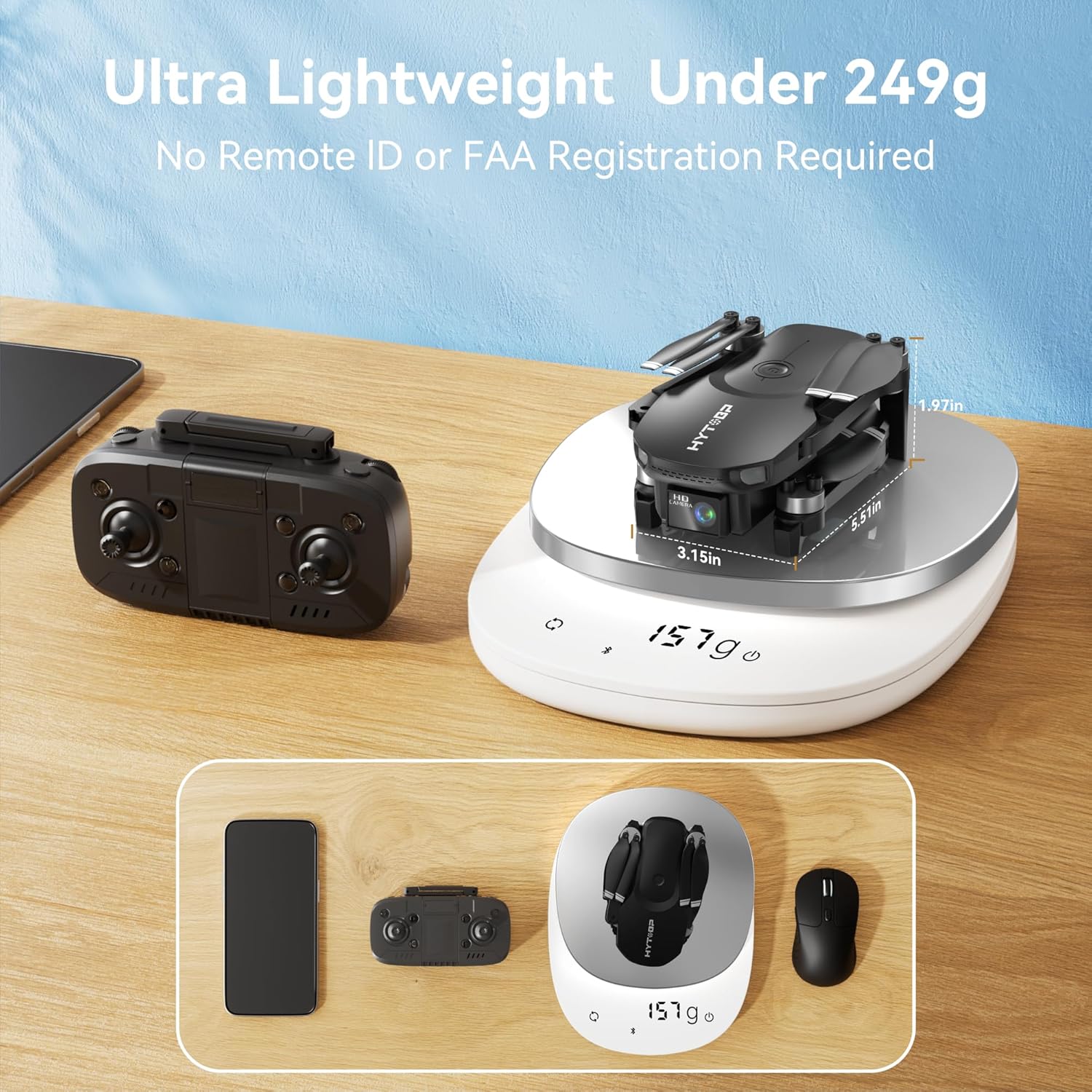
Figure 4.2: The HYTOBP H867 Drone and its remote controller, demonstrating the drone's lightweight design at 157g.
- Joystick kiri: Mengontrol ketinggian (throttle) dan yaw (rotasi).
- Joystik Kanan: Mengontrol gerakan maju/mundur dan kiri/kanan.
- Tombol Lepas Landas/Mendarat Satu Tombol: Memulai lepas landas atau pendaratan otomatis.
- Tombol Mode Kecepatan: Toggles between Low, Medium, and High speed settings.
- Tombol Mode Tanpa Kepala: Mengaktifkan mode penerbangan tanpa kepala.
- Tombol Foto/Video: Mengambil foto atau memulai/menghentikan perekaman video.
- Tombol Daya: Menghidupkan/mematikan remote kontrol.
5. Pengaturan
5.1 Pemasangan dan Pengisian Baterai
- Baterai Drone: Insert the fully charged Lithium Polymer battery into the drone's battery compartment until it clicks into place. Ensure the battery is securely fastened.
- Baterai Pengendali Jarak Jauh: Open the battery cover on the back of the remote controller and insert the required batteries (typically AA, refer to remote for specific type) with correct polarity. Close the cover.
- Pengisian daya: Use the provided USB charging cable to charge the drone batteries. Connect the cable to a USB power adapter (not included) and the battery. The indicator light will show charging status.

Figure 5.1: The HYTOBP H867 Drone includes two batteries, each providing approximately 18 minutes of flight time.
5.2 Pemasangan Baling-Baling
Jika baling-baling tidak terpasang sebelumnya atau perlu diganti:
- Identify the 'A' and 'B' marked propellers and match them to the corresponding motor arms (usually marked 'A' or 'B' near the motor).
- Place the propeller onto the motor shaft and secure it with the provided screws using the screwdriver. Ensure propellers are firmly attached but not overtightened.
5.3 Memasangkan Drone dan Pengontrol Jarak Jauh
- Tempatkan drone di permukaan yang rata dan rata.
- Nyalakan sakelar daya drone. Lampu LED drone akan berkedip.
- Nyalakan remote kontrol. Lampu indikator pada remote akan berkedip.
- Push the left joystick (throttle) fully up, then fully down. The drone and remote indicator lights will become solid, indicating successful pairing.
5.4 Pre-Flight Calibration
After pairing, perform gyroscope calibration:
- Tempatkan drone di permukaan yang rata.
- Push both joysticks down and to the right simultaneously for a few seconds. The drone's lights will flash rapidly and then become solid, indicating calibration is complete.
6. Petunjuk Pengoperasian
6.1 Lepas landas dan Mendarat
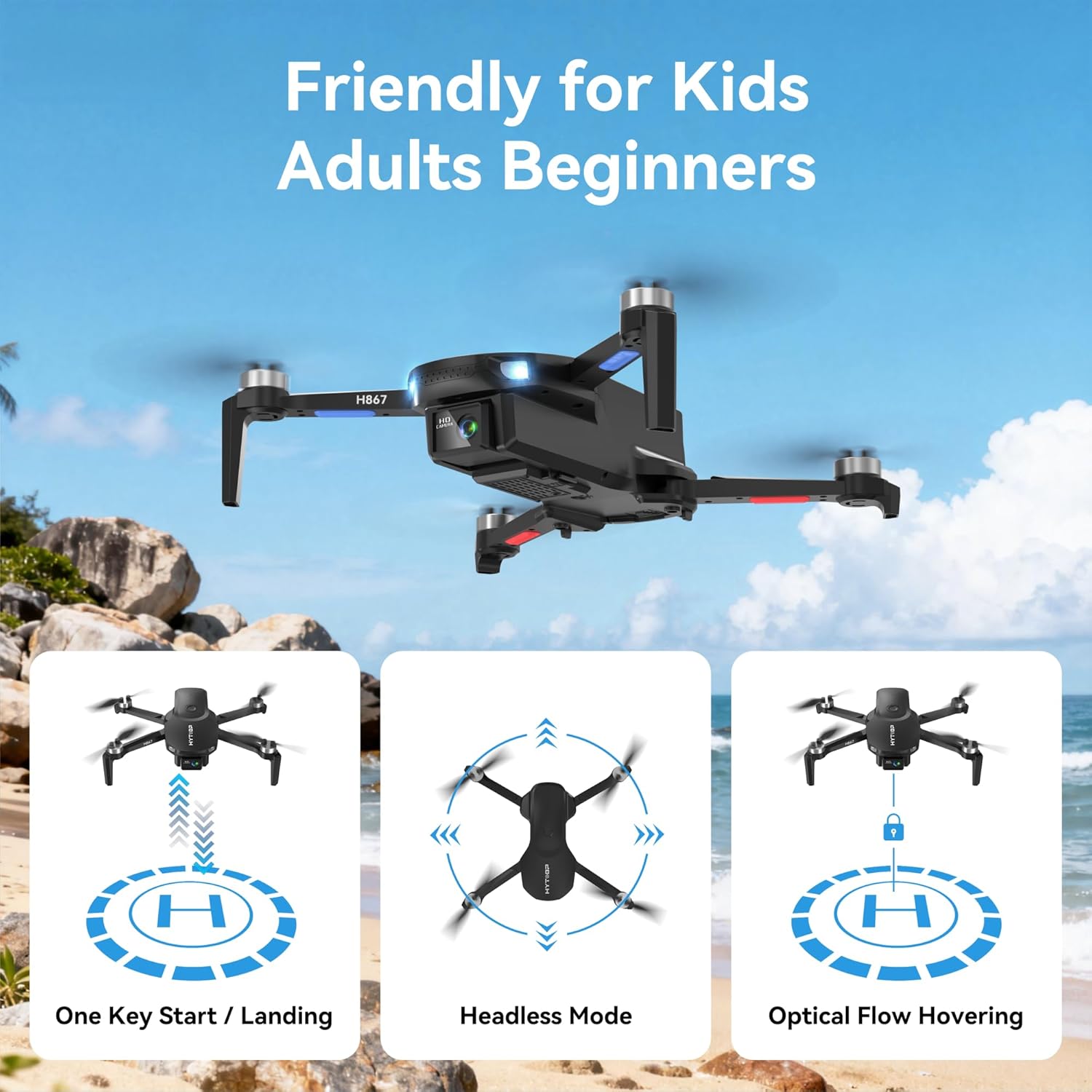
Figure 6.1: The HYTOBP H867 Drone offers user-friendly features like One Key Start/Landing, Headless Mode, and Optical Flow Hovering.
- Lepas Landas dengan Satu Tombol: Press the One-Key Take-off/Landing button. The drone will automatically ascend to a stable hovering altitude.
- Lepas Landas Manual: After calibration, push both joysticks down and outwards to unlock the motors. Slowly push the left joystick (throttle) up to ascend.
- Pendaratan Satu Kunci: Tekan kembali tombol Lepas Landas/Mendarat Sekali Tekan. Drone akan secara otomatis turun dan mendarat.
- Pemberhentian darurat: In an emergency, press and hold the One-Key Take-off/Landing button for a few seconds to stop the motors.
6.2 Kontrol Penerbangan
- Joystick Kiri (Gas/Yaw):
- Push up/down: Ascend/Descend.
- Push left/right: Rotate left/right (Yaw).
- Right Joystick (Forward/Backward/Sideways):
- Push up/down: Fly forward/backward.
- Push left/right: Fly left/right (Strafe).
6.3 Mode Kecepatan

Figure 6.2: The HYTOBP H867 Drone features three adjustable speed modes: Low, Medium, and High, for varied flight experiences.
Press the Speed Mode button on the remote controller to cycle through Low, Medium, and High speed settings. Low speed is recommended for beginners, while High speed offers more agile flight for experienced pilots.
6.4 Mode Tanpa Kepala
Activate Headless Mode by pressing its dedicated button. In this mode, the drone's orientation is relative to the pilot, regardless of the drone's front direction. This simplifies control for beginners.
6.5 Optical Flow Hovering

Figure 6.3: The HYTOBP H867 Drone utilizes upgraded optical flow technology for stable hovering and user-friendly control, alongside One-key Start/Land and Gesture Selfie functions.
The drone uses an optical flow sensor to maintain a stable hover at a fixed altitude and position, especially useful for indoor flight or when GPS signal is weak.
6.6 Special Flight Features
- Putaran 360°: While flying, press the 360° Flip button (if available on remote) and then push the right joystick in the desired direction to perform a flip. Ensure sufficient altitude.
- Gesture Selfie: The drone supports gesture recognition for taking photos or videos. Refer to the specific gestures in the quick start guide or app instructions.
- Penerbangan Orbit: The drone can orbit around a designated point or subject. This feature is typically controlled via the companion mobile application.

Figure 6.4: The HYTOBP H867 Drone is capable of performing an 'Orbit Around the Flight' function, circling a point of interest.
6.7 Operasi Kamera
The HYTOBP H867 is equipped with a 4K HD camera. Connect your smartphone to the drone's Wi-Fi network and use the dedicated app to view hidup footage, capture photos, and record videos. The camera angle can be adjusted by 90 degrees for optimal shots.
7. Pemeliharaan
- Pembersihan: Gunakan kain lembut dan kering untuk membersihkan bodi drone dan lensa kamera. Hindari penggunaan bahan kimia keras.
- Penggantian Baling-Baling: If propellers are damaged, replace them immediately with new ones, ensuring correct 'A' and 'B' propeller placement.
- Perawatan Baterai: Store batteries in a cool, dry place. Do not overcharge or over-discharge. If storing for extended periods, charge to approximately 50% capacity.
- Penyimpanan: Store the drone and remote controller in a safe place, away from direct sunlight and extreme temperatures.
8. Penyelesaian masalah
| Masalah | Kemungkinan Penyebab | Larutan |
|---|---|---|
| Drone tidak merespon remote. | Tidak terhubung; baterai lemah; di luar jangkauan. | Re-pair drone and remote; charge batteries; fly within range. |
| Drone melayang selama penerbangan. | Not calibrated; uneven surface at take-off; strong wind. | Perform gyroscope calibration; take off from a flat surface; avoid flying in strong winds. |
| Propellers do not spin. | Motors locked; low battery; damaged motor/propeller. | Unlock motors (joysticks down and out); charge battery; inspect and replace damaged parts. |
| Kamera tidak berfungsi. | Not connected to Wi-Fi; app issue. | Ensure phone is connected to drone's Wi-Fi; restart app and drone. |
9. Spesifikasi
- Model: H867
- Merek: HITOBP
- Ukuran: Ukuran 20x12.5x15.5 cm
- Berat: 157 gram
- Resolusi Kamera: 4K HD (8.29 MP effective still image resolution)
- Bidang View (FOV): 120°
- Penyesuaian Kamera: 90° (manual/app controlled)
- Motor: Tanpa sikat
- Mode Penerbangan: 3 Speed Modes (Low, Medium, High), Headless Mode, Optical Flow Hovering, Orbit Flight
- Jenis Baterai: Polimer Litium (2 termasuk)
- Kontrol Jarak Jauh: Termasuk

Figure 9.1: The HYTOBP H867 Drone is equipped with upgraded brushless motors for enhanced performance and durability.
10. Garansi dan Dukungan
For warranty information and technical support, please refer to the contact details provided on the product packaging or the official HYTOBP websitus. Simpan struk pembelian Anda sebagai bukti pembelian untuk klaim garansi apa pun.