
1. Pendahuluan
Terima kasih sudah membeliasing the ULTIMEA Aura A60 U2621 7.1ch Dolby Atmos Soundbar System. This manual provides essential information for setting up, operating, and maintaining your new sound system. Please read this manual thoroughly before use to ensure proper functionality and to maximize your audio experience.

Figure 1.1: Immersive audio experience with the ULTIMEA Aura A60 system.
2. Informasi Keselamatan
To reduce the risk of electric shock, fire, or damage to your device, please observe the following safety precautions:
- Jangan biarkan alat ini terkena hujan atau lembab.
- Jangan menaruh benda berisi cairan seperti vas bunga di atas peralatan ini.
- Pastikan ventilasi yang baik. Jangan halangi lubang ventilasi apa pun.
- Jangan memasang di dekat sumber panas seperti radiator, pemanas, kompor, atau peralatan lainnya (termasuk amppengangkat) yang menghasilkan panas.
- Lindungi kabel daya agar tidak terinjak atau terjepit, terutama pada bagian steker, stopkontak, dan titik keluarnya kabel dari peralatan.
- Gunakan hanya perlengkapan/aksesoris yang ditentukan oleh produsen.
- Cabut peralatan ini saat terjadi badai petir atau bila tidak digunakan dalam waktu lama.
- Serahkan semua servis kepada teknisi servis yang berkualifikasi.
3. Isi Paket
Harap periksa apakah semua barang ada dan dalam kondisi baik:
- ULTIMEA Aura A60 Soundbar
- Wireless Subwoofer (4-inch, BassMX Technology)
- 4 x Surround Speakers (2 front, 2 rear)
- Kontrol Jarak Jauh
- Kabel HDMI
- Power Adapter/Cables
- User Manual (dokumen ini)
4. Produk Lebihview
The ULTIMEA Aura A60 U2621 is a 7.1ch Dolby Atmos soundbar system designed to deliver an immersive home theater audio experience. It features a main soundbar unit, a powerful wireless subwoofer with BassMX technology, and four surround speakers.
4.1 Main Soundbar Unit
The main soundbar unit houses 3 main channels for clear dialogue and primary audio. It serves as the central hub for all audio connections.

Figure 4.1: Main soundbar unit with front surround speakers.
4.2 Subwoofer Nirkabel
The dedicated 4-inch wireless subwoofer incorporates BassMX technology to enhance low frequencies, providing deep and resonant bass for a more impactful audio experience.

Figure 4.2: Wireless subwoofer with BassMX technology.
4.3 Pengeras Suara Sekitar
The system includes four surround speakers: two front and two rear. The rear speakers connect wirelessly to the soundbar, minimizing cable clutter and allowing flexible placement to create an expansive acoustic space.

Figure 4.3: Diagram of 7.1ch sound distribution.
4.4 Port Input/Output
The soundbar features multiple input options for versatile connectivity:
- HDMI eARC: For high-quality audio transmission and seamless TV integration.
- Optik: Input audio digital.
- AUX: Masukan audio analog.
- Kabel USB: Untuk pemutaran media.
- Bluetooth dapat digunakan untuk berbagai keperluan, seperti: Streaming audio nirkabel.

Figure 4.4: Rear panel connections, including HDMI eARC.
5. Pengaturan
5.1 Penempatan Fisik
Penempatan komponen sistem suara Anda secara optimal sangat penting untuk pengalaman audio terbaik.
- Bilah suara: Letakkan soundbar tepat di tengah, di bawah televisi Anda. Pastikan soundbar tidak terhalang.
- subwoofer: Position the wireless subwoofer on the floor near the soundbar. Experiment with placement to find the best bass response for your room.
- Front Surround Speakers: Place the two wired front surround speakers to the left and right of your TV, ideally at ear level when seated.
- Speaker Keliling Belakang: Position the two wireless rear surround speakers behind your primary listening position, to the left and right. These speakers will automatically connect wirelessly to the soundbar once powered on.

Figure 5.1: Recommended speaker placement for Dolby Atmos.
5.2 Koneksi
Ikuti langkah-langkah berikut untuk menghubungkan sistem soundbar Anda:
- Sambungan Daya: Connect the power cables to the soundbar, subwoofer, and surround speakers, then plug them into a power outlet.
- HDMI eARC (Disarankan): Connect one end of the provided HDMI cable to the HDMI eARC port on your soundbar and the other end to the HDMI eARC/ARC port on your TV. This connection supports Dolby Atmos and allows for TV remote control of the soundbar.
- Koneksi Optik (Alternatif): If your TV does not have an HDMI eARC/ARC port, connect an optical cable (not included) from your TV's optical output to the OPTICAL input on the soundbar.
- AUX Connection (Alternative): For analog audio sources, connect a 3.5mm AUX cable (not included) from your device's audio output to the AUX input on the soundbar.
- Koneksi USB: Insert a USB drive into the USB port on the soundbar for direct media playback.
- Pemasangan Bluetooth: To connect a Bluetooth device, select the Bluetooth input on the soundbar. On your device, search for 'ULTIMEA Aura A60' and pair.
6. Petunjuk Pengoperasian
6.1 Daya Hidup/Mati
Tekan tombol daya pada soundbar atau remote control untuk menghidupkan atau mematikan sistem.
6.2 Pilihan Masukan
Use the 'Input' button on the remote control or the soundbar to cycle through available input sources: HDMI eARC, Optical, AUX, USB, and Bluetooth.

Figure 6.1: Remote control for easy operation.
6.3 Kontrol Volume
Adjust the master volume using the 'Volume Up' and 'Volume Down' buttons on the remote control or the soundbar. You can also adjust subwoofer and surround speaker levels independently.
6.4 Sound Modes and EQ Presets
The Aura A60 offers various sound modes and EQ presets to optimize audio for different content and preferences.
- Dedicated Modes: Select from 6 specialized modes: Movie, Music, Voice, Sports, Game, and Night.
- Preset EQ: Access 121 professional EQ presets for genres like Bass, Pop, Classical, and Rock via the ULTIMEA app.

Figure 6.2: 121 preset EQ matrix for customized audio.
6.5 Kontrol Aplikasi
Download the ULTIMEA app to your smartphone for advanced control and customization options, including a 10-band EQ and access to all EQ presets.
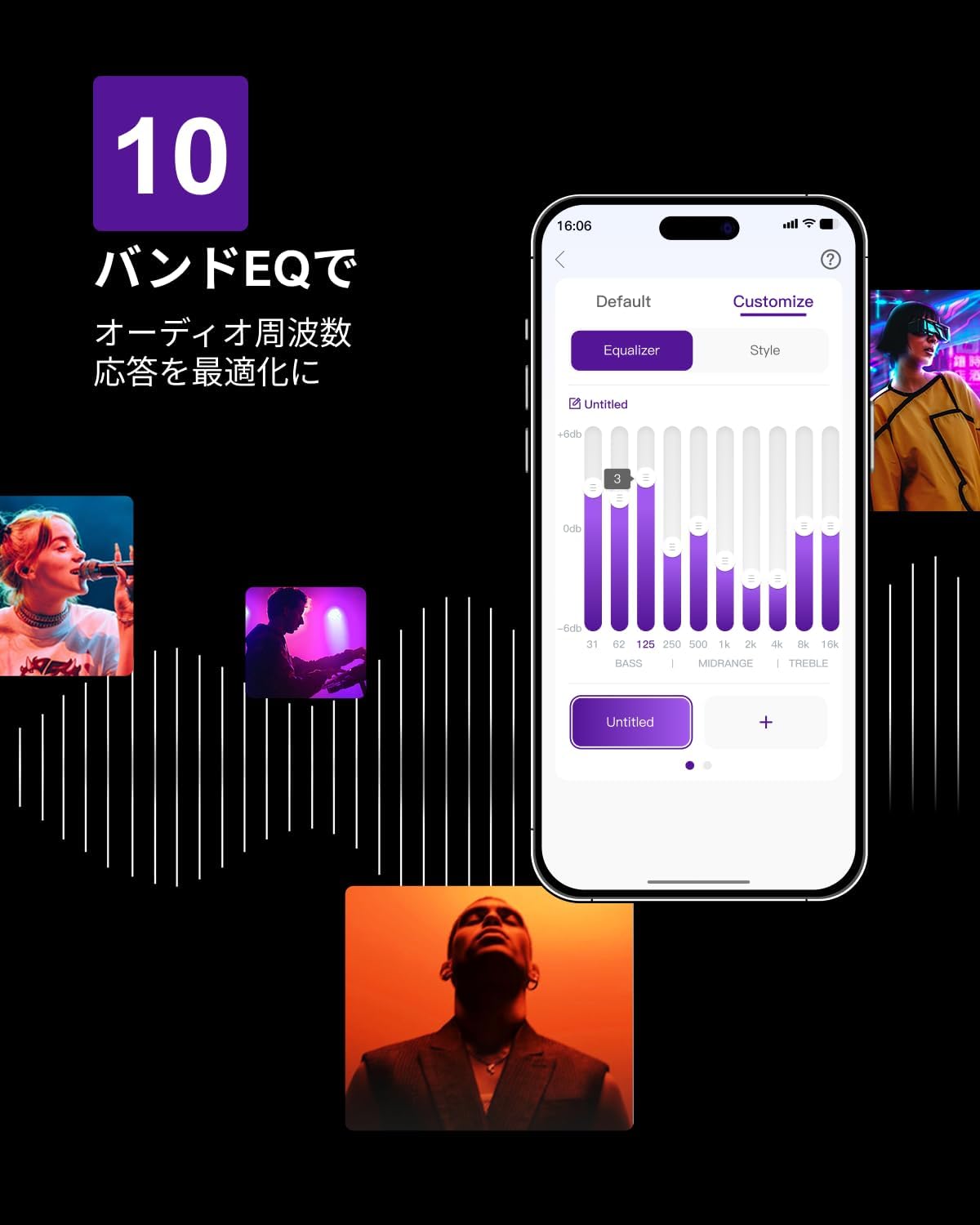
Figure 6.3: ULTIMEA mobile application interface.
7. Pemeliharaan
To ensure the longevity and optimal performance of your ULTIMEA Aura A60 soundbar system, follow these simple maintenance guidelines:
- Pembersihan: Use a soft, dry cloth to wipe the surfaces of the soundbar, subwoofer, and speakers. Do not use liquid cleaners or abrasive materials, as they may damage the finish.
- Ventilasi: Pastikan semua lubang ventilasi tetap bersih dan tidak terhalang untuk mencegah panas berlebih.
- Penyimpanan: Jika menyimpan sistem untuk jangka waktu lama, lepaskan dari listrik dan simpan di tempat yang sejuk dan kering, jauhkan dari sinar matahari langsung dan suhu ekstrem.
8. Penyelesaian masalah
Jika Anda mengalami masalah dengan sistem soundbar Anda, lihat masalah dan solusi umum berikut:
| Masalah | Kemungkinan Penyebab | Larutan |
|---|---|---|
| Tidak ada suara dari soundbar. | Input yang dipilih salah, volume terlalu rendah, kabel tidak tersambung dengan benar. | Verify the correct input source. Increase volume. Check all cable connections (HDMI, Optical, AUX). Ensure the soundbar is powered on. |
| Tidak ada suara dari subwoofer/speaker surround. | Subwoofer/speakers not paired or powered on, volume too low. | Ensure subwoofer and surround speakers are powered on. They should automatically pair. If not, refer to the pairing instructions in the full manual (if available) or contact support. Increase their individual volume levels. |
| Kualitas suara terdistorsi atau buruk. | Incorrect audio settings, poor source quality, interference. | Adjust EQ settings or try different sound modes. Ensure the audio source is high quality. Check for nearby electronic devices causing interference. |
| Masalah koneksi Bluetooth. | Device out of range, not in pairing mode, interference. | Ensure the soundbar is in Bluetooth pairing mode. Move your device closer to the soundbar. Disconnect and re-pair the device. |
Jika masalah berlanjut setelah mencoba solusi ini, silakan hubungi dukungan pelanggan ULTIMEA.
9. Spesifikasi
| Fitur | Detil |
|---|---|
| Merek | ULTIME |
| Nama Model | Aura A60 |
| Nomor Model | U2621 |
| Jenis Pembicara | Soundbar with 7.1ch Surround Sound |
| Teknologi Audio | Dolby Atmos, BassMX Technology |
| Konektivitas | HDMI eARC, Bluetooth, Optical, AUX, USB |
| Subwoofer | 4-inch Wired Subwoofer (integrated BassMX) |
| Speaker Sekitar | 4 (2 wired front, 2 wireless rear) |
| Kontrol | Remote Control, ULTIMEA App |
| Warna | Hitam |
| Dimensi (P x L x T) | 9 cm x 40 cm x 7 cm (Soundbar, approximate) |
| Negara Asal | Cina |
10. Garansi dan Dukungan
ULTIMEA is committed to providing high-quality products and customer satisfaction. Your Aura A60 U2621 soundbar system comes with comprehensive support.
10.1 Informasi Garansi
Specific warranty details may vary by region. Please refer to the warranty card included with your product or visit the official ULTIMEA webKunjungi situs ini untuk melihat syarat dan ketentuan garansi terbaru.
10.2 Dukungan Pelanggan
For any questions, technical assistance, or troubleshooting not covered in this manual, please contact our dedicated support team:
- 365-Day Support: Our expert staff is available year-round to assist you.
- Obrolan Langsung: Instant responses are available via live chat on our weblokasi.
- Pengembalian: We offer a 30-day return policy with free shipping for your peace of mind.

365-Day Expert Support

Instant Live Chat

Pengembalian Gratis 30 Hari
Untuk bantuan lebih lanjut, silakan kunjungi ULTIMEA Brand Store.


