
1. Pendahuluan
Welcome to the user manual for your new OPPO Reno15 F 5G Smartphone. This guide provides essential information on setting up, operating, maintaining, and troubleshooting your device. Please read it carefully to ensure optimal performance and longevity of your smartphone.
The OPPO Reno15 F 5G combines advanced camera capabilities, long-lasting battery life, and robust performance in a sleek design. Key features include a 50MP ultra-wide selfie camera, AI Portrait Glow, a 6500mAh battery with 80W SUPERVOOC charging, a 6.57-inch 120Hz AMOLED display, and IP69 water and dust resistance.
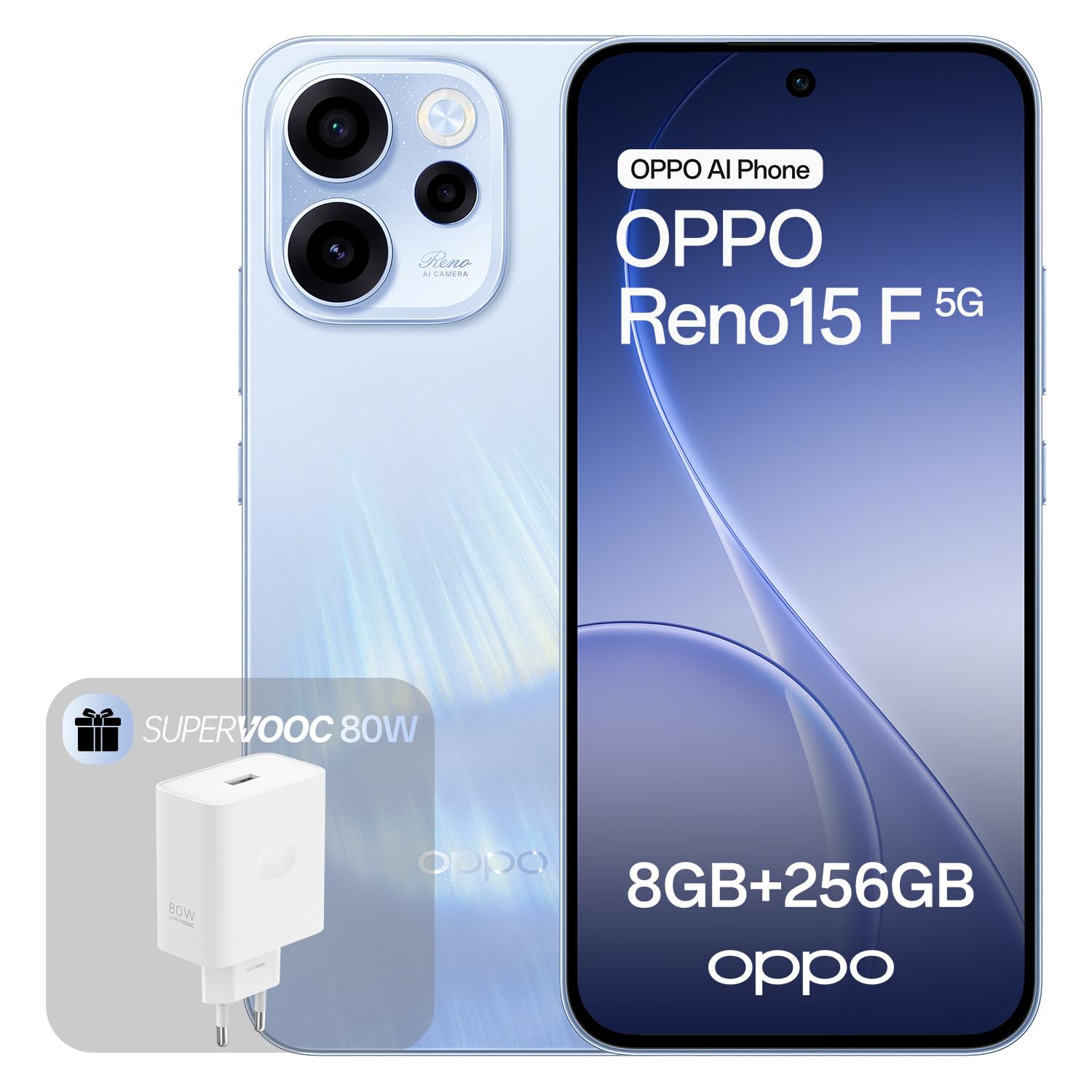
Image: OPPO Reno15 F 5G Smartphone in Aurora Blue.
2. Pengaturan
2.1. Apa yang ada di dalam kotak
- Ponsel pintar OPPO Reno15 F 5G
- Pengisi Daya SUPERVOOC 80W
- Kabel USB
- Alat Ejektor SIM (mungkin berbeda berdasarkan wilayah)
- Panduan Memulai Cepat (dokumen ini)
- Informasi Keselamatan
2.2. Memasukkan Kartu SIM dan Menyalakan Daya
- Temukan tempat kartu SIM di sisi perangkat Anda.
- Masukkan alat pelepas SIM ke dalam lubang kecil di sebelah baki dan tekan perlahan hingga baki keluar.
- Place your nano-SIM card(s) into the tray with the gold contacts facing down. This device supports eSIM functionality.
- Masukkan kembali baki ke dalam telepon dengan hati-hati.
- Tekan dan tahan tombol daya (biasanya di sisi kanan) hingga logo OPPO muncul.
- Follow the on-screen instructions to complete the initial setup, including connecting to Wi-Fi, setting up your Google account, and configuring security features.
2.3. Pengisian Awal
Before first use, it is recommended to fully charge your device. Use the included 80W SUPERVOOC charger and USB cable for fast charging. Connect the USB cable to the phone's USB-C port and the charger to a power outlet.

Image: Illustration of the OPPO Reno15 F 5G's 80W SUPERVOOC charging capability and 6500mAh battery.
3. Mengoperasikan Ponsel Pintar Anda
3.1. Fitur Kamera
Your OPPO Reno15 F 5G is equipped with a versatile camera system designed to capture stunning photos and videos.
- 50MP Ultra-Wide Selfie Camera: Capture group selfies and expansive landscapes with a 100° Field of View (FOV).
- AI Portrait Glow: This feature intelligently applies professional lighting effects (Flash, Backlight, Natural Light) to create studio-quality portraits with natural skin tones in various conditions.
- Sistem Kamera Belakang: Features a 50MP Ultra-Clear Main Camera, an Ultra-Wide Camera, and a Macro Camera for diverse photographic needs.
- AI Flash Photography: Enhances night shots, ensuring subjects are well-lit and vibrant.
- Penghapus AI: Remove unwanted objects or passersby from your photos, even in dynamic shots.

Image: Close-up of the OPPO Reno15 F 5G's rear camera module, highlighting the 50MP main, ultra-wide, and macro lenses.

Image: Demonstration of AI Portrait Glow, showing before and after effects of natural light enhancement on a portrait.
3.2. Baterai dan Pengisian Daya
The device is equipped with a large 6500mAh battery, providing extended usage times. With typical use, it can last up to 2.4 days, or over 11 hours of gaming.
The 80W SUPERVOOC flash charging technology allows you to charge your phone from 1% to 100% in approximately 59 minutes. A few minutes of charging can provide hours of entertainment.
3.3. Tampilan
Experience perfect fluidity and absolute clarity on the 6.57-inch 120Hz AMOLED display. It offers a resolution of 1080x2400 pixels and supports 1.07 billion colors, providing a vibrant and immersive visual experience.

Image: Illustration of the OPPO Reno15 F 5G's 120Hz Smart Adaptive Display, highlighting its fluidity and clarity.
3.4. Kinerja dan Perangkat Lunak
The OPPO Reno15 F 5G runs on ColorOS 16, designed for long-lasting fluidity. The All-New Trinity Engine with AI optimizes performance, ensuring a consistently smooth and responsive experience for years.
- Prosesor: Powered by the Snapdragon 6 Gen 1 chip, optimized for intensive gaming.
- AI HyperBoost 2.0: Enables up to 10 hours of stable, high-frame-rate MOBA gaming.
- AI LinkBoost 3.0: Accelerates the AI Gaming antenna system, provides AI Super Wi-Fi Booster for improved connectivity in crowded spaces, and an AI Network Booster to prioritize data during team fights, reducing lag.
- O+ Connect: Facilitates seamless sharing of photos and videos with other devices.
- Fitur AI: Includes real-time AI translation for travel, AI call translator, instant lost phone locking, and a private processing cloud to protect your data.

Image: Screenshot of the ColorOS 16 interface, demonstrating its smart and smooth operation.

Image: Illustration of the Snapdragon 6 Gen 1 Mobile Platform, emphasizing its fluidity and power.
4. Pemeliharaan
4.1. Ketahanan terhadap Air dan Debu (IP69)
The OPPO Reno15 F 5G is certified with an IP69 rating, providing maximum protection against dust, high-pressure water jets, and temporary immersion. This means the device is designed to withstand harsh environmental conditions.
Catatan Penting:
- IP69 rating is not a permanent condition and resistance might decrease as a result of normal wear.
- Do not charge a wet device. Refer to the safety information for detailed instructions.
- Damage caused by liquids is not covered under warranty if the device has been tampered with or exposed to conditions beyond the IP69 rating.

Image: Illustration of the OPPO Reno15 F 5G highlighting its IP69 water and dust resistance.
4.2. Membersihkan Perangkat Anda
To clean your smartphone, use a soft, lint-free cloth. Avoid using abrasive materials, alcohol, or chemical cleaners, as these can damage the screen or finish. If necessary, slightly dampen kain dengan air.
5. Penyelesaian masalah
If you encounter issues with your OPPO Reno15 F 5G, try the following basic troubleshooting steps:
- Perangkat Tidak Responsif: Tekan dan tahan tombol Daya selama sekitar 10 detik untuk memaksa memulai ulang.
- Baterai Terkuras dengan Cepat: Check background app usage in Settings > Battery. Reduce screen brightness and disable unnecessary features like GPS or Bluetooth when not in use.
- Aplikasi mogok: Bersihkan cache aplikasi yang bermasalah (Pengaturan > Aplikasi > [Nama Aplikasi] > Penyimpanan > Bersihkan Cache). Jika masalah masih berlanjut, coba instal ulang aplikasi tersebut.
- Connectivity Issues (Wi-Fi/Mobile Data): Toggle Wi-Fi or mobile data off and on. Restart your router for Wi-Fi issues. Ensure your SIM card is properly inserted and your mobile plan is active.
- Kinerja Lambat: Close unused apps, clear system cache, or consider a factory reset (back up your data first).
For more complex issues, please refer to the official OPPO support websitus atau hubungi layanan pelanggan.
6. Spesifikasi
| Fitur | Spesifikasi |
|---|---|
| Merek | OPPO |
| Nama Model | Reno15 F 5G |
| Sistem Operasi | Android with ColorOS 16 |
| Ukuran Memori RAM | 8 GB |
| Model CPU | Snapdragon |
| Kecepatan CPU | 2.4 GHz |
| Kapasitas Penyimpanan | 256 GB |
| Ukuran Layar | 6.57 inci |
| Resolusi | Ukuran 1080x2400 |
| Tingkat Penyegaran | 120Hz |
| Warna | Aurora Biru |
| Slot Kartu SIM | Single SIM (eSIM supported) |
| Masukan | USB Tipe C |
| Identifikasi Biometrik | Pengenalan Wajah |
| Tingkat Tahan Air | IP69 (Tahan Air) |
| Soket Headphone | No 3.5mm connector |
| Max Supported Flash Memory | 256 GB |
| Resolusi Kamera Depan | 50 MP |
| Kapasitas Baterai | 6500 mAh |
| Resolusi Pengambilan Video | 4K |
| Teknologi Seluler | 5G |
| Wireless Provider | Tidak terkunci |
| Daya Tahan Baterai Rata-rata | 2.4 Hari |
| Waktu Bicara | 24 Jam |
6.1. Informasi Label Energi

Image: EU Energy Label for OPPO CPH2801 (Reno15 F 5G).
Untuk informasi energi yang lebih rinci, kunjungi Basis data EPREL.
7. Garansi dan Dukungan
7.1. Informasi Garansi
Your OPPO Reno15 F 5G Smartphone comes with a standard manufacturer's warranty. Please refer to the warranty card included in your product packaging for specific terms and conditions, including warranty duration and coverage details. Keep your proof of purchase for warranty claims.
7.2. Dukungan Pelanggan
For further assistance, technical support, or service inquiries, please visit the official OPPO support weblokasi:
- Dukungan OPPO Weblokasi: dukungan.oppo.com
You can also find the Data Transparency Statement in PDF format Di Sini.


