
Aspiron AS-GH002
Aspiron 16-inch Artificial Turf Vacuum (Model AS-GH002) User Manual
Model: AS-GH002 | Brand: Aspiron
1. Pendahuluan
This manual provides essential instructions for the safe operation, assembly, maintenance, and troubleshooting of your Aspiron 16-inch Artificial Turf Vacuum, Model AS-GH002. Please read this manual thoroughly before using the product to ensure proper function and safety.
2. Informasi Keselamatan
Selalu ikuti tindakan pencegahan keselamatan dasar untuk mengurangi risiko kebakaran, sengatan listrik, dan cedera pribadi. Simpan manual ini untuk referensi di masa mendatang.
Pedoman Keselamatan Umum:
- Ensure the power cord is in good condition and properly connected.
- Jauhkan anak-anak dan hewan peliharaan dari area operasi.
- Kenakan perlengkapan keselamatan yang sesuai, termasuk pelindung mata dan alas kaki yang kokoh.
- Do not operate the vacuum in wet conditions or rain.
- Always unplug the unit before performing any maintenance or cleaning.
- The unit features a two-switch safety mechanism to prevent accidental starts. Both the red button and the orange lever must be engaged to operate.
3. Produk Lebihview
The Aspiron AS-GH002 is an electric artificial turf vacuum designed for efficient cleaning and grooming of artificial grass and lawns. It features a powerful 1800W (15 Amp) motor, a 16-inch working width, and a 45-liter collection bag.

Figure 3.1: The Aspiron Artificial Turf Vacuum featuring a powerful 15-Amp motor for effective cleaning.
Fitur Utama:
- 1800W (15 Amp) Electric Motor: Provides strong suction and brush rotation for thorough cleaning.
- 16-inch Working Width: Covers a significant area with each pass, ideal for surfaces up to 6,500 sqft.
- 45-Liter Collection Bag: Large capacity for debris, leaves, and dirt, reducing the frequency of emptying.
- 5-Position Depth Adjustment: Allows precise control over brush height for various turf conditions and maintenance needs.
- 3-Position Adjustable Handle: Ergonomic design to accommodate users of different heights.
- 3500 RPM Spinning Brush: Effectively lifts and grooms artificial grass fibers, featuring an anti-tangle design and removable, washable components.
- Quick-Fold Design: Facilitates easy storage and transport.

Figure 3.2: The 16-inch working width of the vacuum, designed for efficient coverage.

Figure 3.3: The 3500 RPM spinning brush with anti-tangle design, shown as removable and washable for easy maintenance.
4. Pengaturan dan Perakitan
The Aspiron Artificial Turf Vacuum requires minimal assembly. Follow these steps to prepare your unit for first use.
4.1 Perakitan Pegangan:
- Unfold the handle assembly and secure it using the quick-locking levers.
- Adjust the handle height to a comfortable position using the 3-position adjustable rod. Ensure the levers are securely fastened.
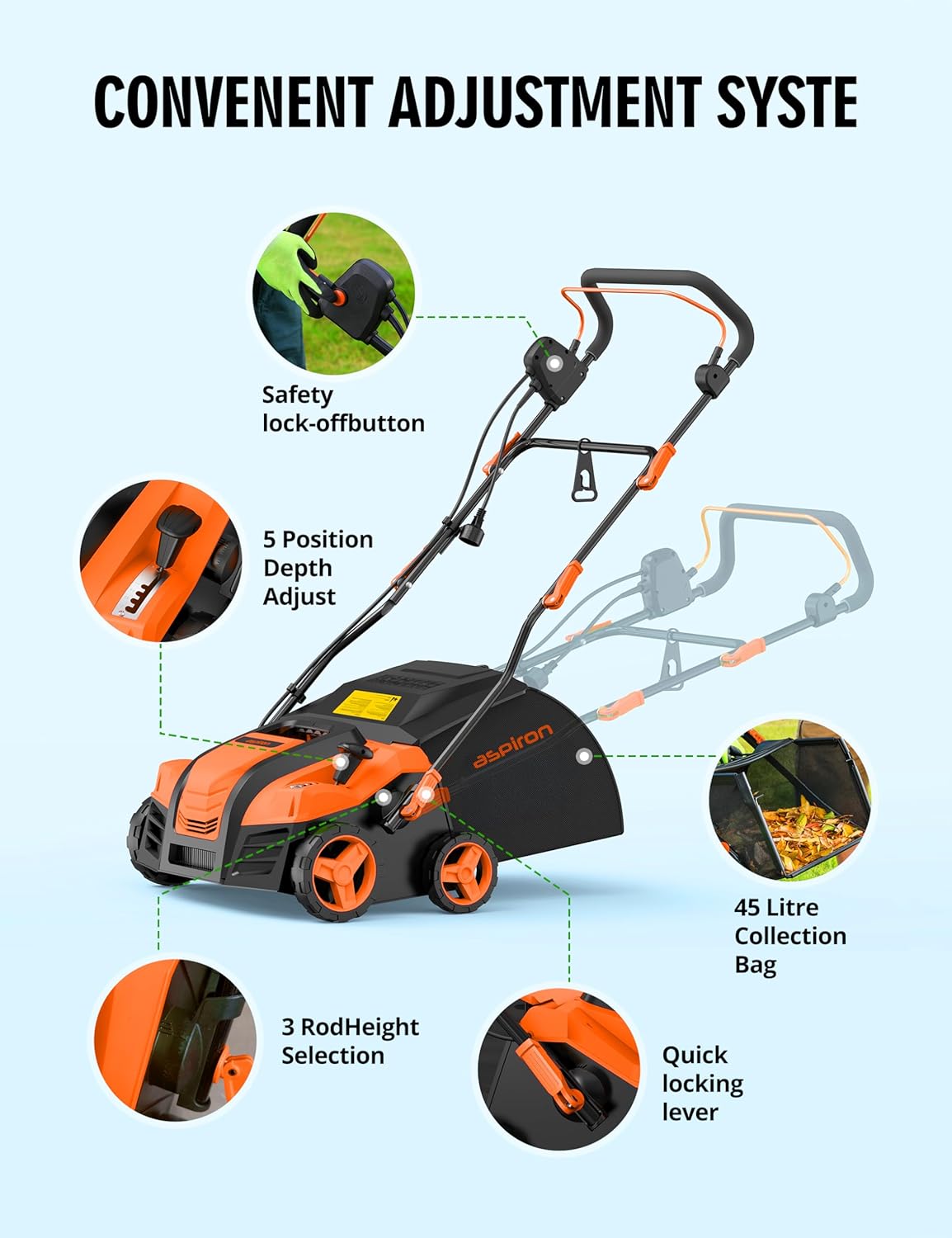
Gambar 4.1: Lebihview of the vacuum's adjustable components, including handle height and depth settings.
4.2 Attaching the Collection Bag:
- Lift the rear flap of the vacuum.
- Align the collection bag with the opening and securely attach it to the unit. Ensure it is firmly in place to prevent debris from escaping.

Figure 4.2: The 45-liter collection bag, demonstrating its easy attachment and removal for emptying.
4.3 Power Cord Management:
Use the provided hooks and clasps to secure the power cord along the handle, keeping it out of your way during operation.
5. Petunjuk Pengoperasian
5.1 Adjusting Working Depth:
The vacuum offers 5 depth settings to suit different turf types and debris levels. Use the control lever on the side of the unit to select your desired working depth. Settings range from -0.47" (deepest) to 0.24" (highest).

Figure 5.1: The 5-position lever for adjusting the working depth of the brush.
5.2 Starting the Unit:
To start the vacuum, first press and hold the red safety button on the handle, then pull the orange lever towards you. Release the red button once the unit starts. To stop, simply release the orange lever.

Figure 5.2: Engaging the safety button and operating lever to start the vacuum.
5.3 Operasi:
Push the vacuum slowly and steadily across the artificial turf or lawn. The self-propelled motion assists in movement. Overlap each pass slightly to ensure complete coverage. The vacuum will collect debris into the attached 45-liter bag.
Video 5.1: Demonstration of the Aspiron Artificial Turf Vacuum in operation, showing its effectiveness on a lawn with leaves.

Figure 5.3: The vacuum effectively lifting and grooming artificial grass fibers, restoring its natural appearance.
6. Pemeliharaan
Regular maintenance ensures the longevity and optimal performance of your Aspiron Artificial Turf Vacuum.
6.1 Emptying the Collection Bag:
When the collection bag is full, detach it from the unit and empty its contents. Reattach securely before resuming operation.
6.2 Cleaning the Brush:
The spinning brush is designed to be removable and washable. Periodically remove the brush and clean any accumulated debris, grass, or hair to maintain efficiency. Ensure the brush is dry before reinstallation.
6.3 Penyimpanan:
For compact storage, utilize the quick-fold feature of the handle. Store the unit in a dry, protected area away from direct sunlight and extreme temperatures.

Figure 6.1: The vacuum in its quick-fold configuration for convenient storage.
7. Penyelesaian masalah
If you encounter issues with your Aspiron Artificial Turf Vacuum, refer to the following common problems and solutions:
| Masalah | Kemungkinan Penyebab | Larutan |
|---|---|---|
| Unit tidak dimulai. |
|
|
| Poor debris collection. |
|
|
| Unit bergetar berlebihan. |
|
|
8. Spesifikasi
| Fitur | Detil |
|---|---|
| Merek | Aspiron |
| Nomor Model | AS-GH002 |
| Sumber Daya | AC (Listrik Berkabel) |
| Tenaga Motor | 1800W / 15 Amp |
| Lebar Kerja | 16 inci |
| Kapasitas Tas Koleksi | 45 Liter (kurang lebih 12 Galon) |
| Berat Barang | 33.5 pon |
| Dimensi Produk (P x L x T) | 41" x 23.6" x 31.5" |
| Mode Operasi | Otomatis (Bergerak sendiri) |
| Perakitan Diperlukan | Ya |
| UPC | 779657329528, 779657328958 |
9. Garansi dan Dukungan
For warranty information, technical support, or to purchase replacement parts, please contact Aspiron customer service. Refer to your purchase documentation for specific warranty terms and contact details.
Kebijakan Pengembalian: This product typically includes a 30-day refund/replacement return policy. Please check with your retailer for exact terms.
Ask a question about this manual
Ask about setup, troubleshooting, compatibility, parts, safety, or missing instructions. Manuals+ will review the question and use this page’s manual context to help answer it.