
Perkenalan
This manual provides detailed instructions for the safe and efficient use of your Samvix iBusiness Mehadrin 128 Kosher MP3 Player. Please read this manual thoroughly before operating the device and retain it for future reference.
Fitur Utama
- Massive 128GB Storage: Store thousands of songs, lectures, and audio files without needing an SD card.
- Full MP3 Playback: Features repeat, shuffle, bookmark, Add to Playlist, and adjustable playback speed for a customized listening experience.
- High-Quality Voice Recording: Built-in recorder with noise reduction and voice activity detection (VAD) for clear recordings.
- Secure and Family-Friendly: Three parental password options, plus USB and Bluetooth password protection for safe use.
- Multilingual and Convenient: Supports English, Hebrew, and Yiddish, with auto power-saving shutdown, date/time display, and Type C USB charging.
- No SD Card Slot: Perangkat ini memiliki fitur ample internal storage and does not include an SD card slot.
- No Radio Functionality: This device is designed for dedicated audio playback and does not include a radio tuner.
Apa yang ada di dalam kotak
- Samvix iBusiness Mehadrin 128GB Kosher MP3 Player
- USB Type-C Charging Cable (not explicitly listed but implied for Type C USB charging)
- User Manual (dokumen ini)
Perangkat Berakhirview
Familiarize yourself with the physical components of your Samvix iBusiness Mehadrin MP3 Player.
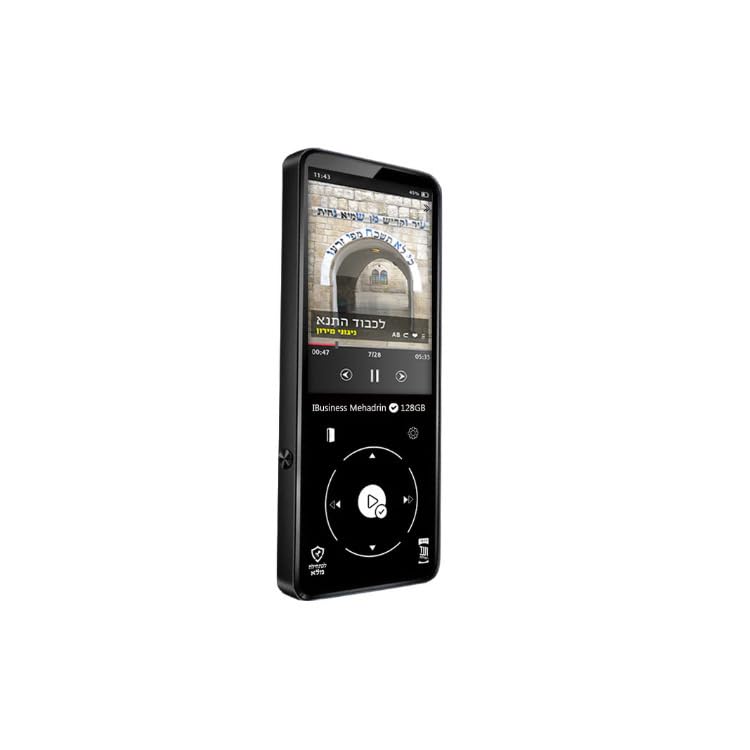
Figure 1: Samvix iBusiness Mehadrin 128 Kosher MP3 Player in its retail packaging.
Panel Depan
- Layar LCD 2.4 inci: Menampilkan menu, informasi musik, dan pengaturan.
- Roda Gulir: Digunakan untuk menavigasi menu dan daftar.
- Tombol Putar/Jeda: Initiates or pauses music playback.
- Tombol Menu: Mengakses menu utama atau kembali ke layar sebelumnya.
- Tombol Sebelumnya/Mundur: Melewati ke trek sebelumnya atau memundurkan trek saat ini.
- Next/Fast-forward Button: Melewati ke trek berikutnya atau mempercepat trek saat ini.
- Tombol Kembali: Kembali ke menu atau layar sebelumnya.
Panel Samping
- Tombol Volume Naik / Turun: Mengatur volume keluaran audio.
- Slot Kartu Micro SD: Note: This model does not include an SD card slot.
Panel Atas/Bawah
- Tombol Daya: Menghidupkan/mematikan perangkat atau mengunci/membuka kunci layar.
- Earphone Port: Connects to wired headphones.
- Port USB Tipe-C: Used for charging the device and transferring files ke/dari komputer.
- Pelabuhan Jalur Keluar: Provides an audio output for connecting to external amppenguat atau pengeras suara.
- Speaker internal: For direct audio playback without headphones.
Pengaturan
1. Mengisi Daya Perangkat
- Connect the USB Type-C charging cable to the device's USB Type-C port.
- Hubungkan ujung kabel lainnya ke adaptor daya USB (tidak disertakan) atau port USB komputer.
- The device will indicate charging status on the screen. Allow sufficient time for a full charge before first use.
2. Mentransfer Musik Files
To transfer music from your computer to the Samvix iBusiness Mehadrin MP3 Player:
- Connect the MP3 player to your computer using the provided USB Type-C cable.
- On the MP3 player, navigate to Pengaturan Sistem > Modus USB dan pilih USB (do not select DAC).
- Your computer should recognize the MP3 player as a removable disk or portable device.
- Open the device's drive on your computer. You can create new folders (e.g., "Music 1", "Music 2") to organize your files.
- Seret dan lepas audio yang Anda inginkan. files (MP3, FLAC, etc.) from your computer into the folders on the MP3 player.
- Suatu ketika semuanya fileSaat data ditransfer, lepaskan perangkat dari komputer Anda dengan aman sebelum mencabut kabel USB.
- The device will automatically update its music library after disconnection.
Petunjuk Pengoperasian
1. Daya Hidup/Mati
- Untuk menghidupkan: Tekan dan tahan tombol Daya hingga layar menyala.
- Untuk mematikan: Tekan dan tahan tombol Daya hingga muncul perintah untuk mematikan daya, lalu konfirmasikan.
- Kunci/Buka Kunci Layar: Tekan sebentar tombol daya untuk mengunci atau membuka kunci layar selama pengoperasian.
2. Menavigasi Menu
- Gunakan Roda Gulir to move through menu options.
- Tekan tombol Tombol Putar/Jeda (center of the scroll wheel) to select an option.
- Tekan tombol Tombol kembali untuk kembali ke menu sebelumnya.
- Tekan tombol Tombol menu untuk pergi ke menu utama.
3. Pemutaran Musik
- From the main menu, select "Music" or "Category" to browse your audio files.
- Use the Scroll Wheel to highlight a song, then press the Play/Pause button to start playback.
- Selama pemutaran, gunakan Sebelumnya/Putar balik Dan Berikutnya/Percepat-maju buttons to change tracks. Press and hold these buttons to fast-forward or rewind within a track.
- Tekan tombol Tombol Putar/Jeda untuk menjeda atau melanjutkan pemutaran.
- Sesuaikan volume menggunakan Tombol Volume Naik / Turun di sisi.
4. Pemasangan Bluetooth
To connect your Samvix iBusiness Mehadrin MP3 Player to Bluetooth headphones or speakers:
- Pastikan perangkat Bluetooth Anda dalam mode berpasangan.
- On the MP3 player, navigate to Pengaturan Sistem > Pengaturan Bluetooth.
- Aktifkan Bluetooth On.
- Memilih Pemindaian Bluetooth to search for available devices.
- Once your device appears in the list, select it to initiate pairing.
- Confirm any pairing requests on both devices. Once connected, the Bluetooth icon will appear on the MP3 player's screen.
5. Rekaman Suara
The device features a built-in voice recorder:
- From the main menu, select the "Voice Recorder" option.
- Follow the on-screen prompts to start, pause, save, or delete recordings.
- Recordings benefit from noise reduction and Voice Activity Detection (VAD) for clear audio.
Kontrol Orang Tua
The Samvix iBusiness Mehadrin MP3 Player offers robust parental control features to ensure a safe listening environment:
- Three Parental Password Options: Configure different password levels to restrict access to certain features or content.
- USB Password Protection: Secure the device with a password to prevent unauthorized file transfer melalui USB.
- Bluetooth Password Protection: Implement a password for Bluetooth connections to control which devices can pair with the MP3 player.
Refer to the device's settings menu for detailed configuration of these parental control features.
Pemeliharaan
Pembersihan
- Gunakan kain lembut, kering, dan bebas serat untuk membersihkan perangkat.
- Jangan gunakan cairan pembersih, aerosol, atau bahan kimia keras.
Perawatan Baterai
- Hindari memaparkan perangkat ke suhu ekstrem.
- Isi daya perangkat secara teratur, meskipun tidak digunakan, untuk menjaga kesehatan baterai.
Penyimpanan
- Simpan perangkat di tempat sejuk dan kering, jauh dari sinar matahari langsung.
- Keep the device away from magnetic fields.
Penyelesaian Masalah
- Perangkat tidak menyala: Pastikan baterai terisi daya. Hubungkan ke sumber daya dan coba lagi.
- Tidak dapat mentransfer files: Check the USB cable connection. Ensure the device's USB Mode is set to "USB" in System Settings. Try a different USB port or computer.
- Bluetooth tidak terhubung: Ensure Bluetooth is enabled on both the MP3 player and the target device. Make sure both devices are in pairing mode and within range.
- Kualitas suara buruk: Check headphone connections. Ensure the audio files are of good quality. Adjust equalizer settings if available.
- Perangkat tidak responsif: Press and hold the Power button for about 10-15 seconds to perform a forced restart.
Spesifikasi
| Merek | SAMVIX |
| Nama Model | MP3 |
| Nomor Model | iBusinessMehadrin128 |
| Fitur Khusus | Perekam Suara |
| Teknologi Konektivitas | Bahasa Indonesia: Bluetooth |
| Kapasitas Penyimpanan Memori | 128 GB |
| Ukuran Layar | 2.4 inci |
| Perangkat yang Kompatibel | Headphone |
| Teknologi Tampilan | Layar LCD |
| Berat Barang | 9.1 pon |
| Dimensi Barang D x L x T | 0.39"Panjang x 9.1"Lebar x 9.1"T |
| UPC | 766162175757 |
Garansi dan Dukungan
For warranty information, technical support, or service inquiries, please refer to the official SAMVIX websitus atau hubungi layanan pelanggan mereka secara langsung. Simpan tanda terima pembelian Anda sebagai bukti pembelian untuk klaim garansi.