
1. Pendahuluan
Thank you for choosing the Luminous Zelio M 1600 Sine Wave Inverter. This inverter is designed to provide reliable and efficient power backup for your home, office, or shop. It features advanced technology to ensure stable power output and protection for your appliances. Please read this manual carefully before installation and operation to ensure safe and optimal performance.
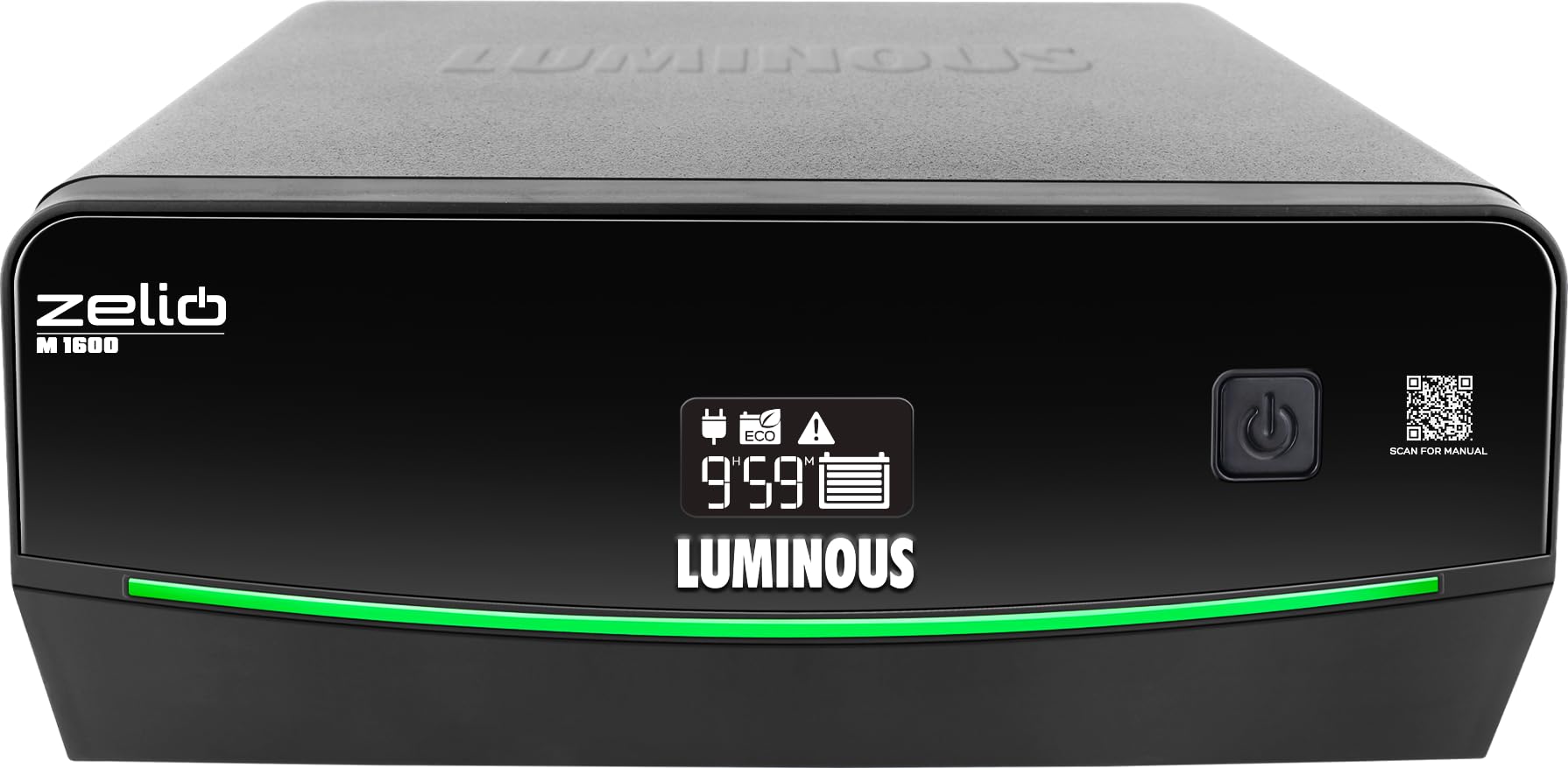
Gambar 1: Depan view of the Luminous Zelio M 1600 Sine Wave Inverter.
2. Informasi Keselamatan
Always follow these safety precautions to prevent injury or damage to the inverter and connected equipment:
- Bahaya Listrik: Jangan membuka inverter casing. Tidak ada komponen di dalamnya yang dapat diservis oleh pengguna. Serahkan semua servis kepada teknisi yang berkualifikasi.
- Ventilasi yang Tepat: Ensure the inverter is installed in a well-ventilated area to prevent overheating.
- Air dan Kelembaban: Keep the inverter away from water, rain, snow, or any liquids.
- Bahan Mudah Terbakar: Jangan operasikan inverter di dekat cairan atau gas yang mudah terbakar.
- Keamanan Baterai: Batteries contain corrosive acid. Wear protective eyewear and gloves when handling batteries. Ensure proper battery connections to avoid short circuits.
- Pembumian: Inverter harus dihubungkan ke ground dengan benar untuk mencegah sengatan listrik.
- Anak-anak: Keep the inverter and batteries out of reach of children.
3. Produk Lebihview dan Fitur Utama
The Zelio M 1600 Inverter combines modern design with advanced functionality for reliable power backup.

Figure 2: Front panel details showing Tri-Color Battery Indicator, LED Backlit Display, and QR Code for manual access.
Fitur Utama:
- High Capacity Output: 1400VA / 1176W, suitable for higher load requirements in homes and small offices.
- Mode Operasi Ganda: UPS/REG mode for stable output to sensitive electronics and ECO mode for wide voltage operation during fluctuations.
- Quick Changeover: Less than 20 milliseconds changeover time ensures uninterrupted power for computers and sensitive appliances.
- Kompatibilitas Baterai 12V: Supports tubular, SMF, and flat plate batteries ranging from 80Ah to 250Ah.
- Advanced Monitoring & Protection: LCD screen with fault indicators and audio alerts for overload, low battery, wrong wiring, short circuit, and over-temperature protection.
- Tri-Color Battery Indicator: Provides instant visual status of the battery.
- LED Backlit Segment Display: For simplified power monitoring and status updates.
- Sine Wave Technology: Ensures peaceful, noise-free operation and is safe for all types of appliances.
- ABCC Technology: For sustained backup and savings.
- Vol rendahtagPengisian Daya Cepat: Reliable power anytime, with charging starting at low voltages (misalnya, 95V).
- SR Technology: For optimized power and lower electricity bills.
4. Instalasi dan Pengaturan
Proper installation is crucial for the safe and efficient operation of your inverter. It is recommended to have installation performed by a qualified technician.
4.1 Membongkar
- Keluarkan inverter dari kemasannya dengan hati-hati.
- Inspect for any shipping damage. If damaged, contact your dealer immediately.
- Pastikan semua aksesori tersedia.
4.2 Penempatan
- Letakkan inverter di atas permukaan yang datar dan stabil.
- Ensure adequate ventilation around the unit. Maintain at least 10 cm clearance from walls or other objects.
- Avoid direct sunlight, heat sources, and areas with high humidity or dust.
4.3 Koneksi Baterai
- Ensure the inverter is switched OFF and disconnected from the mains supply.
- Connect the positive (+) terminal of the battery to the positive (+) terminal of the inverter using the red cable.
- Connect the negative (-) terminal of the battery to the negative (-) terminal of the inverter using the black cable.
- Ensure connections are tight and secure. Incorrect polarity can cause severe damage.
4.4 Sambungan Listrik Utama dan Beban
- Connect the inverter's input power cord to a grounded wall outlet.
- Hubungkan peralatan Anda (beban) ke soket keluaran inverter. Jangan membebani inverter melebihi kapasitas nominalnya (1176W).
5. Petunjuk Pengoperasian
The Zelio M 1600 Inverter offers flexible operating modes to suit your power needs.
5.1 Menghidupkan/Mematikan
- Untuk menghidupkan, tekan dan tahan tombol daya hingga layar menyala.
- Untuk mematikan, tekan dan tahan tombol daya hingga layar mati.
Mode Pengoperasian 5.2
The inverter features two operating modes: UPS/REG and ECO.
- UPS/REG Mode: Provides a narrow input voltage window (e.g., 180V-260V) for sensitive appliances like computers. This mode ensures a stable and precise output voltage.
- Modus Eko: Menawarkan volume input yang lebih luastage window (e.g., 100V-280V), allowing the inverter to operate on mains power even during significant voltage fluctuations. This mode is energy-efficient and suitable for less sensitive appliances.
You can switch between modes using the dedicated mode selection button on the inverter's front panel. The current mode will be indicated on the LED display.

Figure 3: Inverter features like Sine Wave Technology for quiet operation and ABCC Technology for sustained backup.
5.3 Kapasitas Beban
The Zelio M 1600 can power various essential appliances. Ensure the total wattagJumlah perangkat yang terhubung tidak melebihi 1176W.

Gambar 4: Contohample load capacity for common household essentials.
6. Pemeliharaan
Regular maintenance ensures the longevity and optimal performance of your Luminous Zelio M 1600 Inverter and battery.
- Jaga kebersihan: Bersihkan bagian luar inverter secara teratur dengan kain kering. Pastikan lubang ventilasi bebas dari debu dan penghalang.
- Pemeriksaan Baterai: For lead-acid batteries, periodically check the electrolyte level and top up with distilled water if necessary. Keep battery terminals clean and free from corrosion.
- Pemeriksaan Koneksi: Periodically inspect all cable connections (battery, mains, load) to ensure they are tight and secure. Loose connections can cause power loss or overheating.
- Hindari Beban Berlebih: Jangan hubungkan peralatan yang melebihi kapasitas nominal inverter.
- Ventilasi: Selalu pastikan inverter berada di area yang berventilasi baik.
7. Penyelesaian masalah
Bagian ini menyediakan solusi untuk masalah umum yang mungkin Anda temui. Untuk masalah yang tidak tercantum di sini, silakan hubungi dukungan pelanggan.
| Masalah | Kemungkinan Penyebab | Larutan |
|---|---|---|
| Inverter tidak menyala | No mains power, battery discharged, loose battery connections. | Check mains supply. Ensure battery is charged. Verify battery cable connections. |
| Tidak ada daya keluaran | Overload, short circuit, low battery, inverter fault. | Reduce load. Check for short circuits in wiring. Charge battery. Check inverter display for fault codes. |
| Alarm kelebihan beban | Beban terhubung melebihi kapasitas inverter. | Disconnect some appliances to reduce the load. |
| Alarm baterai lemah | Tingkat daya baterai sangat rendah. | Connect to mains power to recharge the battery. |
| Alarm suhu berlebih | Inverter is overheating. | Ensure proper ventilation. Clear any obstructions from vents. Allow inverter to cool down. |
| Wrong wiring indicator | Incorrect battery or mains wiring. | Switch off the inverter and mains. Recheck all wiring connections according to the manual or consult a technician. |
8. Spesifikasi
Technical details for the Luminous Zelio M 1600 Sine Wave Inverter.
| Spesifikasi | Nilai |
|---|---|
| Merek | Bercahaya |
| Nama Model | Zelio M 1600 |
| Inverter Capacity (VA) | 1400 VA |
| Apatage | 1176 Watt |
| Jil.tage | 12 Volt |
| Kompatibilitas Baterai | 80Ah to 250Ah (Tubular, SMF, Flat Plate) |
| Penggunaan yang Direkomendasikan | Kantor pusat |
| Sumber Daya | Bertenaga Baterai |
| Dimensi Barang (P x L x T) | 27.5P x 28.1L x 14T Sentimeter |
| Berat Barang | 12.2 Kilogram |
| Warna | Hitam |
| Negara Asal | India |
9. Garansi dan Dukungan Pelanggan
Luminous berkomitmen untuk menyediakan produk yang andal dan layanan pelanggan yang prima.
9.1 Informasi Garansi
The Luminous Zelio M 1600 Sine Wave Inverter comes with a Garansi 36 Bulan terhitung sejak tanggal pembelian. Harap simpan bukti pembelian Anda untuk klaim garansi. Garansi mencakup cacat produksi dalam kondisi penggunaan normal.

Figure 5: Luminous's commitment to reliable power and expert care, including comprehensive installation, trained service engineers, nationwide service network, warranty assurance, and 24/7 customer support.
9.2 Dukungan Pelanggan
For any queries, technical assistance, or warranty claims, please contact Luminous customer support:
- Kontak Produsen: Luminous Power Technologies Pvt. Ltd., Village-Malpur, Baddi, District-Solan, Himachal Pradesh-173205
- Packer Contact: Luminous Power Technologies Private Limited, Plot No 150, Sector- 44, Gurugram, Haryana -122003
- E-mail: Care@luminousindia.com


