
1. Pendahuluan
The KAIWEETS KTL01 is a non-contact AC voltage tester designed for safe and efficient electrical testing. It features dual-range sensitivity, an LCD display with signal percentage, audible and visual alerts, and a built-in flashlight. This manual provides essential information for the proper setup, operation, maintenance, and troubleshooting of your device.

Image: The KAIWEETS KTL01 Non-Contact Voltage Tester Pen, highlighting its design and display.
2. Informasi Keselamatan
Always prioritize safety when working with electrical systems. This device is rated for KUCINGIV 1000V measurement environments, indicating a high level of protection against transient overvoltages. Adhere to all local and national safety codes.
- Jangan gunakan alat uji jika tampak rusak atau tidak berfungsi dengan benar.
- Pastikan kompartemen baterai tertutup rapat sebelum digunakan.
- Always test on a known live circuit first to confirm the tester is functioning.
- Non-contact detection does not guarantee the absence of voltage. Always verify with a contact method if necessary.
- Keep hands and fingers away from the probe tip during testing.

Image: The KAIWEETS KTL01 detecting voltage in an electrical outlet, showing the red light indicator and CAT IV 1000V safety rating.
3. Produk Lebihview
The KTL01 features an ergonomic design with clear indicators for ease of use.

Image: A detailed diagram labeling the components of the KAIWEETS KTL01, including the battery cover, sensitivity adjustment button, flashlight switch, power button, LCD screen, signal indicator, and probe (NCV sensor).
Komponen Utama:
- Probe (NCV Sensor): Mendeteksi tegangan ACtage tanpa kontak.
- Indikator Sinyal: LED light that illuminates to indicate voltage kehadiran
- Senter: Provides illumination in dark work areas.
- Layar LCD: Menampilkan volumetage strength percentage, bar graph, and mode.
- Tombol Daya: Menghidupkan/mematikan perangkat.
- Saklar Senter: Mengaktifkan/menonaktifkan senter.
- SENS Button (Sensitivity Adjustment): Switches between high and low sensitivity modes.
- Pelindung baterai: Akses untuk pemasangan baterai.

Image: Close-up of the KAIWEETS KTL01's intuitive LCD display, showing a signal percentage readout and an analog bar graph.
4. Pengaturan
Pemasangan Baterai:
- Unscrew the battery cover at the bottom of the tester.
- Masukkan dua baterai AAA 1.5V, pastikan polaritas yang benar (+/-).
- Pasang kembali penutup baterai dengan aman.
5. Petunjuk Pengoperasian
Daya Hidup/Mati:
- Tekan tombol Tombol Daya to turn the tester on. The LCD will illuminate.
- Tekan dan tahan tombol Tombol Daya again to turn the tester off.
- The device will automatically shut off after 5 minutes of inactivity to conserve battery.
Dual-Range Voltage Sensitivitas:
The KTL01 offers two sensitivity modes for various applications:
- High Sensitivity Mode (12V-1000V AC): Suitable for general household wiring, outlets, and circuit breakers.
- Low Sensitivity Mode (70V-1000V AC): Ideal for sensitive devices like doorbells, thermostats, and irrigation systems to minimize false alarms.
Tekan tombol Tombol SENS to switch between high and low sensitivity modes. The LCD will indicate the current mode.
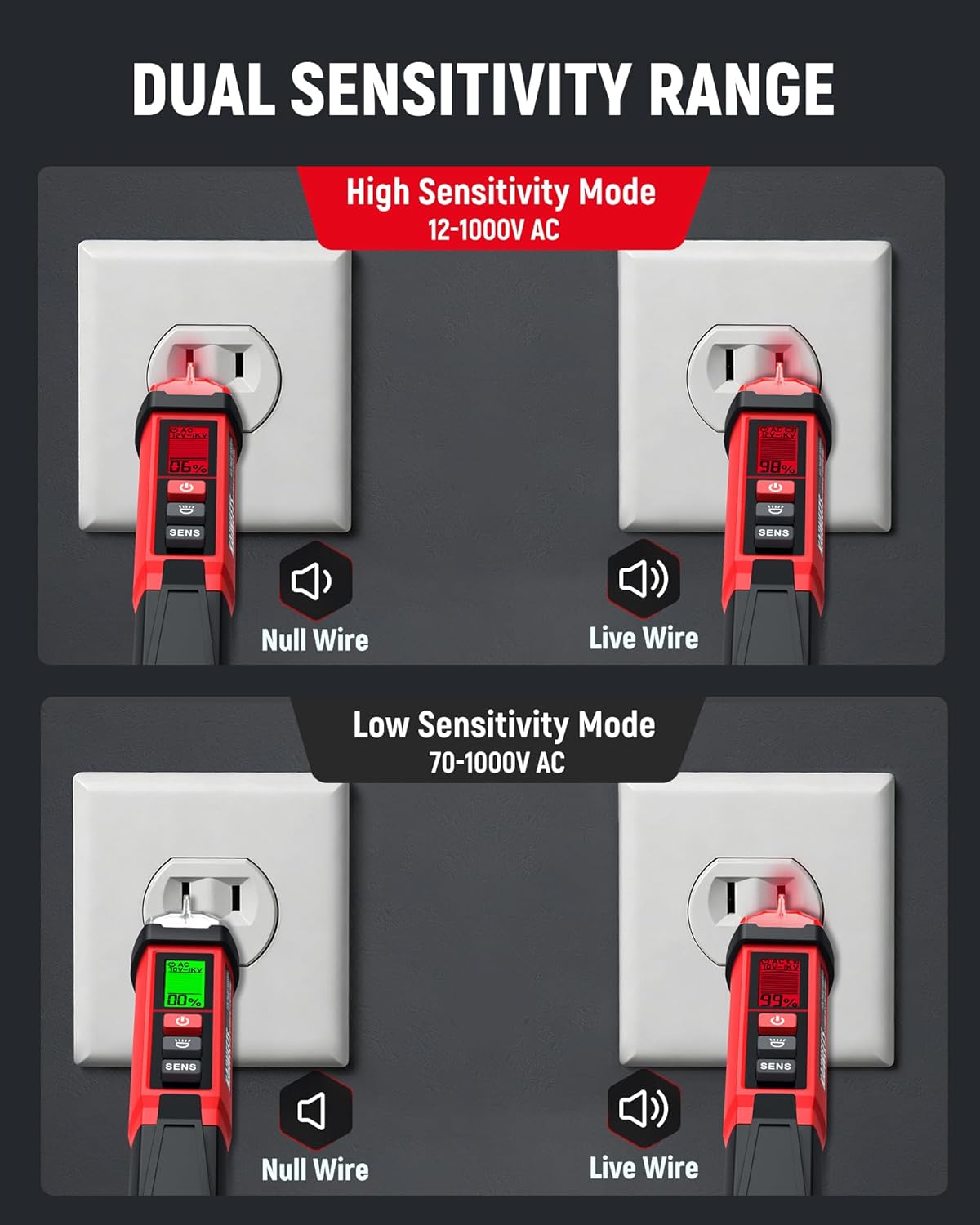
Image: Illustration of the KAIWEETS KTL01 in both High Sensitivity Mode (12-1000V AC) and Low Sensitivity Mode (70-1000V AC), showing detection of Null Wire (green light) and Live Wire (red light) in an outlet.
Vol AC Non-Kontaktage Detection (Live/Neutral Wire):
- Turn on the tester and select the desired sensitivity mode.
- Place the probe tip near the wire, outlet, or component you wish to test.
- Jika tegangan ACtage is detected, the signal indicator will light up (red for live/high voltage, green for low voltage/no current), the buzzer will sound, and the LCD will display the signal strength percentage and bar graph. The buzzer frequency increases with stronger voltage.
Pencari Titik Henti:
To locate a breakpoint in a live wire:
- Ensure the wire is live and the tester is in an appropriate sensitivity mode.
- Move the probe along the length of the wire.
- Penguji akan menunjukkan voltage presence up to the breakpoint. The absence of a signal beyond a certain point indicates a break in the circuit.

Image: The KAIWEETS KTL01 demonstrating its breakpoint test function on an electrical cable, showing how it detects the presence or absence of voltage along the wire.
Operasi senter:
- Tekan tombol Sakelar Senter to turn the built-in LED flashlight on.
- Tekan tombol Sakelar Senter lagi untuk mematikannya.
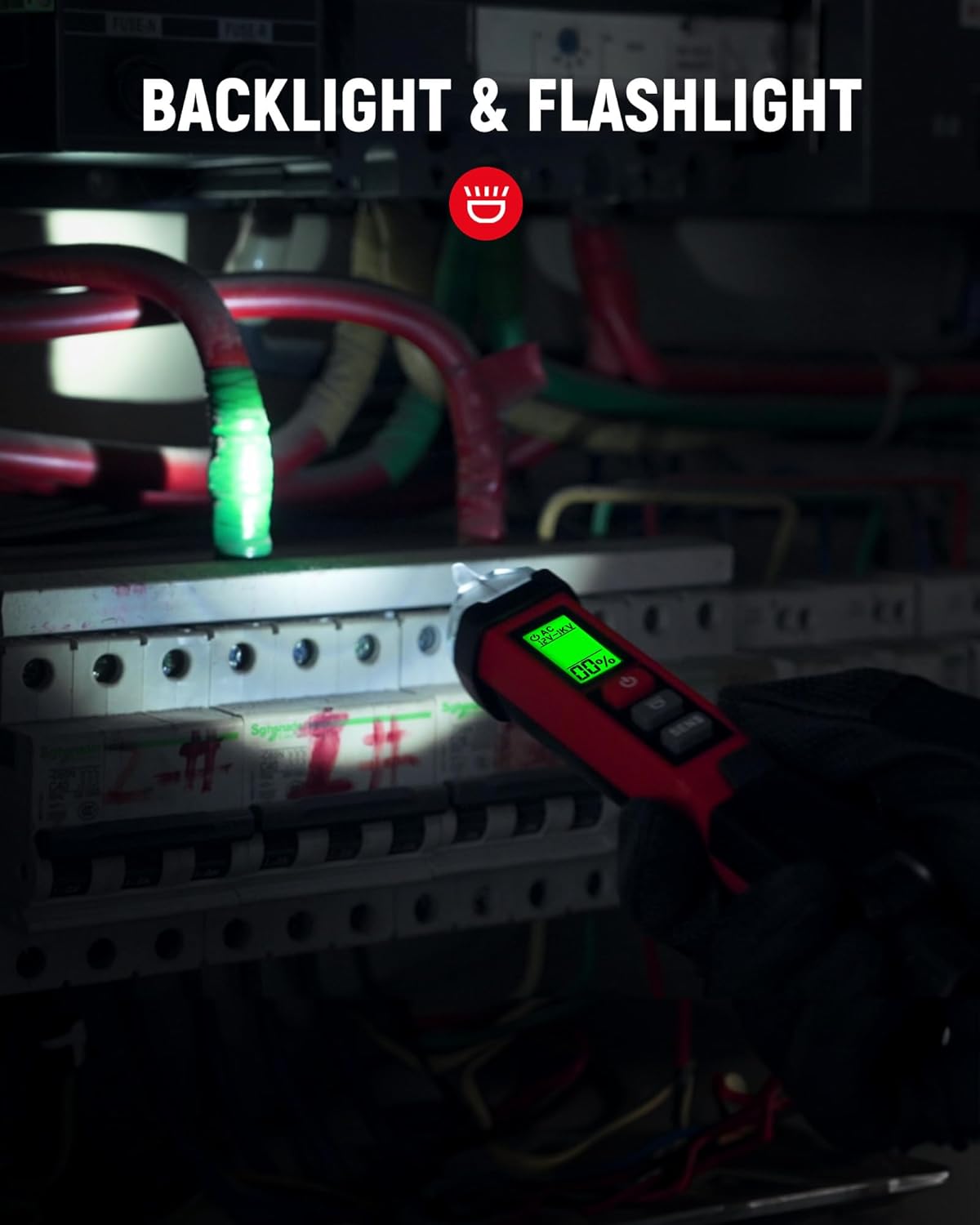
Image: The KAIWEETS KTL01's flashlight illuminating a dark breaker panel, demonstrating its utility in low-light conditions.
Video: KAIWEETS Non-Contact Voltage Tester KTL01, CAT IV 1000V
Video: An official product video demonstrating the features and usage of the KAIWEETS KTL01 Non-Contact Voltage Tester, including its CAT IV 1000V safety rating.
6. Pemeliharaan
- Pembersihan: Bersihkan perangkat dengan kain kering dan bersih. Jangan gunakan pembersih abrasif atau pelarut.
- Penggantian Baterai: Replace batteries when the low-battery indicator appears on the LCD. Always use fresh 1.5V AAA batteries.
- Penyimpanan: Store the tester in a cool, dry place away from direct sunlight and extreme temperatures. Remove batteries if storing for extended periods.
7. Penyelesaian masalah
| Masalah | Kemungkinan Penyebab | Larutan |
|---|---|---|
| No indication when testing a live circuit | Dead batteries; Tester malfunction | Replace batteries; Contact support |
| False positives or inconsistent readings | Interference; Incorrect sensitivity mode | Move away from other electrical devices; Switch to Low Sensitivity Mode |
| Indikator baterai lemah | Baterai lemah | Replace with new 1.5V AAA batteries |
8. Spesifikasi
| Fitur | Detil |
|---|---|
| Merek | KAIWEETS |
| Model | KTL01 |
| Sumber Daya | Ditenagai Baterai (2 x 1.5V AAA) |
| AC Jiltage Range (High Sensitivity) | Tegangan AC 12V - 1000V |
| AC Jiltage Range (Low Sensitivity) | Tegangan AC 70V - 1000V |
| Peringkat Keamanan | KUCINGIV 1000V |
| Menampilkan | LCD with Percentage and Bar Graph |
| Peringatan | Audible (Buzzer) and Visual (LED, LCD) |
| Fitur Khusus | Flashlight, Auto Shut-off, Low Battery Indicator, Breakpoint Finder |
| Berat Barang | 120 gram |
| Dimensi Barang | 1.57x1.18x6.69 inci |
| Suhu Operasional | Hingga 50 Derajat Celcius |
| Sertifikasi | CE, FCC |
9. Garansi dan Dukungan
Jaminan:
The KAIWEETS KTL01 Non-Contact Voltage Tester Pen comes with a Garansi 36 bulan (3 tahun). sejak tanggal pembelian. Garansi ini mencakup cacat produksi dan memastikan produk memenuhi standar kinerja yang ditentukan dalam penggunaan normal. Harap simpan bukti pembelian Anda untuk klaim garansi.
Dukungan Pelanggan:
For technical assistance, warranty inquiries, or any questions regarding the KAIWEETS KTL01, please contact KAIWEETS customer support through their official website or the retailer where the product was purchased. Provide your model number (KTL01) and a detailed description of the issue for efficient service.