
Perkenalan
This manual provides detailed instructions for the operation and maintenance of your PUSOKEI MP3 Player. Please read this manual thoroughly before using the device to ensure proper functionality and to maximize your user experience. Keep this manual for future reference.
Isi Paket
Verifikasi bahwa semua item yang tercantum di bawah ini disertakan dalam paket Anda:
- 1 x PUSOKEI MP3 Player
- 1 x Kabel USB
- 1 Pasang Headphone
- 1 x Penutup Pelindung
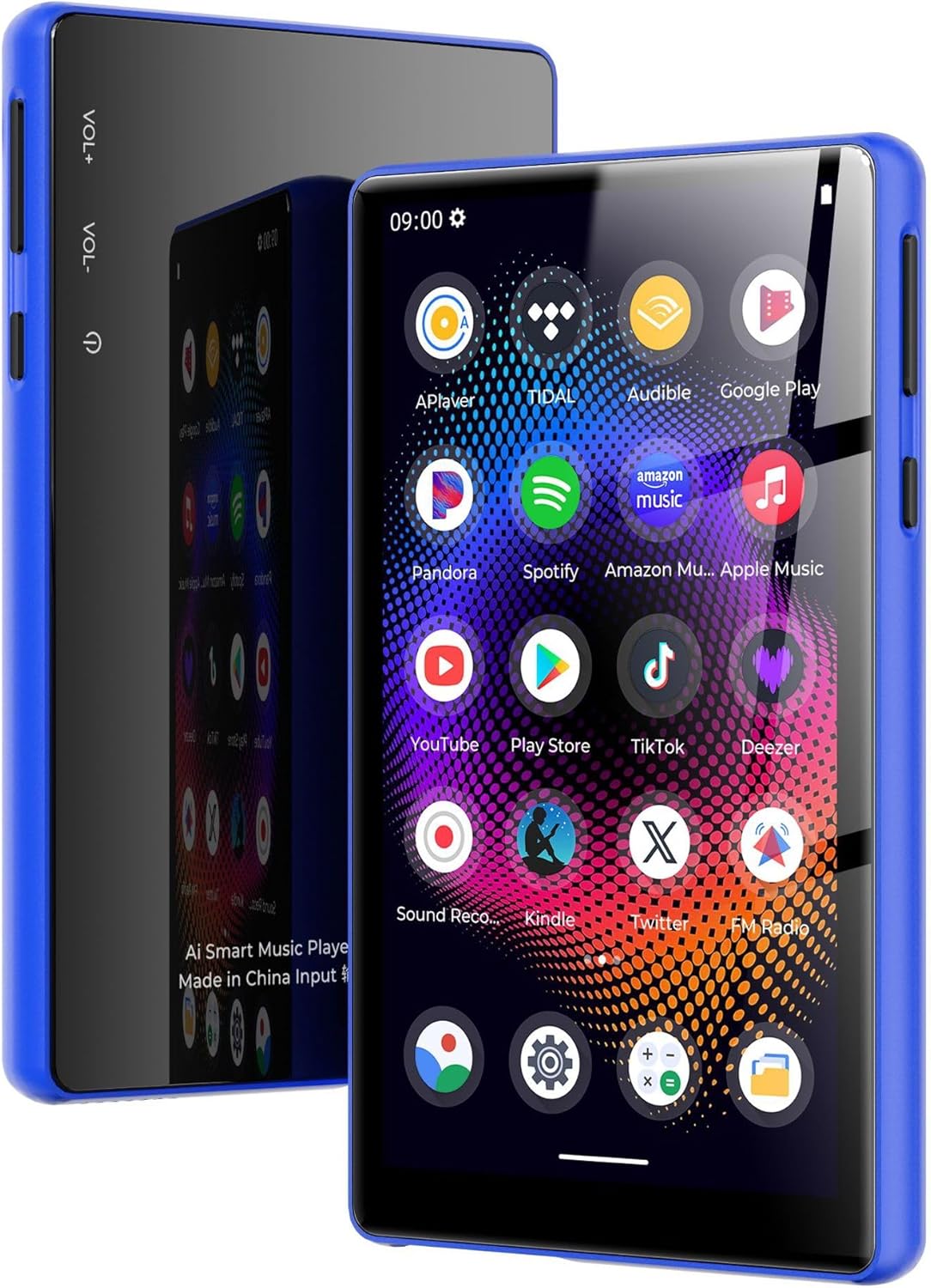
Image: PUSOKEI MP3 Player with its included accessories: USB cable, headphones, and protective cover.
Produk Selesaiview
The PUSOKEI MP3 Player features a 5.0-inch full touchscreen, an 8-core processor, 4GB RAM, and 64GB internal storage, expandable up to 256GB with a microSD card. It supports Bluetooth 5.0 and dual-band Wi-Fi (2.4G/5G) for versatile connectivity.

Image: The PUSOKEI MP3 Player shown in different lifestyle settings, highlighting its portability and versatility for music and entertainment.

Gambar: Detail view of the device's 5-inch full touchscreen, emphasizing its high-definition display for an immersive viewpengalaman ing.
Pengaturan
1. Mengisi Daya Perangkat
Before first use, fully charge the MP3 player. Connect the provided USB cable to the device's charging port and the other end to a USB power adapter (not included) or a computer's USB port. The charging indicator will show the charging status.

Image: An illustration depicting the 2500mAh battery capacity and estimated usage times for music and video playback, as well as standby time.
2. Daya Hidup/Mati
- Untuk menghidupkan: Tekan dan tahan tombol daya (biasanya terletak di samping) hingga layar menyala.
- Untuk mematikan: Press and hold the Power button, then select "Power Off" from the options that appear on the screen.
- Untuk Memulai Ulang: Tekan dan tahan tombol Daya, lalu pilih "Mulai Ulang" dari pilihan yang ada.
3. Konfigurasi Awal
Saat pertama kali dinyalakan, ikuti petunjuk di layar untuk mengatur perangkat Anda:
- Pilih bahasa yang Anda inginkan.
- Connect to a Wi-Fi network (if available) to access online features and app downloads.
- Tetapkan tanggal dan waktu.
4. Mentransfer Files
Untuk mentransfer musik, video, atau lainnya filedari komputer Anda ke pemutar MP3:
- Hubungkan pemutar MP3 ke komputer Anda menggunakan kabel USB yang disediakan.
- On your computer, the device should appear as a removable storage drive.
- Open the device's storage and drag-and-drop your desired files into the appropriate folders (e.g., "Music", "Videos").
- Lepaskan perangkat dari komputer Anda dengan aman sebelum mencabut kabel USB.
5. Inserting/Removing a MicroSD Card
The device supports microSD cards up to 256GB for expanded storage.
- Untuk memasukkan: Locate the microSD card slot. Gently push the card into the slot until it clicks into place.
- Untuk Menghapus: Gently push the inserted microSD card until it springs out, then pull it out.
Petunjuk Pengoperasian
1. Navigasi Dasar
The device operates using a full touchscreen interface. Swipe left/right/up/down to navigate between screens and menus. Tap icons to open applications or select options.
2. Pemutaran Musik
Open the "Music" application. You can browse your music by artist, album, song, or playlist. The player supports various audio formats including WAV, MP3, MP2, AAC, APE, FLAC, WMA.

Image: The MP3 player screen showing a vibrant music playback interface, indicating support for various audio formats and online/offline listening.
3. Pemutaran Video
Access the "Video" application to play stored video files. The device supports 720p or 1080p resolution and formats such as RM, AVI, 3GP, FLV, MP4, DAT, MKV, MPG, MOV, TS without conversion.

Image: The MP3 player screen displaying a high-definition video of an astronaut, demonstrating its 1080P full touchscreen capabilities.
4. Koneksi Bluetooth
To connect to Bluetooth headphones, speakers, or car audio systems:
- Buka "Pengaturan" > "Bluetooth".
- Nyalakan Bluetooth.
- Pastikan aksesori Bluetooth Anda dalam mode pemasangan.
- Pilih aksesori Anda dari daftar perangkat yang tersedia untuk dipasangkan.
The device features Bluetooth 5.0 with bidirectional transmit support.
5. Koneksi Wi-Fi
To connect to a Wi-Fi network for online services:
- Go to "Settings" > "Network & Internet" > "Wi-Fi".
- Nyalakan Wi-Fi.
- Pilih jaringan yang Anda inginkan dari daftar dan masukkan kata sandi jika diminta.
The device supports dual-band Wi-Fi (2.4GHz and 5GHz).

Image: The MP3 player screen surrounded by icons representing wireless connectivity options like Bluetooth headphones, car audio, and Wi-Fi, emphasizing its wide connectivity.
6. Radio FM
Untuk menggunakan fungsi Radio FM:
- Connect the headphones (they act as an antenna).
- Buka aplikasi "Radio FM".
- Scan for available stations within the 87MHz-108MHz frequency range.

Image: The MP3 player screen showing the FM Radio interface tuned to 99.1, with visual representations of sound waves.
7. Pembaca E-book
The device includes an e-book reader application. Supported formats include PDF, TXT, EPUB, FB2. Transfer your e-book files to the device and open them through the e-book app.
8. Menggunakan Aplikasi yang Sudah Terinstal
The MP3 player comes with pre-installed applications such as Spotify and Audible. Ensure you are connected to Wi-Fi to use these online services. You may need to log in to your existing accounts or create new ones.
Pemeliharaan
- Pembersihan: Gunakan kain yang lembut dan kering untuk membersihkan layar dan bodi perangkat. Hindari penggunaan bahan kimia keras atau bahan abrasif.
- Perawatan Baterai: To prolong battery life, avoid fully discharging the battery frequently. Charge the device regularly and store it in a cool, dry place when not in use for extended periods.
- Pembaruan Perangkat Lunak: Periksa pembaruan sistem secara berkala di pengaturan perangkat untuk memastikan kinerja optimal dan akses ke fitur-fitur terbaru.
Penyelesaian Masalah
If you encounter issues with your PUSOKEI MP3 Player, refer to the following common solutions:
- Perangkat tidak akan menyala: Pastikan baterai terisi penuh. Sambungkan perangkat ke pengisi daya setidaknya selama 30 menit sebelum mencoba menghidupkannya kembali.
- Layar tidak responsif: Coba mulai ulang perangkat dengan menekan tombol daya. Jika tidak merespons, biarkan baterai benar-benar habis lalu isi ulang.
- Tidak dapat terhubung ke Wi-Fi/Bluetooth: Ensure Wi-Fi/Bluetooth is enabled in settings. Check if other devices can connect to the network/accessory. Restart the MP3 player and the router/Bluetooth accessory.
- Tidak ada suara dari headphone: Check if headphones are properly plugged in. Ensure volume is not muted or too low. Test with different headphones if possible.
- Filetidak muncul: Memastikan files are transferred to the correct folders. Check file format untuk kompatibilitas.
- Device is slow or freezing: Close unnecessary background applications. Clear cache for frequently used apps. Consider a factory reset if issues persist (Note: A factory reset will erase all data on the device. Back up important fileyang pertama.).
Spesifikasi
| Fitur | Spesifikasi |
|---|---|
| Merek | PUSOKEI |
| Nama Model | PUSOKEI23zwimn9ak-14 |
| Sistem Operasi | Android 11 |
| Chip Utama | MTK MT6762 |
| Memori (RAM) | 4 GB |
| Penyimpanan Internal | 64GB (with 128GB pre-installed memory card) |
| Penyimpanan yang Dapat Diperluas | Mendukung kartu MicroSD hingga 256GB (tidak termasuk) |
| Ukuran Layar | 5.0 inci |
| Resolusi Layar | 720x1280 (supports 720p/1080p video playback) |
| Baterai | Baterai Li-ion 2500mAh |
| Versi Bluetooth | 5.0 (bidirectional transmit) |
| Wifi gratis | 2.4 gram, 5 gram |
| FM Output Frequency | 87MHz-108MHz |
| Format Audio | WAV, MP3, MP2, AAC, APE, FLAC, WMA |
| Format Video | RM, AVI, 3GP, FLV, MP4, DAT, MKV, MPG, MOV, TS (third-party player) |
| Format Gambar | Format gambar JPG, BMP, GIF, PNG |
| Format E-Book | PDF, TXT, EPUB, FB2 |
Garansi dan Dukungan
This PUSOKEI MP3 Player is covered by a manufacturer's warranty for 90 days from the date of purchase.
For technical support, warranty claims, or further assistance, please contact PUSOKEI customer service through the retailer's platform or the official PUSOKEI website. Please have your model number (PUSOKEI23zwimn9ak-14) and proof of purchase ready when contacting support.