
1. Pendahuluan
This manual provides detailed instructions for the installation, operation, and maintenance of your Zebronics DMS200 Monitor Desk Stand. Please read this manual thoroughly before installation and use to ensure proper function and safety. The DMS200 is designed to support monitors from 17 to 32 inches, with a maximum load capacity of 7 kg, offering ergonomic adjustments for an optimized viewpengalaman ing.

Image 1.1: Zebronics DMS200 Monitor Desk Stand overview.
2. Informasi Keselamatan
Harap perhatikan tindakan pencegahan keselamatan berikut untuk mencegah cedera atau kerusakan pada produk:
- Jangan melebihi kapasitas berat maksimum 7 kg (15.4 lbs).
- Ensure the desk surface is stable and strong enough to support the combined weight of the stand and monitor.
- Always follow the installation instructions carefully. Improper installation can lead to equipment damage or personal injury.
- Jauhkan anak-anak dan hewan peliharaan selama pemasangan. Bagian-bagian kecil dapat menyebabkan bahaya tersedak.
- Jangan mengencangkan sekrup terlalu kencang, karena hal ini dapat menyebabkan kerusakan.
- Periksa semua koneksi secara berkala untuk memastikan koneksi tetap aman.
3. Isi Paket
Verifikasi bahwa semua komponen tersedia sebelum memulai instalasi:
- Rakitan Lengan Monitor
- Meja Clamp (C-klamp)
- Basis Dudukan Grommet
- Plat VESA
- Perlengkapan (sekrup, ring, kunci Allen)
- Manual Instruksi
4. Pengaturan dan Instalasi
The Zebronics DMS200 offers two installation methods: C-clamp and Grommet mount. Choose the method best suited for your desk.
4.1. Choosing a Mounting Method
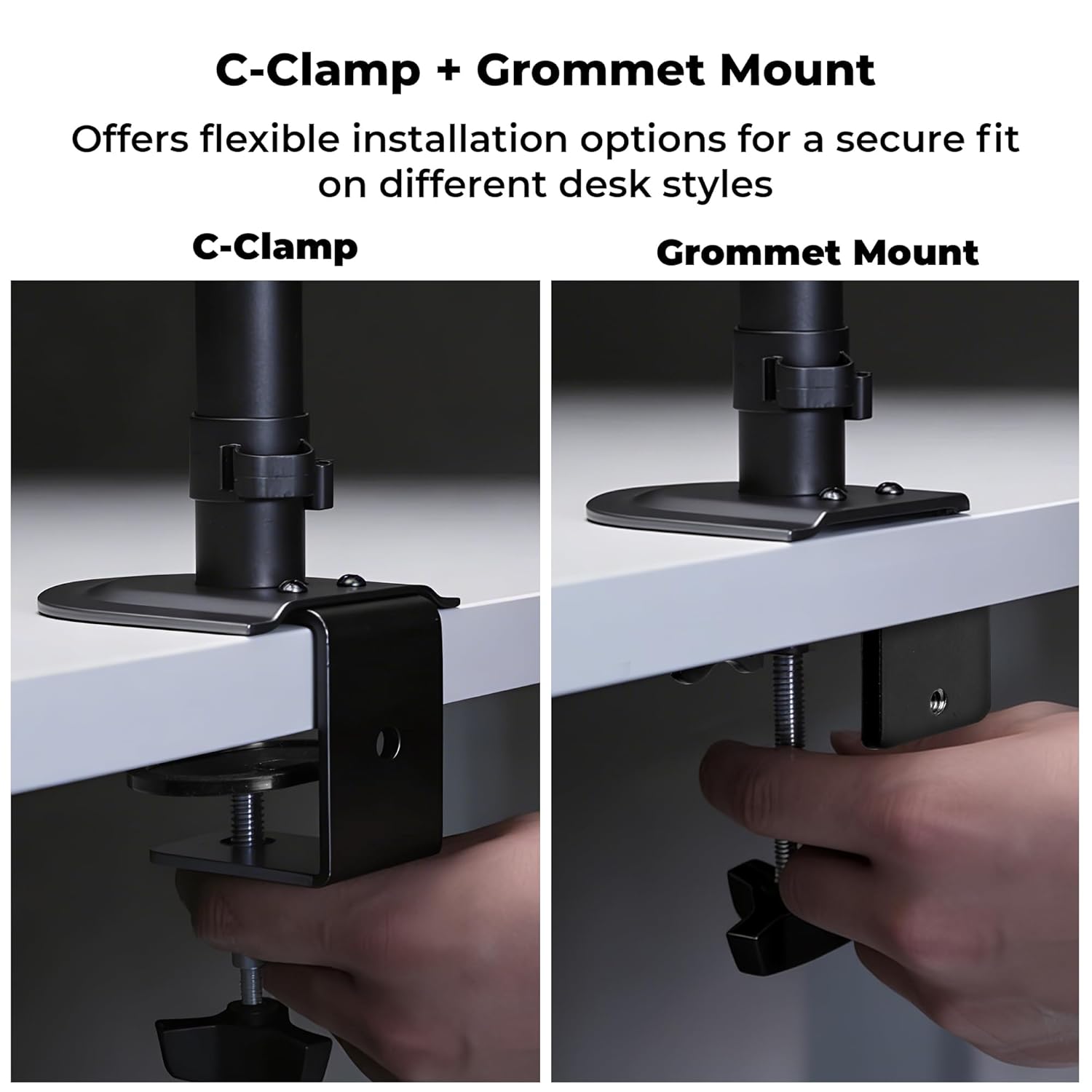
Gambar 4.1: C-Clamp and Grommet Mount options.
- C-Clamp: Ideal for desks without pre-drilled holes. Clamps to the edge of the desk.
- Pemasangan Grommet: Requires a pre-drilled hole (or drilling one) in the desk. Provides a more flush installation.
4.2. C dan Clamp Instalasi
- Lampirkan C-clamp ke bagian bawah tiang utama.
- Position the stand on the edge of your desk.
- Kencangkan C-clamp screw until the stand is securely fastened to the desk. Ensure it is stable and does not wobble.
4.3. Pemasangan Dudukan Grommet
- Bongkar C-clamp from the main pole if it was pre-attached.
- Insert the main pole through the grommet hole in your desk.
- Secure the grommet base plate and tighten the nut from underneath the desk until the stand is firm.
4.4. Ensuring Stability
After mounting the stand, verify its stability on the desk. The anti-slip base and robust construction ensure reliable support for monitors up to 7 kg.

Image 4.4: Stand stability and maximum load capacity.
4.5. Memasang Monitor
The DMS200 supports VESA patterns of 75x75mm and 100x100mm.

Image 4.5: VESA mount plate for monitor attachment.
- Pasang pelat VESA ke bagian belakang monitor Anda menggunakan sekrup yang sesuai dari perlengkapan yang tersedia. Pastikan sekrup tidak dikencangkan terlalu kuat.
- Carefully slide the monitor (with the VESA plate attached) onto the monitor arm's mounting head.
- Secure the monitor to the arm by tightening the locking screw or mechanism on the mounting head.
4.6. Manajemen Kabel
Utilize the integrated cable management clips to keep your workspace tidy.

Image 4.6: Integrated cable management.
- Route your monitor's power and display cables through the clips located along the arm and pole.
- Ensure cables have enough slack for full range of motion without being strained.
5. Petunjuk Pengoperasian
The DMS200 monitor arm provides various adjustments for optimal ergonomic positioning.

Image 5.1: Monitor arm adjustment capabilities.
- Penyesuaian Ketinggian: Loosen the collar on the main pole, adjust the arm to the desired height, and then re-tighten the collar.
- Penyesuaian Kemiringan: The monitor can be tilted up to ±5°. Adjust the tilt angle by gently pushing or pulling the top or bottom of the monitor. If the monitor does not hold its position, tighten the tilt mechanism screw with an Allen key.
- Penyesuaian Putar: The arm allows for ±90° swivel. Gently rotate the monitor left or right to achieve the desired viewsudut.
- Rotasi: The VESA plate allows for 360° rotation, enabling portrait or landscape orientation. Rotate the monitor gently to switch orientations.
- Ekstensi Lengan: The mechanical arm can extend up to 42 cm. Adjust the arm's position by gently pulling or pushing it to bring the monitor closer or further away.
6. Pemeliharaan
To ensure the longevity and proper function of your monitor stand:
- Pembersihan: Bersihkan dudukan dengan kain lembut dan kering.amp Gunakan kain. Hindari pembersih abrasif atau pelarut yang dapat merusak lapisan permukaan.
- Pemeriksaan Berkala: Periksa semua sekrup dan sambungan secara berkala untuk memastikan kekencangan dan keamanannya. Kencangkan kembali jika perlu.
- Kapasitas Beban: Do not place items on the monitor arm or exceed the maximum weight capacity.
7. Penyelesaian masalah
| Masalah | Kemungkinan Penyebab | Larutan |
|---|---|---|
| Monitor sags or does not hold tilt position. | Tilt mechanism screw is loose. | Tighten the tilt adjustment screw on the VESA head using the provided Allen key. |
| Dudukan goyah atau tidak stabil. | Meja kerjaamp/grommet mount is not tight enough. | Kencangkan kembali klem Camp or grommet mount screw/nut. Ensure the desk surface is stable. |
| Monitor cannot be rotated or swiveled smoothly. | Joints may be too tight or require lubrication. | Check for any obstructions. If joints are too stiff, apply a small amount of silicone-based lubricant (avoid oil-based). |
| Cables are strained during adjustment. | Insufficient slack in cable management. | Re-route cables, ensuring enough slack is provided for the full range of arm movement. |
8. Spesifikasi
| Fitur | Detil |
|---|---|
| Model | DMS200 |
| Ukuran Layar yang Didukung | 17 - 32 inci |
| Kapasitas Beban Maksimum | 7 kg (15.4 pon) |
| Kompatibilitas VESA | Ukuran 75x75mm, 100x100mm |
| Jenis Pemasangan | C-Clamp, Gunung Grommet |
| Penyesuaian | Height, Tilt (±5°), Swivel (±90°), Rotation (360°) |
| Ekstensi lengan | Hingga 42 cm |
| Bahan | Metal (Rust-Proof) |
| Warna | Hitam |
| Berat Barang | 1670 gram |
9. Garansi dan Dukungan
Jaminan: The Zebronics DMS200 Monitor Desk Stand comes with a 1-year carry-in warranty to the service center from the date of purchase.
Mendukung: For technical assistance, troubleshooting, or warranty claims, please contact Zebronics customer support. Refer to the official Zebronics websitus atau dokumentasi pembelian Anda untuk rincian kontak.
Manufacturer: Zebronics India Private Limited, 13/7 Smith Road, Royapettah, Chennai, Tamil Nadu - 600 002, India.