
1. Pendahuluan
Thank you for choosing the Tyler TM710-14 14-inch Portable LCD HD TV. This device is designed for versatility, serving as a portable television, a monitor for various devices, or a display for security cameras. Its compact size makes it ideal for use in RVs, kitchens, campers, bathrooms, and bedrooms. This manual provides essential information for the safe and efficient operation of your new portable TV.
Fitur Utama:
- Desain ramping & kompak: 14-inch widescreen LED HDTV, optimized for small spaces.
- Konektivitas Serbaguna: HDMI, USB, SD/MMC inputs for external audio/video playback.
- Audio Terintegrasi: Built-in speakers and headphone jack.
- Penyetel TV Digital: Full band digital TV tuner (ATSC, NTSC compatible).
- Opsi Daya: AC/DC power compatibility, includes car charger.
- Convenient Stand: Built-in stand for easy placement.
- Kompatibilitas Luas: Connects with streaming sticks (Roku, Fire Stick, Apple TV), gaming consoles, computers, and security cameras.
2. Informasi Keselamatan
Harap baca semua petunjuk keselamatan dengan saksama sebelum menggunakan produk ini. Simpan panduan ini untuk referensi di kemudian hari.
- Jangan biarkan unit terkena hujan atau kelembapan untuk mencegah kebakaran atau sengatan listrik.
- Jangan buka kabinet. Rujuk servis hanya kepada personel yang berkualifikasi.
- Hindari menempatkan unit di dekat sumber panas seperti radiator, ventilasi pemanas, kompor, atau peralatan lainnya (termasuk amppengangkat) yang menghasilkan panas.
- Lindungi kabel daya agar tidak terinjak atau terjepit, terutama pada bagian steker, stopkontak, dan titik keluarnya kabel dari peralatan.
- Gunakan hanya perlengkapan/aksesoris yang ditentukan oleh produsen.
- Cabut peralatan ini saat terjadi badai petir atau bila tidak digunakan dalam waktu lama.
- Bersihkan hanya dengan kain kering.
- Pastikan ventilasi yang baik; jangan halangi lubang ventilasi apa pun.
3. Apa yang ada di dalam kotak
Verifikasi bahwa semua item ada dalam kemasan:
- Tyler TM710-14 Portable TV
- Kabel Daya (Adaptor AC)
- Kontrol Jarak Jauh
- Dudukan Terintegrasi
- Antena
- Car Charger (DC Adapter)
- Adaptor RCA
4. Produk Lebihview
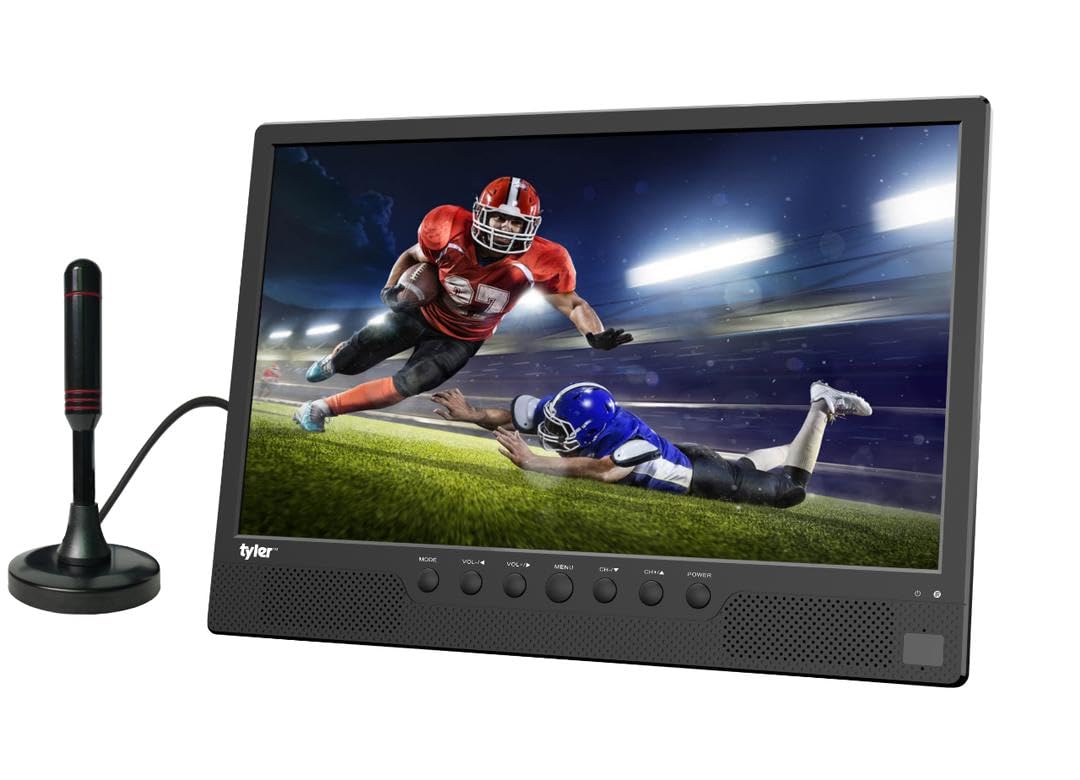
Gambar 4.1: Depan view of the Tyler TM710-14 portable TV, showing the screen, control buttons, and an attached antenna.

Gambar 4.2: Belakang view of the TV with the built-in stand extended, showing the DC 12V input, AV-OUT, AV-IN, HDMI input, and ANT input on the right side, and USB, SD/MMC input on the left.

Gambar 4.3: Detail bagian belakang view of the TV, illustrating the location of the DC 12V input, AV-OUT, AV-IN, HDMI input, ANT input, USB port, and SD/MMC card slot.
Control Buttons (Front Panel):
- ARAH: Switches between input sources (TV, AV, HDMI, USB, SD/MMC).
- VOL-/VOL+: Adjusts volume down/up.
- TIDAK BISA: Mengakses menu di layar.
- CH-/CH+: Changes channels or navigates menu options.
- KEKUATAN: Menghidupkan/mematikan TV.
5. Pengaturan
5.1 Memasang Dudukan
The TM710-14 features a built-in stand. Gently pull the stand out from the back of the unit until it locks into position. Ensure the TV is placed on a stable, flat surface.
5.2 Menghubungkan Daya
- Daya AC: Connect the provided AC power adapter to the "DC 12V" input port on the back of the TV, then plug the adapter into a standard wall outlet.
- DC Power (Car Charger): For portable use, connect the car charger to the "DC 12V" input port and plug the other end into your vehicle's 12V power socket.
5.3 Connecting an Antenna
For receiving over-the-air broadcast channels, connect the included antenna to the "ANT" input port on the back of the TV. Position the antenna for optimal signal reception.
5.4 Penyalaan Awal
Tekan tombol KEKUATAN button on the front panel or the remote control to turn on the TV. The first time you power on, the TV may guide you through an initial setup process, including language selection and channel scanning.
6. Petunjuk Pengoperasian
6.1 Memilih Sumber Input
Tekan tombol MODE button on the TV or the SUMBER button on the remote control to cycle through available input sources: TV (Antenna), AV, HDMI, USB, SD/MMC.
6.2 TV Mode (Antenna)
- Select "TV" as the input source.
- Akses MENU and navigate to "Channel Setup" or "Auto Scan".
- Initiate an auto scan to find available digital (ATSC) and analog (NTSC) channels.
- Menggunakan CH-/CH+ tombol untuk mengubah saluran.
6.3 Menghubungkan Perangkat Eksternal
- HDMI: Connect a streaming stick (Roku, Fire Stick, Apple TV), gaming console, or computer to the Masukan HDMI port. Select "HDMI" as the input source.
- Masukan AV: Use the RCA adapter to connect older devices like DVD players to the AV-IN port. Select "AV" as the input source.
- USB/SD/MMC: Insert a USB flash drive or SD/MMC card into the respective slots. Select "USB" or "SD/MMC" as the input source to browse and play compatible media files (AVI, MOV, MPEG, MP4, MP3, JPEG, etc.).
6.4 Keluaran Audio
The TV has built-in speakers. For private listening, connect headphones to the headphone jack (AV-OUT port can also function as audio out with appropriate adapter).
7. Pemeliharaan
7.1 Membersihkan Layar
Usap layar secara perlahan dengan kain lembut dan bebas serat. Untuk noda membandel, usap layar dengan lembut.ampBasahi kain dengan air atau larutan pembersih layar yang dirancang khusus untuk layar LCD/LED. Jangan semprotkan cairan langsung ke layar.
7.2 Membersihkan Kabinet
Wipe the exterior of the TV with a soft, dry cloth. Avoid using abrasive cleaners or solvents.
7.3 Penyimpanan
If storing the TV for an extended period, unplug it from the power source and store it in a cool, dry place, away from direct sunlight and extreme temperatures.
8. Penyelesaian masalah
| Masalah | Kemungkinan Penyebab | Larutan |
|---|---|---|
| Tidak ada daya | Power cable not connected; outlet not working; power adapter faulty. | Ensure power cable is securely connected. Test the outlet with another device. Try a different power adapter if available. |
| No picture/No signal | Incorrect input source selected; antenna not connected/positioned correctly; external device not powered on or connected properly. | Tekan MODE/SUMBER to select the correct input. Adjust antenna position or rescan channels. Check connections and power for external devices. |
| Tidak ada suara | Volume too low or muted; external device audio settings. | Tekan VOL+ or unmute the TV. Check audio settings on connected external devices. |
| Kontrol jarak jauh tidak berfungsi | Batteries depleted or inserted incorrectly; obstruction between remote and TV; remote sensor blocked. | Replace batteries. Ensure correct polarity. Remove any obstructions. Clean the remote sensor on the TV. |
9. Spesifikasi
| Fitur | Detil |
|---|---|
| Nomor Model | TM710-14 |
| Ukuran Layar | 14 inci |
| Teknologi Tampilan | Layar LCD |
| Resolusi | 1080p |
| Tingkat Penyegaran | 120Hz |
| Rasio Aspek | 16:9 |
| Konektivitas | HDMI (1), USB (1), AV, Antenna |
| Pemutaran Media | USB, SD/MMC (AVI, MOV, MPEG 1/2/3/4, XVID, AVC, MP4, H.264, HEVC(H.265), FLV, MKV, MP3, JPEG, WMV, RMVB, MKY, 3GP) |
| Suara | Built-in speakers (2.0 channels), Headphone Jack (AV-OUT) |
| Catu Daya | AC/DC (12V DC input) |
| Dimensi Produk (P x L x T) | 1"Panjang x 14"Lebar x 11"T |
| Warna | Hitam |
10. Informasi Garansi
The Tyler TM710-14 Portable LCD HD TV comes with a Garansi Terbatas 1 Tahun from the date of purchase. This warranty covers manufacturing defects in materials and workmanship under normal use. It does not cover damage caused by misuse, accidents, unauthorized modifications, or external causes.
Please retain your proof of purchase for warranty claims. For detailed warranty terms and conditions, refer to the documentation included with your product or contact customer support.
11. Dukungan Pelanggan
If you encounter any issues or have questions regarding your Tyler TM710-14 Portable LCD HD TV that are not addressed in this manual, please contact Tyler customer support.
- Weblokasi: Visit the official Tyler websitus untuk Tanya Jawab dan sumber daya dukungan.
- E-mail: Refer to your product packaging or warranty card for support email address.
- Telepon: Silakan lihat kemasan produk atau kartu garansi Anda untuk nomor telepon layanan pelanggan.
When contacting support, please have your model number (TM710-14) and proof of purchase ready.