
Perkenalan
The Roku Hiro 32-inch 720p HD Smart TV offers an integrated Roku streaming experience. This television features an HD display for clear picture quality and speakers with enhanced audio. It supports Bluetooth for private listening with headphones and includes Wi-Fi for internet connectivity. The Roku operating system provides a customizable home screen, access to numerous streaming channels, and automatic updates, making it suitable for various living spaces.
Apa yang ada di dalam kotak
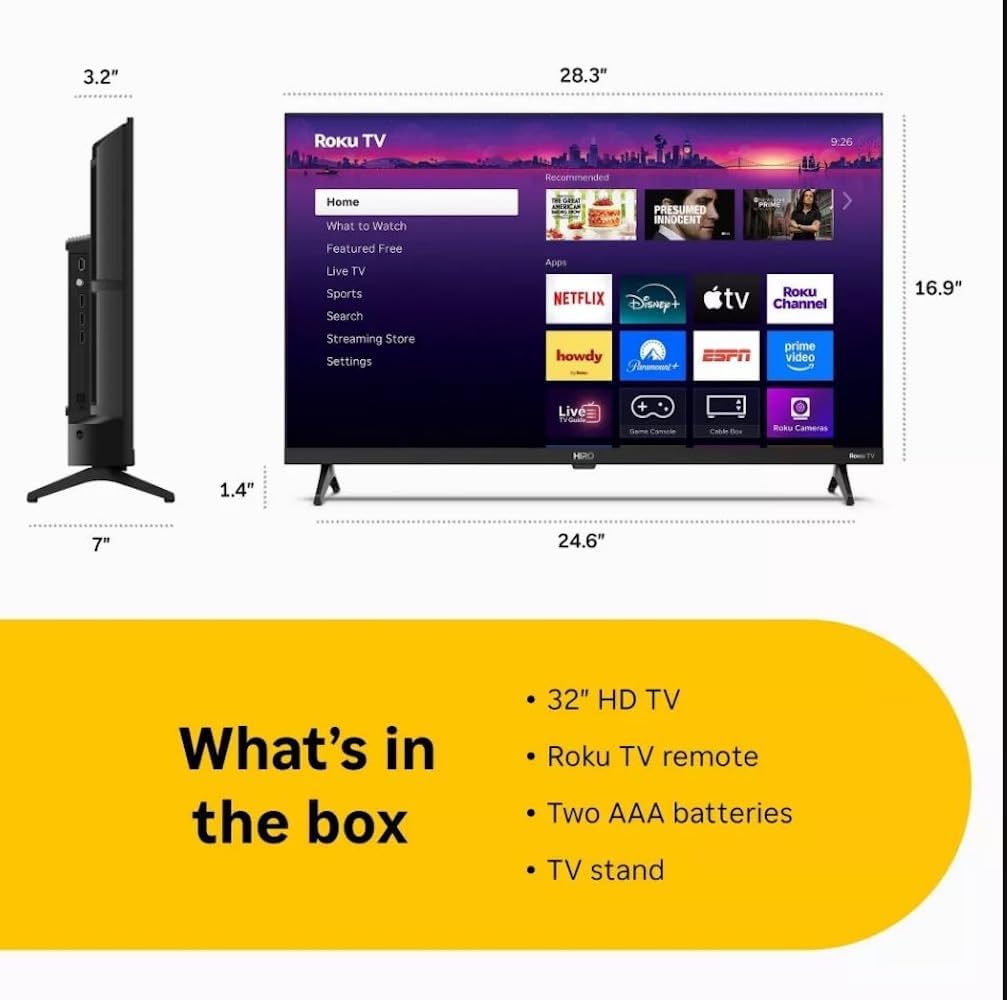
Diagram showing the dimensions of the Roku Hiro 32-inch TV and a list of included accessories: 32-inch HD TV, Roku TV remote, two AAA batteries, and TV stand.
- Hiro 32" 720p HD Smart TV Flat Screen LED Television with Roku TV
- Kontrol Jarak Jauh
- Stand TV
- Kabel listrik
- Panduan Pengguna
Pengaturan
1. Instalasi Berdiri
Carefully place the TV screen-down on a soft, clean surface to prevent damage. Align the TV stand with the designated slots on the bottom of the TV. Secure the stand using the provided screws. Ensure the stand is firmly attached before proceeding.
2. Menghubungkan Perangkat

Belakang view of the Roku Hiro TV, showing the input/output ports including USB, HDMI, and antenna connections.
- Kekuatan: Hubungkan kabel daya ke input daya TV dan kemudian ke stopkontak di dinding.
- HDMI: Connect external devices such as Blu-ray players, game consoles, or cable boxes to the HDMI ports. This TV features 3 HDMI ports.
- Kabel USB: Use the USB port for media playback from a USB drive.
- Audio Optik: Connect an external sound system using an optical audio cable for enhanced sound.
- Antena/Kabel: Connect an antenna or cable TV feed to the RF input for over-the-air or cable channels.
3. Pengaturan Awal
After connecting all necessary cables, power on the TV. Follow the on-screen instructions to:
- Pilih bahasa Anda.
- Sambungkan ke jaringan Wi-Fi Anda.
- Aktifkan akun Roku Anda (atau buat akun baru).
- Scan for available channels if an antenna is connected.
Petunjuk Pengoperasian
Fungsi Kontrol Jarak Jauh

Close-up of the Roku TV remote control, highlighting buttons for TV power, volume, mute, sleep timer, instant replay, options, and app shortcuts.
- Tombol Daya: Menyalakan atau mematikan TV.
- Papan Arah (D-Pad): Menavigasi menu dan memilih item.
- Tombol Oke: Konfirmasikan pilihan.
- Tombol Home: Kembali ke layar utama Roku.
- Tombol Kembali: Kembali ke layar sebelumnya.
- Volume Naik/Turun: Menyesuaikan volume TV.
- Tombol Bisu: Menonaktifkan atau mengaktifkan suara TV.
- Tombol Pintasan Aplikasi: Direct access to popular streaming services (e.g., Netflix, Disney+, Apple TV+, Prime Video).
- Pengatur Waktu Tidur: Sets a timer for the TV to turn off automatically.
- Peluncuran Instan: Jumps back a few seconds in supported content.
- Pilihan: Accesses additional settings or information for the current content.
Navigating the Roku OS

The Roku TV home screen interface, showing recommended content and various streaming applications.
The Roku home screen provides access to all your streaming channels, inputs, and settings. Use the D-Pad on your remote to navigate through the menu options on the left and the app grid on the right. You can customize the order of your channels by highlighting an app, pressing the * (Options) button, and selecting 'Move channel'.
Konten Streaming
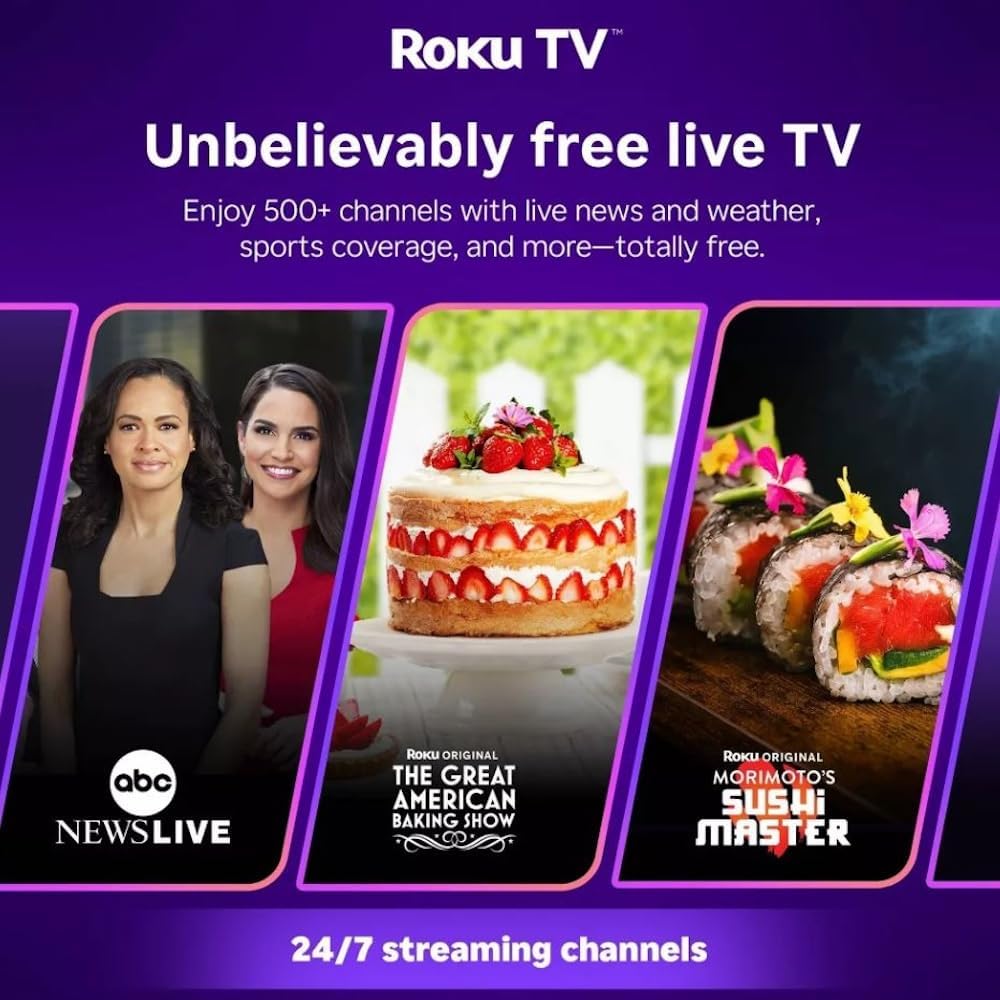
Roku TV interface promoting free live TV channels, featuring examples like ABC News Live, The Great American Baking Show, and Morimoto's Sushi Master.
Access a wide range of streaming services and free content through the Roku Channel Store. The Roku platform offers over 500 free channels, including live television, movies, and news. Use the 'Search' function on the home screen to find specific titles or channels.
Fitur Audio

Roku Hiro TV displaying the home screen with various streaming apps, emphasizing enhanced audio quality.
The TV features enhanced audio quality. For private listening, you can pair Bluetooth headphones directly with the TV. Navigate to Settings > Remotes & devices > Bluetooth devices > Pair new device to connect your headphones.
Pemeliharaan
Membersihkan TV
- Selalu cabut kabel TV sebelum membersihkan.
- Gunakan kain lembut dan bebas serat untuk menyeka layar dan kabinet dengan lembut.
- Untuk noda membandel, oleskan sedikitampBasahi kain dengan air atau pembersih layar yang lembut dan non-abrasif. Jangan semprotkan pembersih langsung ke layar.
- Hindari penggunaan bahan kimia keras, bantalan abrasif, atau pelarut.
Pembaruan Perangkat Lunak
The Roku TV automatically checks for and installs software updates when connected to the internet. To manually check for updates, go to Pengaturan > Sistem > Pembaruan perangkat lunak.
Penyelesaian Masalah
| Masalah | Larutan |
|---|---|
| Tidak ada daya | Pastikan kabel daya terhubung dengan aman ke TV dan stopkontak yang berfungsi. Coba stopkontak lain. |
| Tidak ada gambar, tetapi ada suara | Periksa sumber input. Tekan Rumah button on the remote and select the correct input. Ensure all HDMI cables are securely connected. |
| Tidak ada suara, tetapi gambar ada | Check the volume level and ensure the TV is not muted. If using external audio, verify connections and settings. |
| Tidak dapat terhubung ke Wi-Fi | Verify your Wi-Fi password. Restart your router and modem. Go to Pengaturan > Jaringan > Siapkan koneksi to reconfigure. |
| Kontrol jarak jauh tidak berfungsi | Ganti baterai pada remote. Pastikan tidak ada penghalang antara remote dan sensor IR TV. |
Spesifikasi
| Nama Model | H32C2C4 |
| Ukuran Layar | 32 inci |
| Teknologi Tampilan | DIPIMPIN |
| Resolusi | 720p |
| Tingkat Penyegaran | 60Hz |
| Sistem Operasi | Sistem Operasi Roku |
| Teknologi Konektivitas | Bluetooth, HDMI, Optical Audio, USB, Wi-Fi |
| Total Number of HDMI Ports | 3 |
| Jumlah Port USB | 1 |
| Dimensi Produk (P x L x T) | 3.2"Panjang x 28.3"Lebar x 16.9"T |
| Berat Barang | 7.5 pon |
| Jil.tage | 120 Volt (AC) |
| Jenis Pemasangan | Dudukan Meja |
| Warna | Hitam |
Informasi Garansi
This Roku Hiro TV is covered by a 90-day Replacement Warranty. Please retain your proof of purchase for any warranty claims. For detailed terms and conditions, refer to the warranty documentation included with your product or visit the official Roku support weblokasi.
Mendukung
For further assistance, troubleshooting guides, or to contact customer support, please visit the official Roku support website. You can find comprehensive FAQs and contact information there.