
1. Informasi Keselamatan Penting
Please read all instructions carefully before using this appliance to prevent injury and property damage. Keep this manual for future reference.
- Always place the dispenser on a level, stable surface.
- Jangan mengoperasikan dispenser dengan kabel atau steker listrik yang rusak.
- Pastikan grounding yang tepat untuk mengurangi risiko sengatan listrik.
- Keep children away from the hot water dispenser area due to the risk of scalding.
- Jangan merendam dispenser, kabel, atau steker dalam air atau cairan lainnya.
- Cabut steker dispenser sebelum membersihkan atau melakukan perawatan apa pun.
- This appliance is designed for use with potable water only.
2. Produk Lebihview
The IKT Water Cooler Dispenser provides three temperature settings for water (cold, room temperature, hot) and features a built-in nugget ice maker. It is designed for convenience with a bottom-load water bottle system and self-cleaning capabilities.

Gambar 2.1: Depan view of the IKT Water Cooler Dispenser.

Figure 2.2: Bright LED display indicating various statuses such as 'Making Ice', 'Child Lock', 'Lack of Water', 'Hot Water', 'Room Water', and 'Cold Water'.
3. Pengaturan
3.1 Pembongkaran dan Penempatan
- Buang semua bahan kemasan.
- Place the dispenser on a hard, level surface. Ensure there is at least 4 inches of clearance from the wall for proper ventilation.
- Hindari sinar matahari langsung atau sumber panas.
3.2 Pemasangan Botol Air
This dispenser uses a bottom-load system, eliminating the need for heavy lifting.
- Buka pintu kabinet bawah.
- Insert the probe into a standard 3 or 5-gallon water bottle.
- Geser botol air ke dalam lemari.
- Tutup pintu lemari.

Figure 3.1: Illustration of the no-lift bottom-load water bottle installation.
3.3 Start-up Awal
- Hubungkan dispenser ke stopkontak listrik yang diarde.
- Allow the water tanks to fill completely before turning on heating or cooling functions. This may take a few minutes.
- Press the power button (ON/OFF) to activate the unit.
4. Operasi
4.1 Menyalurkan Air
The dispenser offers three temperature options: cold, room temperature, and hot.
- Air Dingin: Press the 'Cold Water' button. The cold water indicator light will illuminate. Place your cup under the cold water spout and press the dispensing lever.
- Air Suhu Ruangan: Place your cup under the room temperature water spout and press the dispensing lever.
- Air Panas: This function has a child safety lock. First, press and hold the 'Child Lock' button, then press the 'Hot Water' button. The hot water indicator light will illuminate. Place your cup under the hot water spout and press the dispensing lever. Release the child lock button after dispensing.

Figure 4.1: Detail of the Child Safety Lock button for hot water dispensing.
4.2 Pembuat Es Nugget
The integrated ice maker produces nugget ice. It can produce up to 33 lbs of ice daily and store up to 2.76 lbs in its internal bin. Note: The machine does not keep ice frozen.
- To activate ice making, ensure the 'Making Ice' indicator is on. If not, press the ice-making button.
- When the ice bin is full, the machine will make three beeps and stop making ice.
- To dispense ice, place your cup under the ice spout and press the ice dispensing lever.

Figure 4.2: Illustration of the daily ice production capacity and ice bin storage. Note that ice is not kept frozen.
4.3 Empty Bottle Alert
The 'Empty Bottle' indicator light will alert you when the water bottle needs replacement. This indicator is controlled by the PCB program for accurate water level detection. If the bottle is empty, the indicator may not light up immediately; it depends on the cold water tank's water level. Please wait approximately 7 minutes after replacing an empty bottle to check if the indicator turns off.
Video 4.1: Demonstration of water and ice dispensing from the IKT Water Cooler.
5. Pemeliharaan
5.1 Fungsi Pembersihan Mandiri
The dispenser features a self-cleaning function to maintain hygiene.
- Hold the power button to turn off the machine.
- Press and hold the ice-making button for 3 seconds to activate the self-cleaning function.
- The indicator lights will blink, and the power light will remain on during the cleaning cycle.
- The machine will automatically shut off after approximately 10 minutes when the cycle is complete.
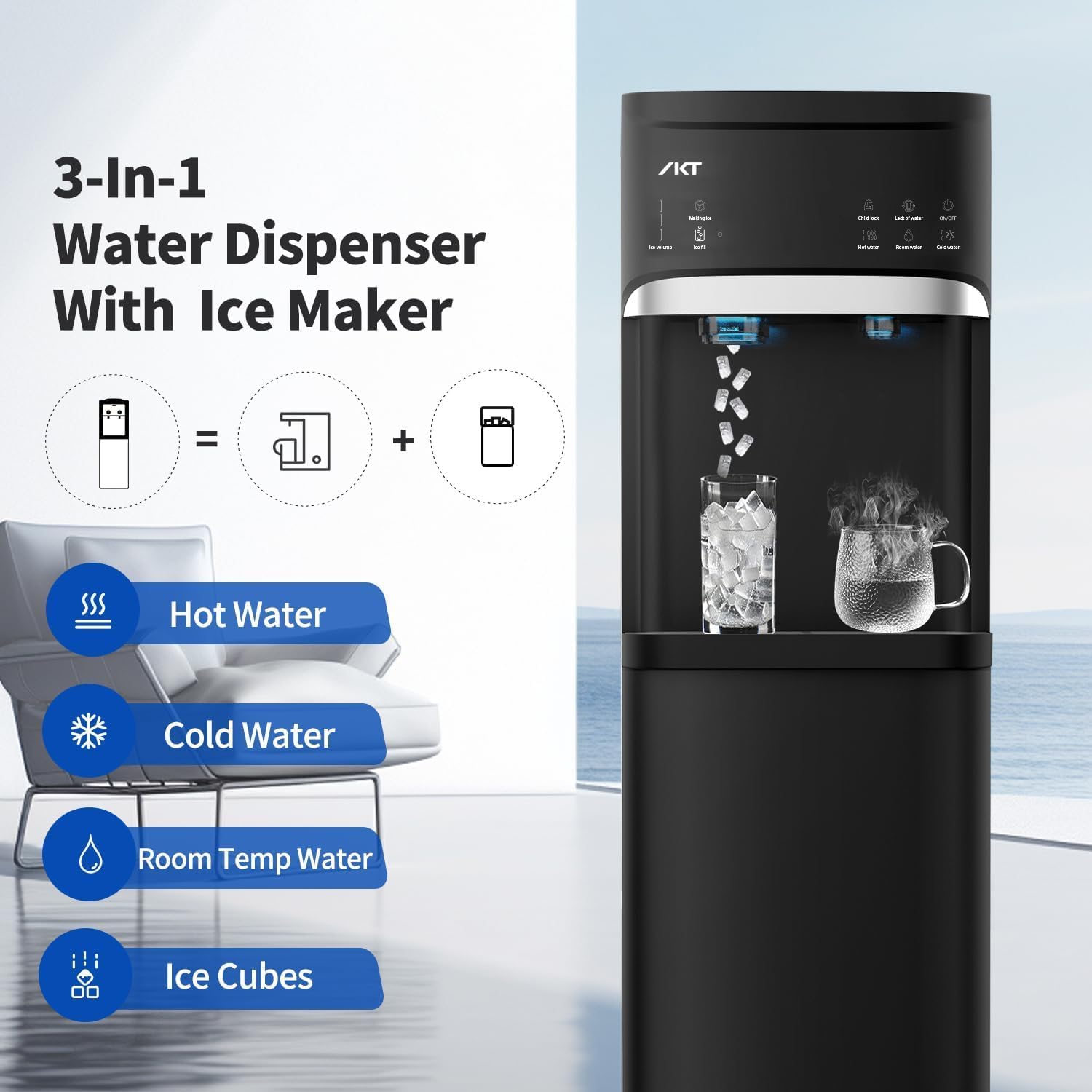
Figure 5.1: Visual representation of the self-cleaning process activation.
5.2 Pembersihan Baki Penampung Tetesan
The removable drip tray should be cleaned regularly to prevent spills and maintain hygiene.
- Gently pull out the drip tray from its position below the spouts.
- Empty any collected water and wash the tray with mild soap and water.
- Bilas hingga bersih dan keringkan sebelum dipasang kembali.

Figure 5.2: Close-up of the removable drip tray for easy cleaning.
5.3 Pembersihan Eksterior
Lap permukaan luar dengan lembut, damp kain. Jangan gunakan pembersih atau pelarut yang bersifat abrasif.
6. Penyelesaian masalah
Review these common issues and solutions before contacting customer support.
| Masalah | Kemungkinan Penyebab | Larutan |
|---|---|---|
| Tidak ada pengeluaran air | Botol air kosong atau tidak terpasang dengan benar. | Check the water bottle and ensure it is full and correctly seated. |
| Tidak ada air dingin | Cold water function not activated or recently turned on. | Ensure the 'Cold Water' button is pressed and the indicator light is on. Allow time for cooling. |
| Tidak ada air panas | Hot water function not activated or child lock not disengaged. | Ensure the 'Hot Water' button is pressed and the indicator light is on. Remember to press the 'Child Lock' button first. Allow time for heating. |
| Pembuat es tidak memproduksi es | Ice making function not activated, water shortage, or ice bin full. | Check if 'Making Ice' indicator is on. Ensure water bottle is not empty. Empty the ice bin if full. |
| Es mencair | The unit does not keep ice frozen. | This is normal operation. The ice maker produces ice, but the storage bin is not refrigerated to keep it frozen. |
7. Spesifikasi
| Fitur | Detil |
|---|---|
| Merek | IKT |
| Nomor Model | IKTLYCZ629N |
| Warna | Hitam |
| Dimensi Produk (P x L x T) | 16.5" x 12.2" x 40.7" |
| Sumber Daya | Listrik Kabel |
| Kapasitas Pembuatan Es | Hingga 33 lbs per hari |
| Kapasitas Penyimpanan Es | 2.76 pon |
| Water Bottle Compatibility | Standard 3-5 Gallon Bottles |
| Pengaturan Suhu | Cold, Room Temperature, Hot |
8. Garansi dan Dukungan
For warranty information or technical support, please refer to the warranty card included with your product or contact IKT customer service directly. Keep your purchase receipt as proof of purchase.
Contact information for IKT customer service can typically be found on the product packaging or the official IKT weblokasi.