
1. Produk Lebihview
The Soundcore Liberty 5 Pro Max are advanced wireless earbuds designed for superior audio experiences, crystal-clear communication, and smart productivity features. They integrate cutting-edge AI technology for noise cancellation, voice recording, and personalized sound.
Fitur Utama:
- Guinness World Records Certified Call Quality: The Liberty 5 Pro Max offers exceptional call performance, certified by Guinness World Records for its speech quality.
- AI Voice Recorder & Transcription: The smart charging case features an integrated microphone to record in-person meetings and interviews, providing AI-generated transcriptions and summaries. (Note: Does not record online meetings or calls.)
- Intuitive AMOLED Smart Case: A 1.78" AMOLED display on the charging case allows direct control over AI recording, ANC settings, and earbud configurations, with customizable wallpapers.
- Panggilan yang Sangat Jelas: Equipped with 10 sensors and a Thus AI Chip, ensuring your voice is heard clearly in any environment, even in noisy conditions exceeding 100 dB.
- Instant Absolute Silence (ANC): Features 100% more effective Active Noise Cancellation than previous models, utilizing 8 sensors and a Thus AI Chip to process over 384K noise signals per second for immediate quiet.
- Personalized Audio with HearID 5.0: Tailor your sound experience with custom EQ and an AI audio optimizer, ensuring optimal sound quality.
- Lag-Free Voice Control: Access 20 integrated commands for music playback and volume adjustment with zero delay, thanks to offline processing.
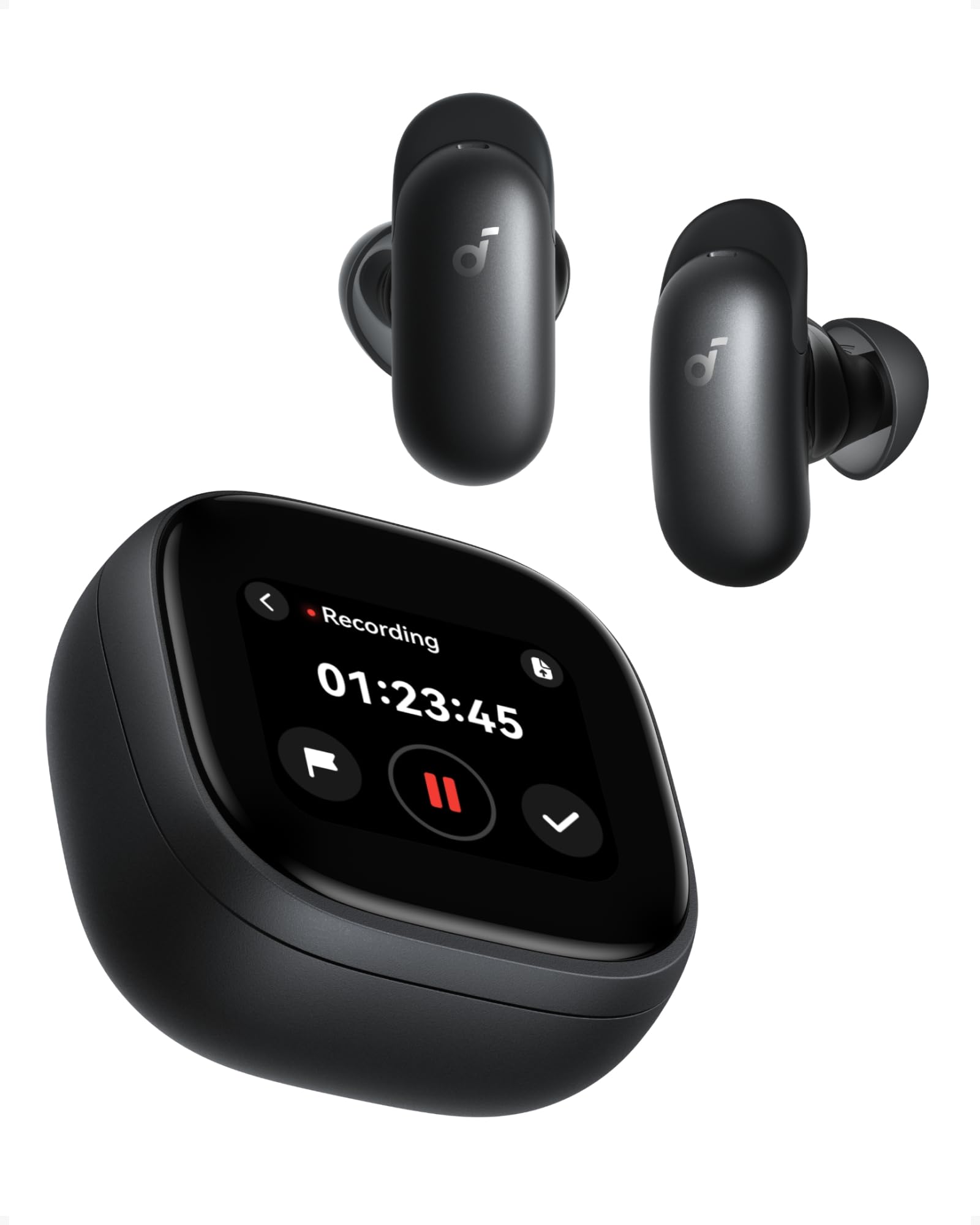
Image: Soundcore Liberty 5 Pro Max earbuds in their smart charging case.
2. Isi Paket
Pastikan semua barang ada di dalam kotak:
- Soundcore Liberty 5 Pro Max Earbuds
- Casing Pengisian Cerdas
- Ear Tips: XXS, XS, S, M, L (Medium pre-installed)
- Ear Wings: 0, 1, 2 (Size 1 pre-installed)
- Kabel Pengisian Daya USB-C

Image: All components included in the Soundcore Liberty 5 Pro Max package.
3. Pengaturan dan Penggunaan Pertama
3.1 Mengisi Daya Earbud dan Casing
- Letakkan earbud ke dalam wadah pengisi daya.
- Connect the charging case to a power source using the provided USB-C cable. The LED indicators on the case will show charging status.
- Untuk pengisian daya nirkabel, letakkan casing di atas alas pengisian daya nirkabel yang kompatibel.
- A full charge for the earbuds takes approximately 50 minutes. The case provides multiple charges for extended use.
3.2 Memasang Earbud
For optimal sound quality and noise cancellation, it is crucial to choose the correct ear tips and ear wings that provide a secure and comfortable seal.
- Experiment with different sizes of ear tips (XXS, XS, S, M, L) and ear wings (0, 1, 2).
- Insert the earbuds into your ears and rotate them until they fit snugly and comfortably.
- Use the Soundcore app's "Tip Fit Test" feature to verify the seal.

Image: Earbud correctly positioned in the ear for a secure fit.
3.3 Memasangkan dengan Perangkat Anda
- Open the charging case. The earbuds will automatically enter Bluetooth pairing mode (LEDs will flash).
- On your device (smartphone, tablet, PC), go to Bluetooth settings and select "Soundcore Liberty 5 Pro Max" from the list of available devices.
- Once connected, the earbuds will automatically connect to the last paired device when removed from the case.
- The Liberty 5 Pro Max supports simultaneous connection to up to 3 devices. Manage connections via the Soundcore app or the smart case display.

Image: Illustration of connecting the earbuds to multiple devices simultaneously.
3.4 Soundcore App Installation
Download the Soundcore app from the App Store (iOS) or Google Play Store (Android) to unlock full features, customize settings, and manage your earbuds.
4. Petunjuk Pengoperasian
4.1 Earbud Controls (Touch/Slide)
The earbuds feature touch and slide controls. Customize these controls via the Soundcore app.
- Putar/Jeda: Ketuk satu kali pada salah satu earbud.
- Lagu Berikutnya: Ketuk dua kali earbud kanan.
- Lagu Sebelumnya: Ketuk dua kali earbud kiri.
- Volume Naik: Slide up on right earbud.
- Volume Turun: Slide down on left earbud.
- Menjawab/Mengakhiri Panggilan: Ketuk satu kali pada salah satu earbud.
- Tolak Panggilan: Tekan dan tahan salah satu earbud selama 2 detik.
- Beralih Mode ANC: Press and hold left earbud for 2 seconds (cycles through ANC, Transparency, Normal).
4.2 Smart Charging Case Display
The 1.78" AMOLED display on the charging case provides direct access to various functions:
- AI Voice Recorder: Start, pause, and stop recordings. View waktu perekaman.
- Kontrol ANC: Adjust Active Noise Cancellation modes (ANC, Transparency, Normal).
- Earbud Settings: Manage equalizer presets, customize controls, and perform firmware updates.
- Status Baterai: View battery levels for both earbuds and the charging case.
- Custom Wallpapers: Personalize the display background.

Image: Hand interacting with the smart charging case display, showing various control options.
4.3 Peredam Kebisingan Aktif (ANC) dan Mode Transparansi
The Liberty 5 Pro Max offers advanced noise control:
- Modus ANC: Mengurangi kebisingan sekitar untuk pengalaman mendengarkan yang lebih mendalam. Ideal untuk perjalanan atau lingkungan yang bising.
- Mode Transparansi: Allows you to hear your surroundings while listening to audio. Useful for awareness in urban areas or conversations.
- Modus Normal: Pemutaran audio standar tanpa kontrol kebisingan aktif.

Image: A man on a boat, illustrating the effectiveness of instant absolute silence with ANC.
4.4 AI Voice Recorder
Utilize the AI Voice Recorder for in-person meetings and interviews:
- Access the recorder via the smart case display or the Soundcore app.
- Start recording. The integrated microphone in the case will capture audio.
- After recording, the system will transcribe and generate AI summaries.
- Manage recordings, transcriptions, and summaries through the Soundcore app or the "Ask Anka" web pintu gerbang.

Image: Individuals in a meeting, demonstrating the use of the AI voice recorder.
4.5 Personalized Audio Settings
The Soundcore app allows you to customize your audio experience:
- Dengar ID 5.0: Perform a hearing test to create a personalized EQ profile tailored to your unique hearing.
- EQ Kustom: Manually adjust equalizer settings to your preference.
- AI Audio Optimizer: Enhances sound quality based on AI analysis.

Image: A woman relaxing, enjoying personalized audio settings.
5. Pemeliharaan
- Pembersihan: Regularly clean the earbuds, ear tips, and charging case with a soft, dry, lint-free cloth. Avoid using harsh chemicals.
- Tahan Air: The earbuds have an IPX4 water resistance rating, meaning they are resistant to splashes and sweat. Do not submerge them in water. Ensure earbuds are dry before placing them back in the charging case.
- Penyimpanan: Simpan earbud dalam wadah pengisi dayanya saat tidak digunakan untuk melindunginya dan menjaga dayanya tetap terisi.
6. Penyelesaian masalah
| Masalah | Larutan |
|---|---|
| Earbud tidak dapat dipasangkan |
|
| Tidak ada suara atau volume rendah |
|
| ANC tidak efektif |
|
| Masalah pengisian daya |
|
7. Spesifikasi
| Fitur | Detil |
|---|---|
| Merek | Inti suara |
| Nama Model | Liberty 5 Pro Max |
| Nomor Model | D1204 |
| Warna | Hitam |
| Faktor Bentuk | Di telinga |
| Kontrol Kebisingan | Pembatalan Kebisingan Aktif (ANC) |
| Impedansi | Tegangan 17 ohm |
| Respon Frekuensi | Frekuensi 20kHz |
| Kepekaan | 123dB |
| Teknologi Konektivitas | Nirkabel |
| Teknologi Nirkabel | Bahasa Indonesia: Bluetooth |
| Versi Bluetooth | 6.1 |
| Jenis Kontrol | Touch and Slide Control |
| Metode Kontrol | Aplikasi, Suara |
| Casing Bahan | Plastik |
| Tingkat Tahan Air | IPX4 (Splash and Sweat Resistant) |
| Rata-rata Daya Tahan Baterai (Earbud) | 12 Jam |
| Waktu Pengisian Baterai | 50 Menit |
| Fitur Khusus | AI Note-Taker, AI Noise Cancellation, AMOLED Smart Case |
| Perangkat yang Kompatibel | iPhone, Android, PC, Mac |
| GTIN (UPC) | 194644331047 |
8. Garansi dan Dukungan
The Soundcore Liberty 5 Pro Max comes with a Garansi 24 bulan sejak tanggal pembelian. Harap simpan bukti pembelian Anda untuk klaim garansi.
For technical support, troubleshooting assistance, or warranty inquiries, please visit the official Soundcore support webAnda dapat menemukan informasi lebih lanjut di situs web mereka atau menghubungi layanan pelanggan mereka. Toko Soundcore di Amazon or the Soundcore app.
9. Informasi Keselamatan Penting
- Jangan sampai terkena suhu ekstrem.
- Hindari menjatuhkan atau membenturkan perangkat dengan keras.
- Jauhkan dari jangkauan anak-anak dan hewan peliharaan.
- Jangan membongkar atau mencoba memperbaiki sendiri perangkat ini.
- Gunakan hanya kabel dan adaptor pengisi daya asli atau bersertifikat.
- Avoid using earbuds at high volume for extended periods to prevent hearing damage.
10. Sumber Daya Video
Tidak ada video produk resmi URLs were provided in the product data. Please refer to the official Soundcore website or YouTube channel for video tutorials and demonstrations.