
1. Pendahuluan
This manual provides essential information and instructions for using your realme 16T 5G Smartphone. Please read this manual thoroughly before using your device to ensure proper operation and to maximize its performance and longevity. Keep this manual for future reference.
2. Apa yang ada di dalam kotak
Verifikasi bahwa semua item ada dalam paket produk Anda:
- realme 16T Smartphone
- Kabel Data USB
- Sarung Telepon
- Panduan Memulai Cepat
3. Perangkat Berakhirview
Familiarize yourself with the physical components of your realme 16T 5G Smartphone.
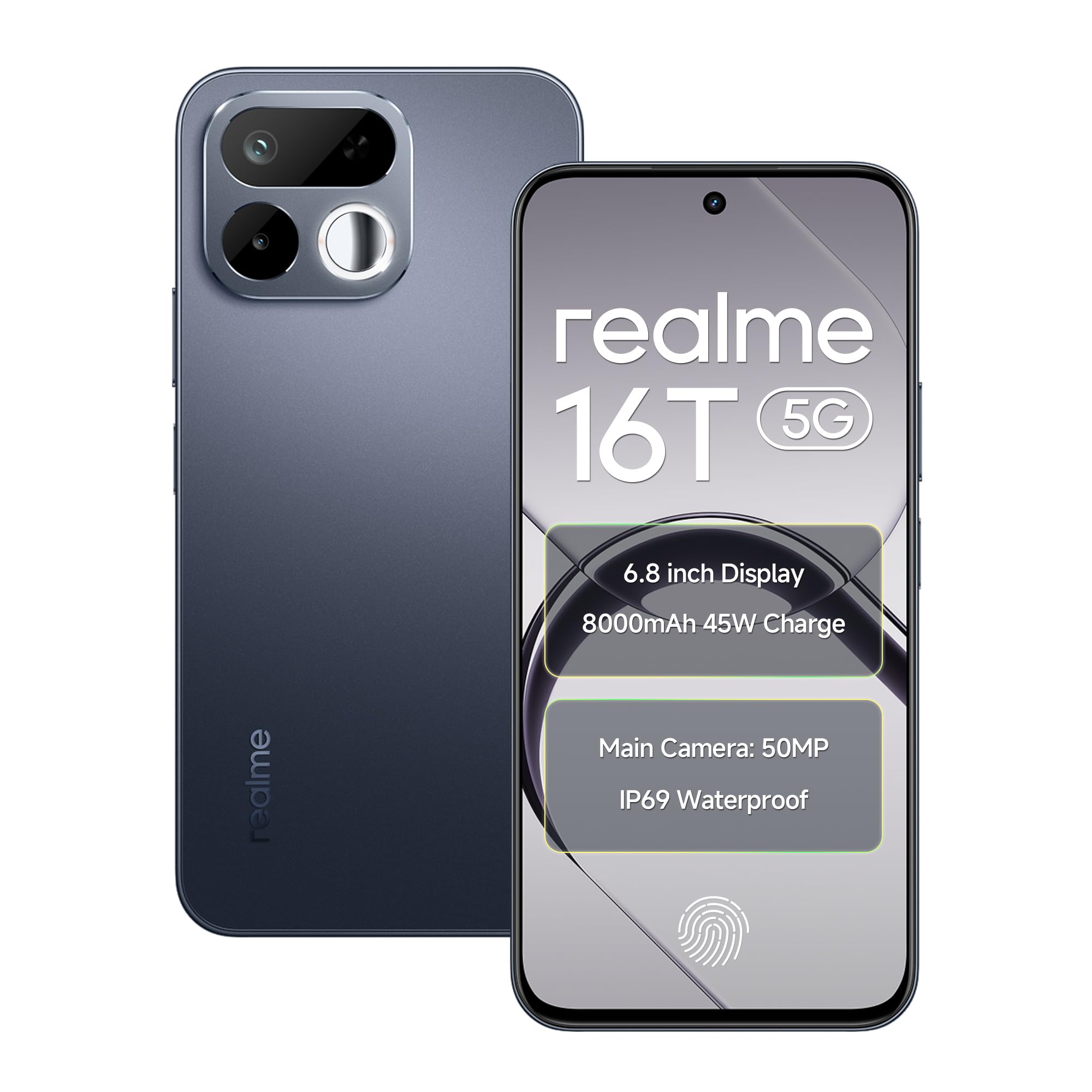
Gambar: Depan dan belakang view of the realme 16T 5G Smartphone, showcasing desain dan modul kameranya.
Fitur Utama:
- Menampilkan: 6.8-inch HD+ LCD with 144Hz refresh rate and 1200 nits peak brightness.
- Prosesor: MediaTek Dimensity 6300 Octa-core chipset.
- Baterai: 8000mAh capacity with 45W SUPERVOOC flash charging.
- Kamera: 50MP AI main camera with selfie mirror functionality.
- Daya tahan: IP69 Pro dust and water resistance, MIL-STD-810H military-grade reliability.
- Sistem Operasi: Android 16 with realme UI 7.0.
4. Pengaturan
4.1 Memasang Kartu SIM dan Kartu MicroSD
- Temukan tempat kartu SIM di sisi perangkat Anda.
- Gunakan alat pelepas SIM yang disediakan untuk membuka baki SIM.
- Carefully place your Nano-SIM cards (supports dual 5G SIM) and a microSD card (for expandable storage up to 2TB) into the designated slots. Ensure the gold contacts are facing down.
- Gently push the SIM tray back into the device until it is flush with the side.
4.2 Menyalakan Perangkat dan Pengaturan Dasar
- Tekan dan tahan tombol Daya hingga logo realme muncul.
- Ikuti petunjuk di layar untuk memilih bahasa, wilayah, dan terhubung ke jaringan Wi-Fi.
- Masuk dengan akun Google Anda atau buat akun baru untuk mengakses layanan Google dan Play Store.
- Siapkan metode kunci layar pilihan Anda (PIN, pola, kata sandi, sidik jari, atau buka kunci wajah).
5. Petunjuk Pengoperasian
5.1 Manajemen Daya
- Nyalakan: Press and hold the Power button until the device vibrates and the realme logo appears.
- Matikan: Tekan dan tahan tombol Daya, lalu ketuk 'Matikan daya' di layar.
- Mulai ulang: Tekan dan tahan tombol Daya, lalu ketuk 'Mulai Ulang' di layar.
5.2 Pengaturan Tampilan
Your realme 16T features a 6.8-inch HD+ LCD with a 144Hz refresh rate for smooth visuals and a 180Hz touch sampling rate for responsive interaction. The display offers up to 1200 nits peak brightness for clear visibility in various lighting conditions.

Image: The realme 16T 5G Smartphone display showcasing a game, highlighting the 144Hz refresh rate and bright visuals.
- To adjust refresh rate: Go to Pengaturan > Tampilan > Kecepatan penyegaran layar.
- To adjust brightness: Go to Pengaturan > Tampilan > Tingkat Kecerahan or use the quick settings panel.
5.3 Baterai dan Pengisian Daya
The device is equipped with an 8000mAh battery and supports 45W SUPERVOOC flash charging.

Image: An illustration of the realme 16T 5G Smartphone's 8000mAh battery capacity and 45W charging capability, with usage estimates for WhatsApp, Instagram, gaming, and YouTube.
- Use the provided 45W SUPERVOOC charger and USB Data Cable for optimal charging speed.
- Hindari penggunaan pengisi daya atau kabel yang tidak bersertifikat untuk mencegah kerusakan pada perangkat.
5.4 Fungsi Kamera
The realme 16T features a 50MP AI main camera. It also includes a selfie mirror function, allowing you to use the rear camera for high-quality selfies.

Image: A person taking a selfie using the realme 16T 5G Smartphone's selfie mirror feature, highlighting the 50MP camera.

Image: A collage demonstrating the AI image editing capabilities of the realme 16T 5G Smartphone, including original, modeling photoshoot, 3D emoji, and cartoon shot options.
- Buka aplikasi Kamera dari layar beranda atau laci aplikasi Anda.
- Beralih antara mode foto, video, potret, dan mode lainnya.
- Utilize the AI features for enhanced image processing and editing.
5.5 Fitur Keamanan
The device supports side fingerprint recognition and face recognition for secure and quick unlocking.
- To set up fingerprint unlock: Go to Pengaturan > Keamanan > Sidik Jari dan ikuti petunjuknya.
- To set up face unlock: Go to Pengaturan > Keamanan > Buka kunci wajah dan ikuti petunjuknya.
5.6 Konektivitas
The realme 16T supports 5G dual-SIM dual-standby, Wi-Fi, Bluetooth, and USB OTG.
- Jaringan 5G: Ensure your SIM cards are 5G enabled and you are in a 5G coverage area.
- Wifinya: Terhubung ke jaringan Wi-Fi melalui Pengaturan > Wi-Fi.
- Bluetooth dapat digunakan untuk berbagai keperluan, seperti: Pasangkan dengan perangkat Bluetooth melalui Pengaturan > Bluetooth.
- USB OTG: Connect USB devices (e.g., flash drives) using a USB OTG adapter.
Suara 5.7
Experience studio-quality sound with Hi-Res high-resolution audio certification. The device also features 400% Ultra Volume for enhanced audio output.

Image: A person holding the realme 16T 5G Smartphone while playing a game, illustrating the 400% Ultra Volume feature with sound waves emanating from the device.
6. Pemeliharaan
6.1 Membersihkan Perangkat Anda
- Gunakan kain lembut dan tidak berbulu untuk membersihkan layar dan badan ponsel.
- Hindari penggunaan bahan kimia keras atau bahan abrasif.
6.2 Pembaruan Perangkat Lunak
Periksa dan instal pembaruan perangkat lunak secara berkala untuk memastikan perangkat Anda memiliki fitur, patch keamanan, dan peningkatan kinerja terkini.
- Pergi ke Pengaturan > Tentang perangkat > Versi realme UI untuk memeriksa pembaruan.
6.3 Manajemen Penyimpanan
Manage your device's storage to maintain optimal performance. The device supports microSD card expansion up to 2TB.
- Pergi ke Pengaturan > Penyimpanan ke view penggunaan penyimpanan dan mengosongkan ruang.
- Lakukan pencadangan data penting secara berkala ke penyimpanan cloud atau perangkat eksternal.
6.4 Durability and Resistance
The realme 16T is designed with IP69 Pro dust and water resistance and MIL-STD-810H military-grade environmental reliability.

Image: The realme 16T 5G Smartphone on a wooden surface with spilled coffee, demonstrating its IP69 Pro dust and water resistance.
Image: A person running with the realme 16T 5G Smartphone, which is shown with debris around it, illustrating its military-grade shock resistance.
While resistant, avoid intentional exposure to water or dust, and do not submerge the device. Damage caused by liquid or dust ingress may not be covered under warranty if proper care is not taken.
7. Penyelesaian masalah
This section addresses common issues you might encounter with your realme 16T 5G Smartphone.
| Masalah | Solusi yang mungkin |
|---|---|
| Perangkat tidak menyala | Ensure the battery is charged. Connect the device to the charger for at least 10 minutes, then try powering on again. If it still doesn't work, perform a force restart by holding the Power button for 10-15 seconds. |
| Baterai cepat habis | Check for apps running in the background. Reduce screen brightness, disable unnecessary features like GPS or Bluetooth when not in use. Go to Pengaturan > Baterai untuk mengidentifikasi aplikasi yang menghabiskan daya. |
| Network connectivity issues (5G/Wi-Fi) | Restart the device. Check if Airplane Mode is off. For mobile data, ensure your SIM card is properly inserted and has an active plan. For Wi-Fi, try forgetting the network and reconnecting, or restart your router. |
| Aplikasi mogok atau macet | Hapus cache aplikasi yang bermasalah (Pengaturan > Aplikasi > [Nama Aplikasi] > Penyimpanan > Hapus cache). If the issue persists, try reinstalling the app. Ensure your device software is up to date. |
| Pembukaan kunci sidik jari/wajah tidak berfungsi. | Ensure your finger/face is clean and dry. Re-register your fingerprint/face in Pengaturan > Keamanan. Check for any physical obstructions on the sensor or camera. |
If you encounter issues not listed here or if the suggested solutions do not resolve your problem, please contact realme customer support.
8. Spesifikasi
Detailed technical specifications for the realme 16T 5G Smartphone:
| Fitur | Spesifikasi |
|---|---|
| Merek | realme |
| Model | 16T |
| Sistem Operasi | Android 16 (with realme UI 7.0) |
| Prosesor | MediaTek Dimensity 6300 Octa-core (2.4 GHz) |
| RAM | 6 GB (juga tersedia dalam 8 GB) |
| Penyimpanan Internal | 128 GB (juga tersedia dalam 256 GB) |
| Penyimpanan yang Dapat Diperluas | Hingga 2 TB melalui microSD |
| Menampilkan | 6.8-inch HD+ LCD, 144Hz Refresh Rate, 1200 nits Peak Brightness |
| Kamera Belakang | Kamera Utama AI 50MP |
| Baterai | 8000 mAh |
| Pengisian daya | Pengisian Cepat SUPERVOOC 45W |
| Konektivitas | 5G Dual SIM, Wi-Fi, Bluetooth, USB Type-C, USB OTG |
| Tahan Air | IP69 Pro |
| Daya tahan | MIL-STD-810H Military-Grade |
| Ukuran | 16.6x7.8x0.8 sentimeter |
| Berat | 192 gram |
9. Informasi Garansi
Your realme 16T 5G Smartphone comes with a 1-year official manufacturer warranty sejak tanggal pembelian. Garansi ini mencakup cacat produksi dalam penggunaan normal. Harap simpan bukti pembelian Anda untuk klaim garansi.
Garansi tidak mencakup:
- Damage caused by improper use, accidents, or unauthorized repairs.
- Keausan normal.
- Damage caused by liquid or dust ingress if not handled according to IP69 Pro guidelines.
For detailed warranty terms and conditions, please refer to the warranty card included in your product package or visit the official realme weblokasi.
10. Support & Safety Information
10.1 Dukungan Pelanggan
For further assistance, technical support, or service inquiries, please contact realme customer service:
- Visit the official realme support weblokasi: realme Support (India)
- Refer to the contact information provided in your Quick Start Guide.
10.2 Pedoman Keselamatan
To ensure safe operation of your device, please observe the following:
- Jangan menggunakan telepon saat mengemudi.
- Hindari memaparkan perangkat ke suhu ekstrem.
- Gunakan hanya aksesori yang disetujui realme.
- Jangan mencoba membongkar atau memperbaiki perangkat sendiri.
- Buang perangkat dan baterainya secara bertanggung jawab sesuai dengan peraturan setempat.


