1. Pendahuluan
This manual provides essential instructions for the safe and effective use of your OMRON Electronic Thermometer Kenon-kun MC-171W. Please read this manual thoroughly before use and keep it for future reference. This device is designed for accurate body temperature measurement in the armpit or oral cavity.
2. Informasi dan Peringatan Keselamatan
PERINGATAN:
- Self-diagnosis or treatment based on measurement results is dangerous. Always follow medical guidance.
- This product is not an ear thermometer. Do not measure temperature anywhere other than the armpit or oral cavity.
- Keep out of reach of infants and young children. Avoid use by children alone.
- Product warranty is limited to use within Japan.
- Always read the instruction manual carefully and use the device correctly.
This device is a Controlled Medical Device with Medical Device Certification (Approval) Number: 219AGBZX00040000.
3. Produk Lebihview
The OMRON Kenon-kun MC-171W is a compact and waterproof electronic thermometer designed for reliable temperature measurement. It features an easy-to-read display and an automatic shut-off function to conserve battery life.
3.1. Komponen
- Thermometer Unit
- Trial Battery (Alkaline manganese button battery LR41 x 1)
- Kotak Penyimpanan
- Manual Instruksi

Gambar: Depan view of the OMRON MC-171W Electronic Thermometer.
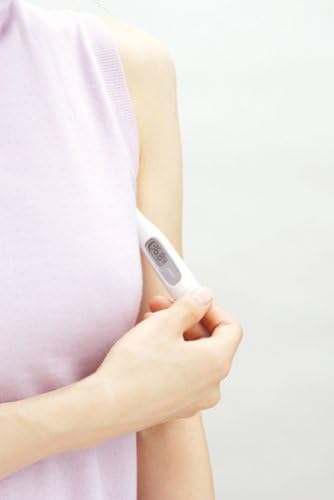
Image: Close-up of the thermometer display showing a temperature reading of 36.8°C.
4. Pengaturan
4.1. Pemasangan Baterai
The thermometer comes with a trial battery (LR41) pre-installed. If the battery needs replacement, follow these steps:
- Locate the battery compartment cover, usually at the end opposite the measurement tip.
- Lepaskan penutup dengan hati-hati.
- Insert a new LR41 alkaline manganese button battery with the correct polarity (+/-).
- Pasang kembali penutup kompartemen baterai dengan aman.
Note: Ensure the cover is properly sealed to maintain the device's water resistance.
5. Petunjuk Pengoperasian
5.1. Penggunaan Umum
- Press the power button to turn on the thermometer. A short beep will sound, and the last measured temperature will be displayed briefly.
- The display will then show 'L' and a flashing '°C' (or '°F'), indicating it is ready for measurement.
5.2. Armpit Measurement
For accurate armpit temperature measurement, follow these guidelines:
- Ensure the armpit is dry.
- Place the tip of the thermometer in the center of the armpit, inserting it from bottom to top.
- Press the elbow firmly against the side of the body, holding the arm at a 30° to 45° angle to ensure the thermometer is securely in place.
- Hold the thermometer in position for approximately 10 minutes until the buzzer sounds.

Image: Diagram showing that temperature can vary between the center and outer parts of the armpit.

Image: Illustration of correct armpit thermometer placement, with the elbow pressed against the side at a 30-45 degree angle.

Gambar: Examples of incorrect armpit thermometer positioning, indicating that the thermometer should not move or shift during measurement.
5.3. Oral Measurement
For accurate oral temperature measurement:
- Place the tip of the thermometer under the tongue, in one of the heat pockets at the base of the tongue.
- Close your mouth and hold the thermometer in place with your lips and fingers.
- Hold the thermometer in position for approximately 5 minutes until the buzzer sounds.
5.4. Hasil Membaca
Once the measurement is complete and the buzzer sounds, the final temperature reading will be displayed on the screen. The thermometer will automatically turn off after approximately 30 minutes of inactivity.
6. Pemeliharaan
6.1. Pembersihan
The OMRON MC-171W is waterproof and can be cleaned by rinsing it under water. For disinfection, wipe the measurement tip with an alcohol swab or a cloth dampened with disinfectant. Do not immerse the entire thermometer in water for extended periods or use harsh chemical cleaners.
6.2. Penyimpanan
Store the thermometer in its protective case when not in use. Keep it in a cool, dry place, away from direct sunlight, high temperatures, and humidity. Avoid dropping or subjecting the device to strong impacts.
7. Penyelesaian masalah
| Masalah | Kemungkinan Penyebab | Larutan |
|---|---|---|
| Termometer tidak menyala. | Baterai mati atau tidak terpasang dengan benar. | Replace the battery (LR41) or reinsert it correctly. |
| Pembacaan yang tidak akurat. | Improper placement or insufficient measurement time. | Ensure correct placement in the armpit or oral cavity and allow sufficient measurement time (10 min for armpit, 5 min for oral). |
| Layar menampilkan 'Err'. | Kesalahan pengukuran atau kerusakan perangkat. | Turn off the thermometer, wait a few minutes, and try again. If the error persists, contact customer support. |
8. Spesifikasi
| Fitur | Detil |
|---|---|
| Nomor Model | MC-171W |
| Nomor Sertifikasi Perangkat Medis | 219AGBZX00040000 |
| Metode Pengukuran | Actual Measurement |
| Akurasi Pengukuran | ±0.1°C (when measured in water bath at 23°C) |
| Rentang Pengukuran | 32.0 hingga 42.0°C |
| Waktu pengukuran | Approx. 10 minutes (armpit), Approx. 5 minutes (oral) |
| Lingkungan Operasional | Ambient temperature +10 to +40°C, Relative humidity 30 to 85% RH |
| Tahan Air | Conforms to JIS T1140 specified drip-proof type |
| Sumber Daya | 1 x LR41 Alkaline manganese button battery |
| Daya Tahan Baterai | Approx. 1100 measurements (when used for 10 minutes each) |
| Product Dimensions (W x L x T) | Ukuran 19.6 x 129.7 x 13.2 mm |
| Berat | Kira-kira 13g (tidak termasuk baterai) |
| Warna | Putih |
| Fitur | Auto-off, Buzzer notification, Previous reading memory, Battery replaceable |
| Negara Asal | Cina |
9. Garansi dan Dukungan
OMRON Healthcare products are manufactured to high-quality standards. For warranty information, please refer to the specific warranty card included with your product. Please note that product warranty is generally limited to use within Japan.
9.1. Dukungan Pelanggan
For product inquiries, separate purchases, consumables, or repair requests, please contact Omron Healthcare Customer Support:
- Weblokasi: https://www.healthcare.omron.co.jp/support/
- Omron Service Center:
- Telephone (Toll-Free): Telepon: 0120-30-6606
- FAX (Toll-Free): Telepon: 0120-10-1625
- Jam Operasional: Monday - Friday, 9:00 - 19:00 (excluding holidays)
Please note that operating hours may change without prior notice.