Perkenalan
This manual provides essential instructions for the installation, operation, maintenance, and troubleshooting of the IBM 49P1599 FRU System Board. This system board is designed for personal computers, featuring a 400/533 Front Side Bus, integrated 10/100 Ethernet, and support for DDR2 memory.
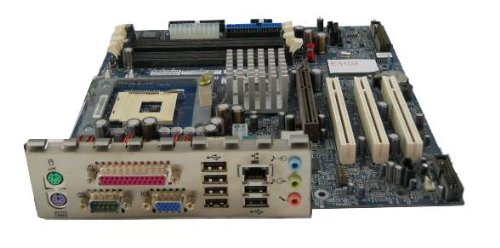
Image: The IBM 49P1599 FRU System Board. This image displays the main components and layout of the motherboard, including CPU socket, memory slots, and various connectors.
Pengaturan dan Instalasi
Careful installation is crucial for the proper functioning of your system board. Always handle the board by its edges to avoid static discharge.
1. Mempersiapkan Instalasi
- Ensure your computer case is compatible with the system board's form factor.
- Kumpulkan peralatan yang diperlukan: obeng kepala Phillips, tali pergelangan tangan antistatis.
- Unplug the power supply from the wall outlet before beginning.
2. Installing the System Board
- Pasang pelindung I/O ke lubang belakang casing komputer Anda.
- Carefully align the system board with the standoffs in the case.
- Secure the system board with screws, ensuring it is firmly seated.
3. Memasang Komponen
Prosesor (CPU)
This system board is supplied without a processor. Refer to your CPU's manual for specific installation instructions. Ensure the CPU is correctly oriented in the socket before securing the retention lever.
Memori (RAM)
The board supports DDR2 RAM and has 2 memory slots.
- Buka klip di kedua ujung slot memori.
- Sejajarkan modul memori dengan slot, pastikan lekukan pada modul sesuai dengan kunci di dalam slot.
- Press down firmly on both ends of the module until the clips snap into place.
Kartu Grafis
The system board features an Integrated Graphics Card Interface and a PCI-Express x16 slot for dedicated graphics cards.
- Locate the PCI-Express x16 slot.
- Remove the corresponding expansion slot cover from your case.
- Insert the graphics card firmly into the slot until it clicks. Secure it with a screw to the case.
4. Kabel Penghubung
- Konektor Daya: Connect the main 24-pin ATX power connector and the 4-pin CPU power connector from your power supply to the system board.
- Perangkat SATA: Connect SATA 3 data cables from your storage devices (hard drives, SSDs) to the SATA ports on the system board.
- Konektor Panel Depan: Connect the power button, reset button, HDD LED, power LED, and USB ports from your case to the corresponding headers on the system board. Refer to the board's silkscreen labels for correct orientation.
- Eternet: The board has integrated 10/100 Ethernet. Connect your network cable to the RJ-45 port on the I/O panel.
Petunjuk Pengoperasian
After completing the physical installation, you can proceed with the initial boot and operating system setup.
1. Boot Awal
- Pastikan semua komponen terhubung dengan aman.
- Hubungkan monitor, keyboard, dan mouse Anda.
- Plug in the power supply and turn on the system.
- Sistem akan menyala, dan Anda akan melihat tampilan di monitor Anda.
2. Pengaturan BIOS/UEFI
During the initial boot sequence, press the designated key (commonly DEL, F2, F10, or F12) to enter the BIOS/UEFI setup utility. Here you can configure boot order, system time, and other hardware settings. Save changes before exiting.
3. Instalasi Sistem Operasi
This system board is compatible with platforms such as Windows 10. Insert your operating system installation media (USB drive or DVD) and follow the on-screen prompts to install the operating system. Ensure all necessary drivers for the system board components are installed after the OS installation.
Pemeliharaan
Regular maintenance helps ensure the longevity and stable performance of your system board.
- Pembersihan: Periodically clean dust from the system board and components using compressed air. Ensure the system is powered off and unplugged before cleaning.
- Pembaruan BIOS: Check the official IBM support website for BIOS updates. BIOS updates can improve compatibility, stability, and performance. Follow the provided instructions carefully when updating the BIOS.
- Pemeriksaan Komponen: Ensure all cables and components remain securely connected.
Penyelesaian Masalah
Jika Anda mengalami masalah, ikuti langkah-langkah pemecahan masalah umum berikut:
Tidak Ada Daya
- Verify the power supply is connected to the wall outlet and turned on.
- Check that the 24-pin and 4-pin power connectors are securely attached to the system board.
- Ensure the front panel power button cable is correctly connected to the system board header.
Tidak ada tampilan
- Confirm the monitor is powered on and connected to the correct video output (either integrated or dedicated graphics card).
- Reseat the graphics card (if applicable) and memory modules.
- Uji dengan monitor atau kabel video yang berbeda jika memungkinkan.
System Fails to Boot
- Periksa apakah ada kabel atau komponen yang longgar.
- Ensure the CPU is properly seated and its cooler is installed correctly.
- Try booting with only one memory module installed, rotating through the modules and slots to identify a faulty one.
- Reset the BIOS to default settings (refer to your system board's specific instructions for clearing CMOS).
Spesifikasi
Garansi dan Dukungan
For warranty information and technical support, please refer to the official IBM website or contact your point of purchase. Keep your proof of purchase for warranty claims. IBM provides resources and support for its products to ensure customer satisfaction.
Untuk bantuan lebih lanjut, kunjungi Dukungan IBM weblokasi.
Dokumen Terkait - 49P1599 FRU
| Fitur | Spesifikasi |
|---|---|
| Nomor Model | 49P1599 FRU |
| Bus Sisi Depan (FSB) | Frekuensi 400/533MHz |
| Teknologi Memori RAM | DDR2 |
| Kecepatan Jam Memori | Frekuensi 2133 MHz |
| Slot Memori Tersedia | 2 |
| Antarmuka Kartu Grafis | Integrated, PCI-Express x16 |
| Standar Bus Sistem yang Didukung | Kartu Grafis SATA 3 |
| Integrated Ethernet | Kecepatan 10/100Mbps |
| Perangkat yang Kompatibel | Komputer Pribadi |
| Kompatibilitas Platform | Jendela 10 |
| Berat Barang | 8 pon |
 |
Sistem Tampilan Informasi IBM 3270: Deskripsi Unit Kontrol 3274 dan Panduan Pemrogram Manual teknis komprehensif yang merinci Sistem Tampilan Informasi IBM 3270, dengan fokus khusus pada Unit Kontrol IBM 3274. Manual ini mencakup aspek fungsional dan pemrograman, aliran data, operasi, dan integrasi dalam lingkungan IBM. |
 |
Sistem Monitor Disk IBM 1130, Versi 2: Panduan Programmer dan Operator Manual teknis komprehensif yang merinci Sistem Monitor Disk IBM 1130, Versi 2. Panduan ini mencakup konfigurasi sistem, teknik pemrograman, prosedur pengoperasian, dan program utilitas untuk sistem komputasi IBM 1130, yang ditujukan bagi para programmer dan operator. |
 |
Sistem Monitor Disk IBM 1130, Versi 2: Panduan Pemrograman dan Operator Panduan komprehensif ini menyediakan prosedur pengoperasian dan pemeliharaan penting untuk Sistem Monitor Disk IBM 1130, Versi 2. Panduan ini mencakup bagian pengantar untuk pengguna baru, kiat pemrograman, dan informasi detail tentang catatan kontrol sistem monitor dan pesan kesalahan. |
 |
Panduan Instalasi & Pengujian IBM 7094 Model 2 untuk Teknisi Pelanggan Manual instalasi dan pengujian resmi untuk Sistem Pemrosesan Data IBM 7094 Model 2. Meliputi prosedur CE, pemasangan kabel, pengaturan sistem, keamanan, dan diagnostik untuk sistem ini.tagkomputer. |
 |
Referensi Teknis IBM 5150 Manual referensi teknis ini memberikan detail desain perangkat keras, informasi antarmuka, dan dukungan BIOS untuk Komputer Pribadi IBM 5150. Manual ini ditujukan untuk programmer dan insinyur yang terlibat dalam desain perangkat keras dan perangkat lunak. |
 |
Manual Referensi Teknis Komputer Pribadi IBM AT Comprehensive technical reference guide for the IBM Personal Computer AT, detailing hardware specifications, system board, BIOS, keyboard, coprocessor, and power supply. |