1. Pendahuluan
The Extech EX310 is a compact, manual-ranging digital multimeter designed for a variety of electrical measurements. It features an extra-large 2000-count LCD and a built-in Non-Contact AC Voltage Detector (NCV) for enhanced safety. This device is capable of measuring AC/DC Voltage, AC/DC Current, Resistance, Diode, and Continuity, and includes a battery test function for 1.5V and 9V batteries. Its robust design, including a protective rubber holster and tilt stand, makes it suitable for field use.
2. Informasi Keselamatan
Selalu patuhi tindakan pencegahan keselamatan saat menggunakan peralatan pengujian listrik apa pun. Kegagalan untuk melakukannya dapat mengakibatkan cedera atau kerusakan pada meteran atau peralatan yang sedang diuji.
- The Extech EX310 is UL listed with a CAT III – 600 Volt safety rating.
- Jangan gunakan lebih dari volume terukurtage, seperti yang tertera pada meteran, di antara terminal atau di antara terminal mana pun dan tanah.
- Always inspect test leads for damage before use. Replace if insulation is compromised.
- Berhati-hatilah saat bekerja dengan sirkuit listrik yang masih aktif.
- Gunakan Vol. Non-Kontaktage (NCV) detector as a preliminary check for live AC voltage, but always verify with direct contact measurements when possible.
- Ensure the function switch is set to the correct range before making measurements.
3. Fitur Produk
- 9-Function Manual-Ranging DMM: Mengukur AC/DC voltage, AC/DC current (up to 10 A), resistance, diode, continuity, plus 1.5 V/9 V battery tests.
- Volume Non-KontaktagDetektor e (NCV): Built-in NCV with red LED and audible beeper alerts to the presence of live AC (100-600 VAC) without probes.
- Extra-Large 2000-Count Display: Clear, easy-to-read 1-inch digits on a high-count LCD ensure readability.
- Rugged, Portable Design: Compact meter (5.7 × 2.9 × 1.6 in, 9 oz) with protective rubber holster, tilt stand, and low-battery indicator.
- Reliable Safety & Accuracy: 0.5% basic accuracy. Designed to UL/CAT II-1000 V & CAT III-600 V safety standards.
4. Isi Paket
The Extech EX310 package includes the following items:
- Extech EX310 Mini Digital Multimeter
- Kabel Uji
- Baterai 9 Volt
- Miringkan Berdiri
5. Produk Lebihview (Controls and Display)
Familiarize yourself with the components of your EX310 multimeter:

Gambar: Depan view of the Extech EX310 Mini Digital Multimeter, showing the large LCD display, function dial, NCV button, and input jacks.
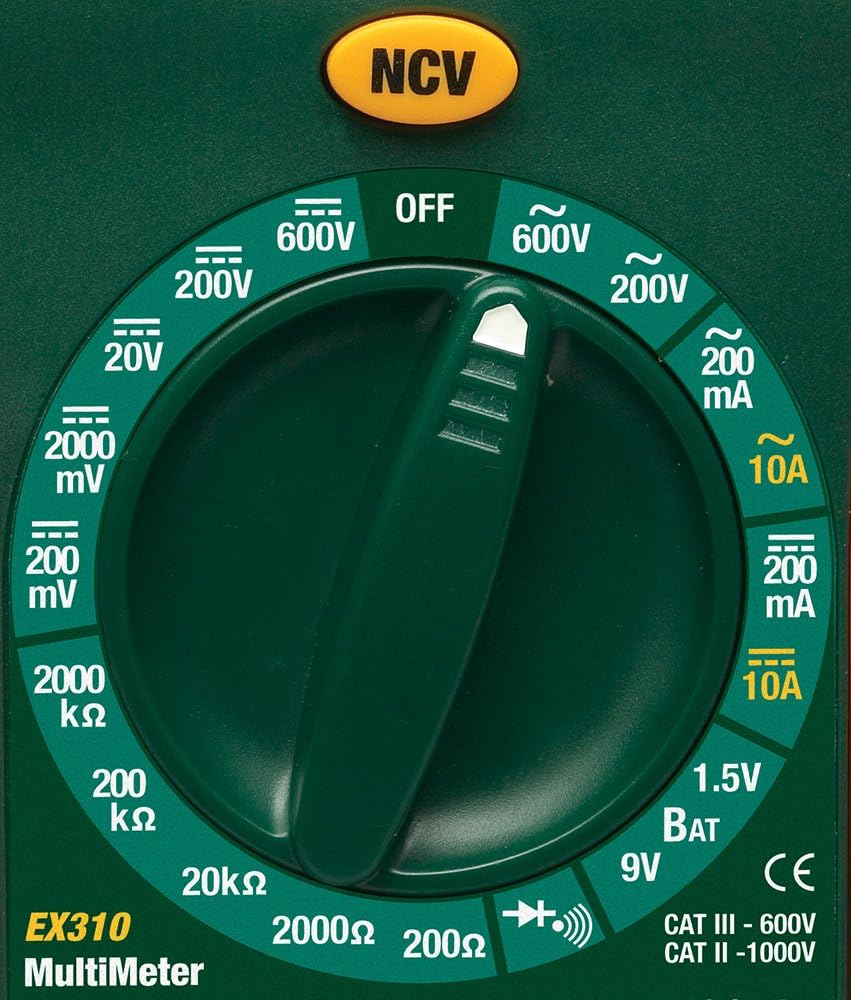
Image: Close-up of the Extech EX310's function dial, illustrating the various measurement ranges and functions such as voltage, current, resistance, diode, continuity, and battery test.
- Layar LCD: Menampilkan hasil pengukuran, satuan, dan indikator fungsi.
- Sakelar fungsi: Rotary dial to select the desired measurement function and range.
- Tombol NCV: Mengaktifkan Vol Tanpa Kontaktage detection feature.
- Jack masukan: Terminals for connecting test leads (COM, VΩmA, 10A).
6. Pengaturan
6.1. Pemasangan Baterai
- Pastikan multimeter dalam keadaan MATI.
- Temukan penutup kompartemen baterai di bagian belakang meteran.
- Lepaskan sekrup pengunci dan lepaskan penutupnya.
- Masukkan baterai 9V baru, perhatikan polaritas yang benar.
- Replace the cover and secure with the screw(s).
Indikator baterai lemah akan muncul di layar ketika baterai perlu diganti.
6.2. Menghubungkan Kabel Uji
Connect the test leads to the appropriate input jacks:
- Masukkan kabel tes hitam ke dalam DAPAT (Jack) umum.
- Untuk sebagian besar pengukuran (Volume)tage, Resistance, Diode, Continuity, mA Current), insert the red test lead into the VΩmA mendongkrak.
- Untuk pengukuran arus tinggi (hingga 10A), masukkan kabel uji merah ke dalam 10A mendongkrak.
7. Petunjuk Pengoperasian
Before making any measurement, ensure the test leads are correctly connected and the function switch is set to the desired range.
7.1. Volt AC/DCtage Pengukuran
- Set the function switch to the desired ACV (~) or DCV (---) range (e.g., 200V, 600V).
- Hubungkan kabel uji merah ke jack VΩmA dan kabel uji hitam ke jack COM.
- Sentuhkan probe penguji ke titik-titik sirkuit di mana tegangantage harus diukur.
- Baca vol.tagnilai e pada LCD.
7.2. Pengukuran Arus AC/DC
Peringatan: Never attempt to measure current on a circuit with voltage present across the current terminals. This can blow the fuse or damage the meter.
- Matikan daya ke sirkuit.
- Set the function switch to the desired ACA (~) or DCA (---) range (e.g., 200mA, 10A).
- Connect the red test lead to the appropriate current jack (VΩmA for mA, 10A for 10A) and the black test lead to the COM jack.
- Buka rangkaian tempat arus akan diukur dan hubungkan meter secara seri.
- Berikan daya ke rangkaian dan baca nilai arus pada LCD.
7.3. Pengukuran Resistansi
- Pastikan sirkuit atau komponen tersebut telah dimatikan alirannya.
- Set the function switch to the desired Resistance (Ω) range (e.g., 200Ω, 20kΩ).
- Hubungkan kabel uji merah ke jack VΩmA dan kabel uji hitam ke jack COM.
- Sentuhkan probe penguji ke komponen atau rangkaian yang akan diukur.
- Bacalah nilai resistansi pada LCD.

Image: The Extech EX310 Multimeter displaying a reading while test leads are connected to a circuit board, demonstrating a typical measurement scenario.
7.4. Uji Dioda
- Ensure the component is de-energized.
- Set the function switch to the Diode (→|) position.
- Hubungkan kabel uji merah ke jack VΩmA dan kabel uji hitam ke jack COM.
- Touch the red probe to the anode and the black probe to the cathode of the diode.
- Baca vol majutage drop on the LCD. Reverse the probes to check for an open circuit (OL).
7.5. Uji Kontinuitas
- Pastikan sirkuit atau komponen tersebut telah dimatikan alirannya.
- Set the function switch to the Continuity (→))) position.
- Hubungkan kabel uji merah ke jack VΩmA dan kabel uji hitam ke jack COM.
- Touch the test probes across the circuit or component.
- An audible tone will sound if continuity exists (resistance below approximately 30Ω).

Gambar: Close-up view of the Extech EX310 Multimeter with its test leads connected to an internal electronic circuit, demonstrating precise measurement capabilities.
7.6. Volume Non-Kontaktage (NCV) Deteksi
- Atur sakelar fungsi ke posisi mana pun.
- Press and hold the NCV button.
- Move the top of the meter (where the NCV sensor is located) close to the suspected AC voltage source (e.g., wire, outlet).
- A red LED will illuminate and an audible beeper will sound, increasing in intensity as the meter gets closer to the live AC voltage.

Image: A hand holding the Extech EX310 Multimeter near an electrical wall outlet, demonstrating the use of the Non-Contact Voltage (NCV) detection feature to identify live circuits.
7.7. Battery Test (1.5V/9V)
- Set the function switch to the 1.5V BAT or 9V BAT position.
- Hubungkan kabel uji merah ke jack VΩmA dan kabel uji hitam ke jack COM.
- Touch the red probe to the positive terminal and the black probe to the negative terminal of the battery.
- Baca volume bateraitage pada LCD.
8. Pemeliharaan
8.1. Penggantian Baterai
Refer to Section 6.1 for detailed instructions on replacing the 9V battery when the low battery indicator appears.
8.2. Penggantian Sekring
If the current measurement functions cease to operate, the internal fuse(s) may need replacement. The fuses are typically located beneath the battery compartment. Refer to the full product manual for specific fuse ratings and replacement procedures. Always replace with fuses of the identical type and rating.
8.3. Pembersihan
Bersihkan casing secara berkala dengan adamp Gunakan kain dan deterjen ringan. Jangan gunakan bahan abrasif atau pelarut. Pastikan meteran benar-benar kering sebelum digunakan.
9. Penyelesaian masalah
- Tidak Ada Tampilan: Check the 9V battery. Ensure it is correctly installed and has sufficient charge.
- Bacaan yang Salah: Verify that the function switch is set to the correct measurement type and range. Ensure test leads are properly connected and making good contact with the circuit.
- Pengukuran Arus Tidak Berfungsi: Check the internal fuse(s). Refer to the Maintenance section for fuse replacement.
- NCV Tidak Terdeteksi: Ensure the NCV button is pressed and held. Confirm the presence of AC voltage (100-600 VAC) in the area being tested.
10. Spesifikasi
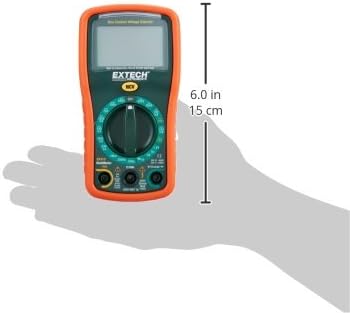
Image: Diagram illustrating the physical dimensions of the Extech EX310 Multimeter, showing a length of 6.0 inches (15 cm).
| Spesifikasi | Nilai |
|---|---|
| Merek | Teknologi Ekstra |
| Nomor Model | EX310 |
| Jenis Pengukuran | Alat Ukur |
| Gaya | Mulai Manual |
| Akurasi Dasar | +/-0.5% |
| Menampilkan | 2000-Count LCD |
| Peringkat Keamanan | UL listed CAT III - 600V, CAT II - 1000V |
| Sumber Daya | Baterai 9V |
| Dimensi Barang (P x L x T) | 5.7 x 1.6 x 2.9 inci (14.5 x 4.1 x 7.4 cm) |
| Berat Barang | 0.704 ons (0.02 Kilogram) |
| Komponen yang Termasuk | Test leads, 9 Volt battery, tilt stand |
11. Informasi Garansi
The Extech EX310 Mini Digital Multimeter is covered by a Garansi suku cadang dan tenaga kerja selama 1 tahun from the date of purchase. Please retain your proof of purchase for warranty claims. This warranty covers manufacturing defects and workmanship under normal use.
12. Dukungan Pelanggan
For technical assistance, troubleshooting beyond this manual, or warranty service, please contact Extech customer support. Refer to the official Extech websitus atau kemasan produk untuk informasi kontak terkini.


