Perkenalan
This manual provides detailed instructions for the setup, operation, maintenance, and troubleshooting of your Casio W93H-1AV Multifunction Sport Watch. Designed for durability and functionality, this digital watch is water-resistant and features a resin case, polyurethane band, and mineral dial window. It includes a digital display with day and date calendars, and a quartz movement for precise timekeeping.

Pengaturan
Pengaturan Waktu dan Tanggal Awal
- Dalam Mode Pencatat Waktu, tekan dan tahan tombol MENYESUAIKAN button (top left) until the seconds digits start to flash. This indicates the setting mode.
- Tekan tombol MODE Tekan tombol (kiri bawah) untuk menelusuri pengaturan: Detik → Jam → Menit → Tahun → Bulan → Hari.
- Gunakan AWAL button (bottom right) to increase the flashing value. Use the MEMBAGI button (top right) to decrease the flashing value (for time and date settings).
- Setelah semua pengaturan disesuaikan, tekan tombol MENYESUAIKAN tombol lagi untuk keluar dari mode pengaturan.
Format 12/24 Jam
Dalam Mode Ketepatan Waktu, tekan tombol 12/24 jam button (top left, labeled ADJUST) to toggle between 12-hour and 24-hour time formats.

Unboxing and Initial Overview
Video 1: Membuka kemasan dan ulasan awalview of the Casio W93H-1AV watch, demonstrating its appearance and basic functions right out of the box.
Petunjuk Pengoperasian
Mode Navigasi
Tekan tombol MODE button (bottom left) to cycle through the different modes: Timekeeping, Stopwatch, Alarm, and Dual Time.
Fungsi Cahaya
Tekan tombol LAMPU button (bottom center) to illuminate the display for easy viewing in low-light conditions. The watch features an Auto EL Backlight with Afterglow.
Mode Stopwatch
- Masuk ke Mode Stopwatch menggunakan MODE tombol.
- Tekan AWAL (bottom right) to begin timing.
- Tekan MEMBAGI (top right) to record lap times without stopping the main timer.
- Tekan AWAL again to pause the timer. Press AWAL untuk melanjutkan.
- Tekan MENYESUAIKAN (top left) to reset the stopwatch to zero.
Mode Alarm
- Navigate to the Alarm Mode using the MODE tombol.
- Tekan tombol MENYESUAIKAN tombol sampai angka waktu alarm berkedip.
- Gunakan MODE untuk memilih antara pengaturan jam dan menit.
- Gunakan AWAL tombol untuk mengatur waktu alarm.
- Tekan MENYESUAIKAN untuk mengonfirmasi dan keluar.
- Tekan AWAL to toggle the alarm on/off. An alarm indicator will appear on the display when active.
Mode Waktu Ganda
This mode allows you to keep track of a second time zone. Navigate to the Dual Time Mode using the MODE tombol. tekan terus MENYESUAIKAN to enter setting mode, then use AWAL Dan MODE untuk mengatur zona waktu kedua.
Pemeliharaan
Penggantian Baterai
The Casio W93H-1AV uses one Lithium Metal battery (CR1616). To replace the battery, carefully remove the four screws on the stainless steel back cover using a small screwdriver. Replace the battery, ensuring correct polarity, and then reattach the back cover securely. It is recommended to have the water resistance seal checked by a professional after battery replacement to maintain its integrity.
Perawatan Tahan Air
This watch is water resistant to 165 feet (50 meters). This means it is suitable for short periods of recreational swimming, but not for diving or snorkeling. Avoid operating buttons while the watch is wet or submerged to prevent water intrusion.
Pembersihan
Bersihkan jam tangan secara teratur dengan kain lembut dan kering. Untuk kotoran yang membandel, gunakan kain yang sedikit kering.amp cloth can be used, followed by drying. Avoid using harsh chemicals or abrasive cleaners.
Penyelesaian Masalah
- Tampilan kosong atau redup: Baterai mungkin lemah atau habis. Lihat bagian "Penggantian Baterai".
- Waktunya salah: Ensure the time and date settings are correctly configured as per the "Initial Time and Date Setting" section. Check if the 12/24 hour format is set as desired.
- Fungsi lampu tidak berfungsi: This could indicate a low battery. If the battery has been recently replaced and the issue persists, contact customer support.
- Tombol tidak responsif: Ensure the watch is not in a locked mode (if applicable, though this model does not feature a lock). If the watch is wet, dry it thoroughly before attempting to use buttons. If the issue persists, a reset may be necessary.
- To perform a full reset: In some cases, removing and reinserting the battery can perform a hard reset. Note that this will erase all settings, and you will need to reconfigure the time and date.
Spesifikasi
| Fitur | Spesifikasi |
|---|---|
| Nomor Model | W93H-1AV (930102) |
| Jenis Tampilan | Digital |
| Pergerakan | Kuarsa Jepang |
| Tahan Air | 165 Kaki (50 Meter) |
| Bahan Kasus | Damar |
| Bahan Pita | Damar |
| Jenis Baterai | 1 Logam Litium (CR1616) |
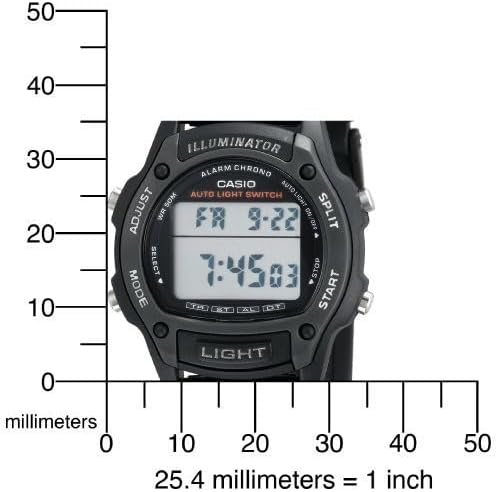
| Diameter Kasus | 36 Milimeter |
| Ketebalan casing | 10 Milimeter |
| Berat Barang | 95 gram |

Garansi dan Dukungan
Garansi Pabrik
This Casio watch is covered by a manufacturer's warranty. Please refer to the warranty card included with your purchase for specific terms, conditions, and duration. Keep your proof of purchase for warranty claims.
Dukungan Pelanggan
Untuk bantuan lebih lanjut, dukungan teknis, atau pertanyaan layanan, silakan kunjungi situs web resmi Casio websitus web atau hubungi departemen layanan pelanggan mereka. Anda juga dapat mengunjungi Toko Casio di Amazon untuk informasi dan sumber daya produk.
Casio Brand Overview
Video 2: A brief brand video from Casio, highlighting their commitment to innovation and quality in timepieces.


