Perkenalan
Terima kasih sudah membeliasing the KLH AUDIO KL-300i Nostalgia 5-n-1 System. This integrated audio system combines classic and modern audio playback capabilities, including a turntable, CD player, cassette player, AM/FM radio, and an iPod dock. This manual provides essential information for setting up, operating, and maintaining your system to ensure optimal performance and longevity.
Informasi Keselamatan
Harap baca semua petunjuk keselamatan dengan saksama sebelum mengoperasikan produk ini. Simpan manual ini untuk referensi di masa mendatang.
- Sumber Daya: Hubungkan unit hanya ke stopkontak listrik AC dengan tegangan yang ditentukan.tage.
- Ventilasi: Pastikan ventilasi memadai. Jangan halangi lubang ventilasi.
- Air dan Kelembaban: Jangan biarkan unit terkena hujan atau kelembapan. Jangan letakkan benda berisi cairan, seperti vas, di atas unit.
- Panas: Jangan letakkan unit di dekat sumber panas seperti radiator, pemanas, kompor, atau peralatan lainnya (termasuk amppengangkat) yang menghasilkan panas.
- Pembersihan: Cabut unit dari stopkontak sebelum membersihkan. Gunakan hanya kain kering.
- Pelayanan: Jangan mencoba untuk memperbaiki produk ini sendiri. Rujuk semua servis ke personel servis yang berkualifikasi.
Isi Paket
Verifikasi bahwa semua item yang tercantum di bawah ini disertakan dalam paket:
- KLH AUDIO KL-300i Main Unit
- Kontrol Jarak Jauh
- Kabel Input Tambahan
- AM/FM Antenna Wire
- Instruksi Manual (dokumen ini)
Produk Selesaiview
Familiarize yourself with the various components and controls of your KLH AUDIO KL-300i system.
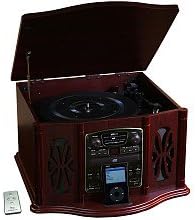
This image displays the KLH AUDIO KL-300i Nostalgia 5-n-1 System. The unit features a dark wood finish. The top lid is open, revealing a turntable. Below the turntable, the front panel includes controls for the CD player, AM/FM radio tuner, and an iPod dock. A small remote control is visible to the left of the main unit.
Kontrol Panel Depan:
- Tombol Daya: Menyalakan atau mematikan unit.
- Pemilih Fungsi: Switches between Phono, CD, Radio, iPod, and Aux modes.
- Tombol Volume: Menyesuaikan tingkat volume utama.
- Kontrol Pemutar CD: Putar/Jeda, Berhenti, Lewati Maju/Mundur.
- Penyetel Radio: AM/FM band selector, Tuning knob.
- iPod Dock: Connector for iPod devices.
- Jack Input Aux: Input 3.5 mm untuk perangkat audio eksternal.
- Jack Headphone: Output 3.5mm untuk mendengarkan secara pribadi.
Panel Atas:
- Meja putar: For playing vinyl records.
- Tutup: Protects the turntable when not in use.
Panel samping:
- Dek Kaset: For playing audio cassette tapes.
Pengaturan
Follow these steps for initial setup of your audio system.
- Penempatan: Place the unit on a stable, flat surface away from direct sunlight, heat sources, and excessive dust or moisture. Ensure there is adequate space around the unit for ventilation.
- Hubungkan Antena: For optimal AM/FM radio reception, connect the supplied antenna wire to the antenna terminal on the rear of the unit. Extend the wire fully for better reception.
- Sambungan Daya: Colokkan kabel daya AC ke stopkontak dinding standar.
- Nyalakan Daya Pertama: Press the Power button on the front panel to turn on the unit.
Petunjuk Pengoperasian
Operasi Umum:
- Daya Hidup/Mati: Tekan tombol Daya untuk menghidupkan atau mematikan unit.
- Pemilihan Fungsi: Use the Function Selector knob or buttons to choose your desired audio source (Phono, CD, Radio, iPod, Aux).
- Penyesuaian Volume: Putar kenop Volume untuk menaikkan atau menurunkan level suara.
Operasi Meja Putar:
- Lift the lid of the unit.
- Tempatkan piringan hitam di piring meja putar.
- Select the appropriate speed (33 1/3, 45, or 78 RPM) using the speed selector switch. For 45 RPM records, place the included adapter on the spindle if needed.
- Gently lift the tonearm and position the stylus over the desired starting groove of the record.
- Lower the tonearm slowly onto the record. Playback will begin automatically.
- To stop playback, gently lift the tonearm and return it to its rest.
Pengoperasian Pemutar CD:
- Press the Function Selector to CD mode.
- Tekan tombol Eject untuk membuka baki CD.
- Letakkan CD dengan sisi label menghadap ke atas ke dalam baki.
- Press the Eject button again to close the tray. The CD will begin playing automatically or display the track count.
- Gunakan tombol Putar/Jeda, Berhenti, dan Lewati untuk mengontrol pemutaran.
Cassette Player Operation:
- Masukkan kaset ke dalam slot kaset di sisi unit.
- Tekan tombol Putar untuk memulai pemutaran.
- Use the Fast Forward (FF) button to advance the tape quickly.
- To stop playback, press the Stop/Eject button. Pressing it halfway will eject the tape.
Pengoperasian Radio AM/FM:
- Press the Function Selector to Radio mode.
- Select either AM or FM band using the band selector switch.
- Rotate the Tuning knob to search for radio stations.
- Adjust the antenna wire for best reception.
iPod Dock Operation:
- Press the Function Selector to iPod mode.
- Carefully place your compatible iPod device onto the iPod dock connector.
- Use your iPod's controls to select and play music. Audio will be routed through the KLH AUDIO system's speakers.
Aux-In Operation:
- Press the Function Selector to Aux mode.
- Connect an external audio device (e.g., MP3 player, smartphone) to the Aux-In jack on the front panel using the supplied 3.5mm auxiliary cable.
- Play audio from your external device. The sound will be played through the KLH AUDIO system's speakers.
Penggunaan Kontrol Jarak Jauh:
The remote control primarily operates the CD player functions (Play, Pause, Stop, Skip). Note that the remote cannot turn the unit on or off.
Pemeliharaan
Proper care will ensure the longevity of your system.
- Membersihkan Unit: Bersihkan bagian luar unit dengan kain lembut dan kering. Jangan gunakan pembersih abrasif, lilin, atau pelarut.
- Perawatan Stylus: Handle the turntable stylus with extreme care. Clean the stylus periodically with a soft brush, brushing from back to front.
- Perawatan CD/Kaset: Keep CDs and cassette tapes clean and free of dust. Store them in their cases when not in use.
Penyelesaian Masalah
If you experience issues with your system, refer to the following common problems and solutions.
| Masalah | Kemungkinan Penyebab | Larutan |
|---|---|---|
| Tidak Ada Daya | Kabel daya tidak terpasang dengan benar. | Periksa sambungan kabel daya ke unit dan stopkontak dinding. |
| Tidak Ada Suara | Volume terlalu rendah; Fungsi yang dipilih salah; Headphone terhubung. | Increase volume; Select correct function; Disconnect headphones. |
| Pemutar piringan tidak berputar | Unit not powered on; Belt dislodged. | Ensure unit is on; Contact service if belt issue suspected. |
| Penerimaan Radio Buruk | Antena tidak memanjang atau diposisikan dengan benar. | Extend and adjust the antenna wire for better signal. |
| CD tidak dapat diputar | CD inserted incorrectly; CD is scratched or dirty. | Ensure CD is label-side up; Clean or replace CD. |
Spesifikasi
| Fitur | Spesifikasi |
|---|---|
| Sumber Daya | AC 120V ~ 60Hz |
| Dimensi (L x D x T) | Approx. 17" x 17" x 10.5" (43.2 cm x 43.2 cm x 26.7 cm) |
| Kecepatan Meja Putar | 33 1/3, 45, 78 putaran per menit |
| Rentang Frekuensi Radio | AM: 530-1710 kHz, FM: 88-108 MHz |
| Kompatibilitas CD | CD, CD-R/RW |
| dok iPod | Compatible with older generation iPods (30-pin connector) |
Garansi dan Dukungan
This product is covered by a limited manufacturer's warranty. For specific warranty terms and conditions, please refer to the warranty card included with your purchase or contact KLH customer support. If you require technical assistance or have questions not covered in this manual, please contact KLH customer service through their official websitus atau informasi kontak yang disediakan bersama produk Anda.


