1. Pendahuluan
The Marshall Acoustic Soloist AS50D is a 50-watt acoustic guitar amplifier designed to provide clear and expressive amplification for acoustic instruments and vocals. It features two independent channels, digital chorus, and reverb effects, making it suitable for various performance and practice environments. This manual provides essential information for the proper setup, operation, and maintenance of your AS50D amppengangkat.
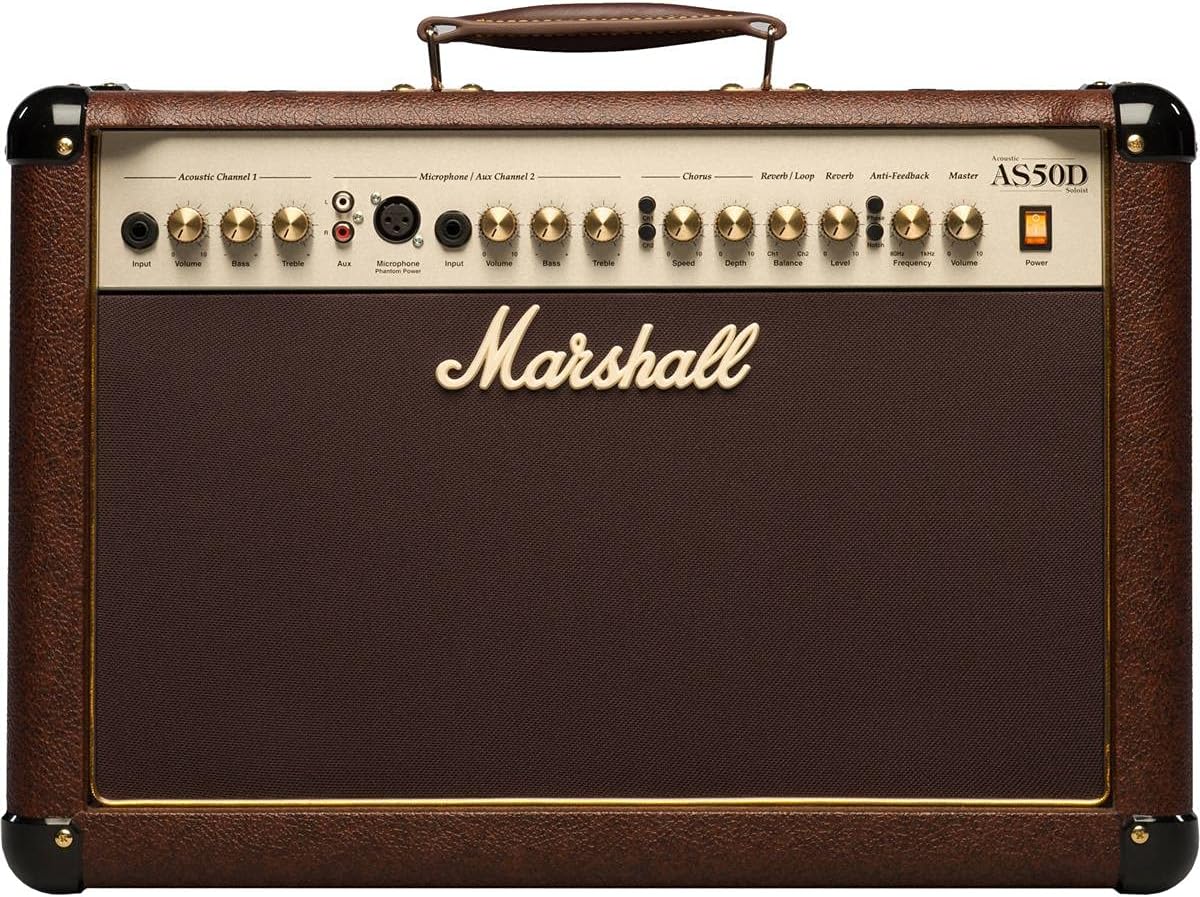
Gambar 1.1: Depan view of the Marshall AS50D Acoustic Soloist Amppengangkat, pertunjukanasing its control panel and speaker grille.
2. Pengaturan
- Membongkar: Lepaskan file ampKeluarkan pengisi daya dari kemasannya. Simpan semua bahan kemasan untuk transportasi atau penyimpanan di masa mendatang.
- Penempatan: Tempatkan ampLetakkan amplifier di permukaan yang stabil dan rata. Pastikan ventilasi yang memadai di sekitar unit untuk mencegah panas berlebih. Hindari meletakkannya di dekat sumber panas atau di bawah sinar matahari langsung.
- Sambungan Daya: Pastikan amplifier's power switch is in the 'OFF' position. Connect the supplied power cord to the amplifier's IEC inlet on the rear panel and then to a suitable grounded AC power outlet. The AS50D operates on 220-240V ~ 50Hz or 120V ~ 60Hz depending on the region.
- Koneksi Awal:
- For acoustic guitars or other instruments, connect a standard 1/4" (6.35mm) instrument cable from your instrument to the 'Input' jack of 'Acoustic Channel 1'.
- For microphones, connect an XLR cable from your microphone to the 'Microphone Input' of 'Microphone / Aux Channel 2'.
- For external audio devices like MP3 players or drum machines, connect them to the 'Aux Input' RCA phono jacks on 'Microphone / Aux Channel 2'.
- Nyalakan: Once all connections are secure, switch the amplifier's power switch to the 'ON' position. The power indicator light will illuminate.
3. Petunjuk Pengoperasian
The AS50D features a comprehensive control panel designed for intuitive operation. Familiarize yourself with each section:
3.1. Acoustic Channel 1
- Masukan: 1/4" (6.35mm) jack for connecting acoustic instruments.
- Volume: Controls the overall output level of Channel 1.
- Bas: Adjusts the low-frequency response of Channel 1.
- Tiga kali lipat: Adjusts the high-frequency response of Channel 1.
3.2. Microphone / Aux Channel 2
- Masukan Mikrofon: XLR input for connecting condenser or dynamic microphones.
- Kekuatan Hantu: Switch to activate +48V phantom power for condenser microphones. Ensure microphone is connected before activating.
- Input (Aux): 1/4" (6.35mm) jack for connecting instruments.
- Volume: Controls the overall output level of Channel 2.
- Bas: Adjusts the low-frequency response of Channel 2.
- Tiga kali lipat: Adjusts the high-frequency response of Channel 2.
- tambahan: Stereo RCA phono inputs for connecting external audio devices (e.g., MP3 players).
3.3. Effects Section
- Chorus Speed: Adjusts the rate of the digital chorus effect.
- Chorus Depth: Adjusts the intensity of the digital chorus effect.
- Reverb / Loop Balance: Blends the dry signal with the effects loop return signal.
- Reverb / Loop Level: Controls the overall level of the effects loop and reverb.
- Tingkat Reverb: Controls the intensity of the digital reverb effect.
3.4. Bagian Utama
- Anti-Feedback Notch: Activates the notch filter to reduce feedback.
- Anti-Feedback Frequency: Adjusts the frequency range targeted by the notch filter. Rotate to find and eliminate problematic feedback frequencies.
- Volume utama: Mengontrol volume output keseluruhan dari amppengangkat.
- Kekuatan: Saklar daya utama untuk amppengangkat.
3.5. Koneksi Panel Belakang

Gambar 3.5.1: Belakang view of the Marshall AS50D Acoustic Soloist Amplifier, showing the power input, footswitch, DI out, and effects loop connections.
- Sakelar kaki: Input untuk footswitch opsional untuk mengontrol efek.
- DI Keluar: XLR output for direct connection to a mixing console or recording device.
- Effects Loop Send: Output to send signal to external effects processors.
- Effects Loop Return: Input to receive signal from external effects processors.
4. Pemeliharaan
- Pembersihan: Putuskan sambungan ampMatikan daya amplifier sebelum dibersihkan. Gunakan kain lembut dan kering untuk menyeka bagian luarnya. Jangan gunakan pembersih abrasif atau pelarut.
- Penyimpanan: Simpan amplifier in a dry, temperate environment, away from extreme temperatures and humidity. If possible, use a protective cover to prevent dust accumulation.
- Angkutan: Saat memindahkan amplifier, ensure it is powered off and disconnected. Use the integrated handle for carrying.
- Pelayanan: Refer all servicing to qualified service personnel. Do not attempt to open the ampsasis pengangkat.
5. Penyelesaian masalah
- Tidak Ada Daya:
- Periksa apakah kabel daya terhubung dengan aman ke kedua sisi. amppenguat suara dan stopkontak dinding.
- Pastikan stopkontak di dinding berfungsi.
- Pastikan amplifier's power switch is in the 'ON' position.
- Tidak ada suara:
- Check all instrument and microphone cables for secure connections and proper functionality.
- Ensure the 'Volume' controls for the active channel and the 'Master Volume' are turned up.
- Verify that your instrument or microphone is working correctly.
- Distortion at High Volumes:
- Reduce the 'Volume' control for the active channel or the 'Master Volume'.
- Ensure your input signal is not too strong. Adjust the output level of your instrument if possible.
- Check the quality of your instrument cables; faulty cables can introduce noise and distortion.
- Feedback (Howling Sound):
- Engage the 'Anti-Feedback Notch' switch.
- Slowly rotate the 'Anti-Feedback Frequency' knob to find and eliminate the problematic frequency.
- Reduce the 'Volume' of the affected channel or the 'Master Volume'.
- Move further away from the amplifier or change your position relative to the speakers.
6. Spesifikasi
| Fitur | Spesifikasi |
|---|---|
| Nomor Model | M-AS50D-U |
| Keluaran Wattage | 50 Watt |
| Jumlah Pembicara | 2 |
| Ukuran Speaker | 8-inch woofers (x2) |
| Saluran | 2 (Acoustic, Microphone/Aux) |
| Efek | Digital Chorus, Digital Reverb |
| Masukan | 1/4" Jack, XLR, Stereo RCA |
| Keluaran | D.I. Out (XLR), Effects Loop Send/Return |
| Kekuatan Hantu | +48V (dapat dialihkan) |
| Anti-Umpan Balik | Notch Filter with Frequency Control |
| Berat Barang | 35.3 pon (16 kg) |
| Dimensi Produk | 21.34 x 10.28 x 16.38 inci (54.2 x 26.1 x 41.6 cm) |
| Jenis Bahan | Logam |
| Sumber Daya | Listrik Kabel |
7. Garansi dan Dukungan
This Marshall amplifier is covered by a manufacturer's warranty. Please refer to the warranty card included with your product for specific terms and conditions, including coverage duration and limitations. For technical support, service, or warranty claims, please contact your authorized Marshall dealer or visit the official Marshall Ampliifikasi webKunjungi situs ini untuk informasi kontak di wilayah Anda.
Simpan bukti pembelian Anda untuk validasi garansi.


