Perkenalan
This manual provides detailed instructions for the proper use and maintenance of your Royal DM2070 Electronic Organizer. Please read this manual thoroughly before operating the device to ensure safe and efficient use. Keep this manual for future reference.
Informasi Keselamatan
- Jangan biarkan perangkat terkena suhu ekstrem, sinar matahari langsung, atau kelembapan tinggi.
- Hindari menjatuhkan perangkat atau membenturkannya dengan kuat.
- Jangan mencoba membongkar atau memperbaiki perangkat sendiri. Serahkan semua servis kepada teknisi yang berkualifikasi.
- Jauhkan perangkat dari air dan cairan lainnya.
- Gunakan hanya jenis baterai yang ditentukan untuk penggantian.
Isi Paket
Verifikasi bahwa semua item ada dalam paket Anda:
- Royal DM2070 Electronic Organizer
- Stylus (if applicable)
- Panduan Memulai Cepat
- Kartu Garansi
Pengaturan
1. Pemasangan Baterai
The Royal DM2070 requires batteries for operation. Follow these steps to install them:
- Temukan penutup ruang baterai di bagian belakang perangkat.
- Geser atau angkat penutup untuk membuka kompartemen.
- Insert the required batteries, ensuring correct polarity (+ and -) as indicated inside the compartment.
- Pasang kembali penutup kompartemen baterai dengan aman.
2. Pengaktifan dan Pengaturan Awal
After installing batteries, power on your device and configure basic settings:
- Tekan dan tahan tombol KEKUATAN tombol sampai layar menyala.
- The device may prompt you to set the date and time. Use the navigation buttons or stylus to enter the correct information.
- Konfirmasikan pengaturan Anda untuk menyelesaikan pengaturan awal.
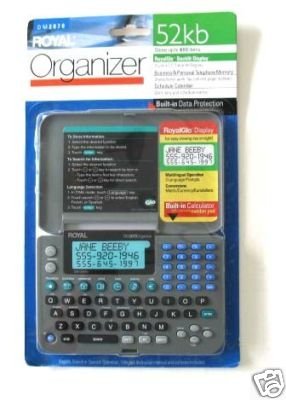
Image: Royal DM2070 Electronic Organizer. This image displays the device's front view, highlighting its screen and keypad, essential for navigation and data entry.
Petunjuk Pengoperasian
1. Navigasi
The DM2070 features a keypad and potentially a stylus for navigation. Use the arrow keys to move between menu options and press MEMASUKI or a designated selection button to confirm.
2. Memasukkan Data
To enter information such as contacts, appointments, or notes:
- Navigate to the desired application (e.g., 'Contacts', 'Calendar', 'Notes').
- Select 'New Entry' or a similar option.
- Use the alphanumeric keypad to input text. Some models may offer an on-screen keyboard via stylus.
- Save your entry before exiting the application.
3. Menggunakan Aplikasi
The DM2070 includes various applications:
- Kalender: View daily, weekly, or monthly schedules. Add and edit appointments.
- Kontak: Store names, phone numbers, addresses, and email information.
- Catatan: Create and manage text notes or memos.
- Kalkulator: Melakukan perhitungan aritmatika dasar.
- Konverter Mata Uang: Convert between different currencies (requires manual update of exchange rates on some models).
Pemeliharaan
1. Membersihkan Perangkat
To keep your DM2070 in optimal condition:
- Bersihkan layar dan casindengan kain lembut, kering, dan bebas serat.
- Untuk noda membandel, sedikit dampen the cloth with water; avoid harsh chemicals or abrasive cleaners.
- Ensure no moisture enters openings.
2. Perawatan Baterai
- Segera ganti baterai saat indikator baterai lemah muncul.
- Lepaskan baterai jika perangkat tidak akan digunakan dalam jangka waktu lama untuk mencegah kebocoran.
Penyelesaian Masalah
If you encounter issues with your Royal DM2070, refer to the following common solutions:
| Masalah | Kemungkinan Penyebab | Larutan |
|---|---|---|
| Perangkat tidak menyala. | Baterai mati atau tidak terpasang dengan benar. | Ganti baterai dengan yang baru, pastikan polaritasnya benar. |
| Layar kosong atau macet. | Gangguan perangkat lunak atau baterai lemah. | Try a soft reset (refer to Quick Start Guide for specific button combination) or replace batteries. |
| Data loss. | Battery depletion or improper shutdown. | Ensure batteries are fresh. Always save data before powering off. |
| Tombol keypad tidak responsif. | Dust/debris under keys or internal issue. | Clean keypad gently. If problem persists, contact support. |
Spesifikasi
Key technical specifications for the Royal DM2070 Electronic Organizer:
| Fitur | Detil |
|---|---|
| Merek | KERAJAAN |
| Nomor Model | DM2070 |
| Bahan Penutup | Kulit |
| Format | Penyelenggara |
| Berat Barang | 181 gram |
| Dimensi Barang (PxLxT) | 24.4x14.5x1 sentimeter |
| Target Pemirsa | Dewasa |
Garansi dan Dukungan
The Royal DM2070 Electronic Organizer comes with a standard manufacturer's warranty. Please refer to the warranty card included in your package for specific terms and conditions. For technical support, service, or inquiries, please contact Royal customer service through the contact information provided on the warranty card or the official Royal weblokasi.


