1. Pendahuluan
The Aiphone AX-8MV is an audio/video master station designed for the AX Series integrated security system. It serves as a central communication and monitoring unit, allowing connection to multiple master stations, door stations, and sub-master stations. This manual provides essential information for the proper setup, operation, and maintenance of your AX-8MV unit.
2. Pengaturan dan Instalasi
2.1. Apa yang ada di dalam kotak
- Aiphone AX-8MV Master Station
- Braket Pemasangan Logam
- Dudukan Flip
2.2. Opsi Pemasangan
The AX-8MV offers flexible installation. Use the included flip stand for convenient desk mounting. For wall installation, utilize the metal mounting bracket to secure the unit to a standard two-gang box or ring.
2.3. Wiring and Power
The master station requires Cat-5e homerun wiring to the Central Exchange Unit (CEU) via an RJ45 jack. Power is supplied by the Aiphone central exchange unit (sold separately) at 24V.
3. Petunjuk Pengoperasian
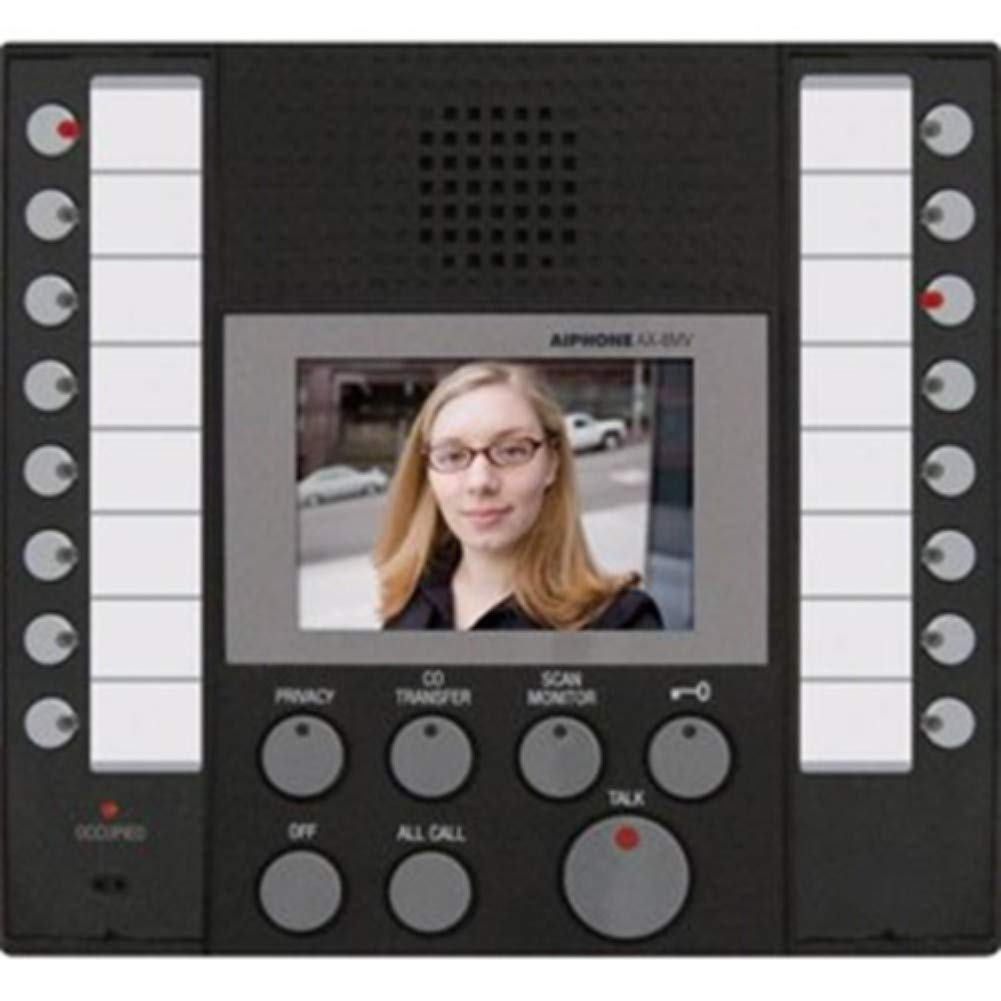
This image displays the Aiphone AX-8MV Audio/Video Master Station. The unit features a central 3.5-inch LCD color monitor showing a person's face, flanked by two columns of call buttons with LED indicators. Below the screen are control buttons for functions such as Privacy, CO Transfer, Scan Monitor, Off, All Call, and Talk, with a prominent red Talk button.
3.1. Komunikasi Dasar
- Panggilan Masuk: When an incoming call is received from an Aiphone AX Series video door station (sold separately), the 3-1/2" LCD color monitor will immediately display the video feed, assisting with visitor identification.
- Menjawab Panggilan: To answer a call, either hold down the answering button for push-to-talk communication or tap the answering button for hands-free communication.
- Volume Nada Panggilan: The call tone volume is adjustable to suit your preference.
3.2. System Controls
- Labeled Buttons: Each master, sub-master, and door station connected to the system has its own labeled button on the master station, enabling selectable and direct calling. An LED indicator on each button shows which station is currently calling.
- All-Call Button: Press the all-call button to broadcast an announcement to every master station connected within the system.
- Tombol Privasi: Activate the privacy button to prevent other intercom users in the system from overhearing your conversation with another intercom.
3.3. Membuka Pintu
The door-release button on the AX-8MV works in conjunction with an electric strike or magnetic lock (sold separately) to remotely unlock the entrance for a visitor.
3.4. Koneksi Eksternal
- Headset/Handset/Speaker: A 3.5-mm jack is provided for connecting a headset, handset, or external speaker (sold separately).
- Sakelar kaki: A footswitch (sold separately) can be attached for hands-free operation of the master station.
- Panggilan Telepon Rumah: Calls can be routed directly to a landline phone through the use of a Viking K-1900-5 callswitch (sold separately).
4. Ekspansi Sistem
The AX Series system can be expanded significantly. Up to seven Aiphone AX-16SW selectors (sold separately) can be integrated to connect a total of 112 additional sub-master or door stations, allowing for comprehensive building-wide security and communication.
5. Pemeliharaan
To ensure optimal performance and longevity of your Aiphone AX-8MV master station, follow these maintenance guidelines:
- Pembersihan: Regularly wipe the unit's black ABS plastic housing and screen with a soft, dry cloth. Avoid using abrasive cleaners, solvents, or harsh chemicals, as these can damage the surface and electronic components.
- Lingkungan: Ensure the unit is installed in a dry environment, away from direct sunlight, extreme temperatures, and excessive dust.
- Inspeksi: Periksa secara berkala semua sambungan kabel untuk memastikan semuanya aman dan bebas dari kerusakan.
6. Penyelesaian masalah
If you encounter issues with your AX-8MV master station, consider the following common troubleshooting steps:
- Tidak Ada Daya: If the unit does not power on, ensure the Aiphone central exchange unit is properly connected and supplying the required 24V. Check all power connections.
- Unclear Communication: If audio communication is unclear or intermittent, verify that all Cat-5e homerun wiring to the CEU and RJ45 jack connections are secure and undamaged.
- Tidak Ada Umpan Video: If the video feed from a door station is not displayed, confirm that the video door station is correctly installed, powered, and properly connected to the AX Series system. Check for any loose video cables.
- Tombol Tidak Responsif: If buttons are not responding, try restarting the entire AX Series system by cycling power to the central exchange unit. If the issue persists, contact technical support.
7. Spesifikasi
| Fitur | Spesifikasi |
|---|---|
| Dimensi Keseluruhan (T x L x D) | 6-7/8 x 7-5/8 x 1-7/8 inci (175 x 194 x 48 mm) |
| Kabel yang Kompatibel | Cat-5e homerun to CEU |
| Koneksi Kabel | jack RJ45 |
| Persyaratan Daya | Tegangan 24V disuplai oleh unit pusat pertukaran Aiphone (dijual terpisah) |
| Bahan Perumahan | Plastik ABS hitam |
| Memantau | 3-1/2" LCD color |
8. Garansi dan Dukungan
Aiphone is committed to quality and reliability, meeting International Organization for Standardization (ISO) standards 9001 and 14001. For specific warranty details, technical assistance, or customer support, please refer to the official Aiphone website or contact your authorized Aiphone dealer. Keep your purchase receipt for warranty claims.


