1. Pendahuluan
This instruction manual provides essential information for the safe and efficient use of your THOMSON CE-26 Cassette/SD/USB Audio System. Please read this manual thoroughly before operating the device and retain it for future reference. The CE-26 allows you to play audio from cassettes, USB drives, and SD/MMC cards, as well as record audio directly from cassettes or external sources to MP3 format on USB or SD/MMC media.
2. Produk Lebihview
Familiarize yourself with the components and controls of your CE-26 audio system.

Gambar 2.1: Panel Depan View. This image displays the front of the THOMSON CE-26 unit, showing the cassette deck, control buttons, display screen, USB port, SD/MMC card slot, and volume knob.
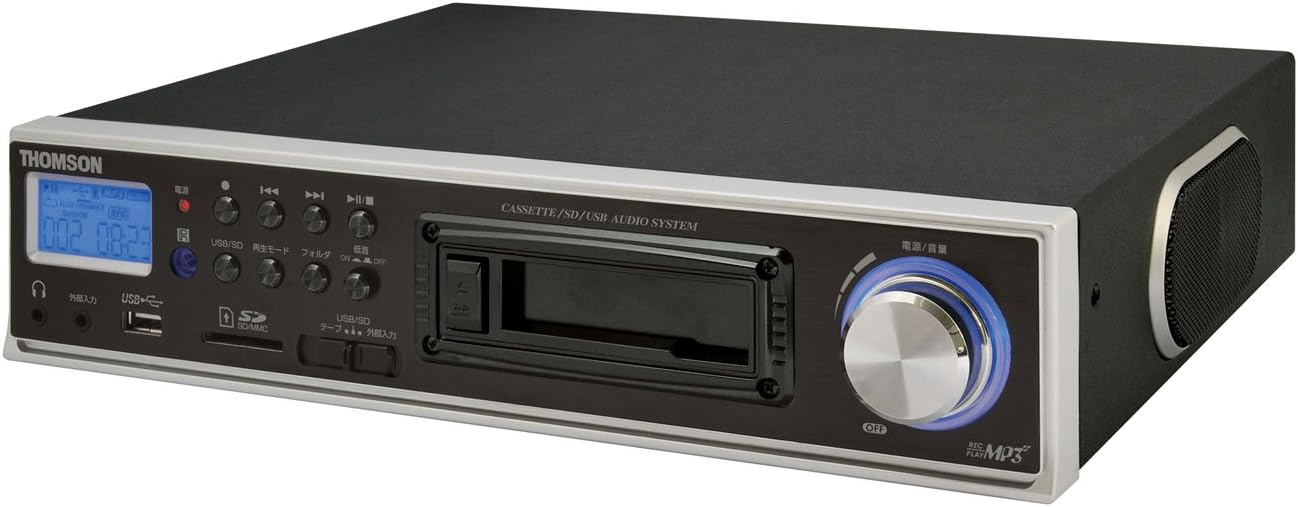
Gambar 2.2: Sudut View. This image shows the THOMSON CE-26 from an angled perspective, highlighting the integrated side speaker and the overall compact design.

Figure 2.3: Remote Control Unit. This image displays the included remote control for the THOMSON CE-26, featuring buttons for search, display, record, playback mode, program, folder navigation, and USB/SD selection.

Gambar 2.4: Fitur Lebih dariview Diagram. This diagram illustrates the key functionalities of the THOMSON CE-26, including direct recording from cassette to USB/SD, MP3/WMA playback, USB/SD memory copying, AUX input, built-in speaker, and remote control.
Kontrol Panel Depan:
- Tombol Daya: Menyalakan atau mematikan unit.
- Tampilan Layar: Shows track information, mode, and time.
- Dek Kaset: For inserting and playing audio cassettes.
- Port USB: Connect USB flash drives for playback or recording.
- Slot Kartu SD/MMC: Insert SD or MMC cards for playback or recording.
- Kontrol Pemutaran Ulang: Play, Pause, Stop, Fast Forward, Rewind, Skip Track.
- Tombol Rekam: Memulai perekaman.
- Tombol Mode: Switches between Cassette, USB, SD, and AUX input modes.
- Tombol Volume: Menyesuaikan tingkat keluaran audio.
- Jack Headphone: Untuk didengarkan secara pribadi.
- Masukan AUX: Hubungkan perangkat audio eksternal.
3. Pengaturan
- Sambungan Daya: Connect the AC power cord to the unit's power input and then to a standard wall outlet.
- Nyalakan Daya Pertama: Press the Power button to turn on the unit. The display will illuminate.
- Memasukkan Media:
- Kaset: Open the cassette door and insert an audio cassette with the open edge facing upwards. Close the door securely.
- Drive USB: Insert a USB flash drive into the USB port. Ensure it is formatted to FAT32.
- Kartu SD/MMC: Insert an SD or MMC card into the card slot until it clicks into place. Ensure it is formatted to FAT32.
- External Audio Device (Optional): To use the AUX input, connect an external audio source (e.g., smartphone, CD player) to the AUX IN jack using a 3.5mm audio cable.
4. Petunjuk Pengoperasian
4.1. Pemutaran Kaset
- Masukkan pita kaset.
- Press the "Mode" button until "Cassette" mode is selected (or the cassette deck automatically starts playing).
- Tekan tombol Putar (►) pada unit atau remote.
- Atur volume menggunakan tombol Volume.
- Use Fast Forward (►►) atau Putar Balik (◄◄) tombol untuk menavigasi rekaman.
- Press Stop (■) to end playback.
4.2. Pemutaran USB/SD
- Insert a USB drive or SD/MMC card containing MP3 or WMA audio files.
- Press the "Mode" button to select "USB" or "SD" mode. The unit will automatically scan and begin playing the first track.
- Gunakan Putar/Jeda (►/∥), Berhenti (■), Lagu Berikutnya (►►|), dan Trek Sebelumnya (|◄◄) tombol untuk mengontrol pemutaran.
- The "Folder" buttons on the remote can be used to navigate between folders on the USB/SD media.
4.3. Recording Audio to MP3 (Cassette to USB/SD)
This feature allows you to convert your cassette tapes into digital MP3 files.
- Insert a blank or desired USB drive/SD card into the respective slot.
- Masukkan kaset yang ingin Anda rekam.
- Press the "Mode" button to select "Cassette" mode.
- Start playing the cassette tape.
- Press the "Record" button on the unit or remote. The recording indicator will light up, and the unit will begin converting the cassette audio to MP3 format on the selected USB/SD media.
- To stop recording, press the "Stop" button. The recorded MP3 file will be saved on your USB drive or SD card.
- Catatan: There might be a slight delay between pressing record and the actual start of recording. It is recommended to start recording slightly before the desired audio begins to avoid cutting off the start of a track.
4.4. Recording Audio to MP3 (AUX Input to USB/SD)
Record audio from an external device connected via the AUX input.
- Connect your external audio device to the AUX IN jack.
- Insert a blank or desired USB drive/SD card.
- Press the "Mode" button to select "AUX" mode.
- Mulai pemutaran di perangkat audio eksternal Anda.
- Press the "Record" button on the unit or remote. The recording indicator will light up, and the unit will begin converting the AUX audio to MP3 format on the selected USB/SD media.
- To stop recording, press the "Stop" button.
4.5. Menyalin Files Between USB and SD/MMC
The CE-26 allows direct copying of MP3/WMA files between a USB drive and an SD/MMC card.
- Ensure both a USB drive and an SD/MMC card are inserted into their respective slots.
- Select either "USB" or "SD" mode using the "Mode" button, depending on which source you want to copy dari.
- Navigasi ke file or folder you wish to copy.
- Press and hold the "Copy" button (often labeled "USB/SD Copy" or similar) on the unit or remote. Follow any on-screen prompts to confirm the copy operation.
- The display will indicate when the copying process is complete.
5. Pemeliharaan
- Pembersihan: Gunakan kain lembut dan kering untuk membersihkan bagian luar unit. Jangan gunakan cairan pembersih atau bahan abrasif.
- Perawatan Dek Kaset: Periodically clean the cassette head and pinch rollers with a specialized cassette head cleaner to ensure optimal audio quality and prevent tape damage.
- Penyimpanan: When not in use for extended periods, disconnect the power cord and store the unit in a cool, dry place away from direct sunlight and extreme temperatures.
6. Penyelesaian masalah
| Masalah | Kemungkinan Penyebab | Larutan |
|---|---|---|
| Tidak ada daya | Kabel daya tidak tersambung; Stopkontak tidak aktif. | Pastikan kabel daya terhubung dengan aman. Periksa apakah stopkontak berfungsi. |
| Tidak ada suara selama pemutaran | Volume terlalu rendah; Mode yang dipilih salah; Headphone tersambung. | Increase volume. Select the correct input mode (Cassette, USB, SD, AUX). Disconnect headphones if using speakers. |
| Cassette tape not playing or recording correctly | Tape tangled or damaged; Cassette heads dirty; Incorrect tape direction. | Check tape condition. Clean cassette heads and pinch rollers. Ensure tape is inserted correctly. |
| Recording stops prematurely or has gaps | USB drive/SD card full; Media format issue; Intermittent power. | Ensure sufficient storage space. Use FAT32 formatted media. Check power connection stability. |
| Poor audio quality from USB/SD | Rusak files; Low bitrate MP3/WMA files. | Try different audio files. Memastikan files tidak rusak. |
| Kontrol jarak jauh tidak berfungsi | Batteries depleted; Obstruction between remote and unit; Incorrect angle. | Ganti baterai remote control. Pastikan terdapat garis pandang yang jelas ke penerima IR unit. |
7. Spesifikasi
| Fitur | Detil |
|---|---|
| Merek | Bahasa Indonesia: TOMSON |
| Nomor Model | CE-26 |
| Media yang Didukung | Cassette Tape, USB Memory, SD/MMC Card |
| Format Audio yang Didukung | MP3, WMA (playback); MP3 (recording) |
| Fungsi Perekaman | Direct digital recording from Cassette to MP3, AUX to MP3 |
| Konektivitas | USB Port, SD/MMC Card Slot, AUX Input (3.5mm), Headphone Output (3.5mm) |
| Speaker internal | Ya |
| Kontrol Jarak Jauh | Termasuk |
| Dimensi (kira-kira) | Ukuran 35.4x33.2x12 cm |
| Berat (kira-kira) | 3.02 kg |
8. Garansi dan Dukungan
For warranty information and technical support, please refer to the warranty card included with your product or contact THOMSON customer service directly. Keep your purchase receipt as proof of purchase.
For further assistance, please visit the official THOMSON websitus atau hubungi pusat layanan resmi mereka.


