Perkenalan
Welcome to the Greenlee DM-810A True RMS Digital Multimeter user manual. This document provides essential information for the safe and effective operation, maintenance, and troubleshooting of your device. The DM-810A is designed for accurate measurement of AC/DC voltage, AC/DC current, resistance, capacitance, frequency, and continuity, making it a versatile tool for electrical professionals.
Informasi Keselamatan
Untuk memastikan pengoperasian dan servis meteran yang aman, ikuti petunjuk ini. Kegagalan untuk mematuhi peringatan ini dapat mengakibatkan cedera parah atau kematian.
- Always read and understand the entire instruction manual before using the meter.
- Jangan melebihi batas input maksimum untuk fungsi apa pun.
- Berhati-hatilah saat bekerja dengan voltagTegangan di atas 30V AC RMS, 42V puncak, atau 60V DC. Tegangan-tegangan initagmenimbulkan bahaya sengatan listrik.
- Always use the proper terminals, function, and range for your measurements. The DM-810A features a Beep-Jack audible and visible warning to guard against improper A and mA terminal plug-in.
- Periksa kabel uji untuk melihat adanya kerusakan isolasi atau logam yang terbuka sebelum setiap penggunaan. Ganti jika rusak.
- Jangan gunakan meteran jika tampak rusak atau jika casingnya terbuka.
- Pastikan penutup baterai tertutup rapat sebelum pengoperasian.
- Adhere to local and national safety codes. Use personal protective equipment (PPE) such as approved safety glasses and electrically insulated gloves when necessary.
Produk Selesaiview
This section identifies the key parts and controls of your Greenlee DM-810A multimeter.

Gambar 1: Depan view of the Greenlee DM-810A Digital Multimeter, showing the display, function selector dial, and input jacks.
- Menampilkan: Large LCD for clear readings, often with dual display capability.
- Tombol Pemilih Fungsi: Used to select the desired measurement function (e.g., V~, V-, A~, A-, Ω, CAP, Hz, Continuity).
- Jack masukan:
- KOMENTAR: Input umum (negatif) untuk semua pengukuran.
- VΩHz: Masukan positif untuk voltage, pengukuran resistansi, frekuensi, dan kapasitansi.
- mAμA: Masukan positif untuk milliampere dan mikroamppengukuran arus saat ini.
- A: Positive input for amppengukuran arus saat ini.
- Tombol:
- MEMILIH: Toggles between functions on a single dial position (e.g., AC/DC voltag(misalnya, dioda/kontinuitas).
- JARAK: Manually selects measurement range or returns to auto-ranging.
- △: Delta function for relative measurements.
- MEMEGANG: Membekukan pembacaan tampilan saat ini.
Pengaturan
Instalasi Baterai
The Greenlee DM-810A requires batteries for operation. Refer to the back of the meter for the battery compartment. Use a screwdriver to open the compartment, insert the specified batteries (typically AA or 9V, check the compartment label), observing correct polarity, and then securely close the cover.
Menghubungkan Pemimpin Tes
Always ensure test leads are properly connected before taking measurements.
- Masukkan kabel tes hitam ke dalam DAPAT Soket input (umum).
- Insert the red test lead into the appropriate positive input jack based on the measurement you intend to make:
- Untuk volumetage, resistance, capacitance, or frequency, use the VΩHz mendongkrak.
- Untuk milliampere atau mikroampere current, use the mAμA mendongkrak.
- Untuk ampere current, use the A mendongkrak.
- The meter's Beep-Jack feature will provide an audible and visible alert if the function selector is set to a current measurement (A or mA) but the test lead is incorrectly plugged into a voltage/resistance jack, or vice-versa. This helps prevent damage to the meter and ensures correct setup.
Petunjuk Pengoperasian
This section details how to perform various measurements with your DM-810A multimeter.
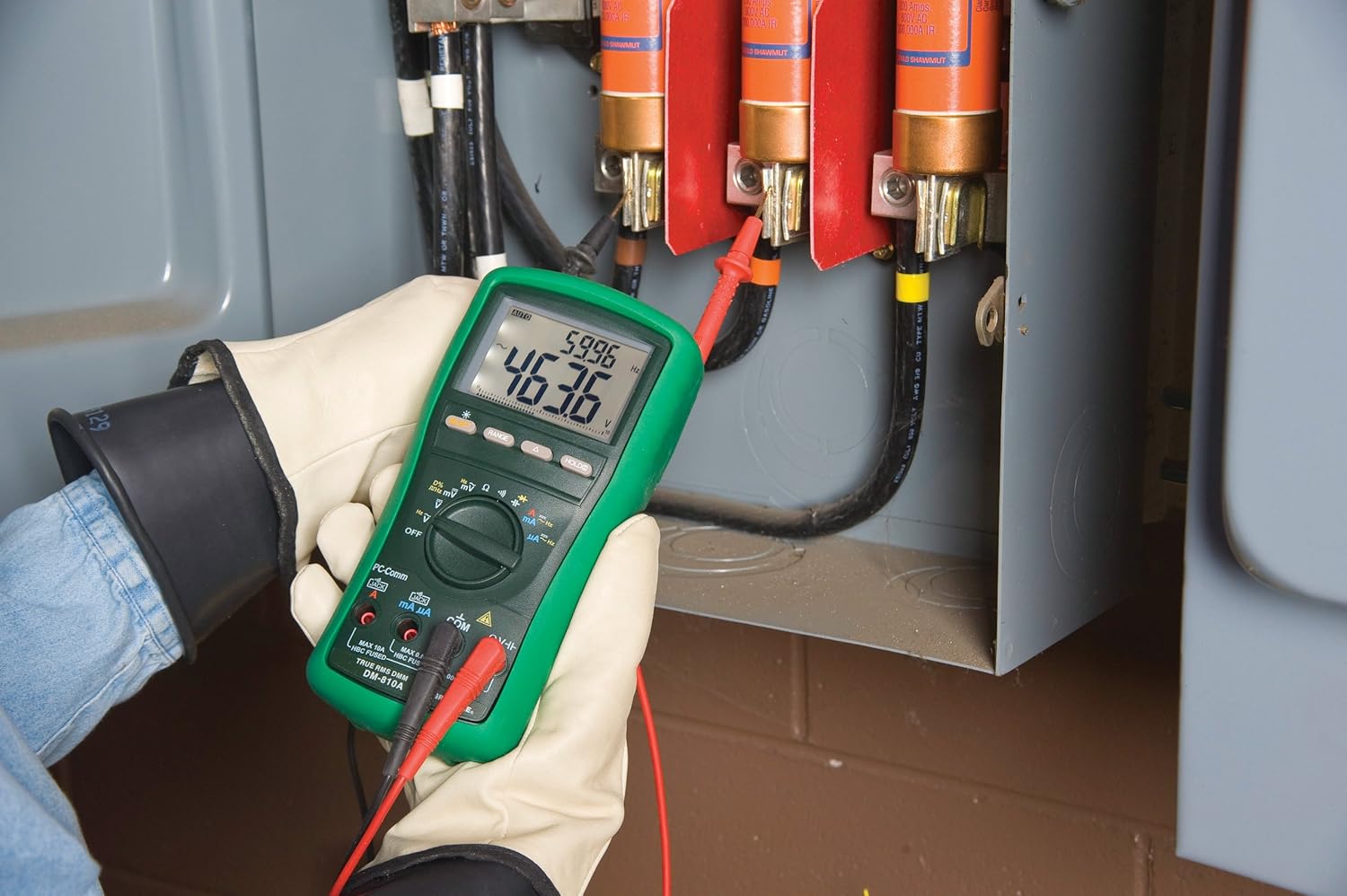
Gambar 2: The Greenlee DM-810A Digital Multimeter being used to take measurements within an electrical panel, demonstrating practical application.
Mengukur Volt AC/DCtage
- Set the function selector to V~ (AC Voltage) atau V- (Tegangan DC)tage). Use the SELECT button to toggle if both are on one position.
- Hubungkan kabel uji hitam ke DAPAT dan tes merah mengarah ke VΩHz.
- Hubungkan probe uji secara paralel di seluruh rangkaian atau komponen yang akan diukur.
- Baca vol.tagnilai e pada layar.
Mengukur Arus AC/DC
Penting: Pengukuran arus memerlukan meteran yang dihubungkan secara seri dengan rangkaian. Pastikan rangkaian dimatikan sebelum menghubungkan meteran.
- Matikan sirkuit.
- Set the function selector to A~ (AC Current) or A- (DC Current), or mA~ / mA-.
- Hubungkan kabel uji hitam ke DAPAT. Connect the red test lead to mAμA for small currents or A for larger currents (up to 10A). The Beep-Jack warning will activate if leads are in the wrong jacks for the selected function.
- Open the circuit where the current is to be measured and connect the meter in series.
- Nyalakan kembali rangkaian dan baca nilai arusnya.
- Matikan aliran listrik pada sirkuit sebelum mencabut meteran.
Mengukur Resistansi (Ω)
- De-energize the circuit or component.
- Set the function selector to Ω.
- Hubungkan kabel uji hitam ke DAPAT dan tes merah mengarah ke VΩHz.
- Hubungkan probe pengujian di seluruh komponen.
- Bacalah nilai resistansinya.
Measuring Capacitance (CAP)
- Pastikan kapasitor telah sepenuhnya dikosongkan muatannya sebelum pengukuran.
- Set the function selector to CAP.
- Hubungkan kabel uji hitam ke DAPAT dan tes merah mengarah ke VΩHz.
- Hubungkan probe penguji ke terminal kapasitor.
- Bacalah nilai kapasitansinya.
Measuring Frequency (Hz)
- Set the function selector to Hz.
- Hubungkan kabel uji hitam ke DAPAT dan tes merah mengarah ke VΩHz.
- Hubungkan probe uji ke sumber sinyal.
- Bacalah nilai frekuensinya.
Uji Kontinuitas
- De-energize the circuit or component.
- Set the function selector to the continuity symbol (often shared with diode test, use SELECT to toggle).
- Hubungkan kabel uji hitam ke DAPAT dan tes merah mengarah ke VΩHz.
- Connect the test probes across the circuit path or component.
- Bunyi bip yang terdengar menandakan kontinuitas (resistansi rendah). Layar akan menampilkan nilai resistansi.
Pemeliharaan
Pembersihan
Usap meteran dengan iklanamp Gunakan kain dan deterjen ringan. Jangan gunakan bahan abrasif atau pelarut. Pastikan meteran benar-benar kering sebelum digunakan.
Penggantian Baterai
When the battery indicator appears on the display, replace the batteries immediately to ensure accurate readings. Follow the battery installation steps outlined in the Setup section.
Penggantian Sekring
If the current measurement functions cease to work, the internal fuses may need replacement. Refer to the meter's internal diagram (usually accessible by opening the battery compartment or back casing) for fuse specifications and replacement instructions. Always replace fuses with those of the specified type and rating to maintain safety and performance.
Penyelesaian Masalah
This section provides solutions for common issues encountered during the operation of your DM-810A multimeter.
| Masalah | Kemungkinan Penyebab | Larutan |
|---|---|---|
| Tidak ada tampilan atau tampilan redup | Baterai mati atau lemah | Ganti baterai. |
| Bacaan salah | Incorrect function/range selected; Damaged test leads; External interference | Verify function and range; Inspect and replace test leads; Move away from strong electromagnetic fields. |
| Pengukuran arus tidak berfungsi | Blown fuse; Incorrect lead connection | Check and replace fuses; Ensure leads are in the correct A or mA jacks. |
| Beep-Jack warning active | Test leads connected to incorrect input jacks for the selected function | Adjust test lead connections to match the selected function on the dial. |
| Tes kontinuitas tidak berbunyi | Rangkaian terbuka; Resistansi tinggi | Ensure the circuit is closed; Check for breaks in the circuit or component. |
Spesifikasi Teknis
The following table outlines the key technical specifications for the Greenlee DM-810A Digital Multimeter.
| Fitur | Nilai |
|---|---|
| Merek | Hijau |
| Model | DM-810A |
| Jenis Pengukuran | Multimeter Digital True RMS |
| Sumber Daya | Bertenaga Baterai |
| Gaya | Digital |
| Berat Barang | 16 ons (1 pon) |
| Dimensi Produk (P x L x T) | 10x10x12 inci |
| Sertifikasi | CE, CSA, UL |
| UPC | 783310087434 |
Garansi dan Dukungan
Informasi Garansi
The Greenlee DM-810A Digital Multimeter comes with a Garansi pabrik 1 tahunGaransi ini mencakup cacat material dan pengerjaan dalam penggunaan normal. Harap simpan bukti pembelian Anda untuk klaim garansi.
Dukungan Pelanggan
For technical assistance, warranty service, or to inquire about replacement parts, please contact Greenlee customer support. Refer to the official Greenlee websitus atau kemasan produk untuk informasi kontak terkini.


