1. Pendahuluan
This manual provides essential instructions for setting up, operating, and maintaining your BlackBerry BB 9900 Bold Touch smartphone. Please read this guide thoroughly to ensure proper use and to maximize the device's capabilities. The BlackBerry BB 9900 Bold Touch combines a capacitive touchscreen with a full QWERTY keyboard, running on BlackBerry OS 7.
3. Perangkat Berakhirview
Familiarize yourself with the physical features of your BlackBerry BB 9900 Bold Touch.
3.1 Depan View

Gambar: Depan view of the BlackBerry BB 9900 Bold Touch, highlighting the 2.8-inch touchscreen and the physical QWERTY keyboard below it. The device also features a trackpad and call/end buttons.
- Tampilan Layar Sentuh: 2.8-inch capacitive display for interactive navigation.
- Keyboard QWERTY: Full physical keyboard for efficient typing.
- Optical Trackpad: For precise navigation and selection.
- Tombol Panggil/Akhiri: Standard telephony controls.
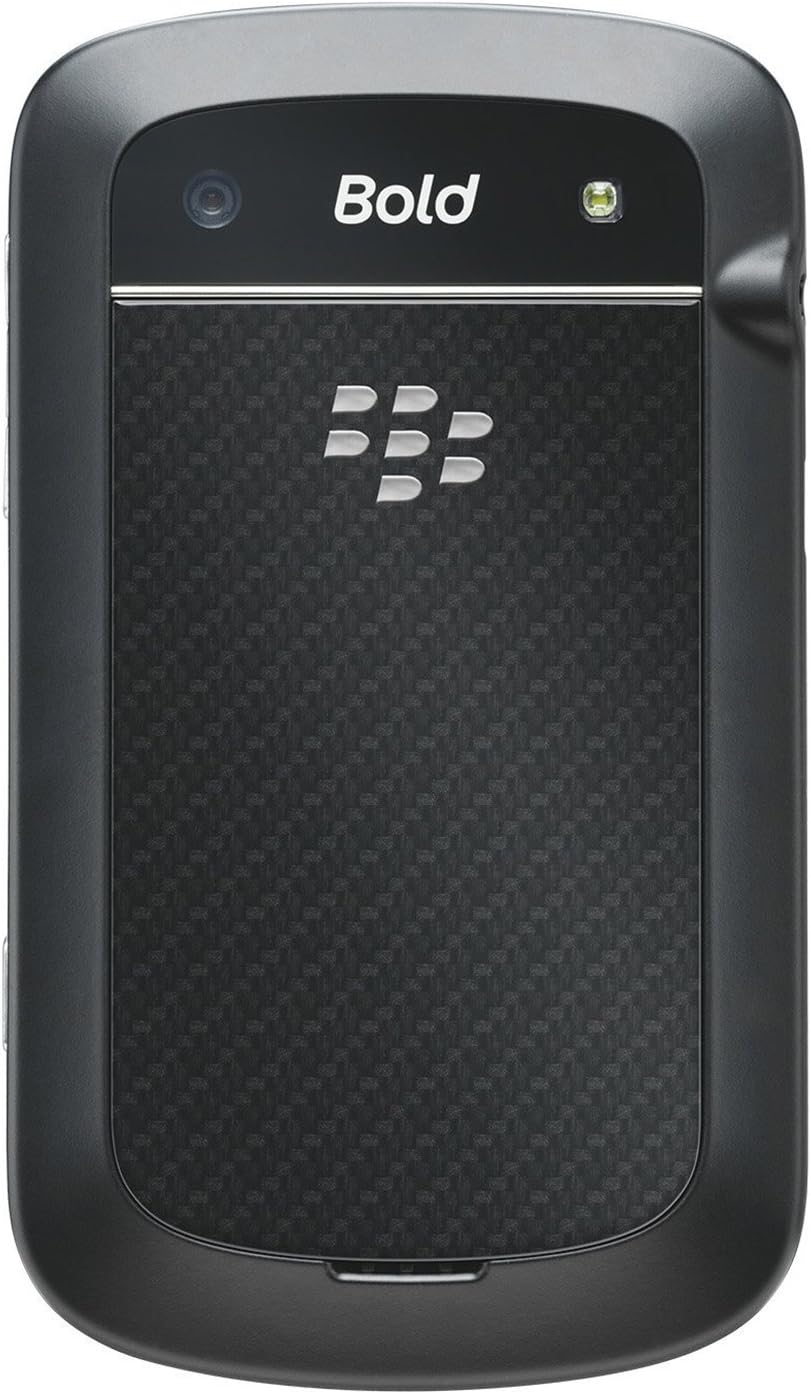
3.2 Belakang View

Gambar: Belakang view of the BlackBerry BB 9900 Bold Touch, featuring the 5-megapixel camera lens, LED flash, and the BlackBerry logo.
- Kamera 5MP: Primary camera with autofocus and LED flash.
- Pelindung baterai: Removable cover for battery and SIM card access.
3.3 Sisi View
Gambar: Samping view of the BlackBerry BB 9900 Bold Touch, illustrating the placement of the volume control buttons and a customizable convenience key.
- Tombol Volume: Sesuaikan tingkat audio.
- Convenience Key: Tombol pintasan yang dapat disesuaikan.
5. Petunjuk Pengoperasian
5.1 Navigasi Layar Sentuh
- Mengetuk: Touch the screen briefly to open applications, select items, or activate buttons.
- Geser: Drag your finger across the screen to scroll through lists or switch between home screen panels.
- Cubit untuk Memperbesar: Use two fingers to zoom in or out on photos, web pages, or maps.
5.2 Using the QWERTY Keyboard
The physical QWERTY keyboard allows for fast and accurate text entry. Each key corresponds to a letter, number, or symbol. Use the 'Alt' key for alternate characters and the 'Shift' key for capitalization.
5.3 Melakukan Panggilan
- From the home screen, tap the Phone icon or press the green Call button.
- Enter the phone number using the keyboard.
- Tekan tombol Panggil berwarna hijau untuk memulai panggilan.
- Untuk mengakhiri panggilan, tekan tombol Akhiri Panggilan berwarna merah.
5.4 Mengirim Pesan
- Tap the Messages icon from the home screen.
- Select 'Compose New' or similar option.
- Masukkan nomor penerima atau pilih dari kontak.
- Type your message using the QWERTY keyboard.
- Tap 'Send'.
5.5 Menggunakan Kamera
- Ketuk ikon Kamera untuk membuka aplikasi kamera.
- Atur komposisi bidikan Anda dengan menggunakan layar sebagai viewpenemu.
- Tap the screen or press the convenience key (if configured) to take a photo.
- The 5MP camera features autofocus and an LED flash for improved image quality.
5.6 Menghubungkan ke Wi-Fi
- Go to 'Options' > 'Networks and Connections' > 'Wi-Fi'.
- Turn Wi-Fi on. The device will scan for available networks.
- Pilih jaringan yang Anda inginkan dan masukkan kata sandi jika diminta.
- Once connected, the Wi-Fi indicator will appear in the status bar.
5.7 Using NFC (Near Field Communication)
The BlackBerry BB 9900 Bold Touch supports NFC for short-range wireless communication. This allows for quick pairing with compatible accessories or sharing data with other NFC-enabled devices by tapping them together.
- Pastikan NFC diaktifkan di pengaturan perangkat Anda.
- Hold your device close to another NFC-enabled device or tag.
- Follow on-screen prompts to complete the desired action (e.g., pairing, data transfer).
9. Dukungan dan Garansi
9.1 Dukungan Pelanggan
For technical assistance, troubleshooting beyond this manual, or service inquiries, please visit the official BlackBerry support website or contact your local service provider. Refer to the packaging or official websitus untuk rincian kontak spesifik.
9.2 Informasi Garansi
Your BlackBerry BB 9900 Bold Touch is covered by a limited warranty. Please refer to the warranty card included in your product packaging or visit the official BlackBerry webSitus ini untuk syarat dan ketentuan terperinci, termasuk masa garansi dan detail cakupan. Simpan bukti pembelian Anda untuk klaim garansi.