Perkenalan
This manual provides comprehensive instructions for the setup, operation, maintenance, and troubleshooting of your DISH DISH211 4-Device Universal Remote. Designed for ease of use, this remote supports DISH TV receivers and can control up to four different devices, including TVs and other entertainment systems. Its ability to learn commands from original remotes makes it a versatile replacement.
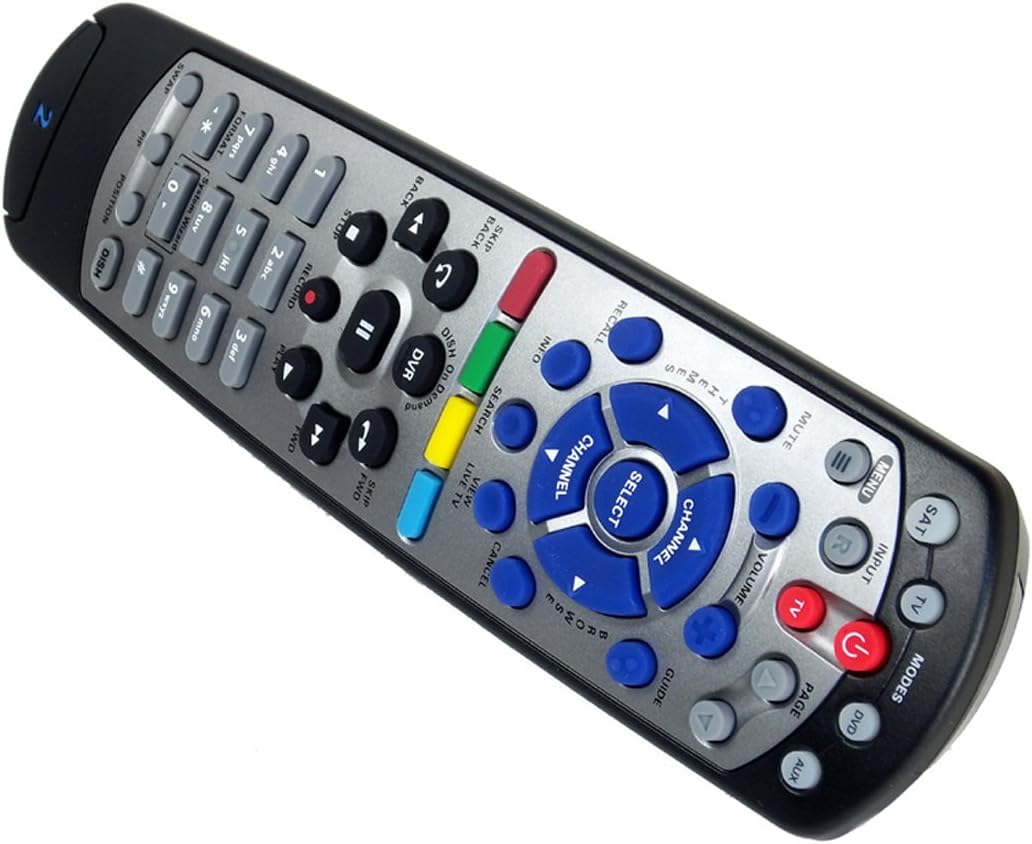
Figure 1: The DISH DISH211 4-Device Universal Remote, showcasing desain ergonomis dan tata letak tombolnya.
Pengaturan
1. Pemasangan Baterai
The DISH211 remote requires two (2) AA batteries for operation. To install:
- Temukan kompartemen baterai di bagian belakang remote.
- Geser penutup baterai ke bawah dan angkat untuk membukanya.
- Masukkan dua baterai AA, pastikan terminal positif (+) dan negatif (-) sejajar dengan indikator di dalam kompartemen.
- Pasang kembali penutup baterai dengan menggesernya ke atas hingga berbunyi klik dan terkunci pada tempatnya.
2. Device Pairing and Programming
The DISH211 remote can be programmed to control your DISH receiver and other devices. It supports both Infrared (IR) and Ultra High Frequency (UHF) communication, depending on your receiver model.

Figure 2: Cover of the official DISH Remote User Guide, which provides detailed programming instructions.
For DISH Receiver Pairing (UHF/IR):
Some DISH receivers may require setting the remote's address and communication type (UHF or IR). A small switch near the battery compartment may allow selection between UHF and IR modes. Ensure this switch is set correctly for your receiver type.
To address the remote to your receiver:
- Tekan tombol Info Sistem button on the front of your receiver to access the system information screen.
- Tekan dan tahan tombol DUDUK button on the remote until all mode lights illuminate.
- Enter a number between 1-15 on the remote keypad. This number corresponds to the TV-2 UHF address displayed on your receiver's screen.
- Tekan tombol # (pound) button once.
- Tekan tombol Catatan tombol tiga kali.
- Memilih Selesai on the system info screen and test the remote's functionality.
For Other Devices (TV, DVD, AUX):
The remote has a large code library and can learn commands from your original remotes. Refer to the official DISH remote user guide (often included with the product or available online) for specific programming codes and learning instructions for various brands and device types.

Figure 3: The back of the DISH remote packaging, indicating compatible DISH receiver models for both IR and IR/UHF configurations.
Petunjuk Pengoperasian
The DISH211 remote is designed for intuitive control of your entertainment system. It features backlit active MODE keys for visibility in low light conditions and dedicated DVR controls.
1. Pemilihan Mode
Press the desired mode button (e.g., DUDUK for DISH receiver, TV for television, DVD for DVD player, Kabel Tambahan for auxiliary device) at the top of the remote to select the device you wish to control. The selected mode button will illuminate.
2. Kontrol Dasar
- Kekuatan: Tekan tombol KEKUATAN Tombol untuk menghidupkan atau mematikan perangkat yang dipilih.
- Volume: Gunakan VOLUME NAIK/TURUN buttons to adjust the audio level of your television.
- Saluran: Gunakan SALURAN ATAS/BAWAH buttons to change channels on your DISH receiver or television.
- Bisu: Tekan tombol BISU untuk menonaktifkan audio.
- Masukan: Tekan tombol MASUKAN button to cycle through video inputs on your television.
3. DVR Controls
The remote includes dedicated buttons for DVR functionality:
- Catatan: Memulai perekaman program yang sedang berjalan.
- Putar/Jeda: Starts or pauses playback of recorded content or live TV.
- Berhenti: Menghentikan pemutaran.
- Mundur/Maju Cepat: Controls playback speed and direction.
- Skip Forward (DISH Skip Forward): Allows quick skipping through commercials or segments.
- Lewati Kembali: Skips backward in recorded content.

Gambar 4: Tampilan jarak dekat view of the DISH DISH211 remote, highlighting the central navigation and DVR control buttons.
Pemeliharaan
1. Penggantian Baterai
When the remote's performance degrades or buttons become unresponsive, it is likely time to replace the batteries. Follow the battery installation steps outlined in the Setup section.
2. Pembersihan
To clean your remote, gently wipe the surface with a soft, dry cloth. For stubborn dirt, slightly dampen the cloth with water or a mild, non-abrasive cleaner. Avoid using excessive liquid or harsh chemicals, as these can damage the remote's electronics or finish.
Penyelesaian Masalah
Remote Tidak Merespons
- Periksa Baterai: Pastikan baterai terpasang dengan benar dan memiliki daya yang cukup. Ganti jika perlu.
- Line of Sight (IR): If using IR mode, ensure there is a clear line of sight between the remote and the device's IR receiver. Obstructions can block the signal.
- Pemilihan Mode: Verify that the correct mode button (e.g., SAT, TV) is selected for the device you are trying to control.
- Remote Address/UHF-IR Switch: For DISH receivers, confirm the remote's address is correctly set and the UHF/IR switch (if present) matches your receiver's configuration. Incorrect settings can prevent communication.
Fungsionalitas terputus-putus
- Gangguan: Other electronic devices or strong light sources (like plasma TV IR interference) can sometimes interfere with IR signals. Try operating the remote from a different angle or location.
- DVR Directory Update: If experiencing lag or unresponsiveness with DVR functions, ensure your DVR's directory is updated. Consult your DISH receiver's manual for instructions on updating its software or directory.
Tombol Tidak Berfungsi
- Bersihkan Jarak Jauh: Dirt or debris under buttons can cause them to stick or become unresponsive. Clean the remote as described in the Maintenance section.
- Program ulang: If specific buttons for a device are not working, the remote may need to be reprogrammed for that device.
Spesifikasi
| Fitur | Detil |
|---|---|
| Nomor Model | DISH211 |
| Merek | PIRING |
| Dimensi Produk | 1.75x4.81x11.38 inci |
| Berat Barang | 9.6 ons |
| Baterai Diperlukan | 2 baterai AA |
| Jumlah Maksimum Perangkat yang Didukung | 4 |
| Perangkat yang Kompatibel | Television, DISH TV receivers (TV1 and TV2 locations) |
| Teknologi Konektivitas | Infrared (IR), Ultra High Frequency (UHF) |
| Fitur Khusus | Backlit keys, Universal compatibility, Learning capability |
Garansi dan Dukungan
Informasi Garansi
The DISH DISH211 Universal Remote typically comes with a Garansi Terbatas 90 Hari. Please refer to the documentation enclosed with your product for specific terms, conditions, and details regarding warranty claims.
Dukungan Pelanggan
For further assistance with programming, troubleshooting, or general inquiries, it is recommended to consult the official DISH Network support resources. This may include their website, online user guides, or customer service contact information. The manufacturer of this product is Audiovox Accessories Corporation.


